The OSI Model
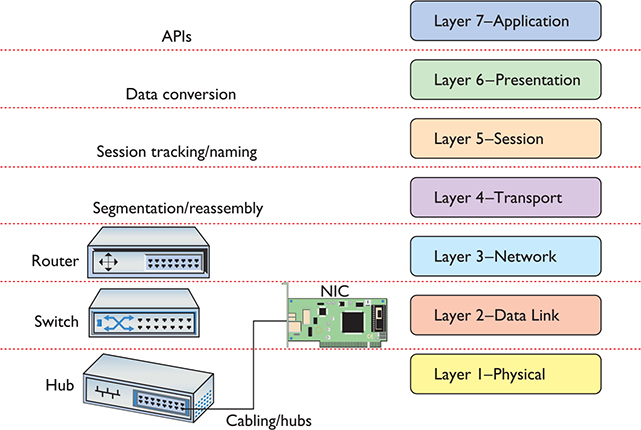
Layer 1: Physical Layer
- "Sending the signal to the other side, making sure that it gets there"
- Looking at bits
To transmit a string of 1s and 0s:
- Wired or wireless (copper)
- Short range or long range
- For short range applications we use copper with the wire
- Fiber optics for long range.
- On wireless there are different antennas that we can use depending on the type of wireless signal that we want to send out.
- Do we want it to be 360 degrees around us? or do we want it to be very directional? How far?
Layer 2: Datalink Layer
-
Once some ones and zeros get to the other side, they're gonna be collected and assembled into what we call a frame.
-
Looking at frames
-
Frame
- A protocol data unit that is the packaging that we use to transport data. A common analogy is an envelope, it has a source and a destination.
-
Local delivery
- Ethernet frames are necessary for local delivery, it could be local within your home or it could be local link. If your home is connected to an ISP (Internet Service Provider), Verizon for example, this connection is called a local link and is considered local delivery because it's interested in this one wire.
-
Switches & switching
- Switching is focuses on high-speed forwarding.
- Switches have got high speed chips that are focused on accelerated forwarding of frames. A dedicated chip inside the device called ASIC (Application Specific Integrated Circuit), a circuit built to do just one thing.
Layer 3: Network Layer
-
Looking at Packets
-
Packets
- A laptop tries to get to a wireless router, the laptop's wireless card is responsible for sending 1s and 0s. The router is going to collect all that data and reassemble them into a frame, and if we look inside of that frame it's gonna contain more data with indicators that will tell us how to decode what's on the inside. In other words if I am carrying IP traffic, its frame is gonna tell me to decode the data as IP.
- Above of this we have got another envelope, this is called a Packet, which also has source and destination IP addresses opposed from source and destination MAC addresses found on layer 2.
- You may find some other technologies besides Ethernet, but ethernet is the most common one.
-
Global delivery
- Talk to anybody in the world with an IP.
-
Routers & routing
- We use routing tables that help us focus on where do we send the message next
- The internet is really just a big collection of routers.
- Every time a packet comes into a router, The router will check its sources, check its destination, figure out where its headed and forward it there.
- Source checking its really optional but we tend to check it for security reasons.
Layer 4: Transport Layer
-
Looking at segments
-
Segments
- Yet another envelope. Segments have source and destination, and the source and destinations are typically but not always port numbers.
- On a Windows server the command
netstatwill show us what ports are open and listening.- Port numbers are like doors or windows that are on a building.
- When an application wants to communicate with other systems, it binds to a socket.
- There is a process that is typically Apache (http) in Linux that is running in your computer, what makes it a network based application is that it bounds to a Socket.
- The common port number for web is gonna be TCP 80 (http)
- For secure web it's gonna be TCP 443 (https)
-
Application payload delivery
- Letting an application talk to another application.
-
Flows
- We are sending different flows. A flow is a series of segments that have the same source and destination port numbers, as well as if it's TCP, and sequence numbers that let us handle reliable delivery.
Layer 5: Session Layer
-
Take all the connections that are coming in and hand them off to the application
-
Packages are all coming from different bays, they are making sense of them and hanging them up to the right applications.
-
The Session layer keeps track of a system’s connections to ensure that it sends the right response to the right computer.
-
"session management plane"
-
Synchronization of mixed flows
Layer 6: Presentation Layer
- Applications "gateway" to the network
- Example: Apache as a web server, if apache wants to send you a video, in order to take that video, and sent it to you, should we send it right away across a wire or should we encrypt it first. A lot of time you will want to use TLS (Transport Layer Security) or SSL, which is handled by an SSL/crypto library that is responsible for encrypting and decrypting the data that Apache wants to use.
- The application simply wants data
- The presentation layer takes the application and and hands it the data.
- Presentation level handles data transmission services
- It takes this data that's being modified and hands it of to the session layer and so for.
- Encoding & decoding
- Encryption & decryption
- Compression & decompression
Layer 7: Application Layer
- Closest to the User
- Language of the application
- Application layer protocols include HTTP, FTP, SMTP and many more.
DoD Model
Internet Origins
- ARPA (Advanced Research Projects Agency) was created in response to SPUTNIK
- ARPA became DARPA (The Defense Advanced Projects Agency)
- Vint Cerf (Turing Award) & Bob Kahn
- TCP/IP
- Tim Berners Lee (Turing Award)
- OBE Alan Turing
TCP/IP Model by DoD/DARPA
- Process / Application
- Host-to-Host
- Internet
- Network access