Front End vs. Back End
Front End
The front end of a web application contains the user's components directly through their web browser (client-side). These components make up the source code of the web page we view when visiting a web application and usually include HTML, CSS, and JavaScript, which is then interpreted in real-time by our browsers.
This includes everything that the user sees and interacts with, like the page's main elements such as the title and text HTML, the design and animation of all elements CSS, and what function each part of a page performs JavaScript.
In modern web applications, front end components should adapt to any screen size and work within any browser on any device. This contrasts with back end components, which are usually written for a specific platform or operating system. If the front end of a web application is not well optimized, it may make the entire web application slow and unresponsive. In this case, some users may think that the hosting server, or their internet, is slow, while the issue lies entirely on the client-side at the user's browser. This is why the front end of a web application must be optimized for most platforms, devices (including mobile!), and screen sizes.
Aside from frontend code development, the following are some of the other tasks related to front end web application development:
- Visual Concept Web Design
- User Interface (UI) design
- User Experience (UX) design
There are many sites available to us to practice front end coding. One example is this one. Here we can play around with the editor, typing and formatting text and seeing the resulting HTML, CSS, and JavaScript being generated for us.
<p><strong>Welcome to Hack The Box Academy</strong><strong></strong></p>
<p></p>
<p><em>This is some italic text.</em></p>
<p></p>
<p><span style="color: #0000ff;">This is some blue text.</span></p>
<p></p>
<p></p>
Watch the simple HTML code render on the left.
Back End
The back end of a web application drives all of the core web application functionalities, all of which is executed at the back end server, which processes everything required for the web application to run correctly. It is the part we may never see or directly interact with, but a website is just a collection of static web pages without a back end.
There are four main back end components for web applications:
| Component | Description |
|---|---|
Back end Servers |
The hardware and operating system that hosts all other components and are usually run on operating systems like Linux, Windows, or using Containers. |
Web Servers |
Web servers handle HTTP requests and connections. Some examples are Apache, NGINX, and IIS. |
Databases |
Databases (DBs) store and retrieve the web application data. Some examples of relational databases are MySQL, MSSQL, Oracle, PostgreSQL, while examples of non-relational databases include NoSQL and MongoDB. |
Development Frameworks |
Development Frameworks are used to develop the core Web Application. Some well-known frameworks include Laravel (PHP), ASP.NET (C#), Spring (Java), Django (Python), and Express (NodeJS JavaScript). |
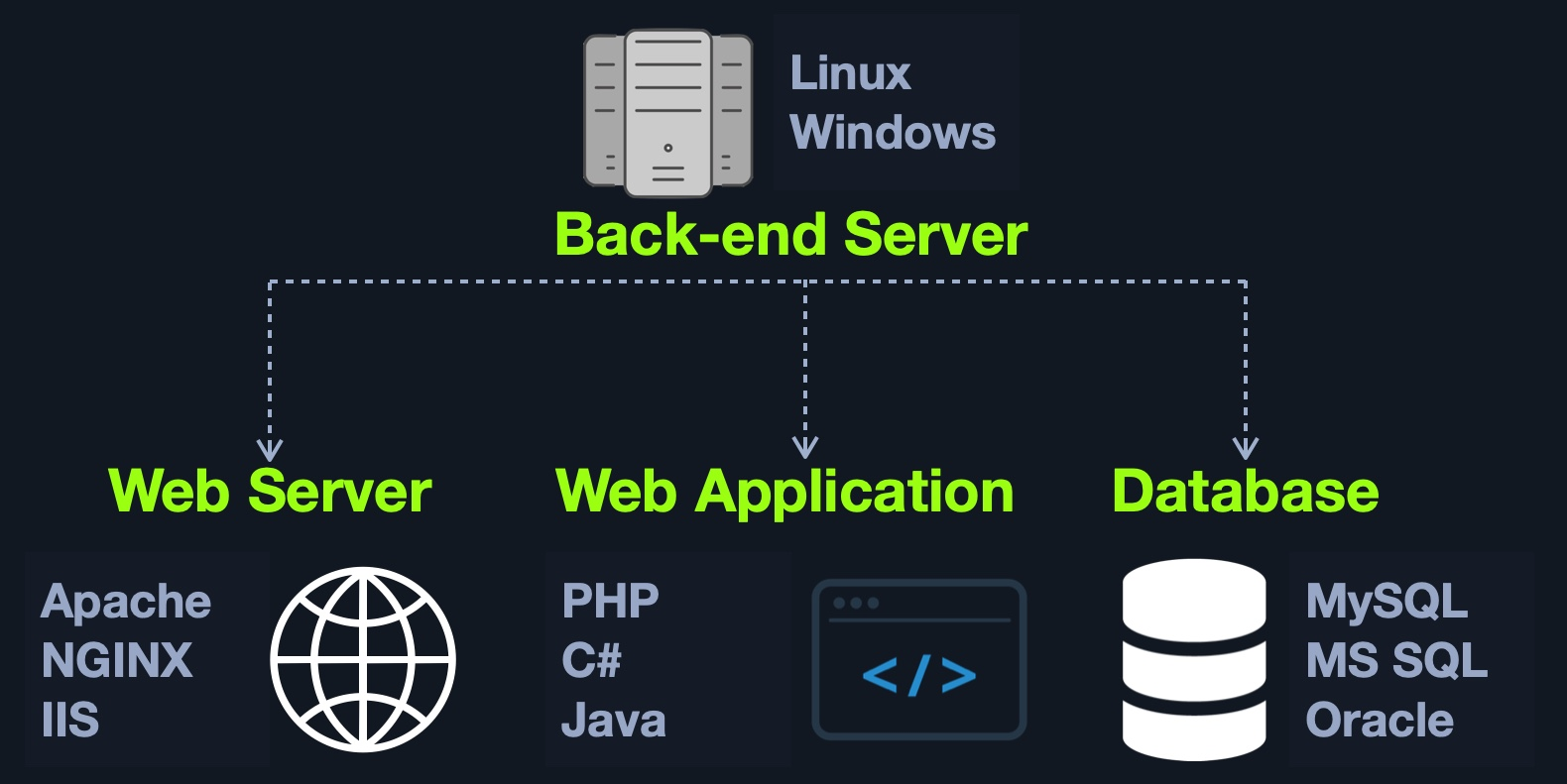
It is also possible to host each component of the back end on its own isolated server, or in isolated containers, by utilizing services such as Docker. To maintain logical separation and mitigate the impact of vulnerabilities, different components of the web application, such as the database, can be installed in one Docker container, while the main web application is installed in another, thereby isolating each part from potential vulnerabilities that may affect the other container(s). It is also possible to separate each into its dedicated server, which can be more resource-intensive and time-consuming to maintain. Still, it depends on the business case and design/functionality of the web application in question.
Some of the main jobs performed by back end components include:
- Develop the main logic and services of the back end of the web application
- Develop the main code and functionalities of the web application
- Develop and maintain the back end database
- Develop and implement libraries to be used by the web application
- Implement technical/business needs for the web application
- Implement the main APIs for front end component communications
- Integrate remote servers and cloud services into the web application
Securing Front/Back End
Even though in most cases, we will not have access to the back end code to analyze the individual functions and the structure of the code, it does not make the application invulnerable. It could still be exploited by various injection attacks, for example.
Suppose we have a search function in a web application that mistakenly does not process our search queries correctly. In that case, we could use specific techniques to manipulate the queries in such a way that we gain unauthorized access to specific database data SQL injections or even execute operating system commands via the web application, also known as Command Injections.
We will later discuss how to secure each component used on the front and back ends. When we have full access to the source code of front end components, we can perform a code review to find vulnerabilities, which is part of what is referred to as Whitebox Pentesting.
On the other hand, back end components' source code is stored on the back end server, so we do not have access to it by default, which forces us only to perform what is known as Blackbox Pentesting. However, as we will see, some web applications are open source, meaning we likely have access to their source code. Furthermore, some vulnerabilities such as Local File Inclusion could allow us to obtain the source code from the back end server. With this source code in hand, we can then perform a code review on back end components to further understand how the application works, potentially find sensitive data in the source code (such as passwords), and even find vulnerabilities that would be difficult or impossible to find without access to the source code.
The top 20 most common mistakes web developers make that are essential for us as penetration testers are:
| No. | Mistake |
|---|---|
1. |
Permitting Invalid Data to Enter the Database |
2. |
Focusing on the System as a Whole |
3. |
Establishing Personally Developed Security Methods |
4. |
Treating Security to be Your Last Step |
5. |
Developing Plain Text Password Storage |
6. |
Creating Weak Passwords |
7. |
Storing Unencrypted Data in the Database |
8. |
Depending Excessively on the Client Side |
9. |
Being Too Optimistic |
10. |
Permitting Variables via the URL Path Name |
11. |
Trusting third-party code |
12. |
Hard-coding backdoor accounts |
13. |
Unverified SQL injections |
14. |
Remote file inclusions |
15. |
Insecure data handling |
16. |
Failing to encrypt data properly |
17. |
Not using a secure cryptographic system |
18. |
Ignoring layer 8 |
19. |
Review user actions |
20. |
Web Application Firewall misconfigurations |
These mistakes lead to the OWASP Top 10 vulnerabilities for web applications, which we will discuss in other modules:
| No. | Vulnerability |
|---|---|
1. |
Broken Access Control |
2. |
Cryptographic Failures |
3. |
Injection |
4. |
Insecure Design |
5. |
Security Misconfiguration |
6. |
Vulnerable and Outdated Components |
7. |
Identification and Authentication Failures |
8. |
Software and Data Integrity Failures |
9. |
Security Logging and Monitoring Failures |
10. |
Server-Side Request Forgery (SSRF) |