Encoding and Decoding
URL Encoding
It is essential to ensure that our request data is URL-encoded and our request headers are correctly set. Otherwise, we may get a server error in the response. This is why encoding and decoding data become essential as we modify and repeat web requests. Some of the key characters we need to encode are:
Spaces: May indicate the end of request data if not encoded&: Otherwise interpreted as a parameter delimiter#: Otherwise interpreted as a fragment identifier
To URL-encode text in Burp Repeater, we can select the text and right-click on it, then select (Convert Selection>URL>URL-encode key characters), or by selecting the text and clicking [CTRL+U]. Burp also supports URL-encoding as we type if we right-click and enable that option, which will encode all of our text as we type it. On the other hand, ZAP should automatically URL-encode all of our request data in the background before sending the request, though we may not see that explicitly.
There are other types of URL-encoding, like Full URL-Encoding or Unicode URL encoding, which may also be helpful for requests with many special characters.
Decoding
While URL-encoding is key to HTTP requests, it is not the only type of encoding we will encounter. It is very common for web applications to encode their data, so we should be able to quickly decode that data to examine the original text. On the other hand, back-end servers may expect data to be encoded in a particular format or with a specific encoder, so we need to be able to quickly encode our data before we send it.
The following are some of the other types of encoders supported by both tools:
- HTML
- Unicode
- Base64
- ASCII hex
To access the full encoder in Burp, we can go to the Decoder tab. In ZAP, we can use the Encoder/Decoder/Hash by clicking [CTRL+E]. With these encoders, we can input any text and have it quickly encoded or decoded. For example, perhaps we came across the following cookie that is base64 encoded, and we need to decode it:
eyJ1c2VybmFtZSI6Imd1ZXN0IiwgImlzX2FkbWluIjpmYWxzZX0=
We can input the above string in Burp Decoder and select Decode as > Base64, and we'll get the decoded value:
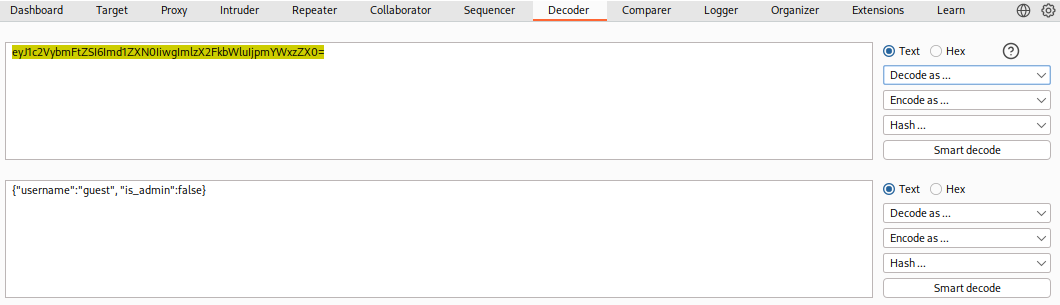
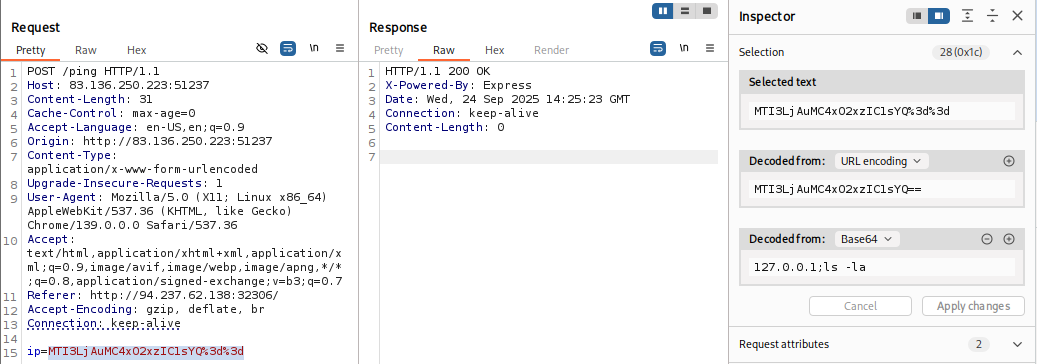
In recent versions of Burp, we can also use the Burp Inspector tool to perform encoding and decoding (among other things), which can be found in various places like Burp Proxy or Burp Repeater:
In ZAP, we can use the Encoder/Decoder/Hash tool, which will automatically decode strings using various decoders in the Decode tab:
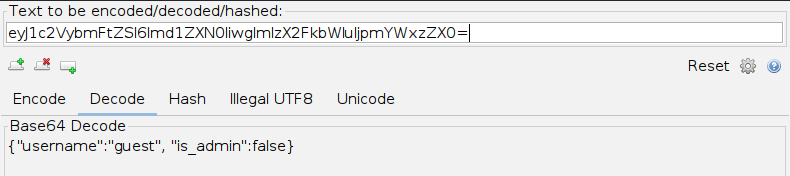
Tip: We can create customized tabs in ZAP's Encoder/Decoder/Hash with the "Add New Tab" button, and then we can add any type of encoder/decoder we want the text to be shown in.
Encoding
As we can see, the text holds the value {"username":"guest", "is_admin":false}. So, if we were performing a penetration test on a web application and find that the cookie holds this value, we may want to test modifying it to see whether it changes our user privileges. So, we can copy the above value, change guest to admin and false to true, and try to encode it again using its original encoding method (base64):
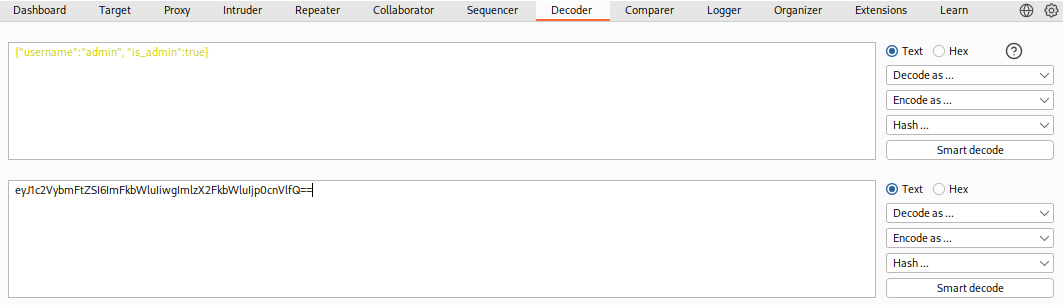
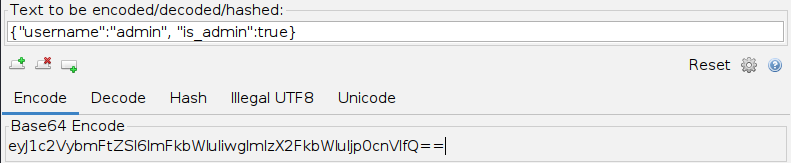
Tip: Burp Decoder output can be directly encoded/decoded with a different encoder. Select the new encoder method in the output pane at the bottom, and it will be encoded/decoded again. In ZAP, we can copy the output text and paste it into the input field above.
Exercise
The string found in the attached file has been encoded several times with various encoders. Try to use the decoding tools we discussed to decode it and get the flag.
Use ZAP Encode/Decode/Hash window to se the different options that we have when decoding in different formats, select the one that changed, or that looks more familiar after decoding
Given text:
VTJ4U1VrNUZjRlZXVkVKTFZrWkdOVk5zVW10aFZYQlZWRmh3UzFaR2NITlRiRkphWld0d1ZWUllaRXRXUm10M1UyeFNUbVZGY0ZWWGJYaExWa1V3ZVZOc1VsZGlWWEJWVjIxNFMxWkZNVFJUYkZKaFlrVndWVmR0YUV0V1JUQjNVMnhTYTJGM1BUMD0=
Base64 Decode 1:
U2xSUk5FcFVWVEJLVkZGNVNsUmthVXBVVFhwS1ZGcHNTbFJaZWtwVVRYZEtWRmt3U2xSTmVFcFVXbXhLVkUweVNsUldiVXBVV214S1ZFMTRTbFJhYkVwVVdtaEtWRTB3U2xSa2F3PT0=
Base64 Decode 2:
SlRRNEpUVTBKVFF5SlRkaUpUTXpKVFpsSlRZekpUTXdKVFkwSlRNeEpUWmxKVE0ySlRWbUpUWmxKVE14SlRabEpUWmhKVE0wSlRkaw==
Base64 Decode 3:
JTQ4JTU0JTQyJTdiJTMzJTZlJTYzJTMwJTY0JTMxJTZlJTM2JTVmJTZlJTMxJTZlJTZhJTM0JTdk
- hmmm could be a URL, but still not sure at this point.
Base64 Decode 4:
%48%54%42%7b%33%6e%63%30%64%31%6e%36%5f%6e%31%6e%6a%34%7d
- That definitely looks like a URL Encode
URL Decode:
HTB{3nc0d1n6_n1nj4}
flag: HTB