DNS Zone Transfers
While brute-forcing can be a fruitful approach, there's a less invasive and potentially more efficient method for uncovering subdomains – DNS zone transfers. This mechanism, designed for replicating DNS records between name servers, can inadvertently become a goldmine of information for prying eyes if misconfigured.
What is a Zone Transfer?
A DNS zone transfer is essentially a wholesale copy of all DNS records within a zone (a domain and its subdomains) from one name server to another. This process is essential for maintaining consistency and redundancy across DNS servers. However, if not adequately secured, unauthorized parties can download the entire zone file, revealing a complete list of subdomains, their associated IP addresses, and other sensitive DNS data.
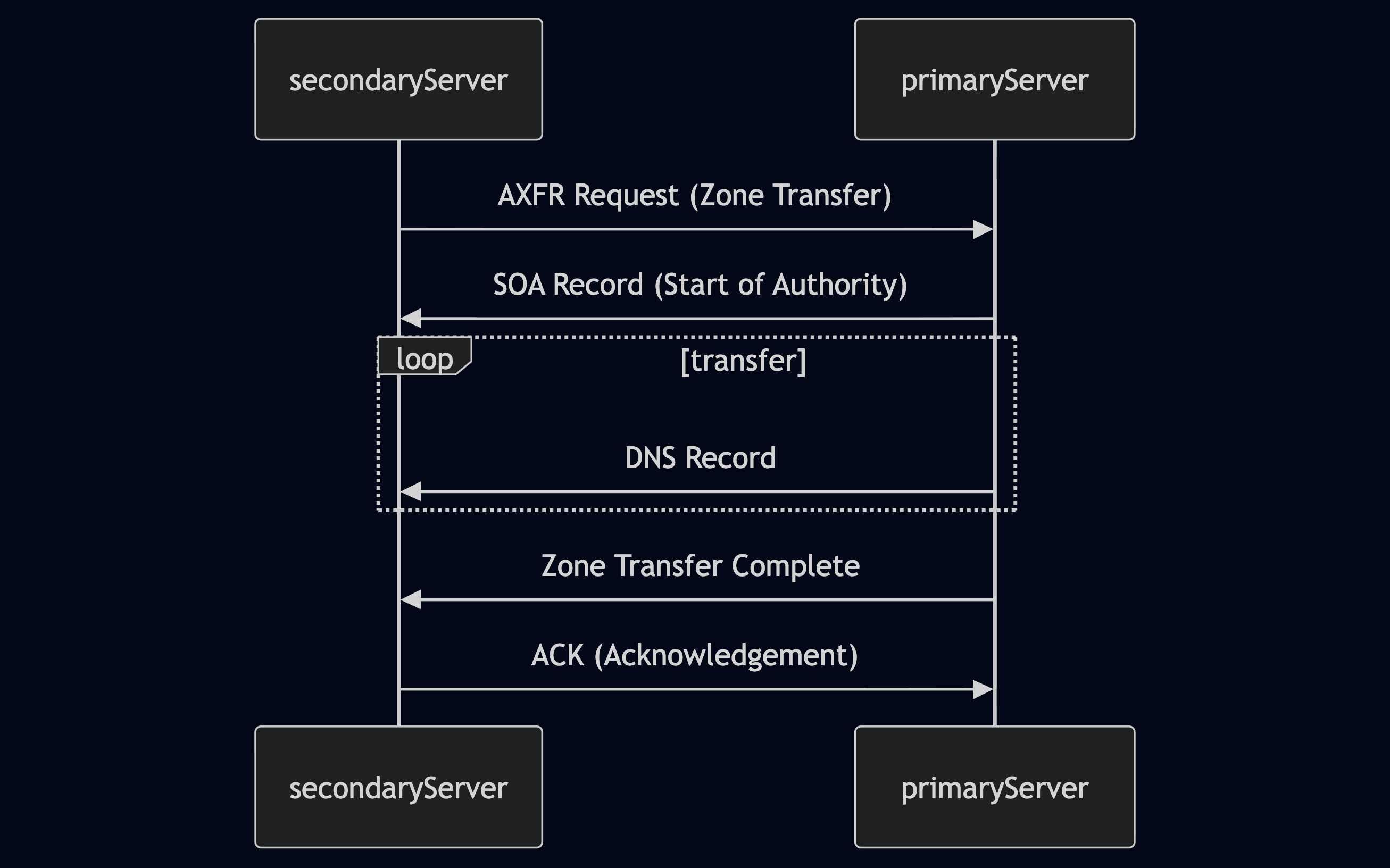
- Zone Transfer Request (AXFR): The secondary DNS server initiates the process by sending a zone transfer request to the primary server. This request typically uses the AXFR (Full Zone Transfer) type.
- SOA Record Transfer: Upon receiving the request (and potentially authenticating the secondary server), the primary server responds by sending its Start of Authority (SOA) record. The SOA record contains vital information about the zone, including its serial number, which helps the secondary server determine if its zone data is current.
- DNS Records Transmission: The primary server then transfers all the DNS records in the zone to the secondary server, one by one. This includes records like A, AAAA, MX, CNAME, NS, and others that define the domain's subdomains, mail servers, name servers, and other configurations.
- Zone Transfer Complete: Once all records have been transmitted, the primary server signals the end of the zone transfer. This notification informs the secondary server that it has received a complete copy of the zone data.
- Acknowledgement (ACK): The secondary server sends an acknowledgement message to the primary server, confirming the successful receipt and processing of the zone data. This completes the zone transfer process.
The Zone Transfer Vulnerability
While zone transfers are essential for legitimate DNS management, a misconfigured DNS server can transform this process into a significant security vulnerability. The core issue lies in the access controls governing who can initiate a zone transfer.
In the early days of the internet, allowing any client to request a zone transfer from a DNS server was common practice. This open approach simplified administration but opened a gaping security hole. It meant that anyone, including malicious actors, could ask a DNS server for a complete copy of its zone file, which contains a wealth of sensitive information.
The information gleaned from an unauthorized zone transfer can be invaluable to an attacker. It reveals a comprehensive map of the target's DNS infrastructure, including:
- Subdomains: A complete list of subdomains, many of which might not be linked from the main website or easily discoverable through other means. These hidden subdomains could host development servers, staging environments, administrative panels, or other sensitive resources.
- IP Addresses: The IP addresses associated with each subdomain, providing potential targets for further reconnaissance or attacks.
- Name Server Records: Details about the authoritative name servers for the domain, revealing the hosting provider and potential misconfigurations.
Remediation
Modern DNS servers are typically configured to allow zone transfers only to trusted secondary servers, ensuring that sensitive zone data remains confidential.
However, misconfigurations can still occur due to human error or outdated practices. This is why attempting a zone transfer (with proper authorisation) remains a valuable reconnaissance technique. Even if unsuccessful, the attempt can reveal information about the DNS server's configuration and security posture.
Exploiting Zone Transfers
You can use the dig command to request a zone transfer:
m4cc18@htb[/htb]$ dig axfr @nsztm1.digi.ninja zonetransfer.me
- This command instructs
digto request a full zone transfer (axfr) from the DNS server responsible forzonetransfer.me. If the server is misconfigured and allows the transfer, you'll receive a complete list of DNS records for the domain, including all subdomains.
Output:
; <<>> DiG 9.18.12-1~bpo11+1-Debian <<>> axfr @nsztm1.digi.ninja zonetransfer.me
; (1 server found)
;; global options: +cmd
zonetransfer.me.	7200	IN	SOA	nsztm1.digi.ninja. robin.digi.ninja. 2019100801 172800 900 1209600 3600
zonetransfer.me.	300	IN	HINFO	"Casio fx-700G" "Windows XP"
zonetransfer.me.	301	IN	TXT	"google-site-verification=tyP28J7JAUHA9fw2sHXMgcCC0I6XBmmoVi04VlMewxA"
zonetransfer.me.	7200	IN	MX	0 ASPMX.L.GOOGLE.COM.
...
zonetransfer.me.	7200	IN	A	5.196.105.14
zonetransfer.me.	7200	IN	NS	nsztm1.digi.ninja.
zonetransfer.me.	7200	IN	NS	nsztm2.digi.ninja.
_acme-challenge.zonetransfer.me. 301 IN	TXT	"6Oa05hbUJ9xSsvYy7pApQvwCUSSGgxvrbdizjePEsZI"
_sip._tcp.zonetransfer.me. 14000 IN	SRV	0 0 5060 www.zonetransfer.me.
14.105.196.5.IN-ADDR.ARPA.zonetransfer.me. 7200	IN PTR www.zonetransfer.me.
asfdbauthdns.zonetransfer.me. 7900 IN	AFSDB	1 asfdbbox.zonetransfer.me.
asfdbbox.zonetransfer.me. 7200	IN	A	127.0.0.1
asfdbvolume.zonetransfer.me. 7800 IN	AFSDB	1 asfdbbox.zonetransfer.me.
canberra-office.zonetransfer.me. 7200 IN A	202.14.81.230
...
;; Query time: 10 msec
;; SERVER: 81.4.108.41#53(nsztm1.digi.ninja) (TCP)
;; WHEN: Mon May 27 18:31:35 BST 2024
;; XFR size: 50 records (messages 1, bytes 2085)
- Note:
zonetransfer.meis a service specifically setup to demonstrate the risks of zone transfers so that thedigcommand will return the full zone record.
Exercises
Target: 10.129.42.195 (ACADEMY-INFOGATH-WEB-DNS)
Challenge 1
After performing a zone transfer for the domain inlanefreight.htb on the target system, how many DNS records are retrieved from the target system's name server? Provide your answer as an integer, e.g, 123.
Use the dig command to perform a zone transfer:
m4cc18@htb[/htb]$ dig axfr @10.129.42.195 inlanefreight.htb
Output:
; <<>> DiG 9.20.11-4+b1-Debian <<>> axfr @10.129.42.195 inlanefreight.htb
; (1 server found)
;; global options: +cmd
inlanefreight.htb.      604800  IN      SOA     inlanefreight.htb. root.inlanefreight.htb. 2 604800 86400 2419200 604800
inlanefreight.htb.      604800  IN      NS      ns.inlanefreight.htb.
admin.inlanefreight.htb. 604800 IN      A       10.10.34.2
ftp.admin.inlanefreight.htb. 604800 IN  A       10.10.34.2
careers.inlanefreight.htb. 604800 IN    A       10.10.34.50
dc1.inlanefreight.htb.  604800  IN      A       10.10.34.16
dc2.inlanefreight.htb.  604800  IN      A       10.10.34.11
internal.inlanefreight.htb. 604800 IN   A       127.0.0.1
admin.internal.inlanefreight.htb. 604800 IN A   10.10.1.11
wsus.internal.inlanefreight.htb. 604800 IN A    10.10.1.240
ir.inlanefreight.htb.   604800  IN      A       10.10.45.5
dev.ir.inlanefreight.htb. 604800 IN     A       10.10.45.6
ns.inlanefreight.htb.   604800  IN      A       127.0.0.1
resources.inlanefreight.htb. 604800 IN  A       10.10.34.100
securemessaging.inlanefreight.htb. 604800 IN A  10.10.34.52
test1.inlanefreight.htb. 604800 IN      A       10.10.34.101
us.inlanefreight.htb.   604800  IN      A       10.10.200.5
cluster14.us.inlanefreight.htb. 604800 IN A     10.10.200.14
messagecenter.us.inlanefreight.htb. 604800 IN A 10.10.200.10
ww02.inlanefreight.htb. 604800  IN      A       10.10.34.112
www1.inlanefreight.htb. 604800  IN      A       10.10.34.111
inlanefreight.htb.      604800  IN      SOA     inlanefreight.htb. root.inlanefreight.htb. 2 604800 86400 2419200 604800
;; Query time: 44 msec
;; SERVER: 10.129.42.195#53(10.129.42.195) (TCP)
;; WHEN: Fri Oct 24 12:06:31 MDT 2025
;; XFR size: 22 records (messages 1, bytes 594)
- Look at the last line:
XFR size: 22 records (messages 1, bytes 594)
flag 22
Challenge 2
Within the zone record transferred above, find the ip address for ftp.admin.inlanefreight.htb. Respond only with the IP address, eg 127.0.0.1
Look at the line:
ftp.admin.inlanefreight.htb. 604800 IN A 10.10.34.2
flag: 10.10.34.2
Challenge 3
Within the same zone record, identify the largest IP address allocated within the 10.10.200 IP range. Respond with the full IP address, eg 10.10.200.1
Look at the line:
cluster14.us.inlanefreight.htb. 604800 IN A 10.10.200.14
flag: 10.10.200.14