Virtual Hosts
Once the DNS directs traffic to the correct server, the web server configuration becomes crucial in determining how the incoming requests are handled. Web servers like Apache, Nginx, or IIS are designed to host multiple websites or applications on a single server. They achieve this through virtual hosting, which allows them to differentiate between domains, subdomains, or even separate websites with distinct content.
How Virtual Hosts Work: Understanding VHosts and Subdomains
At the core of virtual hosting is the ability of web servers to distinguish between multiple websites or applications sharing the same IP address. This is achieved by leveraging the HTTP Host header, a piece of information included in every HTTP request sent by a web browser.
The key difference between VHosts and subdomains is their relationship to the Domain Name System (DNS) and the web server's configuration.
- Subdomains: These are extensions of a main domain name (e.g.,
blog.example.comis a subdomain ofexample.com).Subdomainstypically have their ownDNS records, pointing to either the same IP address as the main domain or a different one. They can be used to organise different sections or services of a website. - Virtual Hosts (
VHosts): Virtual hosts are configurations within a web server that allow multiple websites or applications to be hosted on a single server. They can be associated with top-level domains (e.g.,example.com) or subdomains (e.g.,dev.example.com). Each virtual host can have its own separate configuration, enabling precise control over how requests are handled.
If a virtual host does not have a DNS record, you can still access it by modifying the hosts file on your local machine. The hosts file allows you to map a domain name to an IP address manually, bypassing DNS resolution.
Websites often have subdomains that are not public and won't appear in DNS records. These subdomains are only accessible internally or through specific configurations. VHost fuzzing is a technique to discover public and non-public subdomains and VHosts by testing various hostnames against a known IP address.
Virtual hosts can also be configured to use different domains, not just subdomains. For example:
# Example of name-based virtual host configuration in Apache
<VirtualHost *:80>
    ServerName www.example1.com
    DocumentRoot /var/www/example1
</VirtualHost>

<VirtualHost *:80>
    ServerName www.example2.org
    DocumentRoot /var/www/example2
</VirtualHost>

<VirtualHost *:80>
    ServerName www.another-example.net
    DocumentRoot /var/www/another-example
</VirtualHost>
- Here,
example1.com,example2.org, andanother-example.netare distinct domains hosted on the same server. The web server uses theHostheader to serve the appropriate content based on the requested domain name.
Server VHost Lookup
The following illustrates the process of how a web server determines the correct content to serve based on the Host header:
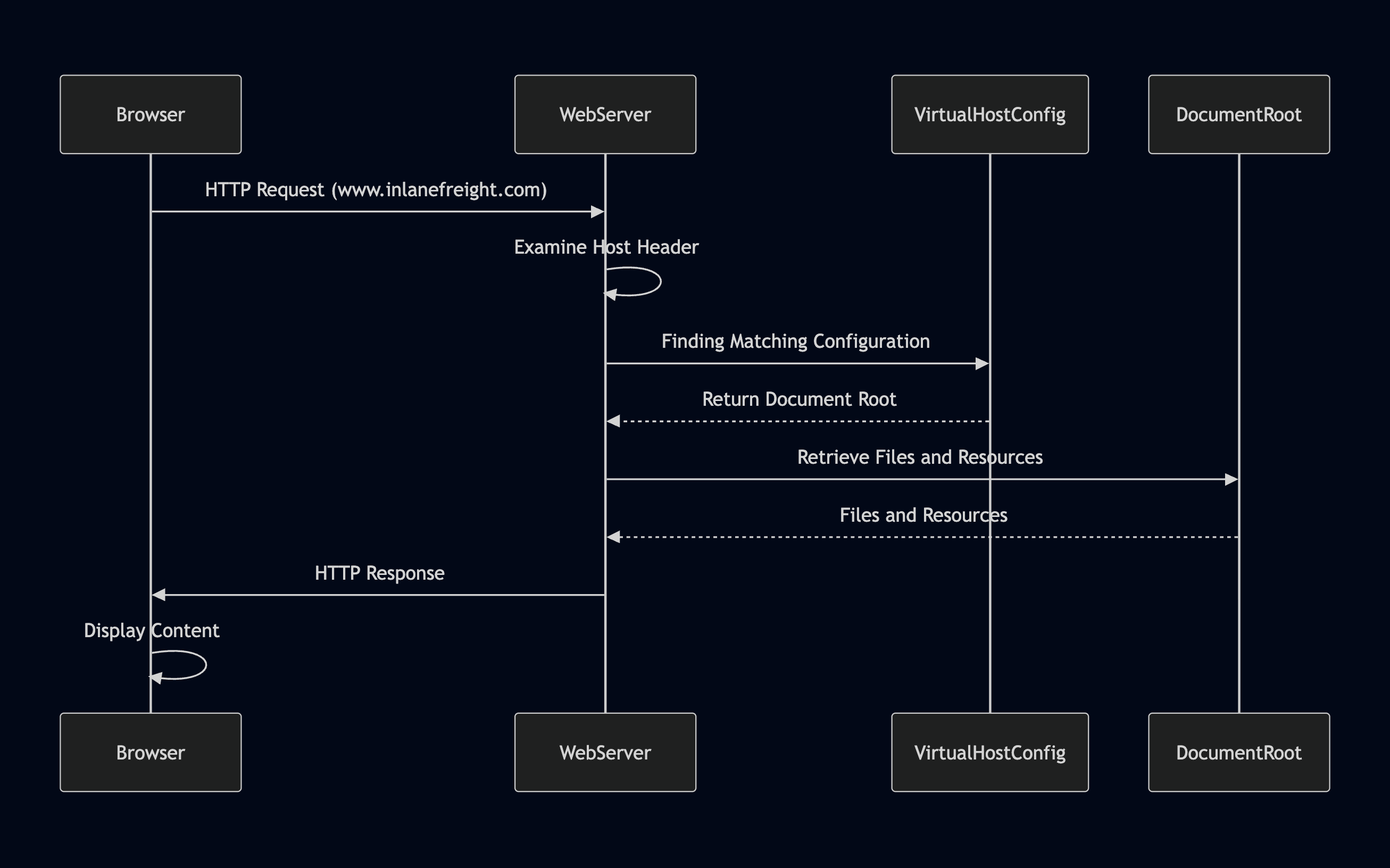
- Browser Requests a Website: When you enter a domain name (e.g.,
www.inlanefreight.com) into your browser, it initiates an HTTP request to the web server associated with that domain's IP address. - Host Header Reveals the Domain: The browser includes the domain name in the request's
Hostheader, which acts as a label to inform the web server which website is being requested. - Web Server Determines the Virtual Host: The web server receives the request, examines the
Hostheader, and consults its virtual host configuration to find a matching entry for the requested domain name. - Serving the Right Content: Upon identifying the correct virtual host configuration, the web server retrieves the corresponding files and resources associated with that website from its document root and sends them back to the browser as the HTTP response.
In essence, the Host header functions as a switch, enabling the web server to dynamically determine which website to serve based on the domain name requested by the browser.
Types of Virtual Hosting
There are three primary types of virtual hosting, each with its advantages and drawbacks:
- Name-Based Virtual Hosting: This method relies solely on the
HTTP Host headerto distinguish between websites. It is the most common and flexible method, as it doesn't require multiple IP addresses. It’s cost-effective, easy to set up, and supports most modern web servers. However, it requires the web server to support name-basedvirtual hostingand can have limitations with certain protocols likeSSL/TLS. - IP-Based Virtual Hosting: This type of hosting assigns a unique IP address to each website hosted on the server. The server determines which website to serve based on the IP address to which the request was sent. It doesn't rely on the
Host header, can be used with any protocol, and offers better isolation between websites. Still, it requires multiple IP addresses, which can be expensive and less scalable. - Port-Based Virtual Hosting: Different websites are associated with different ports on the same IP address. For example, one website might be accessible on port 80, while another is on port 8080.
Port-based virtual hostingcan be used when IP addresses are limited, but it’s not as common or user-friendly asname-based virtual hostingand might require users to specify the port number in the URL.
Virtual Host Discovery Tools
These tools employ various techniques to probe the target server and uncover potential virtual hosts.
| Tool | Description | Features |
|---|---|---|
| gobuster | A multi-purpose tool often used for directory/file brute-forcing, but also effective for virtual host discovery. | Fast, supports multiple HTTP methods, can use custom wordlists. |
| Feroxbuster | Similar to Gobuster, but with a Rust-based implementation, known for its speed and flexibility. | Supports recursion, wildcard discovery, and various filters. |
| ffuf | Another fast web fuzzer that can be used for virtual host discovery by fuzzing the Host header. |
Customizable wordlist input and filtering options. |
gobuster
Gobuster is a versatile tool commonly used for directory and file brute-forcing, but it also excels at virtual host discovery. It systematically sends HTTP requests with different Host headers to a target IP address and then analyses the responses to identify valid virtual hosts.
There are a couple of things you need to prepare to brute force Host headers:
- Target Identification: First, identify the target web server's IP address. This can be done through DNS lookups or other reconnaissance techniques.
- Wordlist Preparation: Prepare a wordlist containing potential virtual host names. You can use a pre-compiled wordlist, such as SecLists, or create a custom one based on your target's industry, naming conventions, or other relevant information.
The gobuster command to bruteforce vhosts generally looks like this:
m4cc18@htb[/htb]$ gobuster vhost -u http://<target_IP_address> -w <wordlist_file> --append-domain
- The
-uflag specifies the target URL (replace<target_IP_address>with the actual IP). - The
-wflag specifies the wordlist file (replace<wordlist_file>with the path to your wordlist). - The
--append-domainflag appends the base domain to each word in the wordlist.
In newer versions of Gobuster, the
--append-domainflag is required to append the base domain to each word in the wordlist when performing virtual host discovery. This flag ensures that Gobuster correctly constructs the full virtual hostnames, which is essential for the accurate enumeration of potential subdomains. In older versions of Gobuster, this functionality was handled differently, and the--append-domainflag was not necessary. Users of older versions might not find this flag available or needed, as the tool appended the base domain by default or employed a different mechanism for virtual host generation.
gobuster will output potential virtual hosts as it discovers them. There are a couple of other arguments that are worth knowing:
- Consider using the
-tflag to increase the number of threads for faster scanning. - The
-kflag can ignore SSL/TLS certificate errors. - You can use the
-oflag to save the output to a file for later analysis.
Output:
m4cc18@htb[/htb]$ gobuster vhost -u http://inlanefreight.htb:81 -w /usr/share/seclists/Discovery/DNS/subdomains-top1million-110000.txt --append-domain
===============================================================
Gobuster v3.6
by OJ Reeves (@TheColonial) & Christian Mehlmauer (@firefart)
===============================================================
[+] Url:             http://inlanefreight.htb:81
[+] Method:          GET
[+] Threads:         10
[+] Wordlist:        /usr/share/seclists/Discovery/DNS/subdomains-top1million-110000.txt
[+] User Agent:      gobuster/3.6
[+] Timeout:         10s
[+] Append Domain:   true
===============================================================
Starting gobuster in VHOST enumeration mode
===============================================================
Found: forum.inlanefreight.htb:81 Status: 200 [Size: 100]
[...]
Progress: 114441 / 114442 (100.00%)
===============================================================
Finished
===============================================================
Virtual host discovery can generate significant traffic and might be detected by intrusion detection systems (IDS) or web application firewalls (WAF). Exercise caution and obtain proper authorization before scanning any targets.
Exercises
Target: 83.136.249.2:39319
vHosts needed for these questions: inlanefreight.htb
Challenge 1
Brute-force vhosts on the target system. What is the full subdomain that is prefixed with "web"? Answer using the full domain, e.g. "x.inlanefreight.htb"
First go ahead an create an entry on the /etc/hosts file for this domain:
83.136.249.2 inlanefreight.htb
Now run a gobuster scan for vhost
┌──(macc㉿kaliLab)-[~/htb]
└─$ gobuster vhost -u http://inlanefreight.htb:39319 -w ~/SecLists/Discovery/DNS/subdomains-top1million-110000.txt --append-domain
- Note: this step will take some time, so be patience (top1million domains!)
Output:
===============================================================
Gobuster v3.8
by OJ Reeves (@TheColonial) & Christian Mehlmauer (@firefart)
===============================================================
[+] Url:                       http://inlanefreight.htb:39319
[+] Method:                    GET
[+] Threads:                   10
[+] Wordlist:                  /home/macc/SecLists/Discovery/DNS/subdomains-top1million-110000.txt
[+] User Agent:                gobuster/3.8
[+] Timeout:                   10s
[+] Append Domain:             true
[+] Exclude Hostname Length:   false
===============================================================
Starting gobuster in VHOST enumeration mode
===============================================================
blog.inlanefreight.htb:39319 Status: 200 [Size: 98]
forum.inlanefreight.htb:39319 Status: 200 [Size: 100]
admin.inlanefreight.htb:39319 Status: 200 [Size: 100]
support.inlanefreight.htb:39319 Status: 200 [Size: 104]
vm5.inlanefreight.htb:39319 Status: 200 [Size: 96]
#www.inlanefreight.htb:39319 Status: 400 [Size: 157]
#mail.inlanefreight.htb:39319 Status: 400 [Size: 157]
browse.inlanefreight.htb:39319 Status: 200 [Size: 102]
web17611.inlanefreight.htb:39319 Status: 200 [Size: 106]
Progress: 19593 / 114442 (17.12%)
- There is our "
web" prefix!
flag: web17611.inlanefreight.htb
Challenge 2
Brute-force vhosts on the target system. What is the full subdomain that is prefixed with "vm"? Answer using the full domain, e.g. "x.inlanefreight.htb"
Again look at the output from the gobuster vhosts scan, note the line:
vm5.inlanefreight.htb:39319 Status: 200 [Size: 96]
flag: vm5.inlanefreight.htb
Challenge 3
Brute-force vhosts on the target system. What is the full subdomain that is prefixed with "br"? Answer using the full domain, e.g. "x.inlanefreight.htb"
Note the line:
browse.inlanefreight.htb:39319 Status: 200 [Size: 102]
flag: browse.inlanefreight.htb
Challenge 4
Brute-force vhosts on the target system. What is the full subdomain that is prefixed with "a"? Answer using the full domain, e.g. "x.inlanefreight.htb"
Note the line:
admin.inlanefreight.htb:39319 Status: 200 [Size: 100]
flag: admin.inlanefreight.htb
Challenge 5
Brute-force vhosts on the target system. What is the full subdomain that is prefixed with "su"? Answer using the full domain, e.g. "x.inlanefreight.htb"
Note the line:
support.inlanefreight.htb:39319 Status: 200 [Size: 104]
flag: support.inlanefreight.htb