XSS Discovery
Automated Discovery
Most Web Application Vulnerability Scanners (e.g., Nessus, Burp Pro, ZAP) can detect XSS vulnerabilities through:
- Passive Scan: Reviews client-side code for DOM-based vulnerabilities.
- Active Scan: Injects payloads into page inputs and monitors the response for successful execution.
Open-source tools for XSS discovery include:
- XSStrike
- Brute XSS
- XSSer
Example: Using XSStrike
git clone https://github.com/s0md3v/XSStrike.git
cd XSStrike
pip install -r requirements.txt
python xsstrike.py

XSStrike v3.1.4
...SNIP...
To test a URL with XSStrike:
python xsstrike.py -u "http://SERVER_IP:PORT/index.php?task=test"
Output:
        XSStrike v3.1.4

[~] Checking for DOM vulnerabilities
[+] WAF Status: Offline
[!] Testing parameter: task
[!] Reflections found: 1
[~] Analysing reflections
[~] Generating payloads
[!] Payloads generated: 3072
------------------------------------------------------------
[+] Payload: <HtMl%09onPoIntERENTER+=+confirm()>
[!] Efficiency: 100
[!] Confidence: 10
[?] Would you like to continue scanning? [y/N]
- The parameter was identified as XSS-vulnerable from the first payload.
Manual Discovery
Manual XSS discovery difficulty depends on the web application's security.
XSS Payloads
Basic method: test XSS payloads manually in input fields or headers like Cookie/User-Agent.
Common payload lists:
- PayloadAllTheThings
- PayloadBox
Challenges:
- Many payloads don't work due to input sanitization or specific contexts.
- Injection vectors include
<script>,<img>, CSS styles, etc.
Manual testing is inefficient. Writing a Python script to automate payload testing and response analysis can help, especially in advanced scenarios.
Note: XSS can be injected into any input in the HTML page, which is not exclusive to HTML input fields, but may also be in HTTP headers like the Cookie or User-Agent (i.e., when their values are displayed on the page).
Code Review
Manual code review is the most reliable XSS discovery method. It involves:
- Reviewing both front-end and back-end code.
- Understanding how input flows to output (browser).
- Writing targeted payloads based on input/output paths.
Limitations of automated tools:
- Common web apps are usually already scanned and patched.
- Manual review can find undiscovered vulnerabilities.
Exercise
TARGET: 94.237.49.209:31642
Challenge 1
Utilize some of the techniques mentioned in this section to identify the vulnerable input parameter found in the above server. What is the name of the vulnerable parameter?
First lets try visiting the site on a browser.
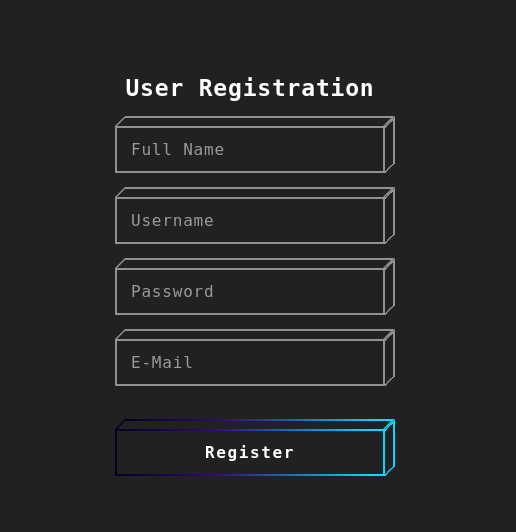
- It seems to be a registration system, each of the boxes is an input field.
Now, lets try registering and looking at how these fields get passed to the server. I used [CTRL+SHIFT+I] and opened the Network tap of DevTools. Now lets input some random data.
When clicking on Register we notice the following:
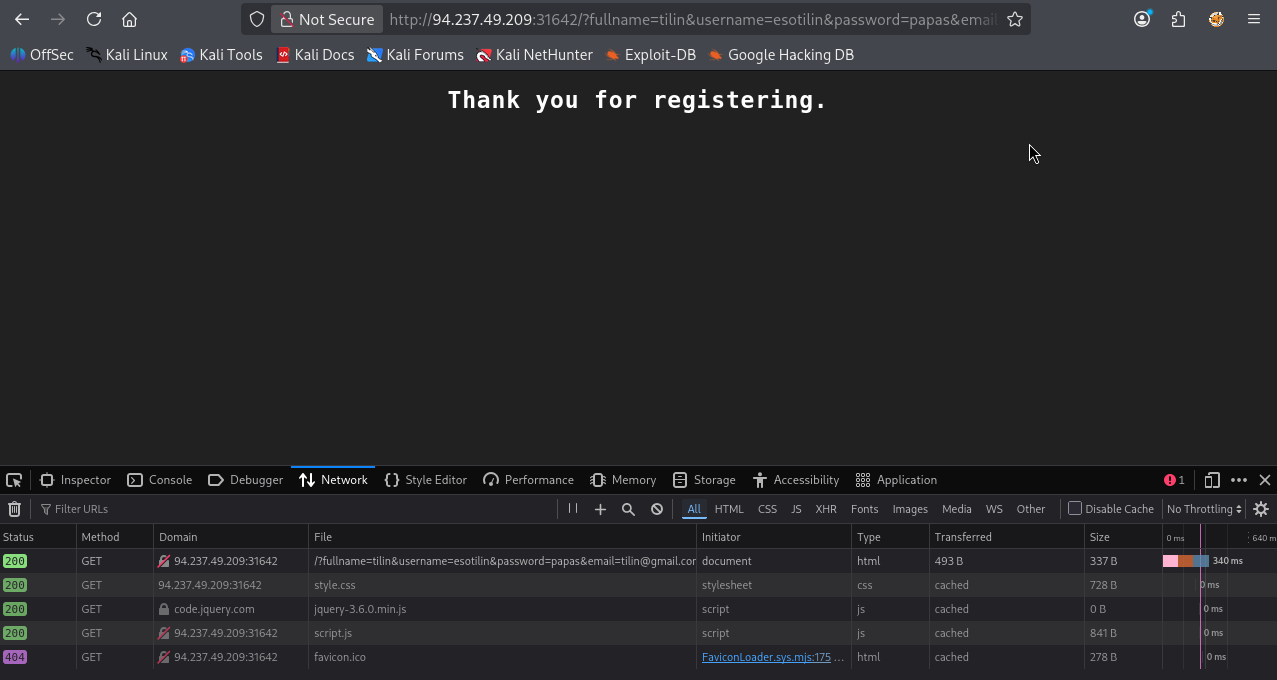
- Parameters are sent via a GET request
More specifically the first of these requests contains the following;
GET http://94.237.49.209:31642/ fullname=tilin&username=esotilin&password=papas&email=tilin@gmail.com
Now, knowing exactly how input field values are passed, lets use XSStrike to check for an XSS vulnerability using the above parameters:
┌──(macc㉿kaliLab)-[~/htb]
└─$ python xsstrike.py -u "http://94.237.49.209:31642/?fullname=tilin&username=esotilin&password=papas&email=tilin@gmail.com"
- Note the
?symbol right after the IP and port so that we can pass the parameters.
Output:
	XSStrike v3.1.5

[~] Checking for DOM vulnerabilities
[+] WAF Status: Offline
[!] Testing parameter: fullname
[-] No reflection found
[!] Testing parameter: username
[-] No reflection found
[!] Testing parameter: password
[-] No reflection found
[!] Testing parameter: email
[!] Reflections found: 1
[~] Analysing reflections
[~] Generating payloads
[!] Payloads generated: 3072
- We have found a Reflection under the
emailparameter.
flag: email
Challenge 2
What type of XSS was found on the above server? "name only"
XSStrike results from the above challenge show 'Reflections found: 1', therefore this is a Reflected XSS type, and since the challenge only asks for the name lets do Reflected
flag: Reflected