Intro to SQL Injections
Use of SQL in Web Applications
Once a DBMS is installed and set up on the back-end server and is up and running, the web applications can start utilizing it to store and retrieve data.
For example, within a PHP web application, we can connect to our database, and start using the MySQL database through MySQL syntax, right within PHP, as follows:
$conn = new mysqli("localhost", "root", "password", "users");
$query = "select * from logins";
$result = $conn->query($query);
Then, the query's output will be stored in $result, and we can print it to the page or use it in any other way. The below PHP code will print all returned results of the SQL query in new lines:
while($row = $result->fetch_assoc() ){
	echo $row["name"]."<br>";
}
Web applications also usually use user-input when retrieving data. For example, when a user uses the search function to search for other users, their search input is passed to the web application, which uses the input to search within the databases:
$searchInput =  $_POST['findUser'];
$query = "select * from logins where username like '%$searchInput'";
$result = $conn->query($query);
If we use user-input within an SQL query, and if not securely coded, it may cause a variety of issues, like SQL Injection vulnerabilities.
What is an Injection?
In the above example, we accept user input and pass it directly to the SQL query without sanitization.
Sanitization refers to the removal of any special characters in user-input, in order to break any injection attempts.
Injection occurs when an application misinterprets user input as actual code rather than a string, changing the code flow and executing it. This can occur by escaping user-input bounds by injecting a special character like ('), and then writing code to be executed, like JavaScript code or SQL in SQL Injections. Unless the user input is sanitized, it is very likely to execute the injected code and run it.
SQL Injection
An SQL injection occurs when user-input is inputted into the SQL query string without properly sanitizing or filtering the input. The previous example showed how user-input can be used within an SQL query, and it did not use any form of input sanitization:
$searchInput =  $_POST['findUser'];
$query = "select * from logins where username like '%$searchInput'";
$result = $conn->query($query);
In typical cases, the searchInput would be inputted to complete the query, returning the expected outcome. Any input we type goes into the following SQL query:
select * from logins where username like '%$searchInput'
So, if we input admin, it becomes '%admin'. In this case, if we write any SQL code, it would just be considered as a search term. For example, if we input SHOW DATABASES;, it would be executed as '%SHOW DATABASES;' The web application will search for usernames similar to SHOW DATABASES;. However, as there is no sanitization, in this case, we can add a single quote ('), which will end the user-input field, and after it, we can write actual SQL code. For example, if we search for 1'; DROP TABLE users;, the search input would be:
'%1'; DROP TABLE users;'
- Notice how we added a single quote (
') after "1", in order to escape the bounds of the user-input in ('%$searchInput').
So, the final SQL query executed would be as follows:
select * from logins where username like '%1'; DROP TABLE users;'
As we can see from the syntax highlighting, we can escape the original query's bounds and have our newly injected query execute as well. Once the query is run, the users table will get deleted.
Note: In the above example, for the sake of simplicity, we added another SQL query after a semi-colon (;). Though this is actually not possible with MySQL, it is possible with MSSQL and PostgreSQL. In the coming sections, we'll discuss the real methods of injecting SQL queries in MySQL.
Syntax Errors
The previous example of SQL injection would return an error:
Error: near line 1: near "'": syntax error
This is because of the last trailing character, where we have a single extra quote (') that is not closed, which causes a SQL syntax error when executed:
select * from logins where username like '%1'; DROP TABLE users;'
In this case, we had only one trailing character, as our input from the search query was near the end of the SQL query. However, the user input usually goes in the middle of the SQL query, and the rest of the original SQL query comes after it.
To have a successful injection, we must ensure that the newly modified SQL query is still valid and does not have any syntax errors after our injection. In most cases, we would not have access to the source code to find the original SQL query and develop a proper SQL injection to make a valid SQL query. So, how would we be able to inject into the SQL query then successfully?
One answer is by using comments, and we will discuss this in a later section. Another is to make the query syntax work by passing in multiple single quotes, as we will discuss next (').
Types of SQL Injections
SQL Injections are categorized based on how and where we retrieve their output.
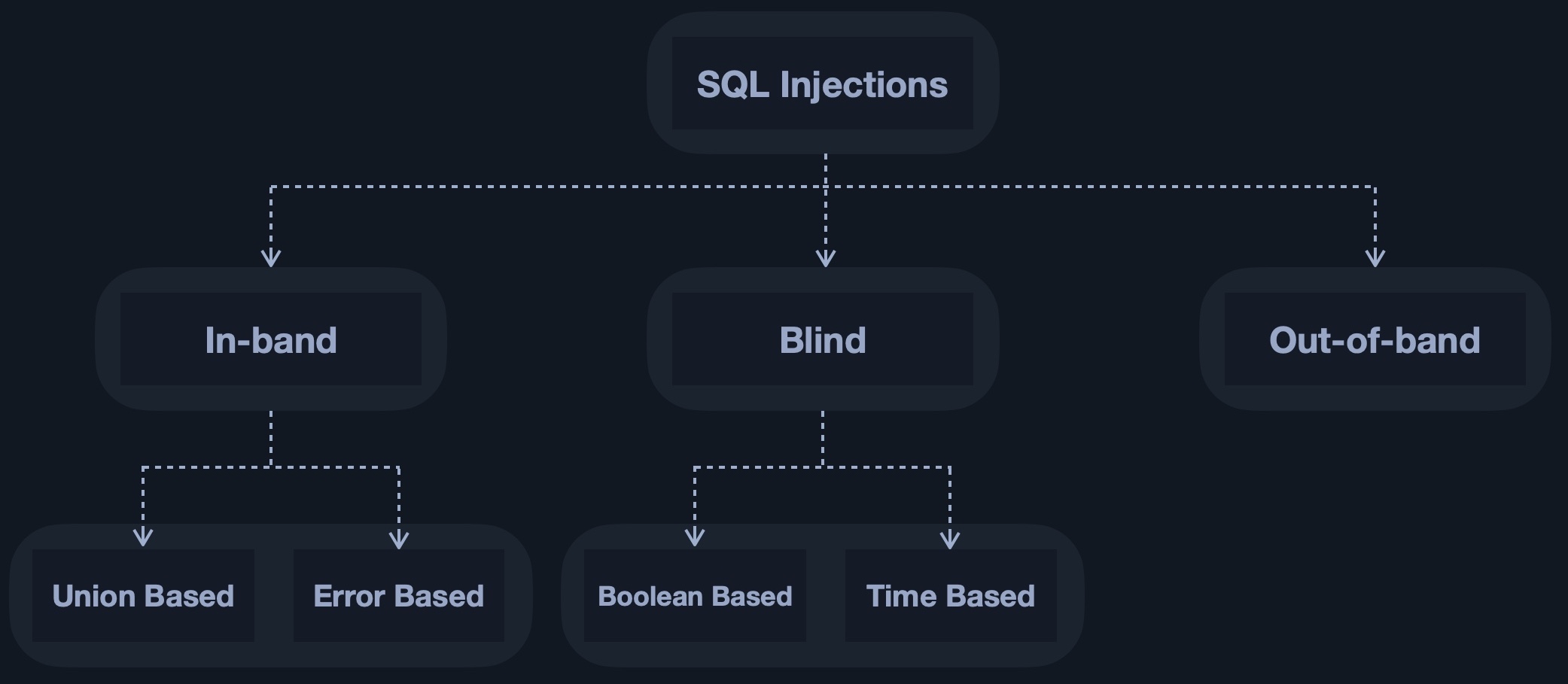
In simple cases, the output of both the intended and the new query may be printed directly on the front end, and we can directly read it. This is known as In-band SQL injection, and it has two types: Union Based and Error Based.
With Union Based SQL injection, we may have to specify the exact location, 'i.e., column', which we can read, so the query will direct the output to be printed there. As for Error Based SQL injection, it is used when we can get the PHP or SQL errors in the front-end, and so we may intentionally cause an SQL error that returns the output of our query.
In more complicated cases, we may not get the output printed, so we may utilize SQL logic to retrieve the output character by character. This is known as Blind SQL injection, and it also has two types: Boolean Based and Time Based.
With Boolean Based SQL injection, we can use SQL conditional statements to control whether the page returns any output at all, 'i.e., original query response,' if our conditional statement returns true. As for Time Based SQL injections, we use SQL conditional statements that delay the page response if the conditional statement returns true using the Sleep() function.
Finally, in some cases, we may not have direct access to the output whatsoever, so we may have to direct the output to a remote location, 'i.e., DNS record,' and then attempt to retrieve it from there. This is known as Out-of-band SQL injection.
In this module, we will only be focusing on introducing SQL injections through learning about Union Based SQL injection.