Appointment
Level: Starting Point Tier 1
Date: 2025-08-30
VM IP: 10.129.200.19
Task 1
What does the acronym SQL stand for?
flag: Structured Query Language
An excellent example of how an SQL Service typically operates is the log-in process utilized for any user. Each time the user wants to log in, the web application sends the log-in page input (username/password combination) to the SQL Service, comparing it with stored database entries for that specific user. Suppose the specified username and password match any entry in the database. In that case, the SQL Service will report it back to the web application, which will, in turn, log the user in, giving them access to the restricted parts of the website. Post-log-in, the web application will set the user a special permission in the form of a cookie or authentication token that associates his online presence with his authenticated presence on the website. This cookie is stored both locally, on the user's browser storage, and the webserver.
Afterward, if the user wants to search through the list items listed on the page for something in particular, he will input the object's name in a search bar, which will trigger the same SQL Service to run the SQL query on behalf of the user. Suppose an entry for the searched item exists in the database, typically under a different table. In that case, the associated information is retrieved and sent to the web application to be presented to the user as images, text, links, and other types, such as comments and reviews.
Task 2
What does the acronym SQL stand for?
SQL Injection is a common way of exploiting web pages that use SQL Statements that retrieve and store user input data. If configured incorrectly, one can use this attack to exploit the well-known SQL Injection vulnerability, which is very dangerous. There are many different techniques of protecting from SQL injections, some of them being input validation, parameterized queries, stored procedures, and implementing a WAF (Web Application Firewall) on the perimeter of the server's network. However, instances can be found where none of these fixes are in place, hence why this type of attack is prevalent, according to the OWASP Top 10 list of web vulnerabilities.
flag: SQL Injection
- More about SQL Injections here: SQL and XML Injections
Task 3
What is the 2021 OWASP Top 10 classification for this vulnerability?
Visit https://owasp.org/www-project-top-ten/ to see classification
flag: A03:2021-Injection
Task 4
What does Nmap report as the service and version that are running on port 80 of the target?
Perform an nmap enumeration for port 80
nmap -sV -p 80 10.129.200.19
-sC: Performs a script scan using the default set of scripts. It is equivalent to--script=default. Some of the scripts in this category are considered intrusive and should not be run against a target network without permission.-sV: Enables version detection, which will detect what versions are running on what port.
Output:
Starting Nmap 7.95 ( https://nmap.org ) at 2025-08-30 19:46 MDT
Stats: 0:00:06 elapsed; 0 hosts completed (1 up), 1 undergoing Service Scan
Service scan Timing: About 0.00% done
Nmap scan report for 10.129.200.19
Host is up (0.063s latency).

PORT   STATE SERVICE VERSION
80/tcp open  http    Apache httpd 2.4.38 ((Debian))

Service detection performed. Please report any incorrect results at https://nmap.org/submit/ .
Nmap done: 1 IP address (1 host up) scanned in 8.04 seconds
flag: Apache httpd 2.4.38 ((Debian))
Task 5
What is the standard port used for the HTTPS protocol?
Look at Ports and Protocols
flag: 443
Task 6
What is a folder called in web-application terminology?
flag: directory
Task 7
What is the HTTP response code is given for 'Not Found' errors?
When navigating through web directories, the HTTP client, which is your browser, communicates with the HTTP server (in this case Apache 2.4.38) using the HTTP protocol by sending an HTTP Request (a GET or POST message) which the server will then process and return with an HTTP Response. HTTP Responses contain status codes, which detail the interaction status between the client's request and how the server handled it. Some of the more common status codes for the HTTP protocol are:
- HTTP1/1 200 OK : Page/resource exists, proceeds with sending you the data.
- HTTP1/1 404 Not Found : Page/resource does not exist.
- HTTP1/1 302 Found : Page/resource found, but by redirection to another directory (moved temporarily). This is an invitation to the user-agent (the web browser) to make a second, identical request to the new URL specified in the location field. You will perceive the whole process as a seamless redirection to the new URL of the specified resource.
flag: 404
Task 8
Gobuster is one tool used to brute force directories on a webserver. What switch do we use with Gobuster to specify we're looking to discover directories, and not subdomains?
Gobuster Gobuster is written in Golang, which is short for the Go programming language.
Installing Go
Since this tool is written in Go, you must install the Go language/compiler/etc. Full details of installation and setup can be found on the Go language website. You need at least Go version 1.19 to compile Gobuster
In Linux you can install Go using the following:
VERSION="1.21.4"   # choose your desired version
ARCH="amd64"       # or "arm64" for ARM systems
curl -O -L "https://golang.org/dl/go${VERSION}.linux-${ARCH}.tar.gz"
sudo tar -C /usr/local -xzf go${VERSION}.linux-${ARCH}.tar.gz
- Set up the environment variables in your
.bash_profileor.profile:
export PATH=$PATH:/usr/local/go/bin
- Reload your profile or start a new shell session to use Go.
Installing Gobuster
If you are using a Debian/Ubuntu-based Linux distribution, you can use the apt package manager to install gobuster using the following command.
sudo apt install gobuster
Using Gobuster
To see how we can use Gobuster, we can use the following syntax.
┌──(macc㉿kaliLab)-[~]
└─$ gobuster --help
NAME:
   gobuster - the tool you love

USAGE:
   gobuster command [command options]

VERSION:
   3.8

AUTHORS:
   Christian Mehlmauer (@firefart)
   OJ Reeves (@TheColonial)

COMMANDS:
   dir      Uses directory/file enumeration mode
   vhost    Uses VHOST enumeration mode (you most probably want to use the IP address as the URL parameter)
   dns      Uses DNS subdomain enumeration mode
   fuzz     Uses fuzzing mode. Replaces the keyword FUZZ in the URL, Headers and the request body
   tftp     Uses TFTP enumeration mode
   s3       Uses aws bucket enumeration mode
   gcs      Uses gcs bucket enumeration mode
   help, h  Shows a list of commands or help for one command

GLOBAL OPTIONS:
   --help, -h     show help
   --version, -v  print the version
dir: Specify that we wish to do web directory enumeration.--url: Specify the web address of the target machine that runs the HTTP server.--wordlist: Specify the wordlist that we want to use.
flag: dir
After checking the help option, we can now use the program to find interesting pages and directories. However, we still lack a wordlist. There is a dedicated folder with a myriad of wordlists, dictionaries, and rainbow tables that comes pre-installed with Parrot OS, found under the path /usr/share/wordlists . However, you can download the SecLists collection as well, it being one of the most famous wordlist collections in use today
Example of a Directory discovery using Gobuster
┌──(macc㉿kaliLab)-[~/Downloads]
└─$ gobuster dir --url http://10.129.200.19/ --wordlist SecLists/Discovery/Web-Content/DirBuster-2007_directory-list-2.3-small.txt
===============================================================
Gobuster v3.8
by OJ Reeves (@TheColonial) & Christian Mehlmauer (@firefart)
===============================================================
[+] Url:                     http://10.129.200.19/
[+] Method:                  GET
[+] Threads:                 10
[+] Wordlist:                SecLists/Discovery/Web-Content/DirBuster-2007_directory-list-2.3-small.txt
[+] Negative Status codes:   404
[+] User Agent:              gobuster/3.8
[+] Timeout:                 10s
===============================================================
Starting gobuster in directory enumeration mode
===============================================================
/images               (Status: 301) [Size: 315] [--> http://10.129.200.19/images/]
/css                  (Status: 301) [Size: 312] [--> http://10.129.200.19/css/]
/js                   (Status: 301) [Size: 311] [--> http://10.129.200.19/js/]
/vendor               (Status: 301) [Size: 315] [--> http://10.129.200.19/vendor/]
/fonts                (Status: 301) [Size: 314] [--> http://10.129.200.19/fonts/]
After checking out the web directories, we have found no helpful information. The results present in our output represent default directories for most websites, and most of the time, they do not contain files that could be exploitable or useful for an attacker in any way. However, it is still worth checking them because sometimes, they could contain non-standard files placed there by mistake.
Task 8
What single character can be used to comment out the rest of a line in MySQL?
Here is an example of how authentication works using PHP & SQL:
<?php
mysql_connect("localhost", "db_username", "db_password"); # Connection to the SQL
Database.
mysql_select_db("users"); # Database table where user information is stored.

$username=$_POST['username']; # User-specified username.
$password=$_POST['password']; #User-specified password.

$sql="SELECT * FROM users WHERE username='$username' AND password='$password'";
# Query for user/pass retrieval from the DB.

$result=mysql_query($sql);
# Performs query stored in $sql and stores it in $result.

$count=mysql_num_rows($result);
# Sets the $count variable to the number of rows stored in $result.
if ($count==1){
	# Checks if there's at least 1 result, and if yes:
	$_SESSION['username'] = $username; # Creates a session with the specified $username.
	$_SESSION['password'] = $password; # Creates a session with the specified $password.
	header("location:home.php"); # Redirect to homepage.
}
else { # If there's no singular result of a user/pass combination:
	header("location:login.php");
	# No redirection, as the login failed in the case the $count variable is not equal to 1, HTTP Response code 200 OK.
}
?>
Notice how after the # symbol, everything turns into a comment? This is how the PHP language works. Keep that in mind for later.
This code above is vulnerable to SQL Injection attacks, where you can modify the query (the $sql variable) through the log-in form on the web page to make the query do something that is not supposed to do - bypass the log-in altogether!
flag: #
Task 10
If user input is not handled carefully, it could be interpreted as a comment. Use a comment to login as admin without knowing the password. What is the first word on the webpage returned?
Navigate directly to the IP address of the target from our browser, inside our Pwnbox instance or Virtual Machine.
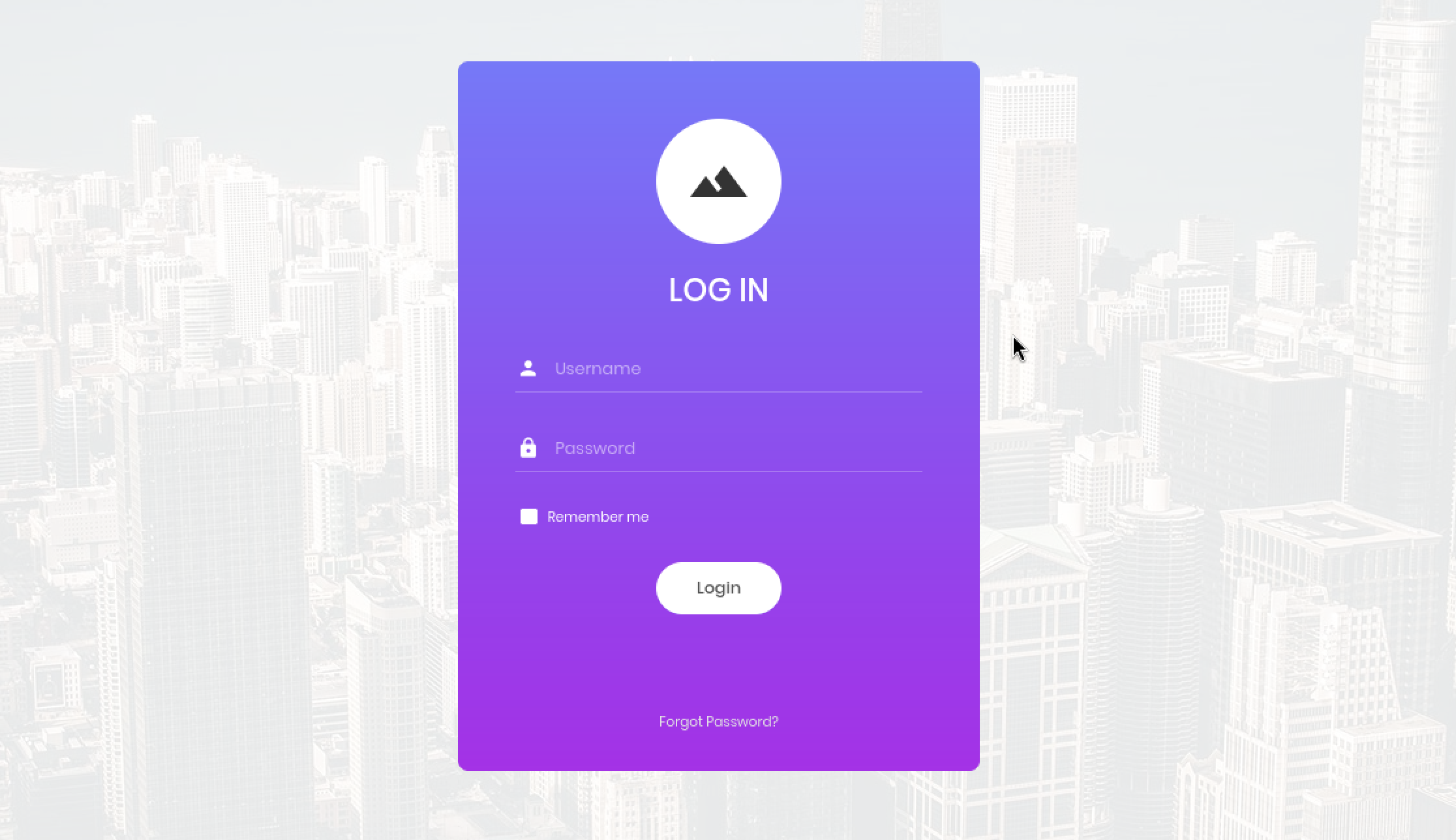
Note that we can specify the username and password through the log-in form on the web page. However, it will be directly embedded in the $sql variable that performs the SQL query without input validation. Notice that no regular expressions or functions forbid us from inserting special characters such as a single quote or hashtag. This is a dangerous practice because those special characters can be used for modifying the queries. The pair of single quotes are used to specify the exact data that needs to be retrieved from the SQL Database, while the hashtag symbol is used to make comments. Therefore, we could manipulate the query command by inputting the following
Username: admin'#
We will close the query with that single quote, allowing the script to search for the admin username. By adding the hashtag, we will comment out the rest of the query, which will make searching for a matching password for the specified username obsolete. If we look further down in the PHP code above, we will see that the code will only approve the log-in once there is precisely one result of our username and password combination. However, since we have skipped the password search part of our query, the script will now only search if any entry exists with the username admin . In this case, we got lucky. There is indeed an account called admin , which will validate our SQL Injection and return the 1 value for the $count variable, which will be put through the if statement , allowing us to log-in without knowing the password. If there was no admin account, we could try any other accounts until we found one that existed. ( administrator , root , john_doe , etc.) Any valid, existing username would make our SQL Injection work.
In this case, because the password-search part of the query has been skipped, we can throw anything we want at the password field, and it will not matter.
Password: abc123
To be more precise, here is how the query part of the PHP code gets affected by our input.
SELECT * FROM users WHERE username='admin'#' AND password='abc123'

We successfully performed a primary SQL Injection and got the flag.
flag: Congratulations
Submit Flag
flag: e3d0796d002a446c0e622226f42e9672