LAB 1 – Command Line Interface (CLI) Familiarization
Class: CYBR-405
Notes:
Questions:
1. How many total files are in the four Lab1 subfolders?
First we see (using ls):
┌──(kali㉿kali)-[~/Desktop/ProfPriceLabs/Lab1]
└─$ ll
total 300
drwxr-xr-x 2 kali kali   4096 Sep 15 12:04  1
drwxr-xr-x 2 kali kali   4096 Sep 15 12:04  2
drwxr-xr-x 2 kali kali   4096 Sep 15 12:04  3
drwxr-xr-x 2 kali kali   4096 Sep 15 12:04  4
-rw-r--r-- 1 kali kali 287006 Sep 15 12:04 'LAB 1 Instructions.pdf'
- There is an extra 'LAB 1 Instructions.pdf' file that is not inside the 4 subfolders
Navigate to the Lab1/ directory in the Terminal, then use the following command:
find . -type f | wc -l
find .starts the search in the current directory (.) and goes through all subdirectories.-type frestricts the results to only files (not directories).| wc -lpipes the output to the word count utility (wc) with the line count option (-l).
Output:
6
- But since this is counting the 'LAB 1 Instructions.pdf' file, we need to subtract one from this number to report the real number fo files within the 4 subfolders
Answer: 5
2. Which folder has the chicken picture?
After looking through the files we find:
┌──(kali㉿kali)-[~/Desktop/ProfPriceLabs/Lab1/3]
└─$ feh d
- It opens an image window of a chicken image!
Answer: ~/Desktop/ProfPriceLabs/Lab1/3
3. Which file has an MD5 hash that ends in 454b?
After trying the md5sum command on many files
┌──(kali㉿kali)-[~/Desktop/ProfPriceLabs/Lab1/2]
└─$ md5sum c
fc148faff73af5acf4bcaf072754454b  c
Answer: ~/Desktop/ProfPriceLabs/Lab1/2/c
4. How many total cats are shown in the pictures?
a
b
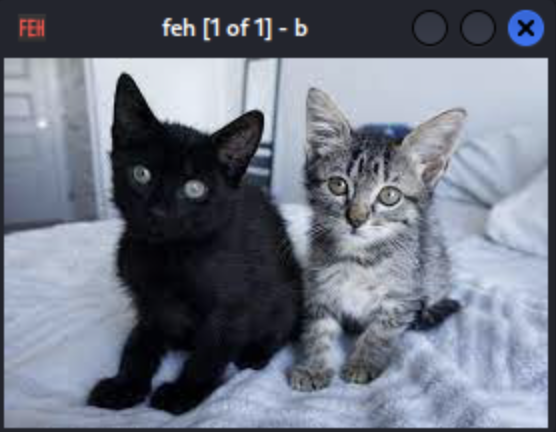
- Which file has an MD5 hash that ends in 6759?
- Make a directory (mkdir) named “new” in Lab1. Next, navigate to 3, hash d, and save the hash value in a log (> log). Move d to the new directory you created in Lab1 using this command (mv d ~/Desktop/Lab1/new). Next, hash d in its new location and compare with its hash from 3. Did the hash value change after the move?
- What body part does “c” reference in the punch line?
- Hash c and record (> log) the value. Type “nano c” to open a text editor to make changes. Once the document opens, the cursor (square white box) should automatically be on the first letter of the sentence. Hit the delete key to delete the first letter and hit “Ctrl” and “X” to exit. Press “Y” and “Enter” to save the changes and return to the terminal window. Rehash C and compare the hash value with the original hash value. Does the hash value change?
- Which file has an MD5 hash that ends in 9815?
- What do computers eat for a snack?
Tips:
If you want history not to show your commands, or you just want to type a command that does not appear in the history (like a hidden/private command) you just start with an space like:
┌──(kali㉿kali)-[~/Desktop/ProfPriceLabs/Lab1/2]
└─$  ls
Output:
   ...
   76  cd 2/
   77  ll
   78  md5sum c
   79  history