09 - Cybersecurity and Incident Response
Class: CYBR-405
Notes:
Module Objectives
By the end of this module, you should be able to:
- Describe basic functions of a network
- Explain the process of defense in depth
- Describe indicators of compromise
- Describe incident response lifecycle
Network High

- Think of your highschool days
- Nobody talk to each other, it was hard to communicate but you could talk to yourself
- Then there was some problems with our comms, and we had to come up with TCP, this is the base of the internet, all comms go through this
- TCP guarantees communication
- UDP just forwards packets as fast as possible
Birth of TCP/IP
In the early 1970s, the U.S. Department of Defense funded a project through DARPA to solve this problem. Two researchers, Vint Cerf and Bob Kahn, were tasked with creating a protocol that could allow different networks to communicate with each other.
Transmission Control Protocol / Internet Protocol, or TCP/IP.
TCP/IP Continued
IP (Internet Protocol)
- Handles addressing and routing
- Moves packets from one computer to another across networks
- Does not guarantee delivery
IP figures out where the data should go,
and TCP makes sure it actually gets there correctly.
TCP (Transmission Control Protocol)
- Ensures reliable delivery
- Breaks data into packets
- Reassembles packets in order
- Retransmits lost packets
Early Internet

Defense in Depth
"An approach to cybersecurity in which a series of defensive mechanisms are layered in order to protect valuable data and information. If one mechanism fails, another steps up immediately to thwart an attack. This multi-layered approach with intentional redundancies increases the security of a system as a whole and addresses many different attack vectors".
- People
- Technology
- Operations
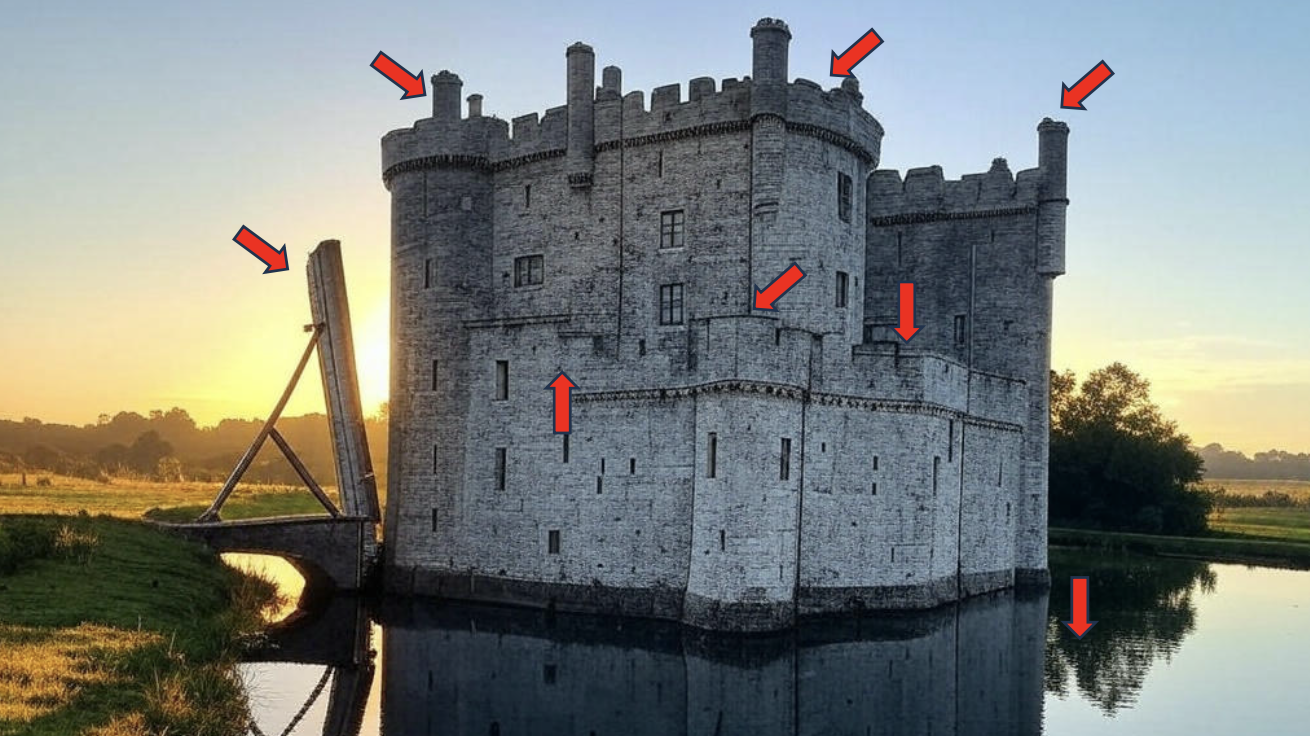
Notes:
- The first line of defense of a castle is the water
- Then we have wholes to defend the castle
- Then we have towers
- And so on
"Hackers don't break in, they log in"
1. Stolen Credentials
2. Exploited Vulnerabilities
Notes:
- Identity & Access Management (IAM): is basically who you are
- In the castle, you get the keys from a knight, you get in (you log in)
- You need to be able to detect a knight walking into the front room
- If you can pretend to be a knight, find the authentication of the king, we call this the pivot to get access (usually an employee)
Weakness
- The "castle approach" focuses defenses on external threats.
- Once inside, the only thing controlling movement is easily defeatable by changing roles (RBAC).
- An admin (role) can easily move laterally (spread) to other systems increasing the negative impact to the organization.
- The volume of different applications and frequency of different vulnerabilities (i.e. backdoors) makes it challenging to keep everything patched to stay ahead of our adversaries.
Notes:
- Tactics:
- Defense Evasion
- Lateral Movement
- Exfiltration
- There is different techniques within tactics
- Techniques describe way to mitigate the behavior

- They have a database of vulnerabilities for basically every single vulnerability in any product you can think of
- This is bad for attackers! becuase they will now have the same information
Indicators of Compromise
How do you know when you are sick?
Fever
Feel Bad
Coughing
Tired
Throwing up
Upset Stomach
Cold Sweats
Etc.
How do you know when you got attackerd?
- Unusual traffic going in and out of the network
- Unknown files, applications, and processes in the system
- Suspicious activity in administrator or privileged accounts
- Irregular activities such as traffic in countries an organization doesn't do business with
- Dubious log-ins, access, and other network activities that indicate probing or brute force attacks
- Anomalous spikes of requests and read volume in company files
- Network traffic that traverses in unusually used ports
- Tampered file, Domain Name Servers (DNS) and registry configurations as well as changes in system settings, including those in mobile devices
- Large amounts of compressed files and data unexplainably found in locations where they shouldn't be
Anatomy of Cyber Attack
Reconnaissance
The threat actor uses the internet, social media, or other tools to discover likely attack courses.
Weaponization
Code and other tactics, techniques, and procedures are found or developed to exploit the target's vulnerabilities.
Delivery
Weaponized code is transmitted to the target.
Exploitation & Installation
The attacker uses the tactics to dismantle internal controls in the target to avoid detection.
Command & Control
This may Include screen capture, malwere execution, or spawning new Virtual opersing eystem environments.
- Also known as C & C or C^2
Execution
This can include extraction or destruction of IT and OT assets, installation of ransomware, IP theft, etc-
Cyber Kill Chain

Digital Forensics
Who - who are the attackers?
What - what did they take?
When - when did they get in?
Where - where did they go?
Why - why me? (why did my controls fail)
How - how did they get in?
Today's Adversaries
- Nation-state (Russia, China, Iran, etc.)
- You can't really fight against it
- Criminal Organizations ("* for hire")
- Business Espionage
- Do you think Tesla is not hacking other car companies? They do it mutually all the time!
- Insider Threat
- If you have a pissed off employee, they know everything about you
- Be careful if you are an IT leader
- Hacktivist Groups
- What is the biggest hacktivist group?
- Anonymous
- What is the biggest hacktivist group?
Averages
/CYBR-405/Visual%20Aids/image-1.png)
U.S. Losses due to Cybercrime
/CYBR-405/Visual%20Aids/image-2.png)
Preparing the Investigation Team
Before initiating the search:
- Review facts, plans, and objectives with the investigation team you have assembled
Goal of scene processing
- To collect and secure digital evidence
Digital evidence is volatile
- Develop skills to assess facts quickly
Slow response can cause digital evidence to be lost
Time to prepare is before you get the call!
Determining the Tools You Need
- Prepare tools using incident and crime scene information
- Create an initial-response field kit
- Should be lightweight and easy to transport
- Should be enough to start 95% of scenarios
- Create an extensive-response field kit
- Includes all tools you can afford to take to the field
- Sufficient equipment for long-term response
- When at the scene, extract only those items you need to acquire evidence
My Teams
- Go Bag - 72 hours of clothes and supplies
- High performance laptop with forensic software
- Initial Response Kit -
- Write blockers
- Cables
- Tools
- Evidence drives
- Inventoried and zip locked after each use
Documenting Evidence
Create or use an evidence custody form
- aka Chain of Custody
An evidence custody form serves the following functions:
-
Identifies the evidence
-
Where it came from
-
Who has handled the evidence
-
Lists dates and times the evidence was handled
-
Lists MD5 and SHA-1 hash values generated at collection
-
Record your activities and findings as you work
- Maintain a journal to record the steps you take as you process evidence
-
Your goal is to be able to reproduce the same results
- When you or another investigator repeat the steps you took to collect evidence
-
A journal serves as a reference that documents the methods you used to process digital evidence
Notes:
- What is a desktop exercise? It is a fire drill
- We are going to have multiple injets and you go through and find out what is going on
Incident Response Life Cycle
/CYBR-405/Visual%20Aids/image-3.png)
Notes:
- We have to have a plan before containment
- Digital Forensics people take place on containment
- You modify plans and procedures based on all that you have found so far
Preparation (Prevention)
Always have in your backpack:
- https://www.amazon.com/Blue-Team-Field-Manual-BTFM/dp/154101636X
- https://www.amazon.com/dp/1075091837?_encoding=UTF8&pd_rd_w=goqtD&content-id=amzn1.sym.476b1b7d-c787-4147-8a3c-fdef209103a1&pf_rd_p=476b1b7d-c787-4147-8a3c-fdef209103a1&pf_rd_r=WCFF0MR3CYSVYKK1WPFQ&pd_rd_wg=kimFe&pd_rd_r=30da9eff-b580-4d84-bc81-3ea063d14f71
Exercise
Stage 1 - Preparation
Incident Handler Communications and Facilities:
- Contact information for team members and others within and outside the organization (primary and backup contacts), such as law enforcement and other incident response teams; information may include phone numbers, email addresses, public encryption keys (in accordance with the encryption software described below), and instructions for verifying the contact's identity
- On-call information for other teams within the organization, including escalation information
- Incident reporting mechanisms, such as phone numbers, email addresses, online forms, and secure instant messaging systems that users can use to report suspected incidents; at least one mechanism should permit people to report incidents anonymously
- Issue tracking system for tracking incident information, status, etc.
- Smartphones to be carried by team members for off-hour support and onsite communications
- Encryption software to be used for communications among team members, within the organization and with external parties; for Federal agencies, software must use a FIPS-validated encryption algorithm
- War room for central communication and coordination; if a permanent war room is not necessary or practical, the team should create a procedure for procuring a temporary war room when needed
- Secure storage facility for securing evidence and other sensitive materials
Incident Analysis Hardware and Software:
- Digital forensic workstations
and/or backup devices to create disk images, preserve log files, and save other relevant incident data - Laptops for activities such as analyzing data, sniffing packets, and writing reports
- Spare workstations, servers, and networking equipment, or the virtualized equivalents, which may be used for many purposes, such as restoring backups and trying out malware
- Blank removable media
- Portable printer to print copies of log files and other evidence from non-networked systems
- Packet sniffers and protocol analyzers to capture and analyze network traffic
- Digital forensic software to analyze disk images
- Removable media with trusted versions of programs to be used to gather evidence from systems
- Evidence gathering accessories, including hard-bound notebooks, digital cameras, audio recorders, chain of custody forms, evidence storage bags and tags, and evidence tape, to preserve evidence for possible legal actions
Incident Analysis Resources:
- Port lists, including commonly used ports and Trojan horse ports
- Documentation for OSs, applications, protocols, and intrusion detection and antivirus products
- Network diagrams and lists of critical assets, such as database servers
- Current baselines of expected network, system, and application activity
- Cryptographic hashes of critical files
to speed incident analysis, verification, and eradication
Incident Mitigation Software:
- Access to images of clean OS and application installations for restoration and recovery purposes
Many incident response teams create a jump kit, which is a portable case that contains materials that may be needed during an investigation. The jump kit should be ready to go at all times. Jump kits contain many of the same items listed in the bulleted lists above. For example, each jump kit typically includes a laptop, loaded with appropriate software (e.g., packet sniffers, digital forensics). Other important materials include backup devices, blank media, and basic networking equipment and cables. Because the purpose of having a jump kit is to facilitate faster responses, the team should avoid borrowing items from the jump kit.
Each incident handler should have access to at least two computing devices (e.g., laptops). One, such as the one from the jump kit, should be used to perform packet sniffing, malware analysis, and all other actions that risk contaminating the laptop that performs them. This laptop should be scrubbed and all software reinstalled before it is used for another incident. Note that because this laptop is special purpose, it is likely to use software other than the standard enterprise tools and configurations, and whenever possible the incident handlers should be allowed to specify basic technical requirements for these specialpurpose investigative laptops. In addition to an investigative laptop, each incident handler should also have a standard laptop, smart phone, or other computing device for writing reports, reading email, and performing other duties unrelated to the hands-on incident analysis.
Exercises involving simulated incidents can also be very useful for preparing staff for incident handling; see NIST SP 800-84 for more information on exercises
Stage 2 - Detection and Analysis
An incident is something we need to respond to, while an event is just an occurrence
Stage 3 - Containment
Malware us spreading across the network
- What should the response team do?
Stage 4 - Eradication and Recovery
The malware has been removed
Stafe 5 - Post-Incident Activity
What document should the team produce after the incident
-
Stop
-
Start
-
Continue
-
What went right
-
What went wrong
-
What we learned
The problem we have in America is that 60% of our GDP is because of small businesses. A small business can't handle this, none of this. Small manufactures
- Spread: NIST Small Business Cybersecurity Corner for small business
- Available for free!