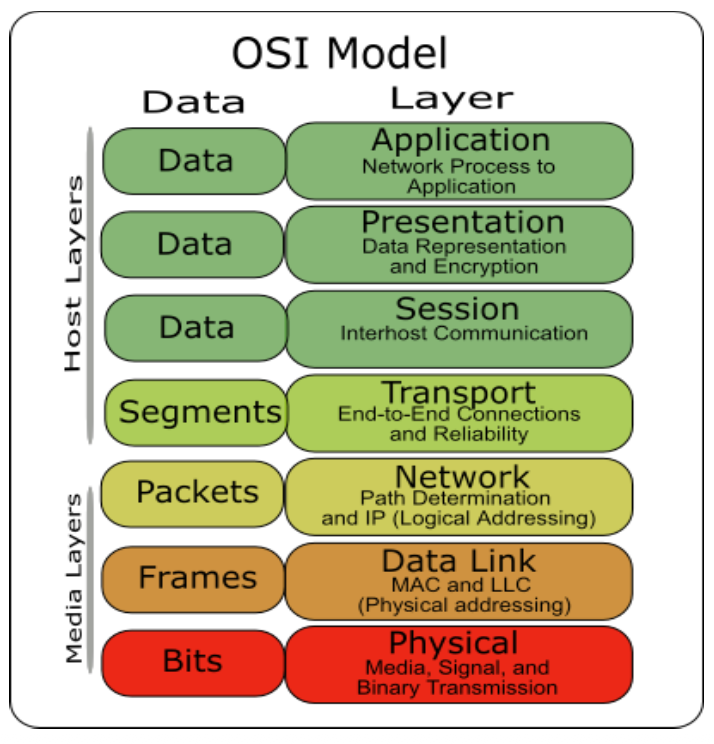
The OSI (Open System Interconnect) Reference Model is a network model consisting of seven layers
Created in 1983, OSI is promoted by the International Standard Organization (ISO)
What is the data link layer?
The data link layer is the protocol layer that handles the moving of data into and out of a physical link in a network.
Its is the second layer of OSI Layered Model.
It is responsible for converting data stream to signals bit by bit and to send that over the hardware.
At the receiving end, the data link layer picks up data from hardware which are in the form of electrical signals, assembles them in a recognizable frame format, and hands over to upper layer.
Notes:
Layer 2 Responsibilities: The Data Link Layer is the second layer of the OSI model. It is responsible for physically moving data into and out of a network link. It converts data streams into electrical signals (bits) for hardware transmission, and on the receiving end, it catches those signals and reassembles them into recognizable frames to pass up the stack.
The "Next Hop" Focus: It is crucial to understand the distinction between layers:
Physical Layer (L1): Only worries about raw bytes/electrical signals moving from one end of a physical wire to another.
Data Link Layer (L2): Worries only about the next hop. It handles single-hop transmissions using physical Ethernet (MAC) addresses.
Network Layer (L3): Worries about the entire end-to-end connection across the internet using software-defined IP addresses.
Collisions vs. Switched Networks: Historically, wired Ethernet over coaxial cables had no central coordination; if two devices spoke at the same time, a data collision occurred. Devices had to listen while speaking to detect these collisions. Modern networks use switches (or Access Points in WiFi) to centrally coordinate traffic and prevent these collisions entirely.
Internet Layers
Notes:
At this layer you still have 32-bit IP addresses
You are completely encapsulated inside this link layer frame
Internet Routing
Notes:
Routing Logic: If a sender (Alice) wants to reach a distant destination (Bob), she doesn't need to know the entire path. She only needs to know the IP address of her next hop (usually the local router, Ivy). Advanced routing protocols handle the rest of the journey.
The ARP Problem: Alice knows Ivy's IP address (Layer 3), but to actually send a physical frame over the local network, she must have Ivy's hardware MAC address (Layer 2).
The Address Resolution Protocol (ARP): To bridge this gap, Alice uses ARP. She sends a local broadcast message to every device on the network asking, "Who has Ivy's IP address? My MAC address is...".
The Response & Cache: Because the network is assumed to be a trusting environment, only Ivy will respond with her MAC address. Once Alice receives Ivy's MAC address, she saves it in an ARP cache for a short period so she doesn't have to broadcast again for subsequent packets. Once the cache expires, the process repeats.
Internet Packet Encapsulation (layer 2 frame)
Notes:
The "Russian Doll" Encapsulation: As data moves down the network stack, it is continuously encapsulated inside the headers of the layers below it. Inside the physical payload of a Layer 2 (L2) frame sits the Layer 3 (L3) IP datagram; inside that IP datagram sits the Layer 4 (L4) TCP packet; and inside that TCP packet is your actual application implementation data.
Layer Responsibilities: Each layer's header serves a specific purpose in getting the data to its destination:
L2: Contains the physical MAC address for local routing.
L3: Contains the IP address for internet-wide routing.
L4: Uses Port numbers to demultiplex (demux) the endpoints, ensuring the data goes to the correct specific application or service on the host machine.
L5: Uses the lower layers to provide a reliable, host-to-host byte stream for the application.
Intermediate Layers
Link layer
Local area network: Ethernet, WiFi, Optical fiber
48-bit media access control (MAC) addresses
Packets called frames
Network layer
Internet-wide communication
Best effort delivery
32-bit internet protocol (IP) addresses in IPv4
128-bit IP addresses in IPv6
Transport layer
16-bit addresses (ports) for classes of applications
The Ethernet Frame Layout: A standard L2 Ethernet frame begins with a 6-byte destination MAC address, followed by a 6-byte source MAC address, and a 2-byte payload type that tells the system how to interpret the encapsulated data inside it.
Inside the payload is your IP datagram, inside of it is TCP, and inside it is your application implementation
Packet Switching
Each packet is routed independently (may arrive at different order)
Notes:
Independent Routing: In modern packet-switched networks, every single packet is routed completely independently of the others.
The Reassembly Burden: Because packets are routed independently, they may take completely different paths across the internet and arrive at the destination entirely out of order. The network infrastructure does not fix this; it is strictly the receiver's job (your OS networking stack) to buffer, sequence, and reconstruct the packets back into the correct order.
MAC Addresses
Most network interfaces come with a predefined MAC address
A MAC address is a 48-bit number usually represented in hex
e.g., 00-1A-92-D4-BF-86
The first three octets of any MAC address are IEEE-assigned Organizationally Unique Identifiers
The next three can be assigned by organizations as they please, with uniqueness being the only constraint
Organizations can utilize MAC addresses to identify computers on their network
MAC address can be reconfigured by network interface driver software
Notes:
The 48-bit Identifier: Most network interfaces are manufactured with a predefined 48-bit Media Access Control (MAC) address, usually written in hexadecimal.
Vendor Prefixes (OUI): To ensure no two MAC addresses in the world are exactly the same, the address is split in half. The first three octets are an Organizationally Unique Identifier (OUI) strictly assigned by the IEEE to specific hardware vendors (like Cisco or ASUSTek). The vendor then independently assigns the last three octets.
Software Overrides: Although it is burned into the hardware, the MAC address is not permanently fixed; it can be easily reconfigured or spoofed by your operating system's network driver software.
Switch
A switch is a common network device
Operates at the link layer
Has multiple ports, each connected to a computer
Operations of a switch
Learn the MAC address of each computer connected to it
Forward frames only to the destination computer
Notes:
The Smart Layer 2 Device: A switch operates entirely at the Data Link layer. It was created to replace the old, chaotic "broadcast" hubs where every packet was sent to everyone, causing data collisions.
Learning and Unicasting: A switch is intelligent. It has multiple ports and actively "listens" to the traffic coming in to learn which MAC addresses are connected to which specific ports. Once it builds this internal mapping table, it forwards incoming frames only down the specific cable connected to the destination computer, creating a secure, collision-free unicast connection.
The address resolution protocol (ARP)
ARP connects the network layer to the data layer by converting IP addresses to MAC addresses.
ARP works by broadcasting requests and caching responses for future use.
The protocol begins with a computer broadcasting a message of the form
who has <IP address1> tell <IP address2> s who has "Ivy", tell "Alice"
When the computer with <IP address1> or an ARP server receives this message, a reply is transmitted in a frame addressed to the requester is <MAC address>
The requestor's IP address <IP address2> is contained in the link header
The Linux and Windows command arp - a displays the ARP table (ARP cache)
Internet Address
Physical Address
Type
128.148.31.1
00-00-0c-07-ac-00
dynamic
128.148.31.15
00-0c-76-b2-d7-1d
dynamic
128.148.31.71
00-0c-76-b2-d0-d2
dynamic
128.148.31.75
dynamic
128.148.31.102
00-22-0c-a3-e4-00
dynamic
128.148.31.137
00-1d-92-b6-f1-a9
dynamic
Notes:
Your physical hardware actually needs the MAC address in order to broadcast a packet
Bridging L3 and L2: ARP is the critical protocol that links the Network layer to the Data Link layer by translating software IP addresses into physical MAC addresses.
The Mechanism: When a computer needs to reach an IP address on its local network, it sends a massive broadcast request to everyone asking, "Who has this IP address? Tell me.". The correct machine receives it and sends a unicast reply back with its MAC address.
Caching: To avoid flooding the network with broadcasts every millisecond, the requesting computer caches this IP-to-MAC mapping in a local ARP table for future use. You can view this table on your machine using the arp -a command.
Notes:
The sender makes a broadcast to everyone ff
The response will be a unicast back to the requestor's MAC address
ARP Spoofing
The ARP table is updated whenever an ARP response is received.
Even without a request it's possible to "poison" an ARP cache by sending gratuitous arp replies.
Requests are not tracked
ARP announcements are not authenticated
Computers trust each other
A rogue computer can spoof other computers
Notes:
The Flaw of Trust: ARP was built for a friendly, trusting network environment. It does absolutely no authentication, and it blindly updates its cache whenever it receives an ARP response—even if it never actually sent out a request.
Gratuitous ARP (Poisoning): An attacker can exploit this by sending fake, unsolicited ("gratuitous") ARP replies to targets on the network to intentionally "poison" their ARP caches.
Notes:
Happy case:
In Alices ARP cache is a binding between Bob's IP address and her MAC address
Packet is addressed to 192.168.1.105
Constructs a Link Layer frame that is destined to 192.168.1.1
Attack:
Now you get this adversary Eve on the shared medium
When Bob sends out an ARP request, which he has to do periodically
Eve responds, and she says "Alice's MAC addresses is actually this ..." (which is actually her MAC address)
Then Alice ask for Bob IP address, and Eve tells Alice that Bob's IP is her own (Eve's IP)
The cool thing is that when Bob sends a Packet to Alice, Eve reads them and forwards it to Alice and the other way around
It looks like everything is normal for them but there is a person in the middle!
Man-in-the-Middle Attack: Imagine Alice and Bob are communicating. An attacker (Eve) sends a poisoned ARP reply to Alice claiming that Bob's IP is actually at Eve's MAC address. Eve sends a similar lie to Bob. Now, whenever Alice and Bob try to talk to each other, their switches forward all the physical frames directly to Eve. Eve secretly intercepts, reads, and forwards the packets along, while Alice and Bob suspect nothing.


/CSCE-313/Lecture/Visual%20Aids/image-69.png)
/CSCE-313/Lecture/Visual%20Aids/image-70.png)
/CSCE-313/Lecture/Visual%20Aids/image-71.png)