W9 - Multiple Processor Systems
Why Multiple Processors?
- Increase computational throughput through parallel execution.
- Improve responsiveness by executing independent work simultaneously.
- Support increasingly demanding workloads.
- Introduce new challenges: shared resources, synchronization, and scheduling
Multiple Processor Systems
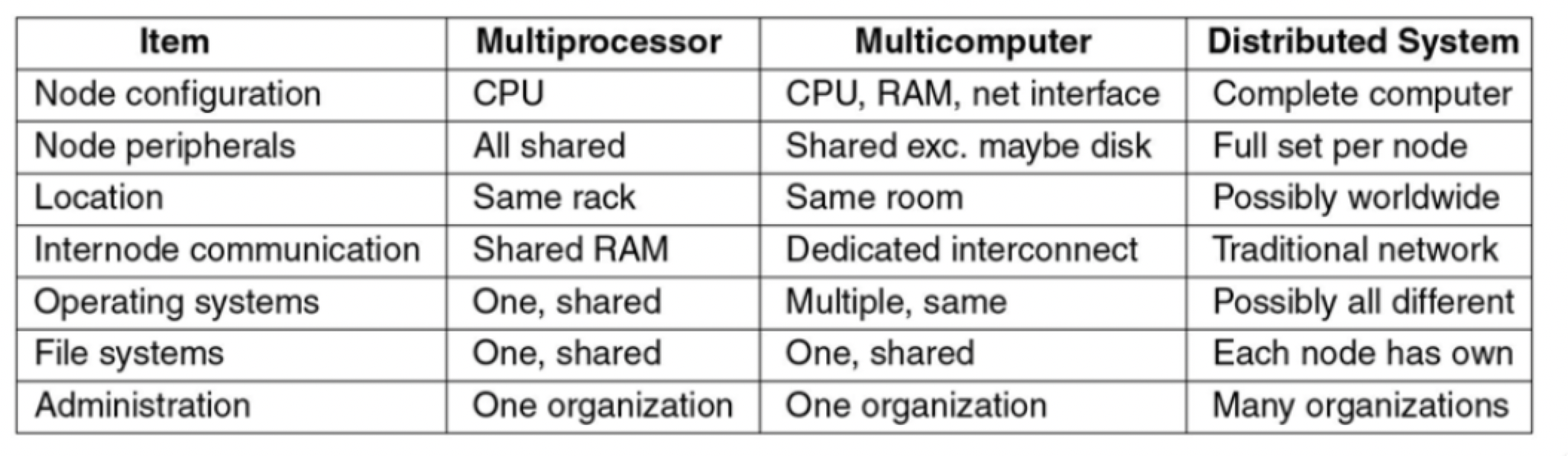
- Three types of systems with multiple processors
- Multiprocessors, multicore (ns)
- Multicomputers, computer clusters (us)
- Distributed Systems, networked computers (ms)

From Single-Core to Multicore
A compact historical timeline:
- 1971: Intel 4004 — early commercial single-chip microprocessor.
- 1990s: Multiprocessor workstations and servers become increasingly common.
- 2005–2006: Dual-core processors become mainstream in personal computers.
- 2020s: Multicore and heterogeneous CPU architectures are widespread.
Comparison of Multiple Processor Systems
How many CPUs does my laptop have?
sysctl -n hw.physicalcpu
sysctl -n hw.logicalcpu
sysctl -n hw.memsize
sysctl -a | grep 'hw.perflevel'
Multiprocessor Hardware
- Shared-memory multiprocessor
- A computer system in which >1 CPUs share a common RAM
- Single bus-based architecture
- CPUs share a common bus
- A CPU uses the bus only when it is idle
- As the # of CPUs increases the bus can become a bottleneck
- Caching reduces contention in the bus, but we need coherence
Two CPUs, Two Caches, One Variable
What Happens When Two CPUs Cache the Same Variable?

Question: CPU 1 modifies x to 20. How does CPU 2 discover the change?
Master-Slave Multiprocessors
- A master CPU runs the OS
- User processes run on slave CPUs
- Advantages
- Stable, no race conditions in the OS
- Disadvantages
- As the # of CPUs increase, the master becomes the bottleneck
- Master must handle all system calls!
- As the # of CPUs increase, the master becomes the bottleneck

- Any CPU can execute system calls and processes of the OS
- More flexible, but we need mutual exclusion in OS resources

How to avoid race conditions within the OS?
- The big kernel lock
- A mutex around the whole operating system
- Is it safe?
- Is it efficient?
It is safe, but not efficient. Many parts of the OS are independent. Why not have one CPU run the scheduler while another one is handling a file-system request?
If CPU 1 is modifying the process table, why should CPU 2 necessarily be prevented from accessing an unrelated filesystem structure
Notes:
- The process wants to overcome these problems, we don't want to block the entire OS wasting the parallel power that we could take advantage of
Two locks, one deadlock
- Thread 1 acquires Lock 1, then requests Lock 2.
- Thread 2 acquires Lock 2, then requests Lock 1.
- Neither can proceed: circular waiting creates a deadlock.
- A consistent lock acquisition order can prevent this particular deadlock.

- How to avoid it
- Use a consistent lock order (e.g., always lock L1, then L2)
- Use deadlock detection and recovery
Multiple Locks
- OS is split in multiple independent critical regions
- One mutex (mutual exclusion) for each
- Example
- One mutex for the process table, one mutex for the file system
- Scheduler and fork system call are mutually excluded
- But a read system call from the file system can go through
- Care to avoid deadlocks, which will freeze the OS
- Resources have a number and always locked in increasing order
- Most modern operating systems use this arrangement
Notes:
- We have the potential issue of a deadlock but now the OS introduced some sort of arrangement to overcome this specific issue and that is now part of the complexity of the OSs itself.
One Big Lock vs. Multiple Locks

-
One big lock (coarse-grained):
- Simple synchronization, but unrelated kernel operations must wait
-
Multiple locks (fine-grained):
- Independent kernel components can execute concurrently
Trade-off: Greater parallelism introduces synchronization complexity and possible deadlocks.
Mutexes in Multiprocessor Systems
-
Disabling interrupts affects only one CPU
-
What about atomic instructions, such as TSL (test and set lock)?

-
To work, a TSL instruction must first lock the bus to prevent other CPUs from accessing it
Notes:
- Reading 0 in this case for both CPU means: ok then we can perform some sort of writing
- CPU 1 writes 1, CPU 2 writes 1 but there is not really consistency on these operations, that's why we need atomic instructions
- Atomic instructions first lock the bus, which prevents any other CPU to access it, then we can safely perform the operation that we are supposed to do
- Atomic instructions are an important requirement for our system
- Lock the bus
- Perform the instructions
- Unlock the bus
Locking the Bus
do {
	lock_bus();
	lock = TSL();
	unlock_bus();
} while (lock==1);
critical_region();
- Is this safe?
- Yes, it is quite straightforward
- It is supposed to do what it is supposed to do
- Is it efficient?
- No, every attempt slows down other CPUs
- Testing the lock is also a write, therefore it invalidates the cache of other CPUs
Solutions to Reduce Bus Locking
- Read the mutex first, and try to TSL only if it is unlocked
- Reads do not need locking the bus
- Of course, we may have a race condition but TSL resolves it
- Introduce some delay between two consecutive TSLs
- Exponential backoff algorithm
- Initially, the delay is 1 instruction
- If locked, delay is doubled up to some maximum
- If unlocked, delay gets reset to 1
- Exponential backoff algorithm
Test-and-test-and-set (TTAS)
while (true) {
	while (atomic_load(&lock) == 1) {
		// Wait using reads
	}

	if (atomic_exchange(&lock, 1) == 0)
		break; // Acquired
}
- Test-and-set uses an atomic read-modify-write operation to acquire a lock.
- Repeated atomic attempts can generate unnecessary cache-coherence traffic.
- Test-and-test-and-set: First check the lock using ordinary atomic loads; attempt acquisition only when it appears free.
- Reduces coherence traffic while the lock remains held, but contention can still occur when it is released.
Spin or Switch
- In uniprocessor systems, spinning (busy waiting) make no sense
- The lock can only be freed by switching to the thread that holds it
- What about multiprocessor systems?
- Spinning wastes CPU cycles checking the lock
- Switching threads/processes also has overhead!
- Also invalidates cache!
- If the average mutex is held for short, it’s better to spin
- If the average mutex is held for long, it’s better to switch
- Modern operating systems adopt a hybrid approach
- A thread that failed to lock a mutex, spins for a short period of time, if threshold is exceeded, then it switches
Notes:
- Also switching introduces some sort of overwork
- What multiprocessor does is to apply some sort of hybrid approach
Spin or Switch: Example
- Spin: Repeatedly check whether a lock is available. Avoids sleeping/waking overhead but consumes CPU time.
- Sleep: Block the waiting thread and let another thread run. Saves CPU resources but introduces scheduling overhead.
- Hybrid: Spin briefly, then block if the lock remains unavailable.
What would you choose?
- Lock expected to be released in 200 ns
- Lock may be held for 100 ms
- Unknown lock duration, varying contention
Would you keep the CPU busy waiting, or let the OS schedule another thread?
Hybrid Mutex: Example
- A thread that failed to lock a mutex:
- Spins for a period of time N
- If threshold is exceeded, then it switches
- Let’s assume that after long-term statistics we know:
- There is a 80% probability that a process will wait for a mutex for 1 ms
- There is a 20% probability that a process will wait for a mutex for 100 ms
- Let’s also assume that a context switch takes 10 ms
- If we set N>=100 ms (spinlock), the overhead is on average:
0.8*1ms + 0.2*100ms = 20.8 ms
- If we set N=0 ms (always switch), the overhead is on average:
2*10ms = 20 ms
- If we set N=1 ms (hybrid), the overhead is on average:
0.8*1ms + 0.2*(1ms + 2*10ms) = 5 ms
Notes:
- The hybrid approach gives advantage but also introduces more complexity that the OS needs to take into consideration
Three Things to Remember
- Multiple processors enable true parallelism, but shared resources introduce concurrency challenges.
- Synchronization ensures correctness, while lock granularity determines how much parallelism is possible.
- Efficient multiprocessor systems balance contention, cache behavior, and scheduling overhead.
Multiprocessor Scheduling
- Scheduling has two dimensions
- Which process / thread should be executed next?
- Which CPU to run it?
- Time Sharing (business as usual)

Why CPU Affinity Matters
- Threads often benefit from reusing data already present in a CPU's cache.
- Migrating a thread may reduce cache locality and incur additional overhead.
- The scheduler balances affinity against load balancing

Keeping a thread on the same CPU can improve cache locality, but strict affinity may reduce load-balancing flexibility.
Affinity Scheduling
- Running the same thread always on the same CPU is cache-efficient
- Affinity Scheduling
- When a thread is created, it is assigned to a CPU
- Load balancing
- CPUs give priority to threads assigned to them
- If none available, take from another CPU instead of going idle
- When a thread is created, it is assigned to a CPU
Gang Scheduling
- There is benefit it running collaborating threads together as a group
- Gang Scheduling
- Groups of related threads are scheduled as a unit
- All run in parallel at different CPUs
- All gang members start and end their quanta togeth

Gang Scheduling: A Practical Example

- Parallel workers may depend on one another.
- A slow or descheduled worker can delay the entire group.
- Gang scheduling coordinates execution of related threads across CPUs
Notes:
- One important advantage of this is that if we are in this situation (worker 1, 2, and 3 start waiting), if worker 4 is scheduled while all the others are waiting, is that making sure that the others are done and the new one can continue
- But note there is no one-size-fits-all
- Question: What happens if one worker is descheduled while all the others wait at the barrier?
Performance vs Efficiency Cores
- Modern processors may combine different types of CPU cores.
- Performance cores favor high computational performance.
- Efficiency cores emphasize energy efficiency.
- Scheduling must consider performance, energy, workload characteristics, and core availability

Multicomputers
- Clusters of nodes
- Equipped with a CPU, memory and networking interface
- They can be connected in various topologies using switches
A Short History of Computer Clusters
- Early high-performance computing relied heavily on specialized parallel machines.
- 1994: The Beowulf project demonstrated clustering commodity computers using Linux and networking.
- Commodity clusters helped make parallel computing more accessible.
- Modern HPC systems and cloud platforms build on related principles of distributed computation
Notes:
- Fundamental stepping stone for the distributed system that we use nowadays
Packet Switching vs Circuit Switching
- Store-and-forward packet switching (used in the Internet)
- Messages are broken into packets
- The full packet is, stored, and then forwarded
- Flexible and efficient, but introduces delay
- Circuit switching (used in telephony networks)
- A path is established between source and destination
- No intermediate buffering
- Fast, but inefficient use of resources
Notes:
- Packet switching: take a message, break it in packets, the full packet is then stored in the machine, and finally you can forward it to another machine
- Circuit switching: before sending anything, we establish a path between the source and the destination, there is no buffering, not anything.
- Important: we do take advantage of the network interfaces
Networking Interfaces
- A hardware component that enables connection to a network
- In UNIX-based systems, try:
> ifconfig - Has its own memory and its own processor or controller
- Eg compression/decompression, encryption/decryption, etc
- In UNIX-based systems, try:

Notes:
- Thanks to the synchronization between the memory and the processor of this network interface: encryption/decryption of data, etc.
- Nodes in communication need to understand their language
Message Passing
- Multicomputers communicate by exchanging messages
- Based on two communication primitives
send(destination, &message);receive(source, &message);
- The address needs to identify the computer and the process
- Multiple processes may communicate in parallel
- The OS needs to know to which process to deliver the package
Shared Memory vs Message Passing

| Shared memory | Message passing |
|---|---|
| Common address space | Separate address spaces |
| Shared loads/stores | Send/receive |
| Synchronization for shared data | Communication and coordination |
| Common in multicore systems | Common in clusters |
Blocking vs Non-Blocking Calls
- Blocking call (synchronous)
- The process is blocked until the send/receive is complete
- Non-blocking call (asynchronous)
- Control is immediately returned to the process, which gets notified by an interrupt when send/receive is done

Blocking vs Non-Blocking in Practice
Server:
import socket
import time

with socket.socket(socket.AF_INET, socket.SOCK_STREAM) as server:
	server.bind(("127.0.0.1", 50007))
	server.listen(1)

	print("Waiting for client...")
	conn, addr = server.accept()

	with conn:
		print("Connected:", addr)
		time.sleep(3)
		conn.sendall(b"Hello from the server!")
Client:
import socket
import time

with socket.socket(socket.AF_INET, socket.SOCK_STREAM) as client:
	client.connect(("127.0.0.1", 50007))

	print("Waiting for response...")
	start = time.perf_counter()

	data = client.recv(1024)    # <- blocking

	print("Received:", data.decode())
	print("Elapsed:", round(time.perf_counter() - start, 2), "s")
Load Balancing
- With multicomputers scheduling is similar to stand-alone computers
- Each runs its own OS, has its own process table, etc
- Instead, we do load balancing
- Assign processes to nodes using processor allocation algorithms
- Sender-initiated: if a node is overloaded, it asks other random nodes if they are available
- Receiver-initiated: if a node has no work to do, it asks other random nodes for work
Load Balancing: Who Should Move?
You Are the Cluster Scheduler
Four nodes, unevenly distributed work
- Node A
	- 8 jobs
- Node B
	- 2 jobs
- Node C
	- 1 jobs
- Node D
	- 1 jobs
Which load-balancing strategy would you choose?
- Move jobs from A to less loaded nodes
- Keep all jobs where they are
- Move all jobs to A
Distributed Systems
- Networks of loosely-coupled complete computer systems
- May run different operating systems
- May have different hardware
- Protocols define a common communication language / rules
Notes:
- A protocol define a common abstraction that allow standalone systems to talk to each other

The OSI Layers and the TCP/IP Stack
Look at:

Notes:
- There are multiple type of protocols, for all different purposes
- CoAP is like a lightweight version of HTTP for IoT and smaller devices
- This tech allows our systems to stop being standalone systems
IP Addresses, Domain Names, and Ports
- IP Addresses
- Each networking interface has a unique IP address
- If I have ethernet and wifi, I have two IP addresses
- In IPv4, addresses are 32 bits
- Presented as 4 bytes separated by dots, e.g. 132.6.34.2
- In IPv6, addresses are 128 bits
- Written as eight groups of 16 bits, expressed in hexadecimal and separated by colons (e.g., 2001:0db8:85a3:0000:0000:8a2e:0370:7334)
- Each networking interface has a unique IP address
- Domain Name System
- To help us remember them, an IP Address can be associated with an text name called domain name, e.g. dtu.dk
- Port Numbers
- A port number identifies the process within the computer system
- Common applications use fixed port numbers, e.g. HTTP is 8
What Happens When I Open a Website?
- DNS: Translate a domain name into an IP address.
- IP + port: Identify a network destination and service endpoint.
- Transport: Establish communication using TCP or QUIC over UDP.
- HTTP: Exchange application requests and responses.
- Browser: Render the received content.

dig www.dtu.dk
curl -I https://www.dtu.dk
Output:
> dig www.dtu.dk

; <<>> DiG 9.10.6 <<>> www.dtu.dk
;; global options: +cmd
;; Got answer:
;; ->>HEADER<<- opcode: QUERY, status: NOERROR, id: 57914
;; flags: qr aa rd ra; QUERY: 1, ANSWER: 2, AUTHORITY: 0, ADDITIONAL: 1

;; OPT PSEUDOSECTION:
; EDNS: version: 0, flags:; udp: 1220
;; QUESTION SECTION:
;www.dtu.dk.                    IN      A

;; ANSWER SECTION:
www.dtu.dk.             600     IN      CNAME   azure.sitecore.dtu.dk.
azure.sitecore.dtu.dk.  3600    IN      A       52.236.166.178

;; Query time: 37 msec
;; SERVER: 10.11.12.13#53(10.11.12.13)
;; WHEN: Thu Nov 05 10:22:07 CET 2026
;; MSG SIZE  rcvd: 90

> curl -I https://www.dtu.dk
HTTP/2 200
date: Thu, 05 Nov 2026 09:22:13 GMT
content-type: text/html; charset=utf-8
content-length: 208352
server: Microsoft-IIS/10.0
cache-control: no-cache, no-store
expires: -1
pragma: no-cache
set-cookie: shell#lang=en; path=/
x-frame-options: SAMEORIGIN
Sockets
- An interface provided by the OS for communication over networks
- Interfaces the Application Layer (user) and the Transport Layer (OS)

Protocol Stacks
- Encapsulation
- Each protocol adds its header to the message
- Communication is modular

Services, Layering and Encapsulation

TCP and UDP Sockets
- Networking sockets come in two flavours: TCP and UDP
- Transmission Control Protocol (TCP)
- Connection-oriented: First, a connection is established, then data is send and received similarly to a read/write to a file
- Reliable: Guarantees that all data will arrive, and in order
- High overhead: services come at a cost
- Typical applications: file transfer, email, www
- User Datagram Protocol (UDP)
- Connectionless: Communication is based on messages
- Best-Effort: No guarantees, data may not arrive, or may arrive out of order
- Low overhead: lack of services makes it lightweight
- Typical applications: video/audio streaming, DNS translation
TCP or UDP? You Decide
- Transferring a large file
- Real-time multiplayer game updates
- Sending an email
- Live interactive voice
- Traditional DNS query
Three Things to Remember
- Multiprocessor scheduling balances parallelism and locality.
- Independent computers coordinate through communication.
- Communication introduces trade-offs in latency, reliability, and overhead